


 Video Converter Ultimate
 ضبط صفحه
 تعمیر ویدیو
2 روش آسان برای فشرده سازی MXF با اندازه پرونده کوچکتر
فرمت MXF یک فرمت فایل استاندارد صنعتی است که از تایمکد کامل و ابرداده (Metadata) پشتیبانی میکند. این فرمت عمدتاً برای استفاده حرفهای از محتوای ویدیویی، بهویژه در پخش تلویزیونی طراحی شده است. MXF یک فرمت کانتینر ویدیویی برای محتوای ویدیویی و صوتی حرفهای مطابق با استاندارد SMPTE است. شما بهراحتی میتوانید ویدیوهای MXF باکیفیت بالا را از دوربین دیجیتال خود دریافت کنید. در عین حال، فایل MXF معمولاً حجم زیادی دارد.
وقتی میخواهید یک ویدئوی بزرگ با فرمت MXF را به اشتراک بگذارید، فشرده کردن MXF و کم کردن حجم آن کاملاً ضروری است. پرسش این است که آیا میدانید چطور فایلهای MXF را فشرده کنید؟

در واقع، ابزارهای زیادی برای فشردهسازی و ویرایش ویدئو در بازار وجود دارد که میتوانند به شما کمک کنند MXF را فشرده کرده و حجم فایل را کاهش دهید. در این مطلب به شما نشان میدهیم چگونه با Adobe Premiere Pro و یک فشردهساز ویدیوی آنلاین رایگان، MXF را فشرده کنید.
قسمت 1. نحوه فشرده سازی رایگان فایلهای MXF به صورت آنلاین
برای فشردهسازی MXF و کاهش حجم فایل، میتوانید نرمافزار محبوب فشردهسازی ویدیوی MXF یعنی Free Video Compressor را انتخاب کنید. این برنامه این قابلیت را دارد که حجم فایل ویدئوی MXF را کاهش دهد و در عین حال کیفیت تصویر و صدای اصلی را حفظ کند. این فشردهساز ویدئو تقریباً از همه فرمتهای ویدیویی پرکاربرد از جمله MXF، MP4، MOV، AVI، MKV، FLV و غیره پشتیبانی میکند. همچنین این امکان را در اختیار شما میگذارد که روی هر دو سیستم Windows و Mac، فایلهای MXF را فشرده کنید.
مرحله 1. وقتی میخواهید یک فایل MXF را فشرده کنید، میتوانید به سایت رسمی این فشردهساز فایل MXF بروید. روی دکمه Add Files to Compress کلیک کنید تا یک لانچر کمحجم برای فشردهسازی فایلهای MXF نصب شود.

مرحله 2. فایل MXF مورد نظر خود را انتخاب کرده و به این فشردهساز آنلاین رایگان ویدئو اضافه کنید. در اینجا میتوانید آزادانه مقدار فشردهسازی ویدئو را بر اساس نیاز خود تنظیم کنید. علاوه بر این، امکان شخصیسازی وضوح ویدئو (Resolution)، نرخ فریم، بیتریت و نام ویدئو را دارید. همچنین میتوانید یک فرمت خروجی دیگر مانند MP4 را برای ویدیوی فشردهشده خود انتخاب کنید.

مرحله 3. پس از آن، کافی است روی دکمه Compress کلیک کنید تا فشردهسازی فایل MXF را به صورت آنلاین و رایگان آغاز کنید.

این کمپرسور ویدئویی رایگان که از بسیاری دیگر کمپرسورهای ویدئویی آنلاین است ، هیچ علامت نمکی به پرونده MXF فشرده شده شما اضافه نمی کند.
قسمت 2. نحوه فشرده سازی MXF در Adobe Premiere Pro
Adobe Premiere Pro یک مجموعه حرفهای تولید ویدئو برای کاربران Mac و Windows است. اگر Premiere Pro روی کامپیوتر شما نصب شده باشد، میتوانید از آن برای فشرده کردن فایلهای MXF استفاده کنید.
مرحله 1. Premiere Pro را روی کامپیوتر خود اجرا کنید. پس از ورود به رابط اصلی، روی New Project کلیک کنید تا یک پروژه جدید بسازید. میتوانید تنظیمات مختلف را در پنجره بازشده شخصیسازی کنید.
مرحله 2. روی File، سپس Import و بعد Media کلیک کنید تا فایل MXF خود را انتخاب و وارد پروژه کنید. اگر میخواهید فایلی با فرمت MXF را که در دوربین دیجیتال شماست فشرده کنید، میتوانید دوربین خود را به کامپیوتر متصل کنید. همچنین میتوانید فایل ویدئویی MXF را مستقیماً از یک پوشه به داخل برنامه بکشید و رها کنید.
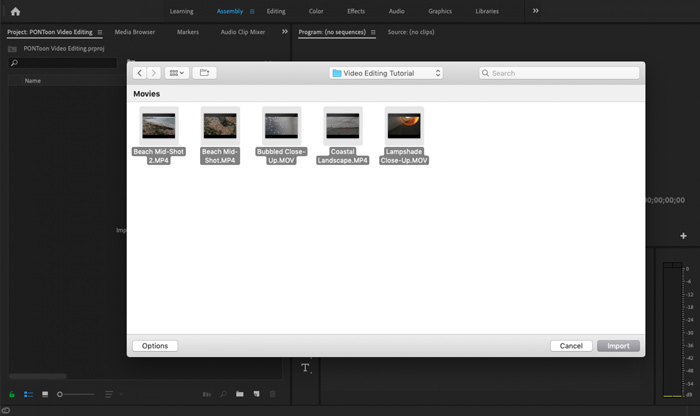
مرحله 3. برای فشردهسازی بهتر فایل MXF، به فضای کاری Editing بروید.
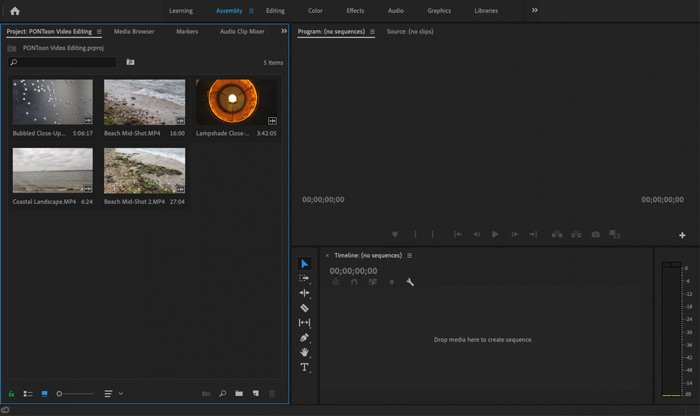
مرحله 4. اکنون میتوانید فایل MXF خود را روی خط زمانی (Timeline) ویرایش کنید. فقط یک کلیپ MXF را از رسانههای واردشده بگیرید و روی تایملاین رها کنید تا یک سکانس جدید ساخته شود. سپس میتوانید فایل MXF را برش دهید (Trim) تا حجم آن کاهش یابد.

همچنین می توانید وضوح ویدیوی سفارشی و سایر موارد را برای فشرده سازی پرونده MXF انتخاب کنید. علاوه بر این ، می توانید MXF را به فرمت ویدیویی که دارای اندازه پرونده کوچکتر است ، خروجی دهید.
قسمت 3. سQالات متداول فشرده سازی پرونده های MXF
سوال 1. فرمت ویدئویی MXF چیست؟
MXF ، مخفف Material eXchange Format ، یک قالب کانتینر است که ویدیو ، صدا و فراداده را ذخیره می کند. این قالب قالب ویدیو برای محتوای صوتی ویدئویی و حرفه ای استاندارد SMPTE است. بسیاری از دوربین های دیجیتال حرفه ای مانند سونی ، پاناسونیک ، کانن و موارد دیگر فیلم ها را در قالب MXF ذخیره می کنند.
سوال 2. چگونه MXF را به صورت آنلاین به MP4 تبدیل کنیم؟
فرمت MP4 بدون تردید محبوبترین فرمت است که تقریباً توسط همه پخشکنندهها (Players)، ویرایشگرها و دستگاهها پشتیبانی میشود. بنابراین در بسیاری از موارد لازم است برای پخش یا ویرایش بهتر، MXF را به MP4 تبدیل کنید. میتوانید از Free Online Video Converter استفاده کنید تا تبدیل MXF به MP4 را بهراحتی انجام دهید.
سوال 3. آیا MXF یک قالب ویدیویی بدون ضرر است؟
MXF می تواند تصاویر RAW بدون ضرر را که استودیوهای حرفه ای پس از تولید را در زمینه کار برای درجه بندی رنگ و ویرایش فیلم ارائه می دهد ، ذخیره کند. قالب MXF می تواند به طور کامل از تایم کد SMPTE پشتیبانی کند.
نتیجه
در این مطلب عمدتاً درباره چگونگی فشرده کردن فایلهای MXF صحبت کردیم. باید پذیرفت که فشردهسازی فایلهای MXF با Adobe Premiere Pro بیش از حد پیچیده است. بنابراین پیشنهاد میکنیم برای کاهش حجم فایلهای MXF خود از Free Video Compressor معرفیشده استفاده کنید.
-
 نحوه فشرده سازی یک فیلم MP4 به اندازه کوچکتر
 ویدیوی MP4 برای بارگذاری خیلی بزرگ است؟ آیا می خواهید اندازه ویدئو را کاهش دهید؟ در اینجا 3 روش کارآمد برای فشرده سازی فایل MP4 به اندازه کوچکتر و بدون محدودیت آورده شده است.
-
 آموزش فشرده سازی GIF و کاهش حجم فایل آن با کیفیت بالا
 در اینجا 2 روش آسان برای فشرده سازی GIF در رایانه یا تلفن همراه وجود دارد. شما می توانید از FVC Free Video Compressor و Photoshop برای کاهش اندازه پرونده GIF از جنبه های مختلف استفاده کنید.
-
 4 روش فشرده سازی فایلهای بزرگ QuickTime MOV بدون از دست دادن کیفیت
 این مقاله نحوه فشرده سازی جزئیات فیلم های QuickTime MOV را در تلفن یا رایانه شما نشان می دهد. اگر فیلم MOV شما برای ارسال ، اشتراک یا ذخیره بیش از حد بزرگ است ، می توانید 4 راه حل قابل اجرا در اینجا دریافت کنید.
