


 Video Converter Ultimate
 ضبط صفحه
 تعمیر ویدیو
روش های آسان برای تبدیل DV به MP4 آنلاین و آفلاین
فرمت فایل DV قبلاً روی تقریباً همه دوربینهای فیلمبرداری (کمکُردرها) محبوبترین فرمت بود، چون ویدئوهای فوقالعادهای را برای تماشا و ویرایش ذخیره میکرد. با این حال، این نوع فایل در عصر مدرن امروز دیگر چندان رایج نیست. برخی برنامهها از این نوع فایل پشتیبانی نمیکنند، که برای کاربرانی که فایل ویدئویی DV دارند مناسب نیست. اما اگر میخواهید ویدئوهای خود را در همه برنامهها پخش کنید، لازم است فایل DV خود را به رایجترین فرمت امروزی، یعنی فرمت MP4، تبدیل کنید. خوشبختانه، این مقاله مؤثرترین روشها برای تبدیل DV به MP4 را با استفاده از مبدّلهای فوقالعاده به شما نشان میدهد. پس در ادامه مقاله را بخوانید تا با تمام جزئیات لازم آشنا شوید.

قسمت 1: تفاوت بین DV و MP4
قبل از شروع فرآیند تبدیل فایل، اجازه دهید ابتدا تفاوت بین فایل DV و فرمت MP4 را ببینیم.
| فایل | DV | MP4 |
| فرمت فایل | .dv | .mp4 |
| نام و نام خانوادگی | ویدئوی دیجیتال | MPEG-4 |
| شرح | تولیدکنندگان اصلی تجهیزات ویدئویی در سال 1995 DV را به عنوان یک فرمت دیجیتال برای ضبط ویدئوی مغناطیسی و یک روش فشرده سازی ویدئو ایجاد کردند. فرمت DV از یک سیگنال ویدیویی 8 بیتی جزء دیجیتال 720×576 پیکسل استفاده می کند. یک توالی DIF حاوی داده های ویدئویی، صوتی و زیرکد برای انتقال داده استفاده می شود. در قسمت خدمات، زمان و تاریخ ثبت می شود. | استانداردهای صوتی MPEG-4 و صوتی AAC به طور مشترک پسوند MP4 را تعریف می کنند. ظرف ممکن است هر رسانه ای را در خود جای دهد، از جمله گرافیک دو بعدی و سه بعدی، صدا، ویدیو و زیرنویس. در ویندوز، عملا هر پخش کننده ای می تواند فایل های MP4 را پخش کند، اما در مک، به یک پلاگین یا تبدیل فایل MP4 به فرمت دیگری نیاز دارید. |
| توسعه دهنده | سونی و پاناسونیک | گروه کارشناسان تصاویر متحرک |
| نوع MIME | ویدئو/x-dv | ویدئو/mp4 |
| برنامه های مرتبط | پخش کننده QuickTime Windows Movie Maker VLC Media Player | VLC Media Player MPplayer پخش کننده QuickTime ویندوز مدیا پلیر فیلم و تلویزیون مایکروسافت |
قسمت 2: بهترین راه برای تبدیل DV به MP4 آنلاین
تبدیل DV به MP4 بهصورت آنلاین دشوار است، بهویژه وقتی ندانید از چه برنامهای میتوانید استفاده و به آن اعتماد کنید. اما به لطف FVC Free Video Converter Online، میتوانید فایل DV خود را سریع و فوری به فرمت MP4 تبدیل کنید. این ابزار آنلاین از انواع گوناگون فایلهای ویدئویی مانند AVI، FLV، M4V، VOB، WMA، MOV، TS و غیره پشتیبانی میکند. همچنین روش تبدیل سادهای دارد، بهطوریکه فقط با چند کلیک میتوانید فایلها را تبدیل کنید. علاوه بر این، اگر قصد دارید چندین فایل DV را در یک فایل MP4 ادغام و تبدیل کنید، میتوانید از این مبدّل استفاده کنید، زیرا فرایند تبدیل دستهای ارائه میدهد. همچنین میتوانید این ابزار را در تمام مرورگرها، مانند گوگل کروم، موزیلا فایرفاکس، سافاری، مایکروسافت اج و غیره استفاده کنید که آن را برای همه کاربران بسیار راحت میسازد. با وجود تمام این قابلیتها، میتوان گفت این مبدّل آنلاین یکی از خاصترین برنامههایی است که میتوانید از آن بهره ببرید. برای یادگیری نحوه تبدیل فایل DV به فرمت MP4 با استفاده از FVC Free Video Converter Online، دستورالعملهای ساده زیر را دنبال کنید.
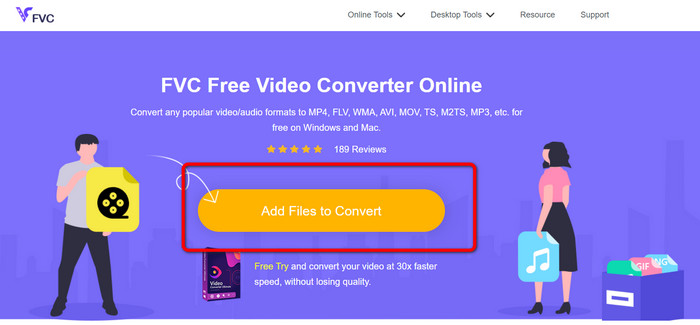
مرحله 1: ابتدا مرورگر خود را باز کرده و به وبسایت FVC Free Video Converter Online بروید. سپس در قسمت مرکزی صفحه اصلی، روی دکمه Add Files to Convert کلیک کنید تا فایل ویدئویی DV خود را بارگذاری کنید.
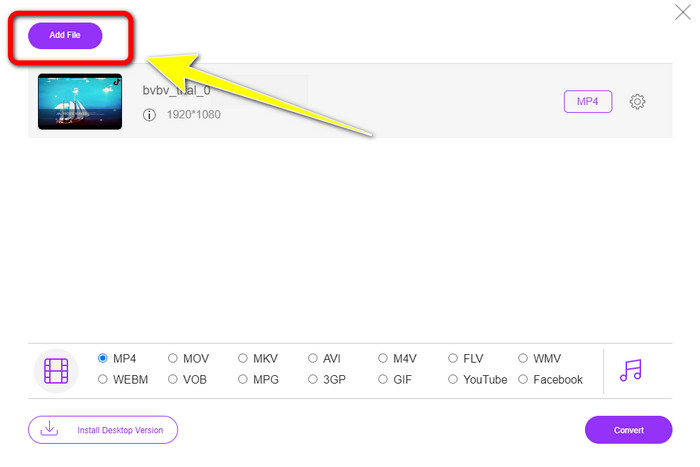
مرحله 2: اگر میخواهید چندین فایل DV را در یک MP4 تبدیل کنید، روی دکمه Add File در بالای سمت چپ رابط کلیک کنید تا فایلهای بیشتری اضافه کنید.
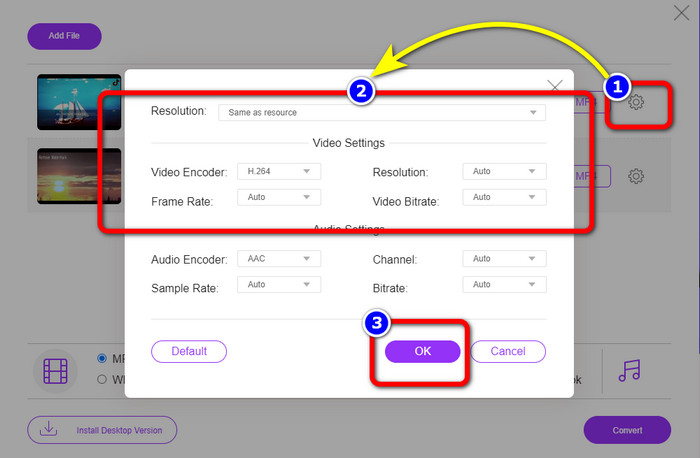
مرحله 3: روی آیکون Setting کلیک کنید تا بیتریت، نرخ فریم و وضوح ویدئو را تنظیم کنید. سپس، وقتی تغییرات موردنظر خود را اعمال کردید، روی OK کلیک کنید.
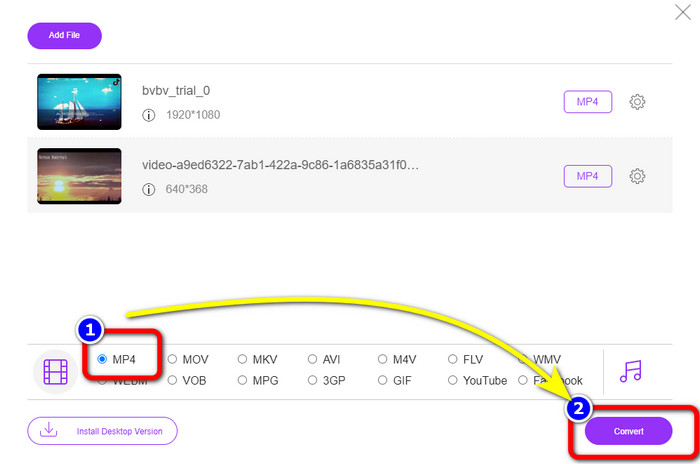
مرحله 4: پس از انجام تمام تغییرات، به قسمت پایین رابط بروید تا گزینههای فرمت را ببینید. فرمت MP4 را انتخاب کرده و برای شروع فرایند تبدیل، روی Convert فشار دهید.
قسمت 3: نحوه تبدیل DV به MP4 بدون ضرر
برای یک مبدّل آفلاین، میتوانید از Video Converter Ultimate استفاده کنید تا فایل DV را در مک و ویندوز بدون افت کیفیت به MP4 تبدیل کنید. شما میتوانید انواع مختلف فایلهای ویدئویی را بدون از دست دادن کیفیت تبدیل کنید. همچنین با استفاده از این برنامه، میتوانید چندین فایل را بهطور همزمان تبدیل کنید، زیرا از فرایند تبدیل دستهای پشتیبانی میکند. این ابزار آفلاین همچنین از فرمتهای متعدد دیگری مانند MOV، AVI، FLV، M4V، SWF، MTS، MKV، WMV، VOB و بیش از 100 فرمت دیگر پشتیبانی میکند. علاوه بر این، Video Converter Ultimate سرعتی فوقالعاده، تا 30 برابر سریعتر از سرعت متوسط تبدیل، ارائه میدهد که آن را برای همه کاربران بسیار راحتتر میسازد. از طرفی، همه کاربران روش آسان برای تبدیل فایلها را ترجیح میدهند. این برنامه رابطی ساده با سرراستترین روش برای تبدیل ویدئوهایتان ارائه میدهد. همچنین میتوانید هنگام تبدیل، ویدئوهای خود را ویرایش کنید، چون دارای ابزارهای ویرایشی است. اگر میخواهید mini DV را به فرمت MP4 تبدیل کنید، از راهنمای دقیق زیر با استفاده از Video Converter Ultimate کمک بگیرید.
مرحله 1: باید برنامه Video Converter Ultimate را با کلیک روی دکمه Download در مک یا ویندوز خود دانلود و نصب کنید. پس از نصب، نرمافزار را اجرا کنید.
دانلود رایگانبرای ویندوز 7 یا بالاتردانلود امن
دانلود رایگانبرای MacOS 10.7 یا بالاتردانلود امن
مرحله 2: پنل Converter را فشار دهید و برای الصاق فایل DV روی نماد Plus کلیک کنید. همچنین میتوانید روی دکمه Add Files کلیک کنید یا فایل را مستقیماً داخل باکس بکشید و رها کنید.
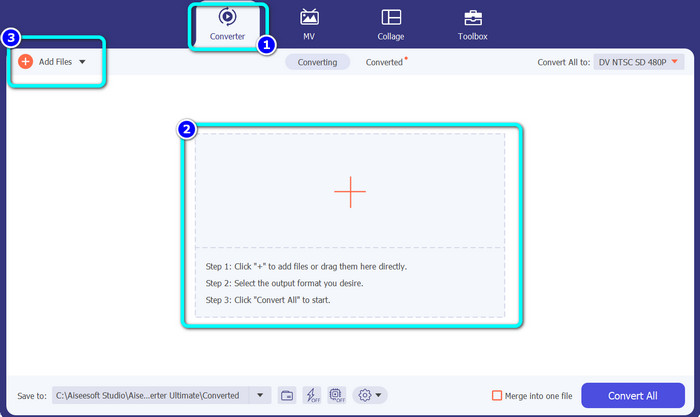
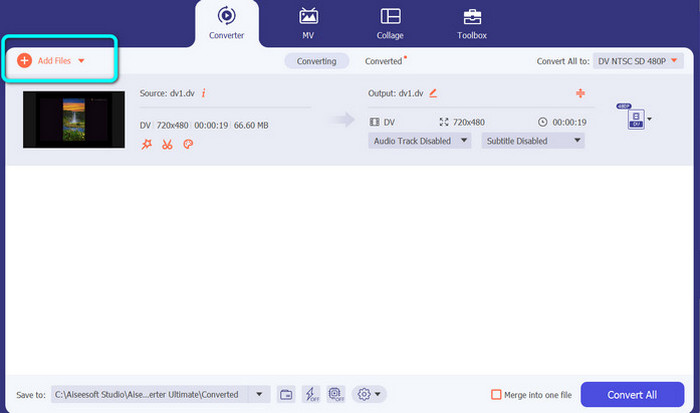
مرحله 3: اگر میخواهید فرایند تبدیل دستهای انجام دهید، روی دکمه Add Files کلیک کنید تا فایلهای ویدئویی DV بیشتری اضافه کنید.
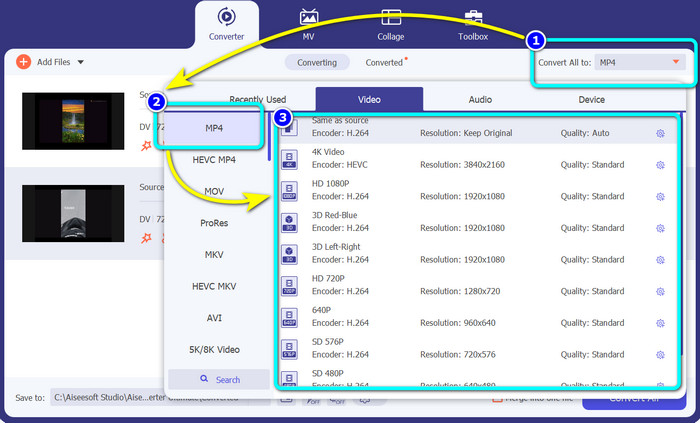
مرحله 4: پس از افزودن فایل DV دیگر، با کلیک روی دکمه Convert All to فرمت خروجی آنها را تغییر دهید. گزینههای فرمت نمایش داده میشوند، و فرمت MP4 را انتخاب کنید. سپس وضوح موردنظر خود را برگزینید.
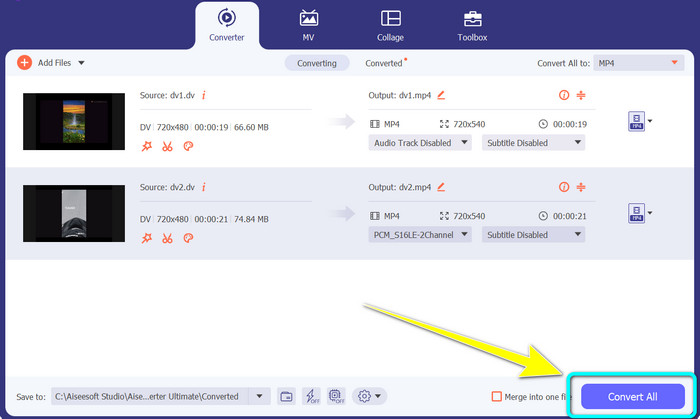
مرحله 5: در آخرین مرحله، با کلیک روی دکمه Convert All فرایند تبدیل را آغاز کنید. سپس فایل ویدئویی خود را در محل دلخواه ذخیره کنید.
قسمت 4: روش آسان برای تبدیل DV به MP4 با استفاده از نرم افزار رایگان
در این قسمت با نحوه تبدیل DV به MP4 با استفاده از ترمز دستی آشنا می شوید. این ابزار آفلاین همچنین قادر به تبدیل فایل های ویدئویی مانند MP4، MKV، WEBM، و غیره است. همچنین یک فرآیند تبدیل دسته ای را ارائه می دهد. با این حال، استفاده از این ابزار آسان نیست. این دارای گزینه های زیادی در رابط است که درک آن به خصوص برای مبتدیان دشوار است. برای تبدیل DV به MP4 مراحل زیر را دنبال کنید.
مرحله 1: برنامه Handbrake را روی رایانه خود دانلود کنید. سپس آن را اجرا کنید.
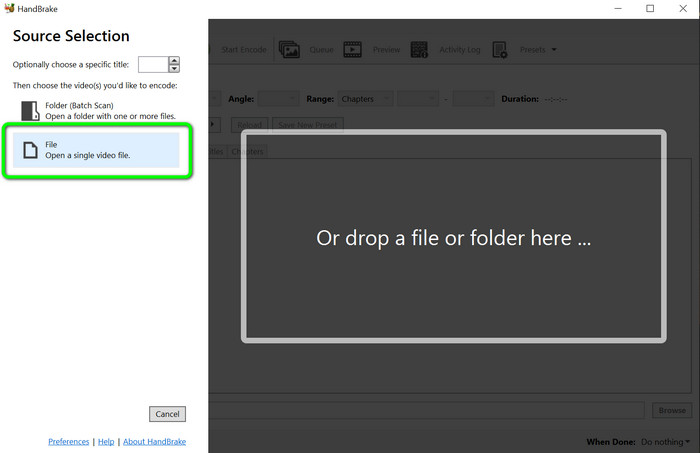
مرحله 2: پس از باز کردن برنامه، برای افزودن فایل DV، دکمه File را انتخاب کنید.
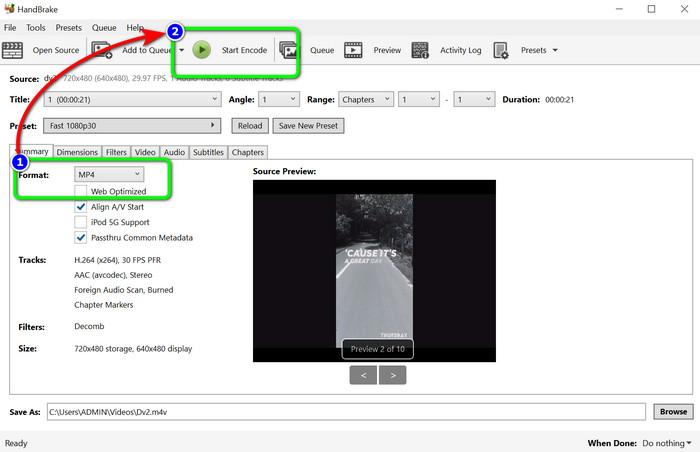
مرحله 3: از بخش گزینههای فرمت، فرمت فایل MP4 را انتخاب کنید. سپس برای شروع فرایند تبدیل، روی دکمه Start Encode کلیک کنید.
بیشتر خواندن:
2 روش برتر برای تبدیل رایگان فایلهای DV به MOV روی دسکتاپ و آنلاین
مبدّلهای کاربردی DV به FLV برای تبدیل DV به FLV [2023]
بخش 5: سوالات متداول در مورد تبدیل DV به MP4
1. آیا VLC می تواند فایل های DV را پخش کند؟
آره! VLC Media Player از فرمت فایل DV پشتیبانی می کند، بنابراین می توانید ویدیوهای خود را در این برنامه پخش کنید.
2. کدام نرم افزار آنلاین برای تبدیل ویدیو بهتر است؟
میتوانید از FVC Free Video Converter Online استفاده کنید. این ابزار آنلاین میتواند ویدئوهای شما را بهراحتی تبدیل کند. همچنین میتوانید تبدیل دستهای انجام دهید و بیتریت، نرخ فریم و وضوح ویدئوی خود را ویرایش کنید.
3. وضوح استاندارد فایل DV چقدر است؟
وضوح استاندارد فایل DV 720 پیکسل افقی و 480 خط در هم آمیخته است. استاندارد با وضوح بالا DV 720 و 1080 خط است.
نتیجه
همانطور که در بالا نشان داده شد، اینها بهترین روشها برای تبدیل DV به MP4 بهصورت آنلاین و آفلاین هستند. میتوانید از FVC Free Video Converter Online برای تبدیل آنلاین فایلها استفاده کنید. همچنین، برای تبدیل سریعتر فایلها بهصورت آفلاین، از Video Converter Ultimate بهره ببرید.
-
 یک راه عالی و رایگان برای تبدیل DV به WMV [آنلاین و آفلاین]
 بهترین راه های تبدیل DV به WMV بدون دردسر را بیابید. میخواهی بیشتر بدانی؟ سپس این مقاله را بخوانید تا در مورد DV و WMV بیشتر بدانید.
-
 نحوه تبدیل F4V به MP4 با موثرترین روش ها
 آیا ویدیوهای F4V شما کیفیت خوبی ندارند؟ سپس آن را به یک فایل MP4 تبدیل کنید. این پست بهترین راه را در مورد نحوه تبدیل F4V به MP4 به صورت آنلاین و آفلاین ارائه می دهد
-
 پنج روش محبوب برای تبدیل Xvid به فرمت MP4
 در این مقاله نگاهی اجمالی به این روش های شگفت انگیز برای تبدیل Xvid به فرمت فایل MP4 داشته باشید. همچنین، بهترین برنامه هایی را که می توانید در تبدیل استفاده کنید، یاد خواهید گرفت
