


 Video Converter Ultimate
 ضبط صفحه
 تعمیر ویدیو
جدیدترین نرم افزار آنلاین و آفلاین که می توانید برای معکوس کردن ویدیوهای MP4 به راحتی استفاده کنید
بیشتر وقتها وقتی سعی میکنیم ویدیوی خود را معکوس کنیم، واکنشهای بامزهای ایجاد میشود که باعث میشود فکر کنیم این خودِ ما هستیم. چون ویدیو بهصورت عقبگرد پخش میشود، اثر آن چیزی تازه برای چشم ما میسازد. بنابراین اگر میخواهید راههای مؤثر برای برعکس کردن ویدیوهای MP4 را بدانید، حتماً این مقاله را تا انتها بخوانید. چون در آن نرمافزارهای مختلف آنلاین و آفلاین معرفی شده که با کمک آنها میتوانید به سادگی تعداد زیادی ویدیوی معکوس بسازید. پس بدون معطلی، بیایید آنها را یکبهیک به شما معرفی کنیم.

بخش 1. نحوه معکوس کردن یک ویدیوی MP4 (آفلاین)
ابزار فوقالعادهای که در سراسر وب میتوان یافت، Video Converter Ultimate است. این ابزار تا به حال به میلیونها کاربری که برای معکوس کردن MP4 دچار مشکل بودهاند کمک کرده است. برخلاف هر ابزار دیگری در این فهرست، حتی بدون اتصال اینترنت هم میتوانید به این نرمافزار دسترسی داشته باشید. علاوه بر این، این ابزار میتواند فوراً وارد کردن و خروجی گرفتن را انجام دهد؛ طوری که قبل از آنکه پلک بزنید، متوجه میشوید ویدیو از قبل معکوس شده است. همچنین یکی از شگفتانگیزترین قابلیتهای این ابزار که کمتر نظیرش پیدا میشود، داشتن همه ویژگیهای پیشرفتهای است که ممکن است دوست داشته باشید از آنها استفاده کنید. حالا بیایید به سراغ مراحل معکوس کردن مؤثر ویدیو برویم.
مراحل نحوه معکوس کردن ویدیوها در Video Converter Ultimate
مرحله 1. ابتدا باید این ابزار را روی حافظه خود دانلود کنید. سپس آن را نصب کرده و مراحل راهاندازی را دنبال کنید.
دانلود رایگانبرای ویندوز 7 یا بالاتردانلود امن
دانلود رایگانبرای MacOS 10.7 یا بالاتردانلود امن
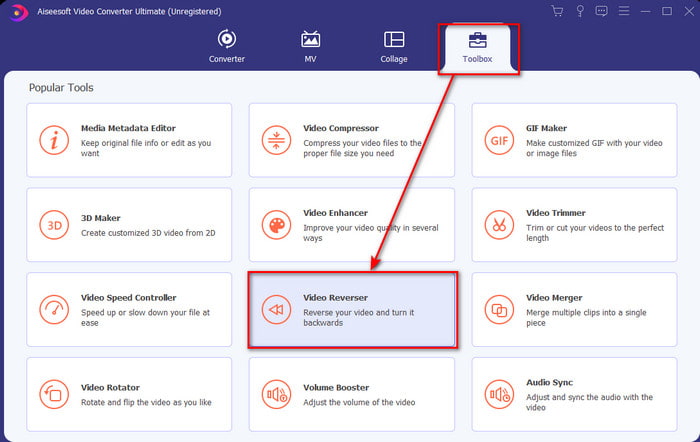
مرحله 2. نرمافزار را اجرا کنید، روی Toolbox کلیک کرده و Video Reverser را انتخاب کنید.
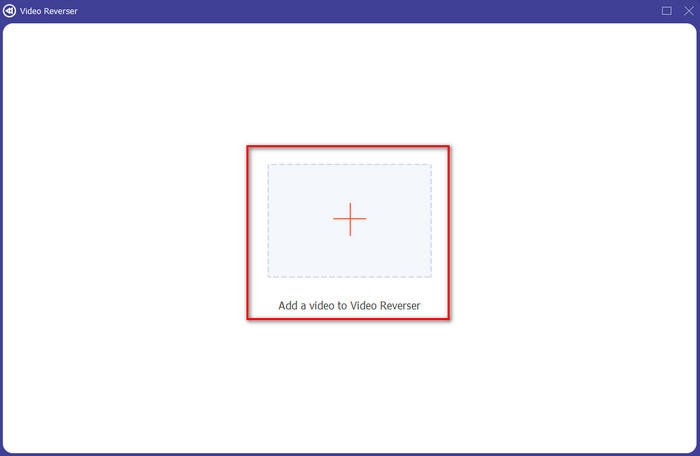
مرحله 3. سپس با کلیک روی علامت + فایل MP4 را اضافه کرده و آن را از پوشههای کامپیوتر انتخاب کنید. بعد روی Open کلیک کنید تا فایل .mp4 در محیط برنامه وارد شود.
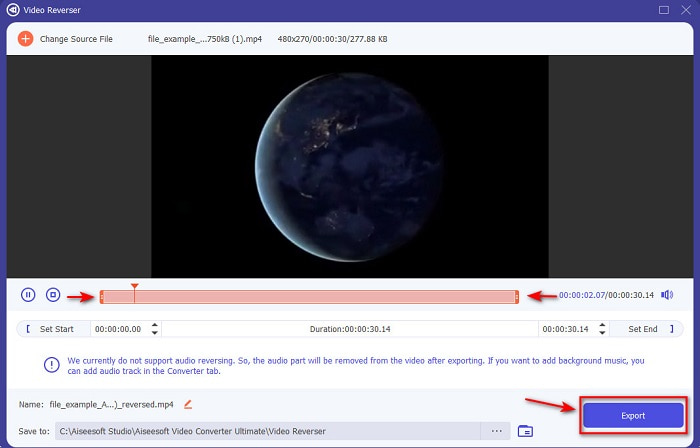
مرحله 4. حالا نقاط شروع و پایان پخش را تنظیم کنید تا مدت زمان ویدیو تغییر کند. برای ادامه روی Export کلیک کنید.
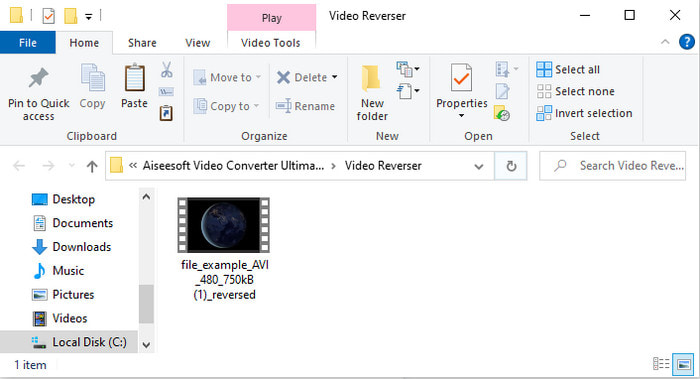
مرحله 5. بعد از تمام شدن فرایند خروجی گرفتن، روی فایل در پوشه کلیک کنید تا ویدیوی معکوس را پخش کنید و همچنین محل ذخیره آن را ببینید.
قسمت 2. نحوه معکوس کردن یک ویدیو MP4 (آنلاین)
1. FileConverto
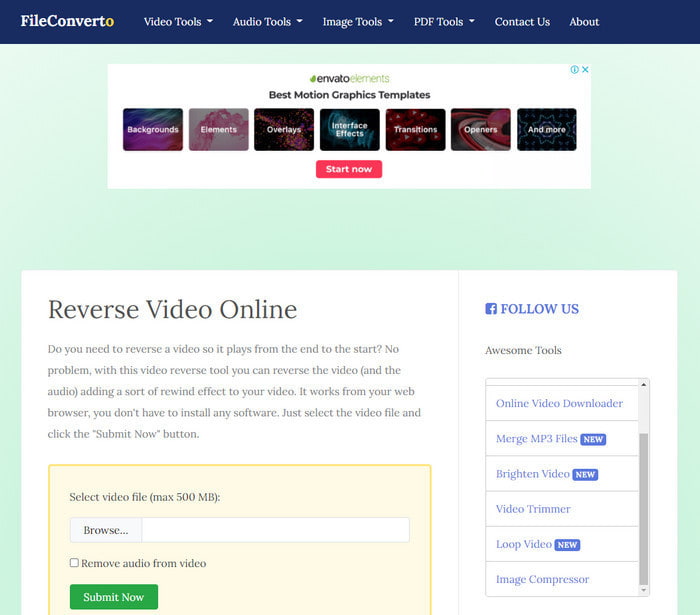
سایت معکوس کردن آنلاین ویدیوی MP4 یعنی FileConverto امکانات وبی متعددی دارد که میتوانید برای خاصتر کردن ویدیوی خود از آنها استفاده کنید. عملکرد این ابزار تحت وب برای کسانی که نمیخواهند هیچ نرمافزاری دانلود کنند، مناسب است. با این حال، رابط کاربری وب کمی کسلکننده است، فرایند آپلود ممکن است زمان زیادی بگیرد و از همه فرمتهای ویدیویی پشتیبانی نمیکند. همچنین هنگام معکوس کردن احتمالاً با باگها و پنجرههای پاپآپ روبهرو میشوید. هرچند مشکلات شناختهشده زیادی دارد، اما همچنان استفاده از آن بد نیست و میتواند به کار بیاید.
طرفداران
- دسترسی به این نرم افزار آسان است و دارای بسیاری از ویژگی های اصلی ویرایش است که شما نیاز دارید.
- بسیار کاربر پسند است که حتی کاربری که معکوس را تجربه نمی کند می تواند آن را در اینجا انجام دهد.
- این تبدیل شما را به 500 مگابایت محدود می کند که عالی است.
منفی ها
- وارد کردن فایلها در اینجا و صادر کردن بسیار کندتر از حد انتظار است.
- در وب ابزار تبلیغات زیادی دارد که فقط می تواند شما را آزار دهد. و بعد از اینکه روی یکی از ویژگی های ابزار وب کلیک کردید، یک تبلیغ نشان می دهد که باید دوباره روی آن کلیک کنید.
- از همه فرمت های ویدئویی پشتیبانی نمی کند.
2. PickFrom
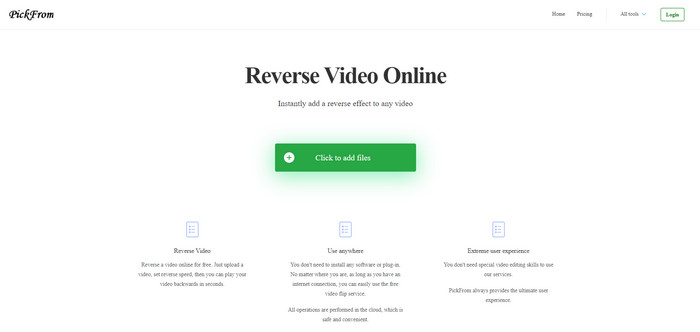
اگر بخواهیم مقایسه کنیم، PickFrom رابط کاربری بهتری نسبت به FileConverto دارد. چون طراحی مینیمال را به نمایش میگذارد و ترکیب رنگ سفید و فیروزهای آن را جذاب کرده است. اما نوشتهها کمی باریک هستند و خواندنشان سخت است. در واقع اگر دید کاملاً سالم (۲۰/۲۰) نداشته باشید، ممکن است خواندن متنهای این ابزار برایتان دشوار باشد. همچنین وقتی میخواهید در اینجا ویدیوهای MP4 را معکوس کنید، گزینهها به زبان چینی سادهشده نوشته شدهاند؛ بنابراین فهم آنها کمی سخت است، اما فرایند وارد کردن فایلها در این سایت از FileConverto سریعتر است.
طرفداران
- رابط وب بسیار بهتری در مقایسه با FileConverto دارد.
- هیچ تبلیغاتی در قسمت بالای وب سایت وجود ندارد، اما اگر به پایین بروید، یکسری تبلیغات مزاحم وجود دارد.
- پشتیبانی از بسیاری از ویژگی های اصلی ویرایش.
منفی ها
- تنظیمات ابزار به زبان چینی نوشته شده است که اگر نمی دانید چگونه چینی صحبت کنید درک آن سخت است.
- پس از کلیک بر روی دکمه شروع، ابزار پاسخ نمی دهد و فرآیند صادرات زمان زیادی می برد.
- کیفیت ویدیوی صادراتی را کاهش می دهد.
3. Media.io
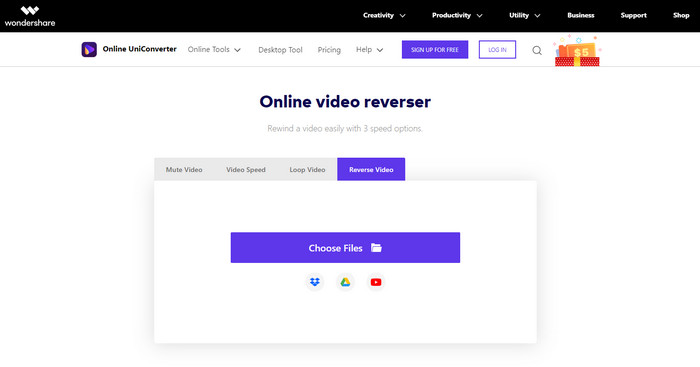
Media.io سه نوع سرعت متفاوت برای معکوس کردن ارائه میدهد: x0.5، x1، x2. اساساً میتوانید با کمک قابلیت معکوس کردن آن، ویدیو را معکوس کرده و فایل MP4 را بهصورت عقبگرد پخش کنید. با اینکه ابزار ظاهر خوبی دارد، هنگام استفاده از Media.io باز هم با برخی مشکلات روبهرو خواهید شد. مثلاً زمانی که میخواهید فایل را خروجی بگیرید، قبل از خروجی گرفتن از شما میخواهد ابتدا وارد حساب کاربری شوید. همچنین فقط میتوانید ۱۰ ویدیوی معکوس با حجم فایل محدود در این سایت ایجاد کنید.
طرفداران
- رابط ابزار عالی و جذاب است.
- در صورت تمایل میتوانید فرمت خروجی نهایی ویدیوی معکوس را تغییر دهید یا فرمت اصلی را حفظ کنید.
- میتوانید ویدیو را بیصدا یا لغو بیصدا کنید.
منفی ها
- وبسایت از شما میخواهد قبل از اینکه بتوانید صادر کنید ثبت نام کنید، به این معنی که به آنها اجازه میدهید اعلانها را از طریق ایمیل ارسال کنند.
- معکوس x 2 نسبت به x 2 سایر ابزارها کندتر است.
- این ابزار در دسترس بودن ابزار وب را محدود می کند. به عنوان مثال، شما نمی توانید بیش از 10 فایل را در روز معکوس کنید و برای اندازه فایل حداکثر محدودیت دارد.
بخش 3. سوالات متداول در مورد معکوس کردن MP4
بعد از معکوس کردن ویدیو کیفیتش پایین میاد؟
معکوس کردن یک ویدیو در ابزار نباید کیفیت ویدیویی را که می خواهید معکوس کنید کاهش دهد. با این حال نرم افزارهای زیادی وجود دارد که کیفیت فیلم را پایین می آورد. اما مواردی وجود دارد که کیفیت آن را پایین می گذارید نه بالا.
چگونه صدا را به فایل معکوس خود اضافه کنم؟
بیشتر نرمافزارهایی که در اینجا فهرست شدهاند از معکوس کردن صدا پشتیبانی نمیکنند، اما میتوانید به این لینک بروید و یاد بگیرید چطور به ویدیو صدا اضافه کنید.
چگونه می توانم ویدیوی معکوس خود را در آیفون ادغام کنم؟
راههای مختلف زیادی وجود دارد که بتوانید ویدیوها را در آیفون بهطور مؤثر ادغام کنید. تنها با خواندن این مقاله میتوانید ۴ روش مختلف برای ادغام ویدیوها در آیفون را یاد بگیرید.
نتیجه
در پایان، حالا که میدانیم چطور با کمک چندین ابزار مختلف، یک فایل MP4 را معکوس کنیم، میتوانید یکی از آنها را برای کار خود انتخاب کنید. با این حال، همه ابزارهای ذکرشده در این مقاله خروجی نهایی خیرهکنندهای مانند Video Converter Ultimate تولید نمیکنند. پس اگر میخواهید از این ابزار شگفتزده شوید، حتماً باید ابتدا آن را دانلود کنید. چون برای فهمیدن نحوه عملکرد کلی این نرمافزار نیازی نیست کتاب قطوری بخوانید.
دانلود رایگانبرای ویندوز 7 یا بالاتردانلود امن
دانلود رایگانبرای MacOS 10.7 یا بالاتردانلود امن
-
 [بهروزرسانی ۲۰۲۱] ۹ بهترین ویرایشگر GIF برای رایانه شخصی، مک، iOS و اندروید
 آیا نیاز به افزودن یک ویژگی شخصی به GIF خود دارید تا بتواند بیانگرتر شود؟ برای آگاهی از نحوه ویرایش و بهترین ابزار برای کار ، به خواندن این مقاله ادامه دهید.
-
 راهنمای نحوه تعمیر فیلم هایی که در تلفن های Android پخش نمی شوند
 آیا می خواهید بدانید دلایل عدم پخش فیلم ها در دستگاه اندرویدی شما چیست؟ و اگر چنین است ، آیا راهی برای حل مشکل به تنهایی وجود دارد؟ برای آشنایی بیشتر به خواندن ادامه دهید.
-
 راهنمای دقیق نحوه پخش فایل های MKV در PS4 [به روز رسانی 2021]
 با خواندن این مقاله راه هایی را در مورد نحوه پخش MKV بر روی PS4 و نحوه تبدیل فایل ویدیویی در صورتی که ویدیو انجام نشود یاد می گیرید' بازی.
