


 Video Converter Ultimate
 ضبط صفحه
 تعمیر ویدیو
نحوه تبدیل M2TS به MP4 بدون کاهش کیفیت
"وقتی فیلم ها را از دوربین سونی به رایانه می گذارم ، آنها پرونده های M2TS هستند که نمی توانند در فیس بوک یا یوتیوب به اشتراک گذاشته شوند. از کجا می توانم یک مبدل ویدیویی پیدا کنم تا پرونده ها را به MP4 تبدیل کرده و از طریق رایانه تماشا کنم؟ "
گاهی میخواهید فایلهای M2TS را روی برخی دستگاههای قابل حمل پخش کنید یا آنها را در یوتیوب یا فیسبوک آپلود کنید. عاقلانه است که آنها را به یک فرمت ویدیویی رایج مثل MP4 تبدیل کنید. در این مطلب، ۵ روش رایگان برای تبدیل M2TS به MP4 در ویندوز و مک با شما به اشتراک میگذاریم.

قسمت 1. بهترین روش تبدیل M2TS به MP4 به صورت رایگان
همه پخشکنندههای چندرسانهای از فایلهای M2TS پشتیبانی نمیکنند. برای لذت بردن بهتر از ویدیوی M2TS ضبطشده با دوربینهای فیلمبرداری HD، بهتر است M2TS را برای پخش، به MP4 که بهطور گسترده استفاده میشود تبدیل کنید. FVC Free M2TS Converter یک مبدّل و ویرایشگر همهکاره M2TS است. با آن نهتنها میتوانید فایلهای M2TS را به MP4، MKV، AVI، MOV و غیره تبدیل کنید، بلکه میتوانید فایلهای M2TS را نیز ویرایش کنید؛ مانند فشردهسازی، ادغام، افزودن تم و موارد دیگر.
دانلود رایگانبرای Windows 7 یا جدیدتردانلود امن
دانلود رایگانبرای MacOS 10.7 یا جدیدتردانلود امن
مرحله ۱.با کلیک روی دکمه Free Download میتوانید بهسرعت Free M2TS Converter را دانلود کنید. سپس آن را روی کامپیوتر ویندوز خود نصب و اجرا کنید. روی دکمه Add File(s) کلیک کنید تا فایل M2TS را به برنامه وارد کنید.
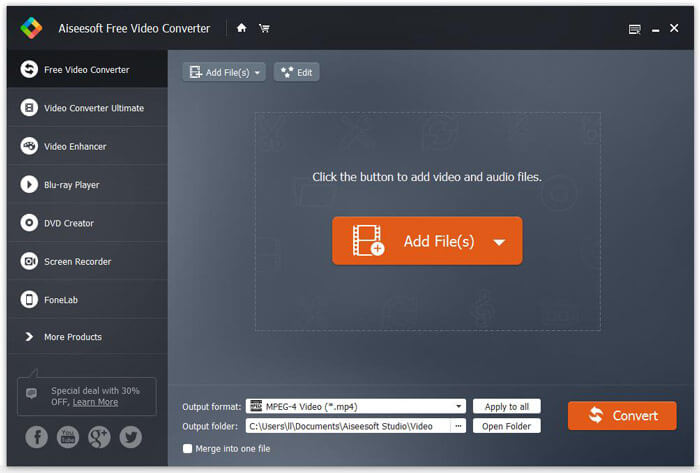
مرحله ۲.روی دکمه کشویی Output format کلیک کنید و MPEG-4 Video (*.mp4) را بهعنوان فرمت خروجی انتخاب کنید. همچنین میتوانید پوشه خروجی را برای ذخیره فایل تبدیلشده تنظیم کنید.

مرحله ۳.اگر میخواهید تم خاصی به ویدیو اضافه کنید، میتوانید روی دکمه Edit در منوی بالایی کلیک کرده و یک تم مناسب انتخاب کنید. پس از انجام همه تنظیمات، میتوانید روی دکمه Convert کلیک کنید تا تبدیل فایل M2TS به MP4 را آغاز کنید.

قسمت 2. نحوه تغییر M2TS به MP4 آنلاین
اگر میخواهید بهصورت آنلاین و رایگان M2TS را به MP4 تبدیل کنید، FVC Free Online Video Converter انتخاب بسیار خوبی خواهد بود. بهعنوان یک مبدّل چندرسانهای آنلاین رایگان، تقریباً تمامی ویدیوها و فایلهای صوتی اصلی را به MP4، FLV، MKV، MOV، M4V، MTS، TS، M2TS، WMV، ASF، VOB، MP3، AAC و غیره تبدیل میکند. علاوه بر این کار کردن با آن بسیار ساده است.
مرحله ۱. به وبسایت FVC Free Online Video Converter بروید. در بالا روی Add Files to Convert کلیک کنید. سپس FVC launcher را دانلود و نصب کنید.

مرحله ۲. ویدیویی را که میخواهید تبدیل کنید انتخاب کنید. اگر به ویدیوی MP4 نیاز دارید، فقط روی MP4 کلیک کنید. سپس روی Convert کلیک کنید.

مرحله ۳. میتوانید فایل ویدیویی MP4 را مستقیماً روی دسکتاپ ذخیره کنید. پس از آن، فرآیند تبدیل بهطور خودکار شروع میشود.
قسمت 3. نحوه تبدیل M2TS به MP4 با ConvertFiles
ConvertFiles مبدل M2TS به MP4 تحت وب است که از 200+ قالب فیلم ، صوتی ، تصاویر ، اسناد ، ارائه ها و بایگانی ها پشتیبانی می کند. برای شروع تبدیل آنلاین M2TS به MP4 مراحل ساده زیر را دنبال کنید.
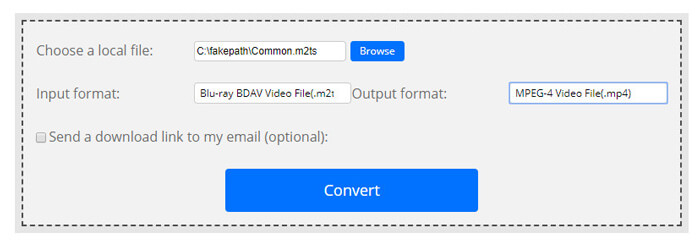
مرحله ۱.به صفحه رسمی ConvertFiles بروید. روی دکمه Browse کلیک کنید تا فایل M2TS موجود در رایانۀ خود را آپلود کنید.
مرحله ۲.روی کادر Input format کلیک کرده و HDV Video File(.m2ts) را انتخاب کنید، سپس روی کادر Output format کلیک کرده و MPEG-4 Video File(.mp4) را بهعنوان فرمت خروجی برگزینید.
مرحله ۳.روی دکمۀ Convert کلیک کنید تا تبدیل M2TS به MP4 را بهصورت رایگان آغاز کنید. فرآیند تبدیل ممکن است چند دقیقه طول بکشد. پس از آن، میتوانید روی لینک دانلود کلیک کرده و فایل MP4 تبدیلشده را دریافت کنید.
بعضی اوقات ممکن است به دلیل نامعتبر بودن فرمت تبدیل ، ناموفق باشد. برای دستیابی به میزان موفقیت بالا ، می توانید در عوض Free M2TS Converter را امتحان کنید.
قسمت 4. نحوه تبدیل M2TS به MP4 با VLC
VLC Media Player یک پخش کننده چندرسانه ای منبع باز برای ویندوز ، مک ، لینوکس ، iOS و اندروید است. همچنین به عنوان یک مبدل عالی M2TS به MP4 برای تبدیل فایل های M2TS به MP4 ، MOV ، AVI و ... کار می کند. علاوه بر این ، می توانید پرونده های M2TS را مانند برش ، برش ، چرخش ، افزودن جلوه های تصویر و موارد دیگر ویرایش کنید.
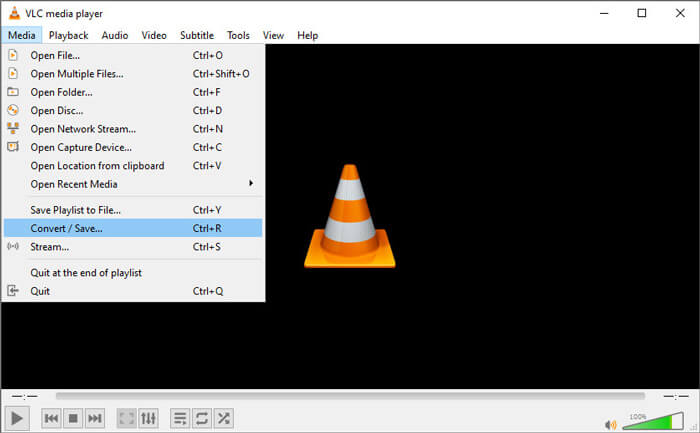
مرحله ۱.VLC Media Player را روی کامپیوتر خود دانلود و اجرا کنید. روی Media > Convert / Save... کلیک کنید تا ادامه دهید. سپس روی دکمۀ Add... کلیک کنید تا فایل M2TS خود را اضافه کنید.
مرحله ۲.روی دکمۀ Convert / Save کلیک کنید تا وارد پنجرۀ Convert شوید. روی دکمۀ کشویی Profile کلیک کرده و Video - H.264 + MP3 (MP4) را بهعنوان فرمت خروجی انتخاب کنید.
مرحله ۳.روی دکمۀ Browse کلیک کنید تا پوشۀ مقصد را انتخاب کنید. سپس روی دکمه Start کلیک کنید تا تبدیل M2TS به MP4 را آغاز کنید.
قسمت 5. نحوه صادرات MP4 از M2TS با ترمز دستی
HandBrake یکی دیگر از رمزگذارهای ویدئویی منبع آزاد و رایگان است که می تواند تقریباً از هر قالبی فیلم را تبدیل کند. با مراحل زیر می توانید Handbrake را برای تبدیل فایل M2TS به MP4 امتحان کنید.
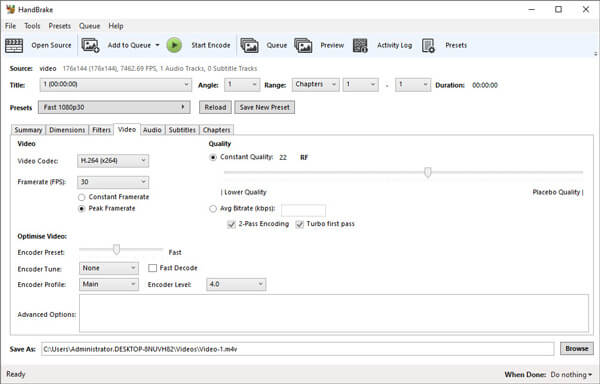
مرحله ۱.نرمافزار HandBrake را بهصورت رایگان روی ویندوز/مک دانلود، نصب و اجرا کنید. روی Open Source در گوشۀ چپ کلیک کنید تا فایل M2TS را از پوشۀ محلی خود وارد کنید.
مرحله ۲.میتوانید تنظیمات مربوط به فایل M2TS را تغییر دهید. از منوی کشویی Format در تب Summary، MP4 را انتخاب کنید. در تب Video نیز میتوانید کُدِک ویدیو، کیفیت ویدیو، نرخ فریم و بهینهسازی ویدیو را تنظیم کنید.
مرحله ۳.روی دکمۀ Browse کلیک کنید تا پوشۀ مقصد را تنظیم کنید. سپس روی دکمۀ Start Encode کلیک کنید تا تبدیل M2TS به MP4 را بهصورت رایگان آغاز کنید.
قسمت 6. سوالات متداول در تبدیل M2TS به MP4
تفاوت بین M2TS و MP4 چیست؟
M2TS مخفف MPEG-2 Transport System است. این یک قالب پرونده ظرف Blu-ray Disc Audio Video است و برای چند برابر سازی جریان های ویدئویی ، صوتی و سایر موارد استفاده می شود. معمولاً پرونده های M2TS با همان کیفیت بزرگتر از پرونده های MP4 هستند. پرونده های MP4 تقریباً در همه پخش کننده های رسانه پشتیبانی می شوند ، اما فایل های M2TS فقط در چند پخش کننده قابل پخش هستند.
چگونه فایلهای M2TS را روی کامپیوتر شخصی (PC) پخش کنم؟
می توانید مستقیماً پرونده های M2TS را در برخی از برنامه های معروف پخش کننده رسانه از جمله Windows Media Player ، VLC Media Player ، 5K Player ، SMPlayer ، Splash و غیره باز کنید. همچنین می توانید فایل های M2TS را با نرم افزار Sony Picture Motion Browser پخش کنید.
آیا VLC میتواند فایلهای M2TS را پخش کند؟
آره. می توانید فایل های M2TS را با VLC Media Player در ویندوز و مک پخش کنید. فقط VLC media player را اجرا کنید و روی Media کلیک کنید تا File Open شود تا فایل M2TS در VLC پخش شود. اگر برای مسئله کدک کار نمی کند ، ابتدا باید M2TS را به فرمت ویدیوی پشتیبانی شده VLC تبدیل کنید.
جمعبندی
با 5 روش رایگان بالا ، می توانید فایل های M2TS را به راحتی به MP4 تبدیل کنید. پس از مقایسه ، مبدل FVC Free M2TS باید بهترین مبدل M2TS به MP4 باشد. با فناوری شتاب سخت افزاری ، فایلهای MP4 را با کیفیت بالا و در عرض چند دقیقه صادر می کند. می توانید این مبدل رایگان را به یک باره امتحان کنید.
-
 راهنمای جامع نحوه تبدیل TS به MP4
 پرونده های TS چیست و می خواهید TS را به MP4 تبدیل کنید؟ در این پست ، ما روش های رایگان و آنلاین شما را برای تبدیل TS به MP4 به اشتراک خواهیم گذاشت.
-
 نحوه تبدیل فایل های MTS به MP4
 نمی دانید چگونه فایل MTS را به MP4 تبدیل کنید؟ در این راهنما ، 6 روش رایگان و آسان برای تغییر قالب MTS به MP4 در ویندوز یا مک بدون افت کیفیت پیدا خواهید کرد.
-
 2 روش ساده برای تبدیل رایگان MTS به MP3
 آیا نیاز به استخراج MP3 صوتی از پرونده MTS دارید اما نمی دانید چگونه؟ این پست دارای 2 روش آسان برای کمک به شما در تبدیل MTS / M2TS به MP3 با کیفیت صدای بالا است.
