


 Video Converter Ultimate
 ضبط صفحه
 تعمیر ویدیو
3 تبدیل آنلاین و آفلاین MPG به MP4 که باید برای تبدیل فایل های MPG تلاش کنید
امروزه MP4 یکی از رایجترین فرمتهایی است که در اینترنت میبینید. هرچند MPG و MP4 شباهتهای زیادی دارند، اما تفاوتهایی هم بین آنها وجود دارد. اگر میخواهید فایل MPG خود را به فرمت MP4 تبدیل کنید، ما مبدلهای ویدیویی محبوب این روزها را آزمایش کردهایم. علاوه بر این، بهترین مبدلهای MPG به MP4 را برای شما برگزیدهایم تا امتحان کنید!

قسمت 1. چرا باید MPG را به MP4 تبدیل کنید
اهمیت تبدیل MPG به MP4 چیست؟ فرمتهای MPG و MP4 اغلب برای ویدیوهایی که در اینترنت قرار میگیرند استفاده میشوند. اما چه تفاوتی با هم دارند؟ MPG یا MPEG فرمت اولیهای است که از کُدک MPEG استفاده میکند. این یک انکودر است که خروجیهای ویدیویی باکیفیت بالا ارائه میدهد.
از طرفی MP4 یکی از رایج ترین فرمت های فایل های ویدئویی است و از فشرده سازی ویدئویی مدرن استفاده می کند. خب، کدوم بهتره؟ قابلیت فشرده سازی بالای MP4 اجازه می دهد تا فایل ها در اندازه های کوچکتر از هر فرمت فایل ویدیویی دیگری مانند MPG فشرده شوند.
قسمت 2. 3 راه برای تبدیل MPG به MP4
در اینجا مبدل های ویدیویی عالی هستند که می توانید به صورت آنلاین و آفلاین از آنها استفاده کنید و یاد بگیرید که چگونه MPG را به MP4 تغییر دهید.
1. از Video Converter Ultimate استفاده کنید
Video Converter Ultimate یک مبدل فایلهای رسانهای است که به شما اجازه میدهد فایل MPG خود را بهراحتی به فرمت MP4 تبدیل کنید. این مبدل رابط کاربری سادهای دارد، اما خروجیهای چشمگیری تولید میکند. این برنامه دارای قابلیتهایی برای ویرایش، بهبود و فشردهسازی فایل MPG شما است. افزون بر این، میتوانید چندین فایل MPG را بهصورت دستهای در این مبدل به MP4 تبدیل کنید.
Video Converter Ultimate همچنین گزینه ای دارد که در آن می توانید تصاویر و فیلم ها را کولاژ کنید. همچنین، اگر می خواهید یک GIF ایجاد کنید، این مبدل این ویژگی را دارد. علاوه بر این، با استفاده از این مبدل می توانید فایل های حجیم را بدون افت کیفیت تبدیل کنید. حتی اگر ویژگی های آن حرفه ای به نظر می رسند، می توانید به سرعت از آنها استفاده کنید زیرا استفاده از آنها فقط آسان است.
مرحله 1. برای دانلود این مبدل، روی دکمه دانلود زیر کلیک کنید. مراحل نصب را دنبال کرده، سپس برنامه را باز کنید.
دانلود رایگانبرای ویندوز 7 یا بالاتردانلود امن
دانلود رایگانبرای MacOS 10.7 یا بالاتردانلود امن
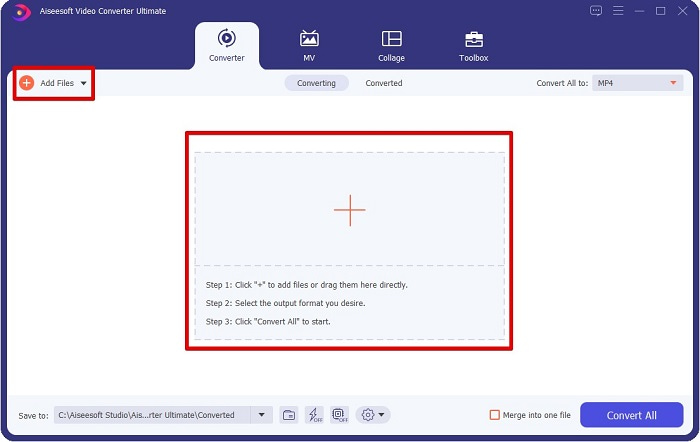
مرحله 2. پس از اجرای مبدل، روی دکمه Add Files یا دکمه + کلیک کنید تا فایل MPG خود را بارگذاری کنید. فایلهای رایانه شما نمایش داده میشود؛ در پوشههایتان فایل مورد نظر را پیدا کنید. سپس روی Open کلیک کنید تا فایل به صف تبدیل افزوده شود.
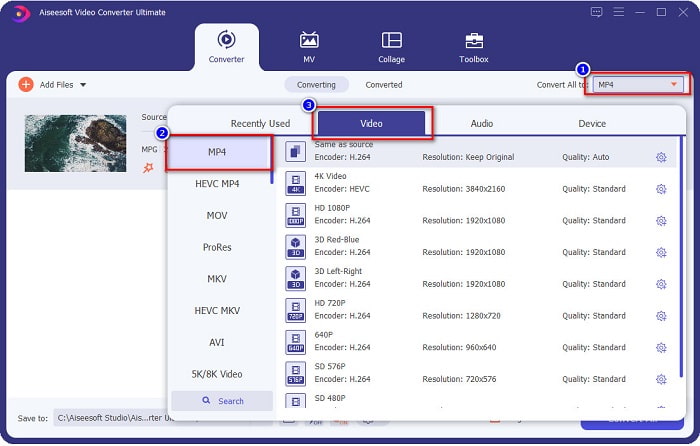
مرحله 3. برای تغییر فرمت فایل MPG خود، در گوشه بالای سمت راست صفحه روی Convert All to کلیک کنید. پس از نمایش فهرست فرمتها، فرمت MP4 را انتخاب کنید.
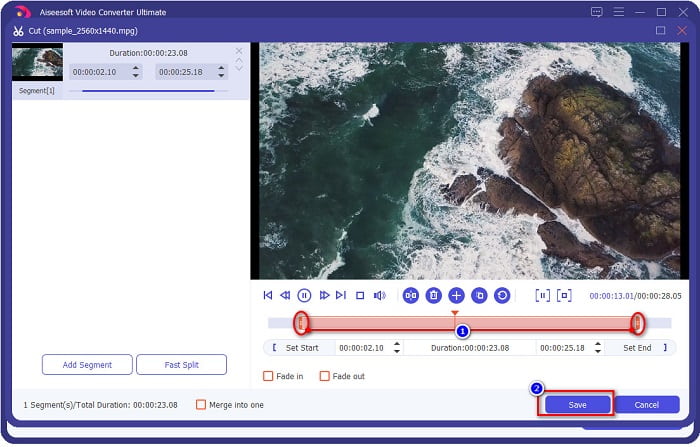
اگر میخواهید طول ویدیوی خود را کوتاه کنید، روی دکمه scissor کلیک کنید تا ویدیو را برش دهید. با کشیدن دکمههای play head میتوانید طول ویدیو را تنظیم کنید. برای اتمام، روی Save کلیک کنید.
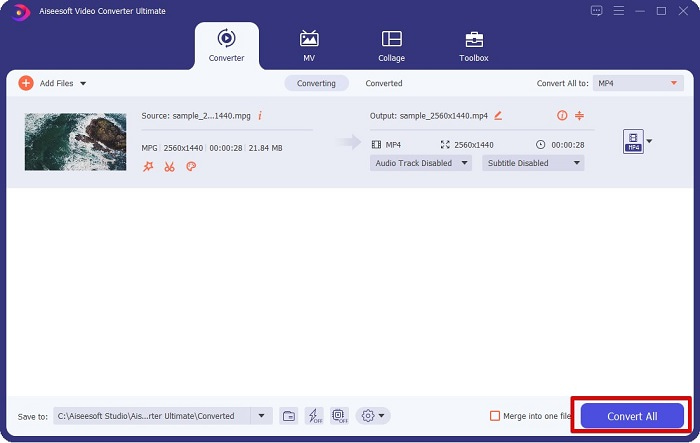
مرحله 4. هنگامی که فرمت فایل مورد نظر خود را انتخاب کردید، روی Convert All کلیک کنید تا فایل MPG شما به فایل MP4 تبدیل شود. کمی صبر کنید تا فایل MPG شما به فایل MP4 تبدیل شود. با همین چند مرحله ساده، فایل MPG خود را بهراحتی به MP4 تبدیل کردهاید.
2. از مبدل آنلاین رایگان استفاده کنید
FVC Free Online Video Converter به شما امکان میدهد فایل MPG خود را بهصورت رایگان و بدون ثبتنام به فرمت MP4 تبدیل کنید. این یک مبدل ویدیویی آنلاین رایگان است که اجازه میدهد بدون محدودیت تبدیل انجام دهید. علاوه بر این، با این مبدل میتوانید فایلهای حجیم را بهصورت آنلاین تبدیل کنید. همچنین نیازی به دانلود هیچ برنامهای ندارید، زیرا میتوانید بهصورت آنلاین به آن دسترسی داشته باشید. با این حال، نقطهضعف آن وابستگی به اینترنت است؛ یعنی سرعت تبدیل به سرعت اینترنت شما بستگی دارد. با وجود این، بسیاری از کاربران از این مبدل استفاده کردهاند و ثابت شده که یک مبدل ویدیویی فوقالعاده است.
در اینجا لیستی از مراحل تبدیل در FVC Free Online Video Converter آمده است:
مرحله 1. مرورگر خود را باز کرده و عبارت FVC Free Online Video Converter را جستجو کنید.
مرحله 2. وقتی وارد صفحه وب شدید، روی Add Files to Convert کلیک کنید. یک کادر متنی ظاهر میشود که در آن ابتدا باید لانچر را دانلود کنید. هنگامی که لانچر دانلود شد، به فایلهای شما هدایت میشوید؛ فایل MPG مورد نظر برای تبدیل را انتخاب کنید.
برای تبدیل دستهای فایلها، نسخهٔ دسکتاپ را دانلود کنید.
مرحله 3. پس از انتخاب فایل MPG، نخستین رابط را میبینید که در آن فهرست فرمتهای ویدیویی تنظیمشده نمایش داده میشود. پیش از تبدیل آنلاین فایل MPG به MP4، فرمت MP4 را انتخاب کنید.
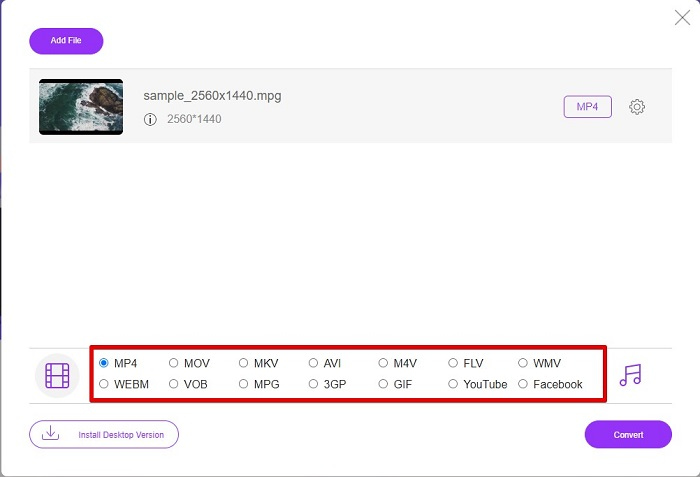
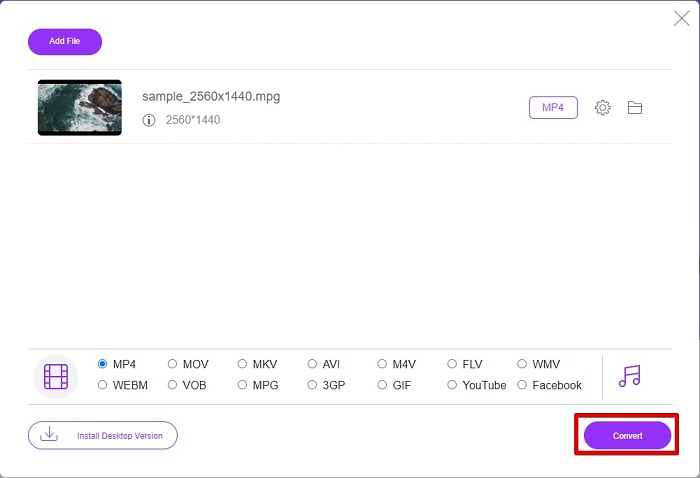
مرحله 4. روی دکمه Convert کلیک کنید تا فرایند تبدیل آغاز شود. یک تب جدید باز میشود که در آن محل ذخیرهسازی فایل تبدیلشده را در رایانه خود انتخاب میکنید، سپس روی select folder کلیک کنید.
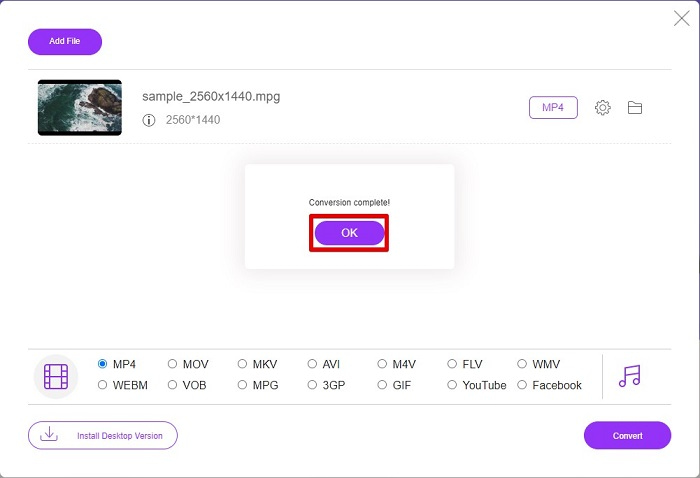
مرحله 5. در نهایت، فایل شما شروع به تبدیل میکند؛ وقتی تبدیل به پایان رسید، برای اتمام روی OK کلیک کنید. و تمام! تبدیل شما به سادگی 1-2-3 انجام شد!
3. از ConvertFiles.com استفاده کنید
ConvertFiles.com یک برنامه مبدل آنلاین رایگان برای تبدیل فایل MPG شما به MP4 است. این امکان را به شما می دهد تا فرمت های فایل را تا 300 نوع فرمت فایل تبدیل کنید. و اگر به دنبال تبدیل MPG به MP4 به صورت آنلاین هستید که به شما امکان می دهد اسناد، نقاشی ها، فیلم ها، ارائه ها و موارد دیگر را تبدیل کنید. اما در استفاده از این مبدل آنلاین با تبلیغات آزاردهنده زیادی مواجه خواهید شد. با این وجود، این مبدل آنلاین هنوز ارزش امتحان کردن را دارد و امیدوارکننده است.
در اینجا نحوه تبدیل فایل MPG به فرمت فایل MP4 آمده است:
مرحله 1. در مرورگر خود عبارت ConvertFiles.com را جستجو کنید تا مستقیم وارد صفحه وب شوید.
مرحله 2. با کلیک روی دکمه مستطیلی یا دکمه Browse کنار Choose a local file، فایل MPG خود را انتخاب کنید. فایل MPG خود را پیدا کرده و آن را انتخاب کنید.
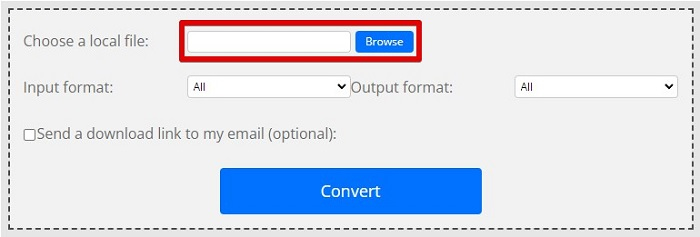
مرحله 3. پس از انتخاب فایل MPG مورد نظر برای تبدیل، در بخش فرمت خروجی، با کلیک روی دکمه drop-down، فرمت .mp4 را برگزینید.
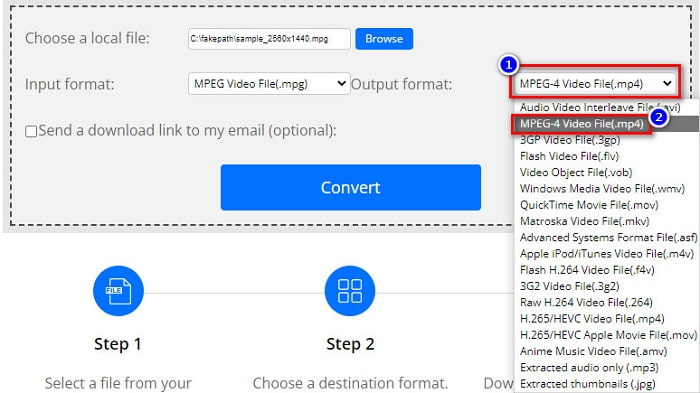
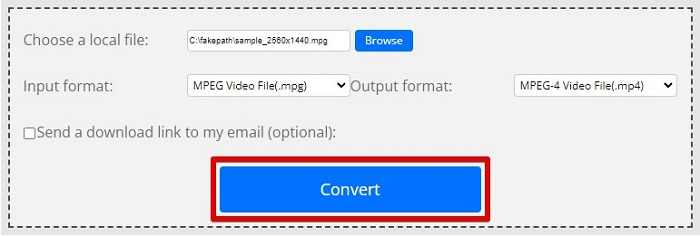
مرحله 4. وقتی فرمت مورد نظر را انتخاب کردید، اکنون میتوانید با کلیک روی Convert فایل خود را تبدیل کنید.
MPG در مقابل MP4
MPG که توسط گروه متخصصان تصویر متحرک (MPEG) ساخته شده است، یک فرمت ویدیوی دیجیتال رایج برای ذخیره اطلاعات ویدئو، صدا و ابرداده است. هنگام ایجاد فیلم برای اشتراک گذاری در اینترنت بسیار مفید است. آن فایلهای MPG معمولاً حاوی فشردهسازی ویدیویی/صوتی MPEG-1 یا MPEG-2 هستند.
فرمت MP4 که توسط گروه متخصصان تصویر متحرک (MPEG) در سال 2001 منتشر شد، می تواند به شما کمک کند داده های ویدئو، صدا، زیرنویس و تصویر را در آهنگ های جداگانه ذخیره کنید. این فرمت کوتاه MPEG-4 Part 14 است. بعلاوه، یکی از محبوب ترین فرمت های مورد استفاده برای پخش و اشتراک گذاری ویدیوها است.
بخش 3. سوالات متداول در مورد فرمت MPG و MP4
آیا می توانم فایل های MPG را بدون از دست دادن کیفیت به MP4 تبدیل کنم؟
آره. Video Converter Ultimate به شما این امکان را می دهد که MPG خود را با وجود حجم فایل بدون از دست دادن کیفیت به فرمت MP4 تبدیل کنید.
کجا می توانم فایل های MPG را پخش کنم؟
فایلهای MPG بهطور گسترده پشتیبانی میشوند. بنابراین بسیاری از پخشکنندههای رسانه میتوانند این فرمت را باز کنند، از جمله Microsoft Windows Media Player و VideoLAN VLC Media Player. برای اطلاعات بیشتر میتوانید این مقاله را ببینید: بهترین 4 پخشکننده MPG/MPEG برای Windows/Mac/Android/iPhone [2021]
آیا می توانم MP4 را به MPG تبدیل کنم؟
آره. می توانید با استفاده از مبدل های فایلی که در بالا ذکر کردیم، MPG را به فرمت فایل MP4 تبدیل کنید.
نتیجه
مبدلهایی که در بالا فهرست کردیم، مبدلهایی هستند که ثابت شده قابل اعتمادند. استفاده از آنها آسان و رایگان است! اما اگر میخواهید مبدلی داشته باشید که بتواند فایل MPG شما را به فرمت MP4 تبدیل کند و در عین حال امکانات فوقالعادهای برای بهبود فایل شما داشته باشد، در آن صورت Video Converter Ultimate بهترین انتخاب است. علاوه بر این، اگر یک مبدل آنلاین عاری از تبلیغات میخواهید که بتواند بهراحتی فایلهای حجیم را نیز تبدیل کند، FVC Free Online Converter را امتحان کنید.
-
 3 روش آسان برای تبدیل MPG به MOV در Mac/Windows/Online
 آیا می خواهید فایل های MPG خود را تبدیل کنید و بعداً آنها را روی iOS، iPod، iPad یا Mac خود انتقال دهید؟ این مقاله به نحوه تبدیل MPG به MOV با مراحل کمک می کند.
-
 نحوه تبدیل MPG به FLV بدون از دست دادن کیفیت [ثابت شده]
 شما باید فیلم مورد علاقه خود را در این پخش کننده رسانه تماشا کنید، اما MPG را پشتیبانی نمی کند. سعی کنید با استفاده از مبدل هایی که این مقاله معرفی می کند، فایل MPG خود را به FLV تبدیل کنید.
-
 2 مبدل MPG نهایی برای تبدیل MPG به WMV به صورت رایگان
 آیا می خواهید MPG را به WMV رایگان تبدیل کنید؟ در این صورت، شما خوش شانس هستید زیرا متوجه شدیم که دو ابزار وجود دارد که می توانید برای تبدیل فایل های MPG خود از آنها استفاده کنید.

