


 Video Converter Ultimate
 ضبط صفحه
 تعمیر ویدیو
مبدل WTV به MP4: نحوه تبدیل WTV به MP4
WTV ، به عنوان جانشین فرمت DVR-MS ، توسط مایکروسافت برای ذخیره محتوای تلویزیون ضبط شده توسط Windows Media Center ساخته شده است. WTV با رمزگذاری استاندارد MPEG-2 و MPEG-4 و MPEG-1 Layer II یا Dolby Digital AC-3 پشتیبانی می شود ، توسط چند نرم افزار مانند FFMPEG ، Windows Media Center ، CyberLink PowerDVD 12 ، Nero 12 ، HandBrake ، CCextractor و غیره پشتیبانی می شود.

اگر میخواهید فایلهای WTV را بهراحتی تماشا یا به اشتراک بگذارید، بهتر است آنها را به فرمت MP4 تبدیل کنید؛ محبوبترین قالب که تقریباً روی هر دستگاهی پشتیبانی میشود.
ما در اینترنت بهدنبال مبدل WTV به MP4 گشتیم و ۲ مورد از بهترین مبدلهای رایگان WTV به MP4 را برای تبدیل WTV به MP4 پیدا کردیم.
قسمت 1. مبدل ویدئو رایگان - تبدیل WTV به MP4 آنلاین
تبدیل WTV به MP4 بسیار ساده است. آسانترین روش برای تغییر WTV به MP4 این است که آن را بهصورت آنلاین انجام دهید. Free Online Video Converter یک نرمافزار رایگان برای تبدیل WTV به MP4 و سایر فرمتهای رایج ویدیویی و صوتی است. این ابزار آنلاین رایگان با Windows 10/8/7 و Mac OS X 10.7 و نسخههای بالاتر سازگار است و میتوانید تنها در چند مرحله، WTV را به MP4 تبدیل کنید.
برای ساده سازی فرآیند ، می توانید راهنما را دنبال کنید:
1. روی دکمه Add Files to Convert کلیک کنید تا فایلهای WTV را از رایانه (PC) بارگذاری کنید.
2. از میان گزینهها، MP4 را انتخاب کنید.
3. روی Convert کلیک کنید تا فایلهای WTV بهطور خودکار تبدیل و دانلود شوند.
اکنون ، ما اینجا هستیم تا شما را در چگونگی تبدیل WTV به MP4 با جزئیات بررسی کنیم.
مرحله 1. افزودن فایلهای WTV
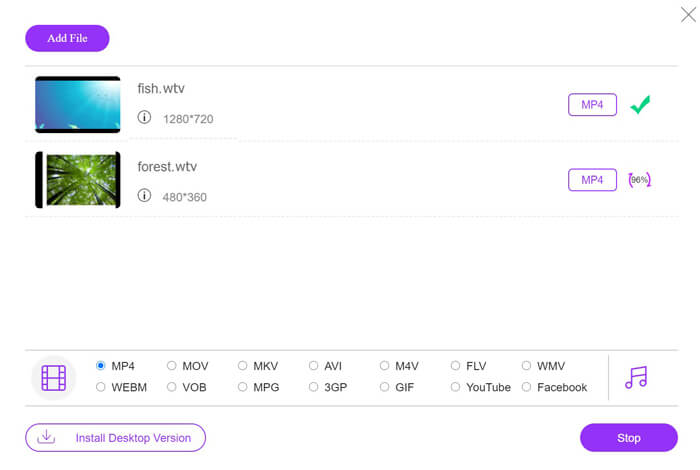
این مبدل آنلاین رایگان WTV به MP4 را از طریق مرورگر خود باز کنید. روی دکمه Add Files to Convert کلیک کنید؛ پنجرهای باز میشود که از شما میخواهد لانچر را دانلود و نصب کنید. آن را دانلود کنید و پس از نصب موفق، پنجره متنباز ظاهر میشود. سپس میتوانید ضبطهای WTV موجود در رایانه را برای بارگذاری انتخاب کنید. این نرمافزار رایگان از تبدیل دستهای پشتیبانی میکند و میتوانید بیش از یک فایل WTV را بهصورت آنلاین اضافه کنید.

مرحله ۲. انتخاب MP4
در پایین صفحه، تیک گزینه MP4 را بزنید؛ در همانجا میتوانید سایر گزینههای خروجی مانند MKV، AVI، M4V، FLV، VOB، GIF، YouTube، Facebook، MP3، AAC، WMA، WAV، FLAC و غیره را نیز پیدا کنید.
علاوه بر این، میتوانید روی آیکون Settings در کنار پنل خروجی MP4 کلیک کنید تا انکودر، نرخ فریم، وضوح تصویر (رزولوشن)، نرخ بیت و سایر پارامترها را تنظیم کنید.

مرحله 3. تبدیل WTV به MP4
پس از انجام همه تنظیمات، روی دکمه Convert کلیک کنید؛ پنجرهای باز میشود که از شما میخواهد مسیر ذخیره فایلهای MP4 تبدیلشده را انتخاب کنید. مسیر دلخواه را انتخاب کرده و به این مبدل آنلاین رایگان بازگردید، سپس دوباره روی Convert کلیک کنید تا فرایند تبدیل و دانلود خودکار فایلهای MP4 آغاز شود. میتوانید درصد پیشرفت تبدیل را بهصورت مستقیم مشاهده کنید.
قسمت 2. ترمز دستی - تبدیل WTV به MP4 در کامپیوتر / مک
روش رایگان دیگر برای تبدیل WTV به MP4 استفاده از ترمز دستی است. HandBrake معدود نرم افزاری است که می تواند پرونده های WTV را بخواند. علاوه بر این ، همچنین می تواند WTV را به رایانه Windows و Mac شما به MP4 / MKV تبدیل کند.
HandBrake نرم افزار رومیزی منبع باز است ، بنابراین باید ابتدا این مبدل رایگان را در رایانه بارگیری کنید.
باز هم ، مراحل ساده تبدیل WTV به MP4 در ترمز دستی به شرح زیر است:
1. پرونده های WTF یا کل پوشه را به HandBrake اضافه کنید.
2. نمایه MP4 سفارشی در HandBrake.
2. پیش نمایش و تبدیل WTV به MP4.
در اینجا راهنمای جامع تغییر WTV به MP4 در HandBrake وجود دارد.
مرحله 1. افزودن فایلهای WTV در HandBrake
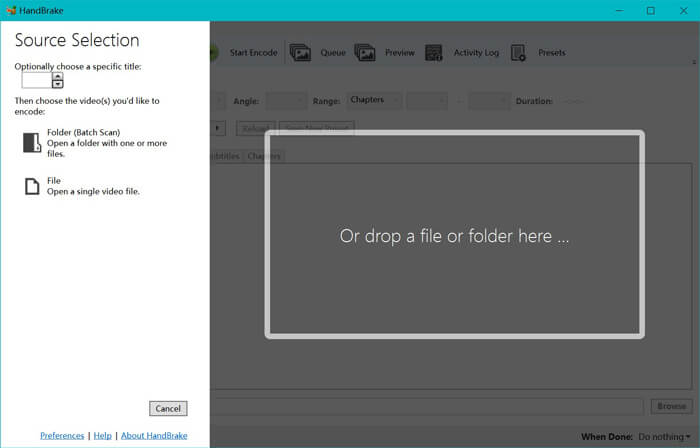
پس از نصب HandBrake روی رایانه، این برنامه بهصورت پیشفرض پنجره انتخاب منبع (open-source dialog) را نمایش میدهد. در اینجا میتوانید با کلیک روی Folder یا File، پوشه یا فایلهای WTV را در پنجره اصلی انتخاب کنید. بهطور جایگزین، میتوانید فایلهای WTV را بکشید و درون این نرمافزار رها کنید.
مرحله 2. انتخاب فرمت MP4
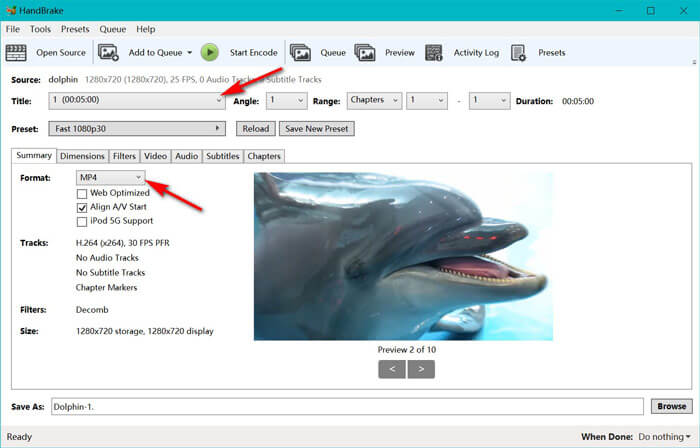
پس از بارگذاری فایلهای WTV، میتوانید از منوی کشویی Title، فایل WTV مورد نظر خود را انتخاب کنید. سپس در تب Summary، فرمت MP4 را بهعنوان خروجی برای فایل WTV انتخابشده برگزینید. علاوه بر این، HandBrake این امکان را میدهد که ابعاد تصویر، فیلترها، کدک/کیفیت ویدئو، ترک صوتی و غیره را تنظیم کنید. این برنامه فقط به MP4 محدود نیست و میتواند فرمتهای دیگری مانند AVI، MOV، M2TS و غیره را نیز به MKV تبدیل کند.
مرحله 3. پیشنمایش و تبدیل WTV به MP4
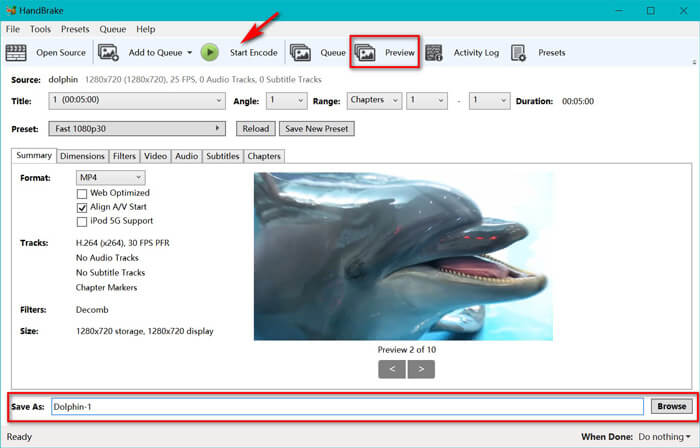
قابلیت Preview در نوار ابزار HandBrake به شما اجازه میدهد قبل از فرایند کدگذاری، پیشنمایشی از ویدئوی MP4 جدید خود مشاهده کنید. پس از آنکه همه تنظیمات به شکل مطلوب انجام شد، یک نام برای فایلهای MP4 تبدیلشده انتخاب کرده و با کلیک روی دکمه Browse در پایین صفحه، محل ذخیره ویدئوهای جدید را مشخص کنید. در نهایت، روی دکمه Start Encode در نوار ابزار کلیک کنید تا فرایند تبدیل WTV به MP4 آغاز شود.
قسمت 3. سQالات متداول WTV تا MP4
چرا HandBrake MP4 را به عنوان M4V ذخیره می کند؟
برای پرونده های MP4 ، هنگام انتخاب زیرنویس های صوتی AC3 و SRT یا نشانگرهای فصل برای شخصی سازی فایل MP4 ، HandBrake به صورت خودکار فایل های MP4 را با استفاده از پسوند M4V انجام می دهد. اما می توانید پسوند .m4v را مستقیماً به .mp4 تغییر دهید.
آیا VLC player می تواند پرونده های WTV را پخش کند؟
VLC نمی تواند مستقیماً پرونده های WTV را پخش کند. برای نصب بسته کد WTV و سپس پخش پرونده های WTV روی VLC ، باید بسته K-Lite Code Pack را نصب کنید.
آیا می توانم پرونده های محافظت شده WTV را تبدیل کنم؟
بله، تو میتونی. با این حال ، فقط MCEBuddy از ویرایش و تبدیل پرونده های WTF تجاری محافظت شده پشتیبانی می کند. برای کپی و تبدیل پرونده های محافظت شده WTV باید از این نرم افزار استفاده کنید.
نتیجه
برای استفاده راحت از Window Media Center پرونده های WTV ضبط شده ، ابتدا باید WTV را به MP4 تبدیل کنید. این پست دارای 2 روش رایگان برای تبدیل WTV به MP4 بصورت آنلاین از طریق Free Video Converter Online و HandBrake است. مبدل ویدیوی آنلاین بصورت رایگان به شما امکان می دهد WTV را به فرمت های MP4 و سایر فرمت های محبوب تبدیل کنید ، در حالی که HandBrake به شما امکان کنترل بیشتر ویرایش با گزینه های محدود محدودیت قالب را می دهد.
کدام راه مورد نظر شماست؟
یا شاید مبدل WTV به MP4 بهتری دارید؟
در هر صورت ، دوست دارم از شما بشنوم. بنابراین ، پیش بروید و در زیر نظر دهید.
-
 نحوه تبدیل MXF به MP4 از طریق مبدل رایگان
 این پست راهنمای دقیق تبدیل MXF به MP4 در رایانه است. در مراحل ساده می توانید 4 مبدل MXF به MP4 رایگان برای تبدیل دوربین فیلمبرداری MXF به MP4 رایگان دریافت کنید.
-
 3 روش برتر تبدیل MP4 به MOV
 چگونه MP4 را به MOV در Mac تبدیل کنیم؟ آیا راهی رایگان برای تبدیل MP4 به MOV بدون افت کیفیت وجود دارد؟ این پست سه روش ساده برای کمک به شما در تبدیل ویدیو از MP4 به MOV در Mac ، Windows PC و آنلاین را به اشتراک می گذارد.
-
 نحوه تبدیل M2TS به WMV در ویندوز / مک / آنلاین (استفاده کاملاً رایگان)
 در اینجا 3 روش آسان برای تبدیل M2TS به فیلم های WMV آورده شده است. به سرعت می توانید قالب ویدئو را از M2TS به WMV به صورت رایگان در ویندوز ، مک و آنلاین تغییر دهید. تبدیل دسته ای پشتیبانی می شود.
