


 Video Converter Ultimate
 ضبط صفحه
 تعمیر ویدیو
100% روش های رایگان فشرده سازی اندازه پرونده M4V از GB به MB
قالب فایل M4V ، مشابه MP4 ، یک ظرف ویدیویی عالی است که توسط Apple تولید شده است. می توانید تقریباً روی همه پخش کننده های معروف مانند iTunes ، QuickTime ، VLC Media Player ، RealPlayer و موارد دیگر ، پرونده های M4V را پخش کنید. اما گاهی اوقات ، ممکن است متوجه شوید که فیلم M4V شما برای ذخیره یا به اشتراک گذاری بسیار بزرگ است. در این شرایط ، باید اندازه پرونده را کاهش دهید.
اگر نمیدانید چگونه M4V را فشرده کنید، میتوانید گزینههای زیر را امتحان کنید.

قسمت 1. نحوه فشرده سازی M4V آنلاین به صورت رایگان
همانطور که اشاره کردیم ، ممکن است ویرایش و به اشتراک گذاری یک فایل ویدیویی بزرگ در YouTube ، Facebook ، Instagram یا سایر سایت های پخش کمی سخت باشد. زیرا این سایتها معمولاً محدودیت شدیدی در اندازه ویدیویی که بارگذاری می کنید دارند. علاوه بر این ، پرونده های بزرگ می توانند فضای زیادی را در رایانه ، درایو دیسک ، تلفن ، درایو فلش ، کارت حافظه و غیره اشغال کنند.
بنابراین، وقتی یک فایل M4V حجیم دارید، بهتر است با یک فشردهساز ویدیوی حرفهای حجم آن را کاهش دهید. اگر به دنبال یک برنامه رایگان هستید، چرا FVC Free Video Compressor را امتحان نمیکنید؟ استفاده از آن کاملاً رایگان است. علاوه بر این، یک ابزار فشردهسازی آنلاین است؛ یعنی میتوانید هر ویدیویی را بدون نصب نرمافزارهای حجیم روی کامپیوتر، تا اندازه دلخواه فشرده کنید.
می توانید از آن در هر مرورگر اصلی مانند Google Chrome ، Mozilla Firefox و Microsoft Edge استفاده کنید. و هیچ علامتی به فیلم فشرده اضافه نخواهد شد. حتی می توانید از فیلم با کیفیت تصویر بالا لذت ببرید.
در اینجا مراحل نحوه فشرده سازی آنلاین پرونده های بزرگ M4V آورده شده است.
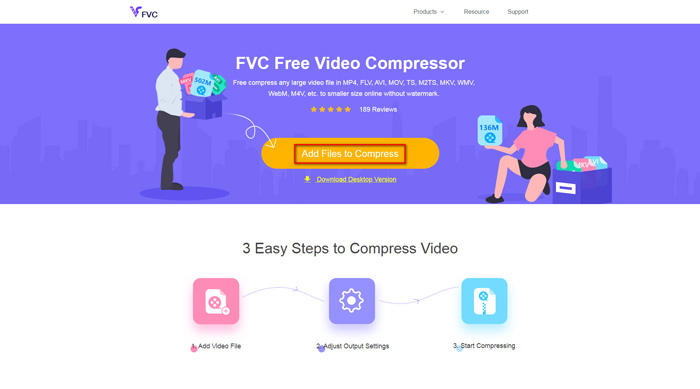
مرحله 1. در مرورگر خود به وبسایت FVC Free Video Compressor بروید. یک دکمه با عنوان Add Files to Compress در بنر میبینید. روی آن کلیک کنید و طبق راهنما لانچر FVC را روی کامپیوتر خود دانلود و نصب کنید.
مرحله 2. بعد از آن، باید فایل M4V موردنظری را که میخواهید فشرده کنید انتخاب کنید. سپس میتوانید اسلایدر پشت کادر Size را حرکت دهید تا بهسادگی اندازه دقیق فایل موردنظر را تنظیم و پیدا کنید. همچنین میتوانید بر اساس نیاز خود، وضوح (رزولوشن) و بیتریت را بهصورت جداگانه تغییر دهید.
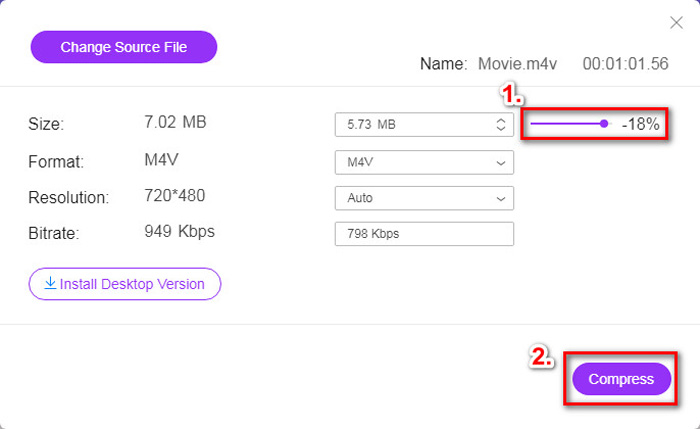
مرحله 3. اگر میخواهید M4V را به MP4 فشردهسازی/تبدیل کنید، باید در این قسمت MP4 را بهعنوان فرمت خروجی انتخاب کنید. در غیر این صورت میتوانید مستقیماً روی Compress در گوشه راست کلیک کنید. یک پوشه برای ذخیره ویدیوی فشردهشده انتخاب کرده و چند ثانیه صبر کنید تا ویدیوی موردنظر را دریافت کنید.
قسمت 2. نحوه کاهش اندازه پرونده M4V در مک / ویندوز
از آنجا که M4V فرمتی است که توسط اپل توسعه داده شده، میتوانید از پخشکننده پیشفرض اپل یعنی QuickTime Player نیز برای فشردهسازی فایلهای M4V در مک استفاده کنید. همچنین QuickTime Player نسخه ویندوز هم برای کاربران PC ارائه میدهد. اما باید توجه داشته باشید که جدیدترین نسخه ویندوز QuickTime، نسخه 7.7.9 است که در سال 2016 منتشر شده. بنابراین، اگر بهدنبال یک برنامه تازه و بهروز هستید، میتوانید FVC Free Video Compressor را امتحان کنید که حتی از ویدیوهای 4K هم پشتیبانی میکند.
به هر حال ، لطفاً مراحل زیر را دنبال کنید تا اندازه پرونده M4V را در QuickTime کاهش دهید.
مرحله 1. فایل M4V منتظر فشردهسازی را با QuickTime باز کنید.
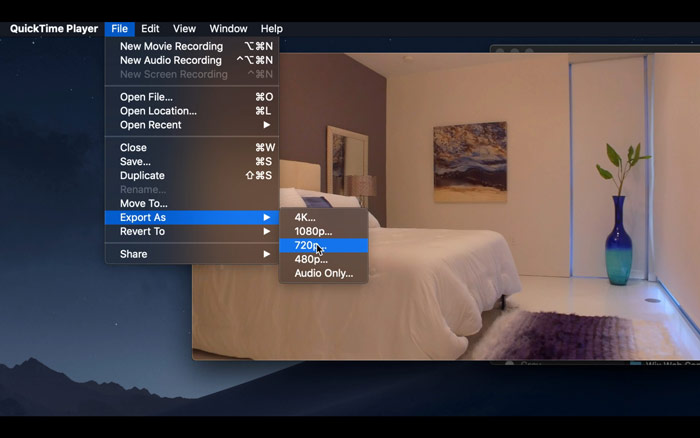
مرحله 2. منوی File را در گوشه بالا چپ پیدا کنید. روی آن کلیک کرده و گزینه Export As را از فهرست بیابید. سپس وضوحی پایینتر از ویدیوی اصلی را برای فشردهسازی ویدیو انتخاب کنید. در نهایت، ما اینجا نمیخواهیم حجم را افزایش دهیم.
مرحله 3. اگر نمیخواهید مسیر ذخیرهسازی را تغییر دهید، میتوانید مستقیماً روی Save کلیک کنید. لطفاً برای خروجی گرفتن از ویدیو کمی صبر کنید.
قسمت 3. سQالات متداول فشرده سازی M4V
1. آیا می توانم M4V را به MP4 تغییر نام دهم؟
خیر، اگر منظورتان این است که با تغییر پسوند فایل به .mp4، M4V را به MP4 تبدیل کنید، این کار ممکن نیست؛ زیرا شیوهٔ رمزگذاری آنها یکسان نیست. باید برای تبدیل M4V به MP4 از یک ابزار حرفهایتر استفاده کنید.
2. آیا YouTube قالب M4V را قبول می کند؟
متأسفانه ، یوتیوب فقط تعداد محدودی از قالب های فایل را پشتیبانی می کند که شامل M4V نیستند. بنابراین ، اگر می خواهید فیلم M4V خود را در YouTube بارگذاری کنید ، باید آن را به قالب پشتیبانی شده از YouTube مانند MP4 تبدیل کنید.
3. چگونه چندین فیلم M4V را در یکی ادغام کنیم؟
اگر چند فایل ویدیوی M4V دارید که باید در یک فایل واحد ادغام شوند، میتوانید از FVC Free Online Video Merger برای ادغام کردن ویدیوهای مختلف استفاده کنید.
نتیجه
اکنون دو روش ساده و رایگان برای فشرده کردن فایل M4V در اختیار دارید. اگر کاربر مک هستید، میتوانید از QuickTime Player برای کاهش حجم ویدیو استفاده کنید. اما اگر از وضوحهای ثابت ارائهشده توسط QuickTime راضی نیستید یا از کامپیوتر ویندوزی استفاده میکنید، میتوانید به FVC Free Video Compressor فرصت دهید.
-
 مبدل M4V به MP3 - 4 بهترین روش برای استخراج MP3 از پرونده های M4V
 وقتی می خواهید به راحتی صوتی MP3 را از فیلم های M4V استخراج کنید ، می توانید در مورد 4 بهترین مبدل M4V به MP3 اطلاعات بیشتری کسب کنید تا فایل های صوتی مورد نظر را از مقاله دریافت کنید.
-
 4 روش برای تبدیل فیلم های QuickTime به MP4 به صورت رایگان در تلفن / رایانه
 4 روش تبدیل QuickTime به فیلم های MP4 را به صورت رایگان در تلفن یا رایانه خود بخوانید و دریافت کنید. می توانید فرمت فایل را از MOV به MP4 در ویندوز / مک / آیفون / اندروید / آنلاین با سهولت تغییر دهید.
-
 4 بهترین مبدل MP4 به M4V برای تبدیل فیلم های MP4 به M4V با سهولت
 در صورت نیاز به تغییر پرونده های MP4 به M4V ، باید جزئیات بیشتری درباره تفاوت بین این دو قالب و همچنین بهترین مبدل های MP4 به M4V را از مقاله بیاموزید.
