


 Video Converter Ultimate
 Screen Recorder
 Videó javítás
GIF gyors kivágása a 4 GIF-vágóval
Ha meg szeretnéd változtatni egy GIF méretét, az egy egyszerű feladat, ha a legjobb megoldást használod a GIF kivágására. Azonban nem minden GIF‑szerkesztő kínál professzionális és valóban használható vágási megoldást. Minden, amit a GIF‑vágókról tudnod kell, ebben a bejegyzésben található. Hogy minden elérhető, legjobb opciót bemutassunk, olvasd el az alábbi részleteket, és nézd meg azt a négy nagyszerű vágóprogramot, amellyel megváltoztathatod a GIF‑ed méretét.

1. rész: GIF-ek körbevágása Windows és Mac rendszeren
1. módszer: Használja a Video Converter Ultimate alkalmazást – a legjobb GIF-vágó
Ez egy professzionális eszköz, amely bármilyen problémánál csakis kiváló eredményt nyújt a felhasználónak. A FVC Video Converter Ultimate már beszállt a GIF‑ek szerkesztésébe vágással, csonkítással, kivágással, sőt akár saját GIF készítésével is. Ez az eszköz nemcsak GIF‑ekhez remek: a GIF‑et MOV, AVI, MP4, MKV, WMV és további több mint 200 formátumba is konvertálhatod. Emellett a feldolgozási folyamat is teljesen más, mint a többi eszköznél, mivel villámgyors importálást és exportálást támogat. Továbbá ez az eszköz már rengeteg GIF‑szerkesztési problémát megoldott. Így a kivágás rábízása is gyerekjáték. Szeretnéd megtanulni, hogyan vágj ki egy GIF‑et? Ebben az esetben a következő rész lépésről lépésre bemutatja, hogyan teheted meg gyorsan.

FVC Video Converter Ultimate
Több mint 5 689 200 letöltés- Professzionális és nagyon megbízható GIF-vágó Windows és Mac rendszeren érhető el.
- Támogatja a GIF konvertálását MP4, MOV, WMV, MKV és 200+ formátumba.
- További speciális funkciók állnak rendelkezésre a GIF-ek létrehozásához, gyorsításához vagy lassításához stb.
- Biztonságos minden típusú vírus ellen.
- Az ultragyors exportálási folyamat segítségével pillanatok alatt elkészítheti a kivágott GIF-et.
Ingyenes letöltés Windows 7 vagy újabb rendszerre Biztonságos letöltés
Ingyenes letöltés macOS 10.7 vagy újabb rendszerre Biztonságos letöltés
1. lépés. Töltsd le a vágóprogramot a meghajtódra az alul látható letöltés gombra kattintva. Ezután telepítsd a szoftvert, és kattints a Start Now gombra a következő lépéshez.
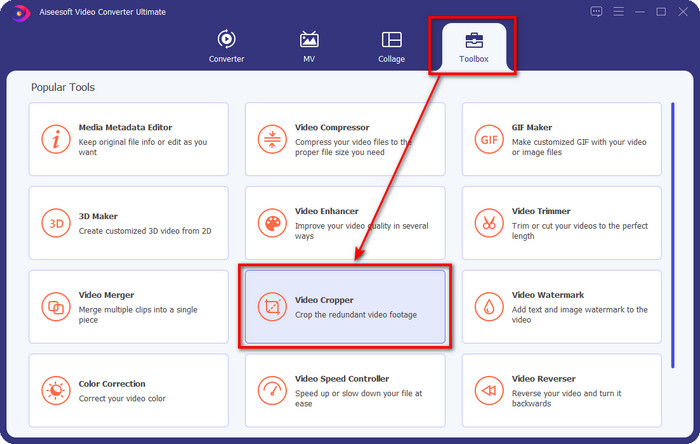
2. lépés. Miután megnyílt, kattints a Toolbox menüre, és keresd meg a Video Cropper opciót a felület tetején.
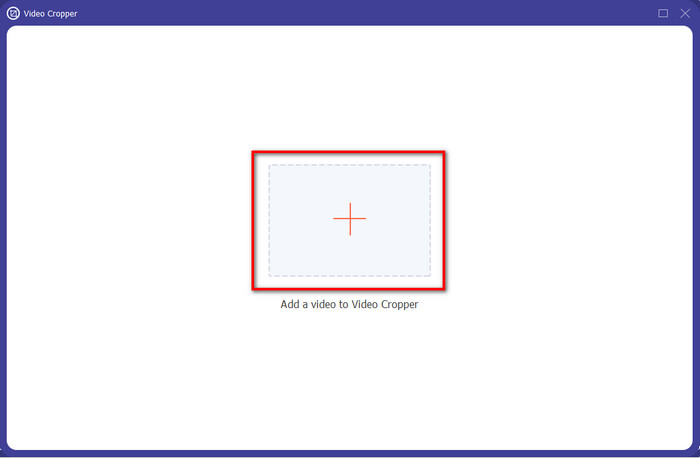
3. lépés. Egy új felület jelenik meg; kattints a + gombra, ekkor megnyílik egy mappa, ahol megkeresheted a GIF‑et. Kattints rá, majd nyomd meg az Open gombot a folytatáshoz.
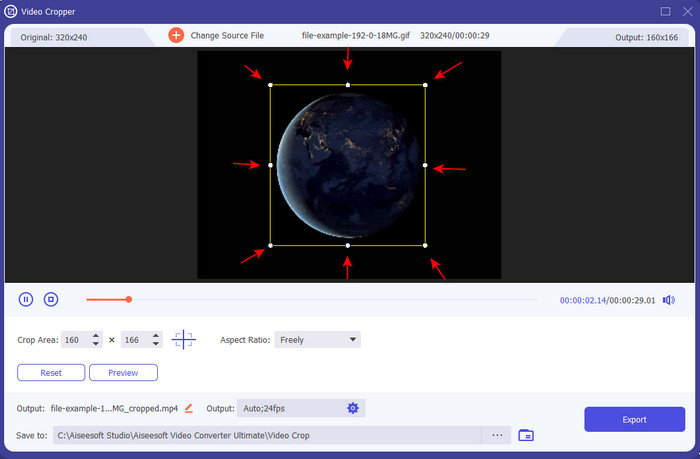
4. lépés. Kattints a Cut opcióra (olló ikon), ezután egy új felület jelenik meg a képernyőn, ahol kivághatod a GIF‑et, és az oldalarányt tetszésed szerint módosíthatod a kis pontok szabad mozgatásával.
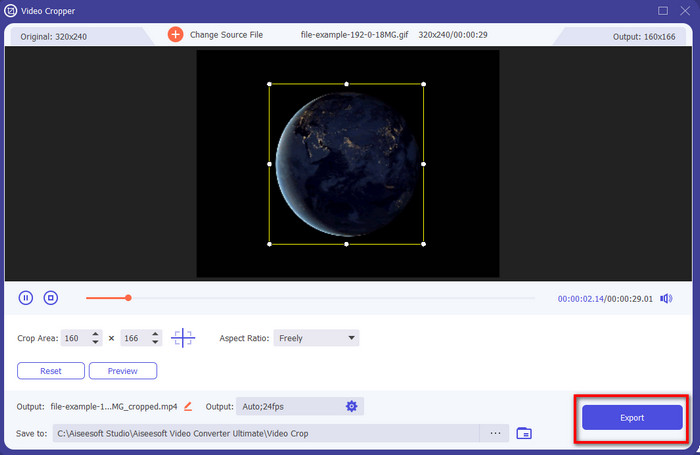
5. lépés. A beállítások után nyomd meg az Export gombot, hogy elmentsd és letöltsd a kivágott GIF‑et a meghajtódra – és már kész is, ilyen egyszerűen vágtad ki a GIF‑edet.
2. módszer. Használja a Photoshopot
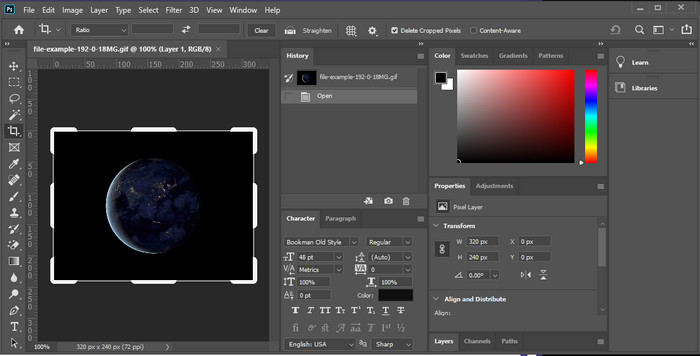
A Photoshop egy profi eszköz, amely minden beillesztett képnél – így a GIF‑eknél is – komoly szerkesztést tesz lehetővé. Ez az eszköz már több millió tapasztalt felhasználónak segített bonyolult képszerkesztési feladatoknál. Azonban a sok fejlett funkció miatt a program használata technikai jellegű és nehezen átlátható egy kezdő számára, főleg, ha még nincs tapasztalatod szerkesztésben. Bár használhatod vágóként is, egy egyszerű feladathoz mégis túlzás lehet. De ha kifejezetten arra vagy kíváncsi, hogyan lehet GIF‑et vágni Photoshopban, kövesd az alábbi lépéseket.
1. lépés. Töltsd le, majd indítsd el a Photoshopot az asztali gépeden.
2. lépés. Kattints a File menüre, keresd meg a GIF‑et, majd nyomd meg az Open gombot. Nyomd meg a billentyűzeten a C gombot, állítsd be a méretet, majd nyomd meg az Enter billentyűt a folytatáshoz.
3. lépés. Exportáld a végső eredményt a File menü alatt található Save opcióra kattintva.
2. rész: GIF-ek online vágása
1. mód. Használja az Ezgif-et
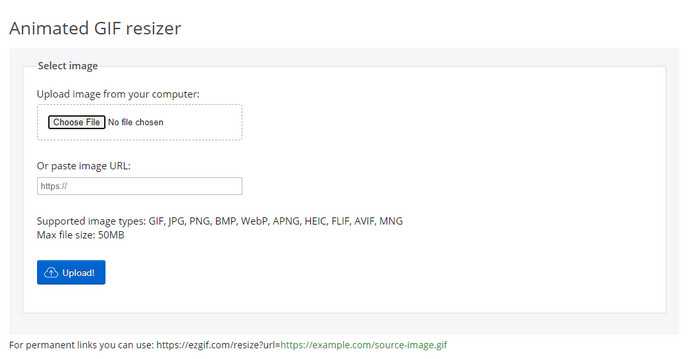
Ha online GIF‑vágóra van szükséged, valószínűleg már ismered az Ezgif eszközt. Nem meglepő, hogy ez az online GIF‑szerkesztő felkerült a listára, hiszen szerkesztési képességeiről ismert. A korábban említett vágókkal ellentétben ingyenes, és nem kell letölteni. Az összélmény elég jó, de nem a legjobb, amivel találkoztunk, főleg a zavaró reklámok miatt. Ráadásul, ha itt vágsz ki egy animált GIF‑et, készülj fel rá, hogy türelemre lesz szükséged, mivel a GIF feltöltése és letöltése egy kis időt vesz igénybe.
1. lépés. Nyisd meg a böngésződet, és keresd meg az Ezgif weboldalt.
2. lépés. Lépj a Crop részre, nyomd meg a Choose File gombot, keresd meg a fájlt a mappádban, majd kattints az Upload gombra.
3. lépés. Húzd a frame dots jelölőpontokat tetszés szerint, majd kattints a Crop Image gombra a folytatáshoz.
2. út. iLoveIMG
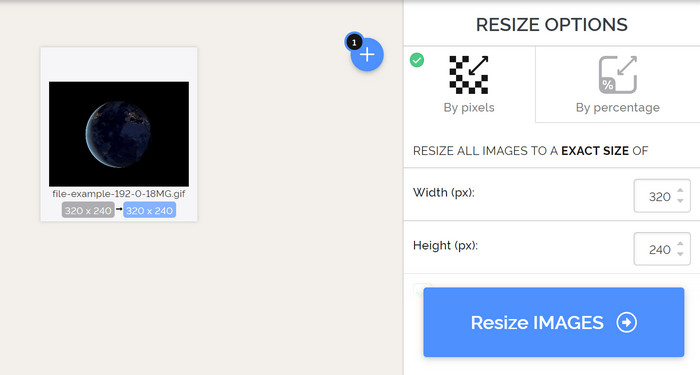
Tanuld meg, hogyan vághatsz GIF‑eket online az iLoveIMG segítségével. Ez az eszköz olyan funkciókat kínál, amelyekkel képeidet vághatod, átméretezheted, tömörítheted és még sok mást is megtehetsz. A fájlok feltöltése és letöltése itt jobb, mint az Ezgif esetében, mert nem tart olyan sokáig a betöltés. Ha nem szeretnél vágóprogramot letölteni az asztali gépedre, ez az eszköz az elsőként említett online megoldáshoz hasonlóan jó választás lehet. Arra viszont számíts, hogy néhány reklám az oldalon kissé zavaró lehet.
1. lépés. Nyisd meg a keresőmotorodat, keresd meg az iLoveIMG oldalt, majd kattints a Crop Image opcióra.
2. lépés. Nyomd meg a Select Image gombot, és tallózd be a GIF fájlt. Állítsd be a frame ratio keretarányt az igényeid szerint, majd kattints a Crop Image gombra.
3. lépés. Várd meg, amíg a vágási folyamat befejeződik, majd töltsd le a fájlt.
3. rész. GYIK a GIF-kivágással kapcsolatban
Milyen képesítéseket kell keresnem egy GIF-vágónál?
A GIF-vágó kiválasztásakor számos követelményt figyelembe kell vennie, és ezek közül az első az eszköz kompatibilitása a platformokon. Feltétlenül olvassa el a cikk áttekintését az eszközökről, hogy megtudja, elérhetők-e az eszközein. Ezenkívül biztonságos a rosszindulatú programok ellen, különösen online vagy letölthető; A vágás egyszerű feladat, de ügyeljen arra, hogy a vágógép megbízható legyen. Végül a vágógépnek számos olyan funkcióval kell rendelkeznie, amelyekre szüksége lesz annak meghatározásához, hogy a kivágott méret megfelelő-e. Ezek közé tartozik a vágókeret, az előnézeti lehetőség, a hossz és a magasság, stb.
Biztonságos az online GIF-vágó használata?
Nos, a legtöbb online GIF‑vágó biztonságos, de nem mindegyik. Ezért mielőtt használnád őket, győződj meg róla, hogy az adott online eszköz biztonságos, így elkerülheted az eszközeidben okozott, visszafordíthatatlan károkat.
Hogyan állíthatom be a GIF-et háttérként?
Számos módja van annak, hogy a GIF‑et háttérképként használd a mobiltelefonodon vagy az asztali gépeden. Emellett egy bónusz eszközt is bemutatunk, amely segít GIF‑et készíteni képek vagy videók összeállításából. Mire vársz még? Kattints ide, és tudd meg, hogyan állíthatsz be GIF‑et háttérképként az eszközödön.
Következtetés
Az összes lehetséges online és offline módszert összegyűjtöttük a GIF‑ek vágására. A cikkben szereplő eszközök már bizonyították, hogy a méret megváltoztatása egyszerű a segítségükkel. Ha azonban professzionális eredményre és problémamentes használatra vágysz, a FVC Video Converter Ultimate kiváló választás. Ez az eszköz egyértelműen megmutatja a különbséget egy jó és a legjobb vágó között. Ha tehát profin szeretnél vágni, az alábbi letöltés gombra kattintva azonnal letöltheted az eszközt.
Ingyenes letöltés Windows 7 vagy újabb rendszerre Biztonságos letöltés
Ingyenes letöltés macOS 10.7 vagy újabb rendszerre Biztonságos letöltés
-
 Hogyan vágjunk le MP4 fájlt a videó minőségének elvesztése nélkül [2021]
 Tanulja meg, hogyan vághatja le az MP4-et a csak Önnek biztosított egyszerű lépésekkel. Tehát tartsa a lépést, mert bemutatjuk Önnek a legjobb vágóeszközöket, amelyeket használhat.
-
 Készítse el legjobb animált GIF-jét az Online GIF Maker segítségével [2021]
 Informatív áttekintés arról, hogyan készíthet GIF-et ezekkel az egyszerű online GIF-készítőkkel, amelyekkel már találkozik vagy nem az interneten.
-
 [2021-ben frissítve] 9 legjobb GIF-szerkesztő PC-re, Mac-re, iOS-re és Androidra
 Kell hozzá személyes érintés a GIF -hez, hogy kifejezőbb legyen? Olvassa tovább ezt a cikket, hogy megtudja, hogyan kell szerkeszteni, és mi a legjobb eszköz a feladathoz.
