


 ビデオコンバーター究極
 スクリーンレコーダー
 ビデオ修復
ビデオ修復
 安全なダウンロード
Twitter、Instagram、および TikTok の動画の長さの基準を学ぶ
TikTokやTwitter、Instagramなど、各プラットフォームの動画の長さの基準を知りたいですか?それなら、この有益な記事を読むのが一番です。各プラットフォームで投稿できる動画の最大再生時間について、考えうるあらゆる詳細をお伝えします。さらに本記事では、動画編集ソフトを使って動画の長さをカットする方法も紹介します。これにより、さまざまなSNSに投稿する前に、どのように動画を短く編集すればよいかが分かります。すべての情報を知るために、最初から最後までお読みください。

パート 1. Instagram の動画の長さの基準
Instagram は、今日最も一般的に使用されているソーシャル メディア プラットフォームの 1 つです。写真やストーリーなどの投稿に適しています。また、他のユーザーとコミュニケーションできるコミュニケーション プラットフォームでもあります。このパートでは、Instagram の動画の長さの基準に関するすべての詳細を学びます。以下の追加情報を参照してください。
IGフィード投稿の動画の長さ
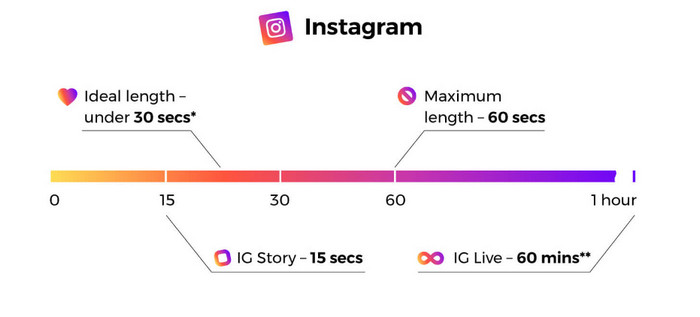
インフィード動画投稿について言えば、これらはスクロール中に表示される動画です。インスタグラムの動画の長さは最大60秒または1分です。
Instagramストーリーズ
Instagram ストーリーに動画をアップロードまたは投稿する場合は、最大 15 秒の動画の長さでアップロードできます。 Instagram のストーリーにもっと長い動画を投稿したい場合は、15 秒の動画クリップをたくさんアップロードできます。 IG ストーリーにさまざまな広告を投稿することもできますが、動画の長さは 15 秒のままです。
Instagramライブ動画
インスタグラムでライブ動画を共有することもできます。 Instagram ライブ動画の長さは最大 1 時間です。
Instagram TV
インスタグラムの最新機能が使えるようになりました。 Instagram TV (IGTV) は、従来のテレビに代わるプラットフォームです。そのため、最大 60 分の長い動画を送信できます。ユーザーは、サブアプリを起動するとすぐにビデオの視聴を開始できます。また、IGTV のすべての動画は縦型です。その形式がモバイル専用プラットフォームで最も効果的だからです。
これらは、ストーリー、インフィード動画投稿、ライン動画、および IGTV での Instagram の最大動画の長さです。
パート 2. TikTok の動画の長さの基準
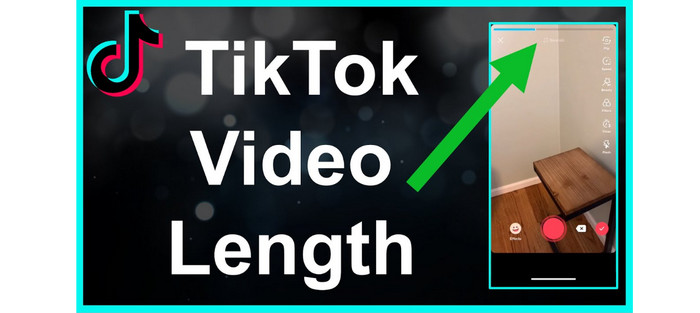
以前は、TikTok ビデオの平均の長さはわずか 15 秒でした。アプリの初期アピールには、短いビデオが含まれていました。すばやく魅力的なビデオが提供されるため、彼らはスクロールし続けました。ただし、15 秒の制限時間は約 1 年間しかありませんでした。 ByteDance Company が所有するアプリは、動画の最大再生時間を 2017 年に 1 分、2021 年に 3 分に延長しました。
現在、TikTok の動画の長さは最大 10 分です。このようにして、ユーザーはより長いビデオをアップロードできます。ただし、考慮しなければならないことがたくさんあります。ユーザーは一口サイズのコンテンツを好むことを常に覚えておいてください。つまり、短い動画を投稿する方が長い動画を投稿するよりも優れているということです。
パート 3. Twitter の動画の長さの基準
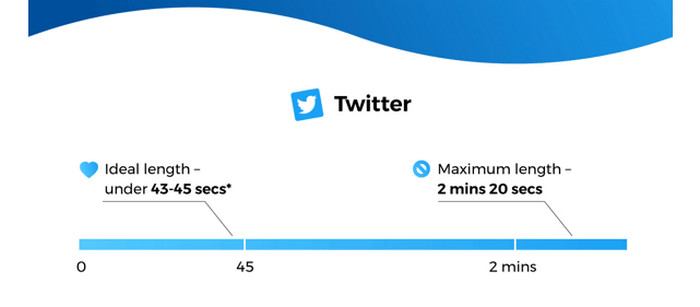
短い動画を投稿したい場合、Twitterアプリは最適なプラットフォームです。投稿できる最大動画長は140秒、つまり2分20秒です。動画広告を投稿する場合も同じ長さが上限になります。補足として、7秒未満の動画を投稿すると、自動的にループ再生されます。つまり、その動画はGIFのような形式として扱われます。GIFは、視聴者の心と記憶に残る重要な要素の1つです。さらに、Twitterにおける理想的な動画の長さは約44秒と言われています。視聴者の関心を引きつけるには十分な長さです。
パート 4. これらのプラットフォームのビデオの長さをカットする方法
各SNSプラットフォームの最大動画長を把握した今、動画を投稿する際の長さの条件は理解できたはずです。では、希望の長さに動画をカットするにはどうすればよいのでしょうか?そのような場合にはVideo Converter Ultimateをお勧めします。Video Converter Ultimateは、TikTokやTwitter、Instagramなど各種プラットフォーム向けに動画を短くできるソフトです。希望の長さに合わせて動画をカット/トリミングできます。また、このプログラムでは、シンプルな手順で動画をカットできるため、熟練者だけでなく初心者でも操作可能です。分かりやすいインターフェースを備えており、直感的に理解しやすいのも特徴です。
さらに、Video Converter Ultimate は、主に Windows および Mac コンピュータなど、あらゆるデバイスで利用できます。そのため、Mac ユーザーでも Windows ユーザーでも、簡単にダウンロードしてビデオのカットに使用できます。さらに、プログラムはさまざまな出力形式をサポートしています。最終出力は MP4、MKV、AVI、MOV などで保存できます。ビデオの解像度と品質を調整して、より魅力的なものにすることもできます。それとは別に、編集したビデオを保存するとき、プログラムは透かし、ロゴ、ステッカーなどの邪魔な要素をビデオに入れません.
ステップ1. 下のダウンロードボタンをクリックして、MacまたはWindowsのパソコンにVideo Converter Ultimateを入手します。その後、インストールが完了したらプログラムを起動します。
無料ダウンロードWindows 7 以降に対応安全なダウンロード
無料ダウンロードMacOS 10.7 以降に対応安全なダウンロード
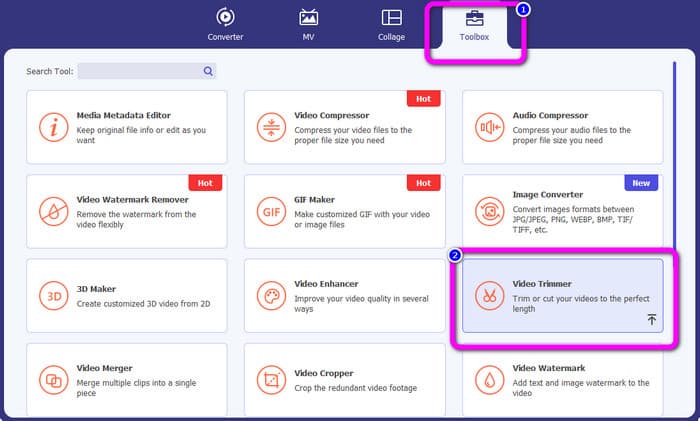
ステップ2. すると、メインインターフェースがパソコン画面に表示されます。画面上部のツールボックスオプションをクリックします。さまざまなツールが表示されるので、ビデオトリマーツールを選択します。
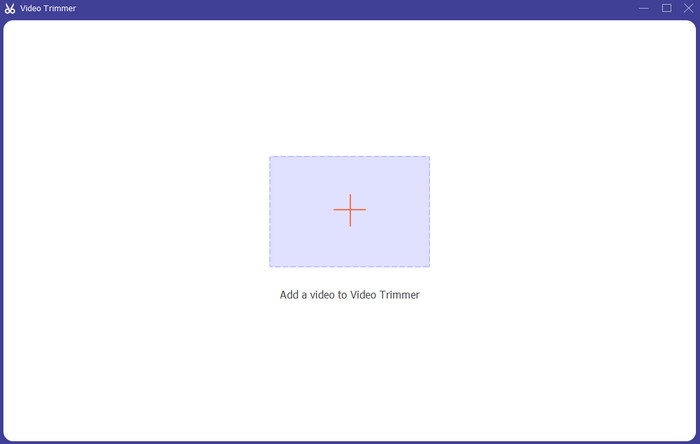
ステップ3. さらに別の画面が表示されます。短くしたい動画を追加するには、「+」アイコンをクリックします。するとファイルフォルダが開くので、対象の動画を選択します。
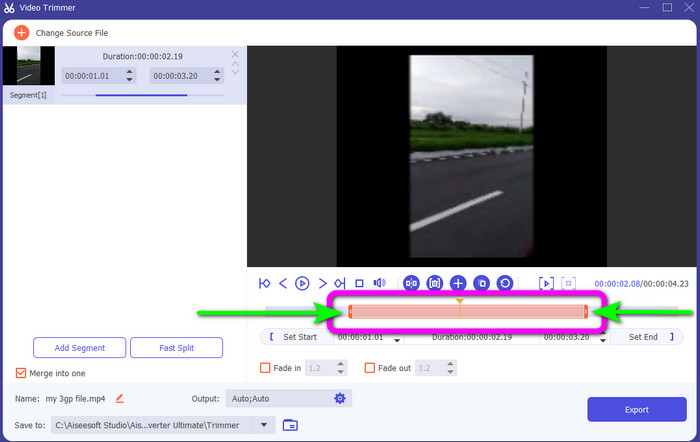
ステップ4. 再生ヘッドを調整またはドラッグすることで、自由に動画をカットできます。お好みに合わせて動画の端を調整してください。
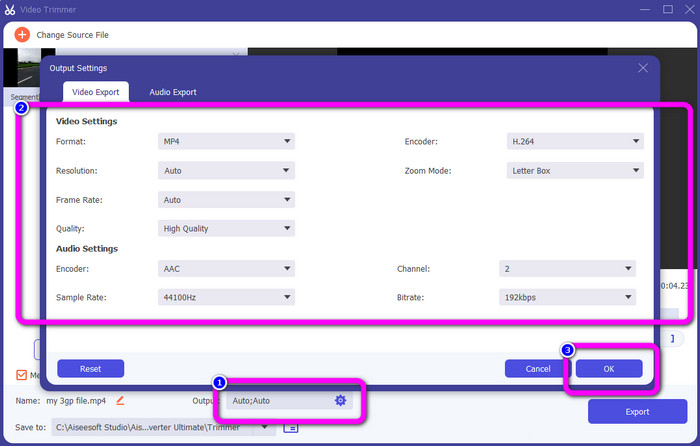
ステップ5. そのほかの変更を行うには、出力設定に進みます。この設定では、解像度、画質、フレームレート、出力形式など、動画の各種パラメータを変更できます。設定が完了したらOKをクリックします。
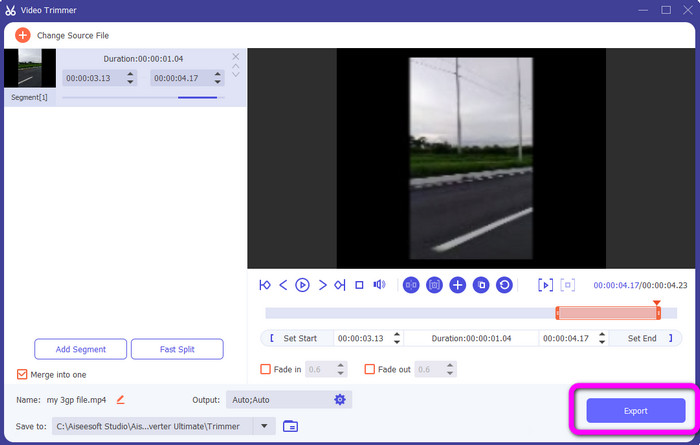
ステップ6. 動画の仕上がりに満足したら、エクスポートボタンをクリックします。書き出しが完了したら、このビデオトリマーからパソコンに保存できます。あとは、その動画をさまざまなSNSに投稿して活用できます。
パート 5. ソーシャル ネットワーク サービス プラットフォームの動画の長さに関する FAQ
1. Snapchat ビデオの長さはどのくらいですか?
通常の投稿を参照している場合、10 秒が最大のビデオの長さです。しかし、広告を購入したい場合、最も長い動画は 3 分です。
2. Facebook の動画の最大の長さは?
Facebook の動画の長さの制限は、広告を含めて 240 分 (4 時間) です。最適な動画の長さは、15 秒から 3 分以上です。
3. TikTok ビデオの最適な長さは?
TikTok 動画の理想的な長さは 10 ~ 15 秒です。視聴者の注目を集めるには十分です。
結論
この記事を通じて、TikTok、Twitter、Instagramをはじめとする各種SNSプラットフォームの動画の長さの基準を理解できたはずです。さらに、Video Converter Ultimateを使って動画の長さをカットする方法も学びました。SNS用に動画を短くしたい場合は、このオフラインプログラムを利用してください。シンプルなインターフェースと手順により、動画を手早く簡単にカットできます。
-
 TikTokでビデオをトリミングする方法[詳細な手順]
 TikTokで動画を短くする方法を知りたいですか?次に、簡単な方法を提供します。また、オフラインのアプリケーション/プログラムを使用して他の方法を学びます。
-
 Snapchatを使用してビデオをトリミングする方法[ステップバイステップ]
 この有益な投稿では、Snapchat でビデオをトリミングする方法を紹介します。また、Snapchat 用の動画をカットする注目のアプリも紹介します。詳しくはこちらをご覧ください。
-
 動画を効果的に分割する優れた方法
 この記事では、動画をパーツに分割する方法について説明します。したがって、興味がある場合は、この投稿をクリックしてください。最も簡単な方法を試すことができます。
