


 ビデオコンバーター究極
 スクリーンレコーダー
 ビデオ修復
ビデオ修復
 安全なダウンロード
iMyFone無料HEICコンバーターと使用する代替案の包括的なレビュー
Apple Inc.は、JPEGのような一般的な画像形式とは異なり、ストレージのスペースを節約できるため、HEICアドバンス非可逆圧縮を使用するというアイデアを思いつきました。現代的な削減スタイルにより、AppleはそれをiOS11およびmacOSHighSierraまたは更新されたバージョンに適応させます。すべてのAppleデバイスで人気がありますが、WindowsやAndroidなどの他のオペレーティングシステムでのサポートは、JPEGとの互換性がありません。互換性に関する問題が高まっているため、多くのユーザーは、形式をJPEGまたはJPGに変更するために使用できるHEICコンバーターを探しています。
市場ですでに目にしているかもしれないコンバーターのひとつが、iMyFone Free HEIC Converterです。ここでは、このソフトウェアを詳しく見ていくとともに、数秒でHEICをJPGに変換するために使えるほかの代替ツールについても紹介します。

パート1。iMyFone無料HEICコンバーターとは何ですか
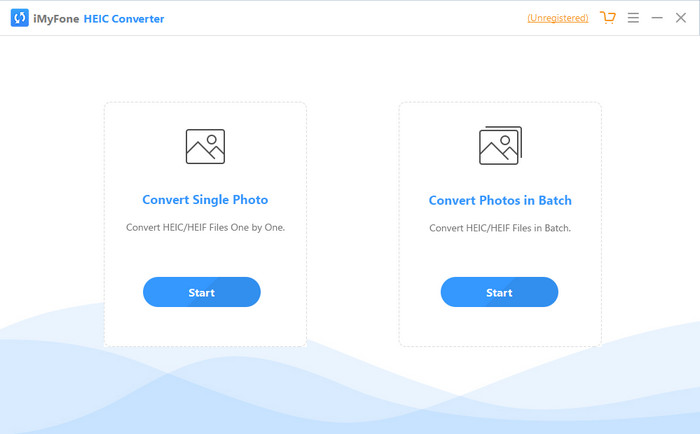
iMyFone HEIC Converterは、HEIC形式をJPEGなど、必要とする画像形式に変換するために欠かせないコンバーターです。他のコンバーターと違い、このソフトは画質を落とさずにHEIC画像をJPEGへ変換できます。さらに、画像の品質を自分の希望に合わせて調整することも可能です。このようなソフトがあれば、HEICファイルの互換性の問題を心配する必要はありません。1分もかからずに問題を解決してくれます。変換機能に加えて、このソフトはWindows版とMac版の両方に対応しているため、どちらのデスクトップ環境にもインストールして利用できます。
異なるオペレーティングシステムをサポートしていますが、ソフトウェアが両方のシステムで完全に同じタスクを実行していることがわかります。しかし、このコンバーターが、Webでダウンロードまたはアクセスできる他のコンバーターよりも優れている理由は何でしょうか。ソフトウェアを見たい場合は、パート2を読んで、機能、長所、短所、およびその使用方法を理解する必要があります。
パート2。iMyFone無料HEICコンバーターレビュー|主な機能、長所、短所、およびその使用方法
WindowsおよびMacでiMyFoneHEICConverterを使用する主な機能:
◆単一のHEICファイルまたはバッチのHEICファイルを変換するオプションがあります。
◆画質を低下させることなく、ここでHEICファイルを変換しますが、品質を上げることもできます。
◆1分以内にHEICからJPEG/JPGへの変換をサポートします。
◆プライバシーコンテンツの破損を防ぐために、変換されたHEICファイルをローカルドライブに即座に保存します。
長所
- HEIC形式を簡単に変換する作業を行います。
- そのGUIは単純なので、すぐに使用方法を学ぶことができます。
- また、制限なしで一度に複数のHEICファイルを変換することもサポートしています。
短所
- HEICファイルがここで認識できない場合があり、HEICをJPGに変換することしかできません。
- プレミアムバージョンを購入しなかった場合、特に試用期間後は、HEICファイルを変換できません。
- ドラッグアンドドロップ機能は使用できません。
WindowsおよびMacでiMyFoneHEICコンバーターを使用する方法:
ステップ1. 公式サイトからiMyFone HEIC Converterをダウンロードし、Windows版かMac版かを選択します。
ステップ2. ソフトを起動すると、画面に2つのオプションが表示されます。そのうちの1つで開始をクリックして次のステップへ進みます。
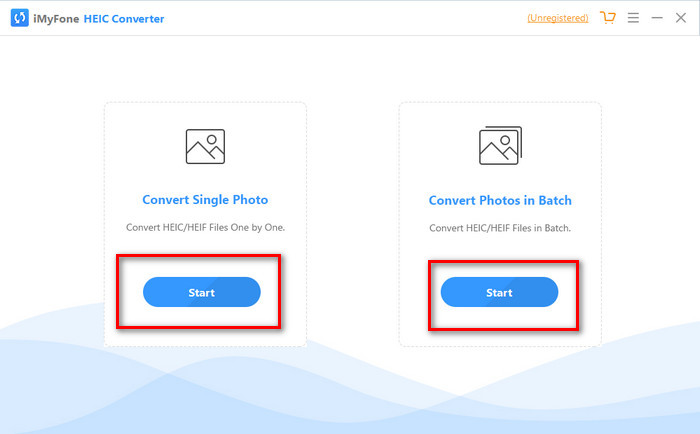
単一の写真の変換またはバッチでの写真の変換のいずれかを使用できます。あなたの選択が何であれ、それはお互いに違いはありません。
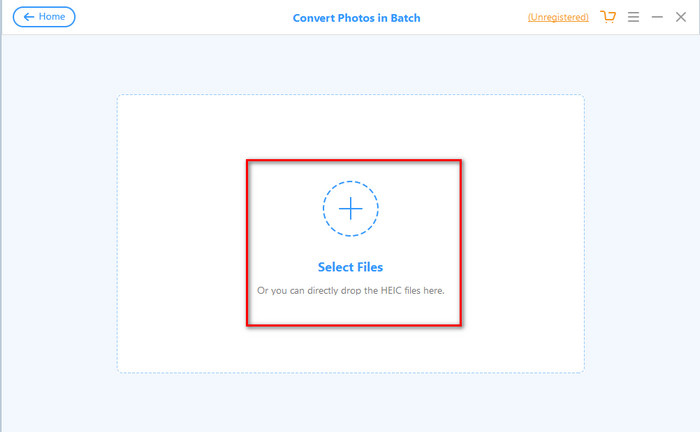
ステップ3. +ボタンを押して、ドライブ内にあるHEICファイルをアップロードします。
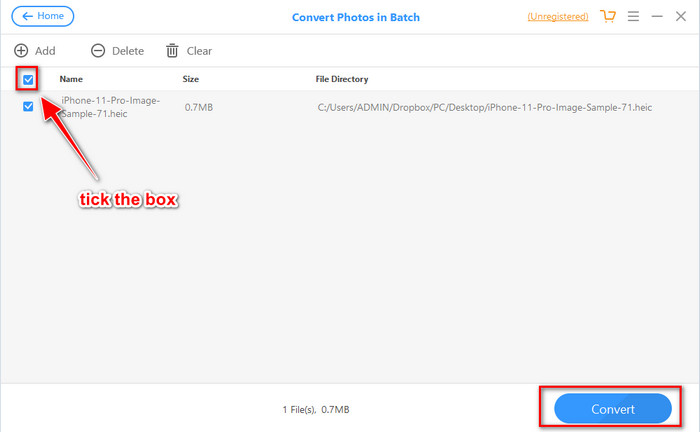
ステップ4. チェックボックスにチェックを入れ、変換を押します。必要であれば画質を調整し、再度変換をクリックして形式を変更します。
パート3。iMyFone無料HEICコンバーターのオンラインおよびオフラインの上位3つの選択肢
FVC無料のHEICからJPGへのコンバーター
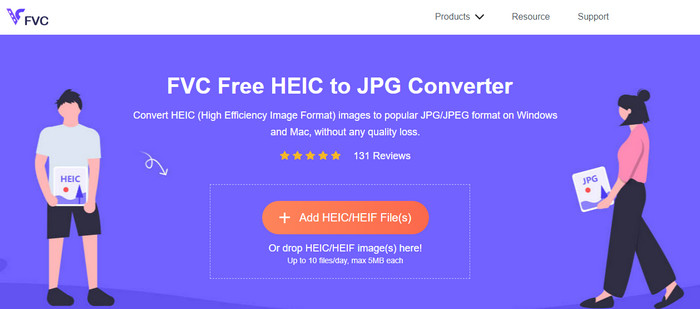
iMyFone HEIC ConverterをダウンロードしたくないがHEICをJPGに変換したい場合は、FVC Free HEIC to JPG Converterの利用をおすすめします。このウェブツールを使えば、HEICファイルをJPEGに変換して互換性の問題を解消できます。先ほど紹介したコンバーターと同様に、このツールもHEIC画像をJPEGにのみ変換でき、出力形式をほかに選ぶことはできません。とはいえ、さまざまなブラウザーからアクセスできる優秀なオンラインコンバーターです。
Webツールは無料でオンラインで利用できますが、覚えておく必要のある制限がいくつかあります。まず、画像のファイルサイズ。ここでのアップロードで問題が発生する可能性があるため、写真のサイズが5MB以下であることを確認してください。次は、1日あたりに利用可能な変換です。このコンバーターを使用してHEICを変換できるのは1日10回のみです。ツールの使用には制限がありますが、無料の変換を体験するためにそれを使用したことはまだ素晴らしいです。
AiseesoftHEICコンバーター
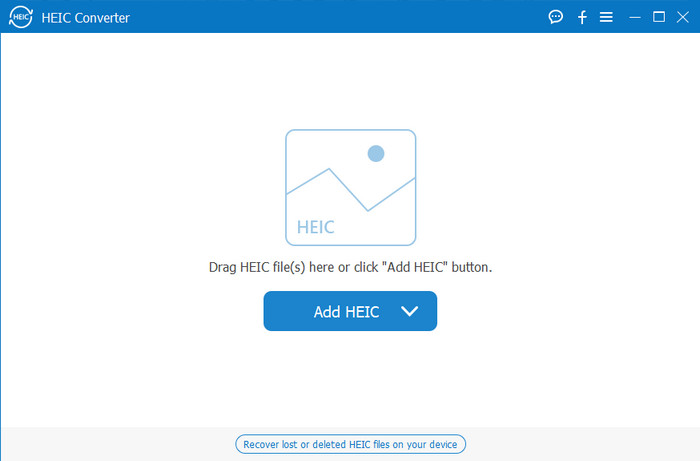
Aiseesoft HEIC Converterは、デスクトップにダウンロードできるiMyFone HEIC Converterの最良の代替ソフトです。HEICファイルを変換したいなら、ぜひ入手しておきたい高性能なHEICコンバーターです。先ほどのソフトも変換は速いですが、このコンバーターならそれ以上に、まばたきする間もないほどのスピードでHEICファイルを変換できます。複数のHEICファイルであっても、超高速な変換に対応しているため、完了を待たされることはほとんどありません。さらに、ドラッグ&ドロップでHEICファイルを追加できるので、アップロード操作も非常に簡単です。
そのうえ?レビューするソフトウェアが他の出力形式をサポートしていない場合は、このツールでJPEGまたはPNGを選択できます。また、スライダーをドラッグすることで、仕様に応じてHEIC画像の品質を調整できます。 HEICファイルにバインドされているEXIFファイルを保存し、選択した形式に転送します。すごいですよね?このツールは、市場に出回っている他のコンバーターよりもはるかに優れています。
関連記事:
パート4。iMyFone無料HEICコンバーターに関するFAQ
iMyFone HEIC ConverterでJPGファイルをエクスポートすると透かしが残りますか?
そうではないので、ここでHEICファイルをアップロードしてから変換し、完了したら透かしなしでファイルをダウンロードできます。
iMyFone HEICコンバーターでHEICファイルを変換できないのはなぜですか?
試用期間が終了した場合、このツールを再度使用して変換することはできません。したがって、それを使用する場合は、ここでコードを購入または登録してから、このコンバーターを使用して必要なHEICファイルを変換する必要があります。
iMyFone HEIC Converterをダウンロードしても安全ですか?
はい、コンバーターは安全で、どのデスクトップデバイスにも無料でダウンロードできます。ソフトウェアを安全にダウンロードするには、コンバータの公式Webサイトにアクセスする必要があります。そこで、ダウンロードボタンをクリックして、デスクトップにHEICコンバーターを配置できます。
結論
iMyFone Free HEIC Converterをレビューしたことで、このコンバーターについて十分な知識が得られたはずです。あとは、これが自分にとって最適なHEICコンバーターかどうかを判断するだけです。いくつか短所や欠点はあるものの、WindowsとMacのどちらでも快適に使える優れたツールであることに変わりはありません。もし使用を決めたなら、公式サイトにアクセスしてダウンロードとインストールを行い、手元のHEICファイルをJPEGに変換するのに役立ててください。ただし、HEICファイルをPNGに変換したい場合には、このツールでは対応できません。その場合は、HEICをJPGまたはPNGに簡単に変換できるAiseesoft HEIC Converterをダウンロードする必要があります。今すぐ入手したい場合は、上のダウンロードボタンをクリックしてください。
-
 WindowsおよびMacのLightroomにHEICをインポートする効果的な方法
 WindowsおよびMacのLightroomにHEICファイルをインポートする方法を知りたいですか?したがって、この記事を注意深く読んで、その方法を理解してください。
-
 JoyoshareHEICコンバーター|あなたが知っておくべきアプリのレビューと機能
 知っておく必要のあるJoyoshareHEICConverterのベストレビュー。入手する前に知っておく必要のある詳細と機能が含まれているため、
-
 AndroidでHEICファイルを表示および変換する方法[無料]簡単]
 元の画質を損なうことなく、AndroidでHEICファイルを表示または変換しますか?このタイプのシナリオでは、この記事が役立ちます。
