


 Video Converter Ultimate
 Skjermopptaker
 Videoreparasjon
 Sikker nedlasting
7 enkle måter å raskt konvertere HEIC til PNG på sekunder
Vil du gjøre HEIC-filen din bredt kompatibel med andre enheter? Da har vi det du leter etter! Denne artikkelen viser deg de beste måtene å konvertere HEIC-filen din til PNG uten problemer. Så spenn fast setebeltet mens vi ser på de beste metodene for å konvertere HEIC til PNG uten anstrengelse.

Del 1. Hvorfor konvertere HEIC til PNG-format
HEIC-filformat er et bildeformat som er laget av Apple. Det er et bildeformat som Apple-enheter vanligvis bruker. Selv om den har en oppløsning av høy kvalitet, tar den ikke for mye plass på enheten din. HEIC-filer er imidlertid ikke kompatible med enheter som ikke er fra Apple. I motsetning til dette er PNG, som står for Portable Graphics Format, et bildefilformat laget for å erstatte GIF-formater.
Det er det mest brukte bildeformatet som er ukomprimert, noe som betyr at det har en enorm filstørrelse. Likevel støtter nesten alle enheter dette bildefilformatet. Så hvis du vil åpne HEIC-bildet ditt på andre enheter bortsett fra Apple, bør du konvertere det til et PNG-filformat.
Del 2. 5 enkle måter å konvertere HEIC-filen din til PNG-fil på nettet
Det er ganske vanskelig å lete etter de beste måtene å konvertere HEIC til PNG. Vi søkte imidlertid etter de beste og enkleste metodene for å endre HEIC til et PNG-filformat.
Bruk FVC Free HEIC til PNG Converter
Den beste måten å konvertere HEIC til PNG på er å bruke et konverteringsverktøy. Og det beste verktøyet vi fant på internett er FVC Free HEIC to PNG Converter. Denne konverteren er et nettbasert verktøy som på en praktisk måte konverterer HEIC-filen din til PNG-filformat. I tillegg, hvis du vil batchkonvertere HEIC-filene dine til PNG, har dette verktøyet også den funksjonen.
Det er også tilgjengelig i nesten alle vanlige nettlesere, noe som gjør det til et verktøy uten nettlesergrense. Videre har den et enkelt programvaregrensesnitt og har ingen filstørrelsesgrense, slik at du kan konvertere HEIC-filer uten å tenke på filstørrelsen. Følg derfor den enkle guiden nedenfor hvis du er interessert i å bruke denne online HEIC til PNG-konverteren.
Trinn 1. Søk etter FVC Free HEIC to PNG Converter i nettleseren din. Du kan også klikke på denne lenken for å gå direkte til nettsiden deres. Slik ser førstesiden ut:

Trinn 2. Klikk deretter på knappen Add HEIC/HEIF File(s). Datamappene dine vil vises, der du velger HEIC-filen din.
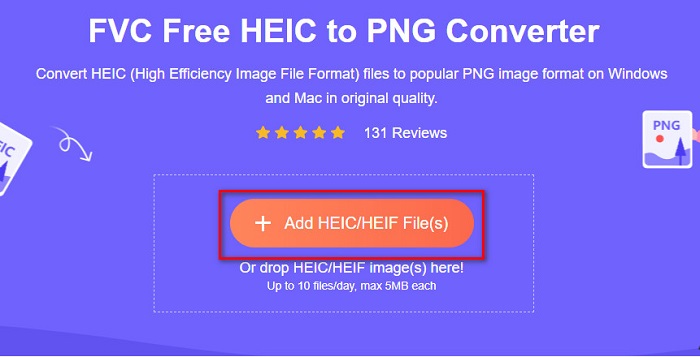
Trinn 3. Deretter vil datamappene dine vises, der du velger HEIC-filen din. Trykk på Open. Så starter konverteringen fra HEIC til PNG.

Trinn 4. Til slutt, i programmets grensesnitt, klikker du på knappen Download for å laste ned PNG-filen din.

Enkelt, ikke sant? Du kan konvertere HEIC-filen din til en PNG-fil ved å følge disse enkle trinnene.
Bruk Xconvert.com
Xconvert er en gratis nettbasert HEIC til PNG-konverter som enkelt konverterer HEIC-filer til PNG-filer. Denne nettbaserte konverteren har et brukervennlig grensesnitt som er gunstig for nybegynnere. I tillegg kan du endre bildekvalitet/oppløsning når du bruker denne nettjenesten. Men siden det er et internettavhengig verktøy, kan du oppleve en treg konverteringsprosess når internettforbindelsen er svak. Det inneholder også annonser som kan virke forstyrrende.
Trinn 1. Søk etter Xconvert.com i nettleseren din. På nettsiden deres klikker du på knappen Add Files, deretter vises filene på datamaskinen din, og du velger HEIC-filen din.

Trinn 2. Bildet ditt vil bli lastet opp til programmets grensesnitt. Etter opplasting klikker du på knappen Convert nederst til høyre i grensesnittet. Vent deretter til filen din er klar til å lastes ned, og gå så videre til neste trinn.
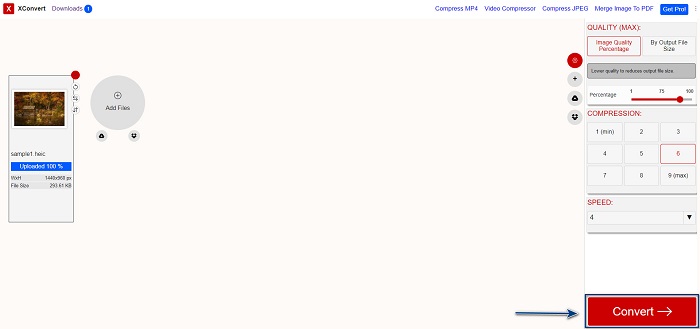
Trinn 3. Når filen din er klar, klikker du på knappen Download for å laste ned PNG-filen din. Over nedlastingsknappen vil du også se utdatafilens størrelse og hvor lang tid konverteringen tok.

Bruk Zamzar
En annen måte å konvertere HEIC til PNG på nettet er å bruke den nettbaserte konverteren Zamzar. Du har sannsynligvis sett denne tjenesten når du har søkt etter en HEIC til PNG-konverter. Denne konverteren er tilgjengelig i nesten alle nettlesere. I tillegg har den et enkelt brukergrensesnitt som gjør den brukervennlig. Men filen din kan bli ødelagt hvis internettforbindelsen avbrytes under konverteringsprosessen. Likevel er det mange brukere som bruker denne konverteren for å endre HEIC til PNG-fil.
Trinn 1. I nettleseren du bruker, søker du etter Zamzar. På nettsiden deres klikker du på knappen Add Files. Filene på datamaskinen din vil vises, og du laster opp HEIC-bildet ditt.

Trinn 2. Etter å ha lastet opp HEIC-filen din, klikker du på drop-down-knappen og velger PNG som filens utdataformat.

Trinn 3. Til slutt klikker du på knappen Convert Now for å konvertere HEIC-filen din til PNG-format. Last deretter ned PNG-filen din. Vent bare et par sekunder, og det er gjort!

Bruk Conversion Tools.io
Conversion Tool er en nettbasert HEIC til PNG-konverter med et enkelt brukergrensesnitt. Den kan konvertere HEIC-filen din til PNG i høy hastighet. Videre inneholder den ikke mange annonser, i motsetning til andre nettbaserte konvertere. Ulempen er imidlertid at du bare kan konvertere ti filer per dag, og at det finnes en grense for filstørrelse. Men hvis du bare konverterer en liten fil, kan dette verktøyet passe godt for deg.
Trinn 1. Søk etter Conversion Tools.io i nettleseren din. Klikk deretter på knappen Browse i hovedgrensesnittet, eller dra og slipp HEIC-filen din på Browse-knappen.

Trinn 2. Deretter klikker du på knappen Run Conversion for å begynne å konvertere HEIC-filen din til en PNG-fil. Vent så til bildefilen din blir behandlet, og gå videre til neste trinn.

Trinn 3. For å avslutte klikker du på knappen Download for å laste ned PNG-filen din.

Bruk CDKM
Det siste verktøyet vi vil presentere for deg er CDKM. Dette verktøyet lar deg konvertere HEIC-filer til PNG med bare noen få klikk. Men å bruke denne nettbaserte konverteren kan ta noen sekunder, avhengig av internetthastigheten din. Den inneholder også annonser som kan være irriterende. Likevel har den ingen begrensning på filstørrelse, så den er verdt å prøve.
Trinn 1. Søk etter CDKM online converter i nettleseren din. I hovedgrensesnittet klikker du på knappen Choose Files. Datamappene dine vil vises, og du velger HEIC-filen din for å laste den opp.

Trinn 2. Klikk deretter på knappen Start Conversion for å starte konverteringsprosessen.

Trinn 3. Til slutt ruller du litt nedover til du ser knappen Download. Klikk på Download-knappen for å laste ned PNG-filen din.

Del 3. Konverter HEIC til PNG på Mac
Apple-enheter støtter HEIC-filformater, og ved å bruke Mac kan du åpne en HEIC-fil. Men hvis du vil konvertere HEIC-filen til PNG, kan du endre den ved å bruke Photo App på Mac. Følgelig, hvis du er en Mac-bruker, bør du lese denne delen.
Trinn 1. Først drar og slipper du HEIC-filen din inn i Foto-appen. Forhåndsvis deretter HEIC-bildet ditt og klikk på Fil > Eksporter > Eksporter 1 bilde.

Trinn 2. Deretter klikker du under Bildetype på utdataformatet du ønsker. Velg PNG-filformat.

Trinn 3. Klikk så på knappen Eksporter, og velg deretter hvor du vil lagre utdatafilen. Du vil se at HEIC-filen din er endret til PNG-format.

Del 4. Konverter HEIC-fil til PNG på iPhone
Hvis du bruker en iPhone, kan du åpne en HEIC-fil på enheten din. Men hvis du vil konvertere HEIC-filen din til PNG ved hjelp av en iPhone-enhet, så har vi en måte for deg. Ved å følge disse enkle og enkle trinnene nedenfor kan du enkelt konvertere HEIC til PNG.
Trinn 1. I Foto-appen på iPhone-en din trykker du på Velg-knappen øverst på skjermen. Velg deretter HEIC-filen din og trykk på Del-ikonet.
Trinn 2. Sveip opp på skjermen; du vil se alternativet Kopier bilde, og trykker deretter på det.
Trinn 3. Gå til slutt til Filer-appen, trykk på bla gjennom-knappen og velg ønsket plassering for utdatafilen (trykk på iCloud Drive eller På min iPhone). Lim deretter inn HEIC-filen din der.

Etter at du har limt inn filen, vil du se at filen automatisk blir konvertert til en PNG-fil.
Del 5. Utvidet kunnskap om HEIC-fil og PNG-fil
Hvis du fortsatt er i tvil om du vil konvertere HEIC-filen til PNG, gir vi deg et sammenligningsdiagram for å hjelpe deg å skille forskjellene mellom disse to filene. Dessuten gir den deg en klar oversikt over HEIC- og PNG-karakteristikker. Les nøye for å vite forskjellen mellom HEIC-filer og PNG-filer.
| HEIC | PNG | |
| Kompatibilitet | Bare Apple-enheter støtter dette filformatet. | Nesten alle enheter støtter denne filen, inkludert Apple-enheter. |
| Filstørrelse | Liten filstørrelse. | Kan oppnå stor filstørrelse. |
| Bildekvalitet | Høy bildekvalitet. | Har en god kvalitet, men ikke bedre enn HEIC-filen. |
| Komprimert/ukomprimert | Komprimert | Ukomprimert |
| Redigering | Beholder bildekvaliteten ved redigering. | Kvaliteten kan forringes ved redigering. |
Del 6. Vanlige spørsmål om konvertering av HEIC til PNG
Vil konvertering av HEIC til PNG påvirke filstørrelsen?
Ja. Når du konverterer HEIC til PNG, vil det øke filstørrelsen, selv om den ikke blir høy.
Kan du åpne PNG-filer på Adobe Photoshop?
Sikkert. Du kan åpne PNG-filer på Adobe Photoshop fordi Adobe Photoshop støtter PNG-filformat.
Kan du åpne PNG-filformatet på Apple-enheter?
Ja. Når du tar skjermbilder fra iPhone, vil de automatisk lagres på kamerarullen som en PNG-fil.
Konklusjon
Endelig! Vi er nå ved slutten av denne gjennomgangen. Denne artikkelen gir deg de beste løsningene for å konvertere HEIC-filen din til PNG-format. Alle de nettbaserte HEIC til PNG-konverterne som er vist ovenfor, kan effektivt konvertere filen din uten anstrengelse. I tillegg finnes det også andre alternativer du kan bruke hvis du er Mac- eller iPhone-bruker. Men hvis du ser etter den beste HEIC til PNG-konverteren med fremragende funksjoner, er FVC Free HEIC to PNG-konverteren det beste valget for deg.
-
 Hvordan åpne HEIC-fil på Windows, Mac og Online
 Leter du etter en måte å åpne HEIC filer på? Denne artikkelen gir deg de beste løsningene for å åpne HEIC-filer på Windows, Mac og Online.
-
 JPG VS GIF: 3 enkle måter å konvertere JPG til GIF
 Vil du vite forskjellen mellom JPG og en GIF? Eller vil du bytte JPG til GIF-animert format? Les deretter denne artikkelen for å få en idé.
-
 5 beste måter å endre bilde til animert GIF [Oppdatert 2022]
 Trenger du et konverteringsbilde til GIF? Denne artikkelen vil gi de fem beste omformerne vi kan finne på markedet. Så la oss finne ut disse verktøyene ved å lese denne artikkelen.
