


 Video Converter Ultimate
 Skärminspelare
 Video reparation
 Säker nedladdning
7 enkla sätt att snabbt konvertera HEIC till PNG på några sekunder
Want to make your HEIC file widely compatible with other devices? We have what you are looking for! This article shows you the best ways to convert your HEIC file to PNG without having a hard time. So buckle up as we indulge in knowing the best ways to convert HEIC to PNG effortlessly.

Del 1. Varför konvertera HEIC till PNG-format
HEIC-filformat är ett bildformat som är skapat av Apple. Det är ett bildformat som Apple-enheter ofta använder. Även om den har en högkvalitativ upplösning tar den inte för mycket plats på din enhet. HEIC-filer är dock inte kompatibla med icke-Apple-enheter. Däremot är PNG, som står för Portable Graphics Format, ett bildfilformat skapat för att ersätta GIF-format.
Det är det mest använda bildformatet som är okomprimerat, vilket innebär att det har en enorm filstorlek. Icke desto mindre stöder nästan alla enheter detta bildfilformat. Så om du vill öppna din HEIC-bild på andra enheter förutom Apple, konvertera den bättre till ett PNG-filformat.
Del 2. 5 enkla sätt att konvertera din HEIC-fil till PNG-fil online
Att leta efter de bästa sätten att konvertera HEIC till PNG är ganska svårt. Men vi sökte efter de bästa och enklaste metoderna för dig att ändra HEIC till ett PNG-filformat.
Använd FVC Free HEIC till PNG Converter
The most excellent way to convert HEIC to PNG is to use a converter tool. And The best tool that we found on the internet is FVC Free HEIC to PNG Converter. This converter is an online tool that conveniently converts your HEIC file to PNG file format. In addition, if you want to batch convert your HEIC file to PNG, this tool has that feature for you.
Det är också tillgängligt i nästan alla vanliga webbläsare vilket gör det till ett verktyg utan webbläsarbegränsning. Dessutom har den ett enkelt mjukvarugränssnitt och har ingen filstorleksbegränsning, så du kan konvertera HEIC-filer utan att tänka på filstorleken. Följ därför den enkla guiden nedan om du är intresserad av att använda denna online HEIC till PNG-omvandlare.
Step 1. On your browser, search FVC Free HEIC to PNG Converter. You can also click this link to go directly to their webpage. This is what the first interface looks like:

Step 2. Next, click the Add HEIC/HEIF File(s) button. Your computer folders will appear, where you will select your HEIC file.
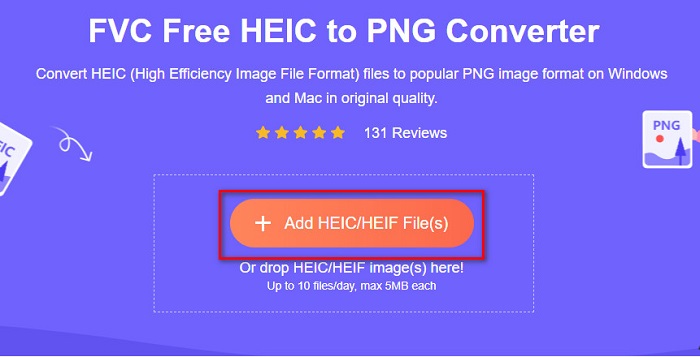
Step 3. Then, your computer folders will appear, where you will select your HEIC file. Press Open. Then your HEIC to PNG conversion will start.

Step 4. Lastly, the software’s interface, click the Download button, to download your PNG file.

Enkelt, eller hur? Du kan konvertera din HEIC-fil till en PNG-fil genom att följa dessa enkla steg.
Använd Xconvert.com
Xconvert is a free online HEIC to PNG Converter that easily converts HEIC files to PNG files. This online converter has an easy-to-use software interface beneficial for beginner users. Moreover, you can change the image resolution of your image when using this online converter. However, since it is an internet-dependent tool, you may experience a slow conversion process when the internet is slow. It also contains ads that might be disturbing for you.
Step 1. Search Xconvert.com in your browser. On their website, click the Add Files button, then your computer files will appear, and then select your HEIC file.

Step 2. Your image will be uploaded to the software’s interface. After uploading, click the Convert button located at the bottom right corner of the software interface. And then wait for your file to be ready to download, then proceed to the next step.
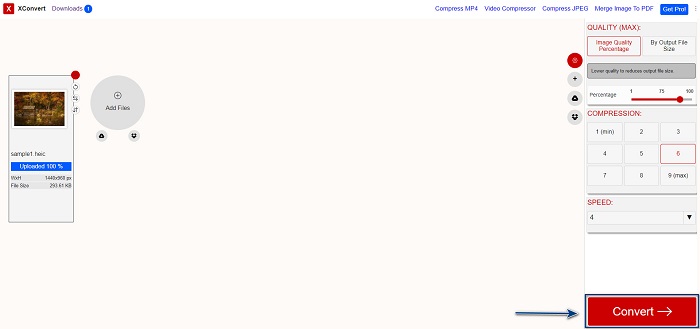
Step 3. When your file is ready, click the Download button to download your PNG file; above the download button, you will also see the output size and how long it took to convert.

Använd Zamzar
Another way to convert HEIC to PNG online is using Zamzar online converter. You probably have seen this converter when searching for a HEIC to PNG converter. This converter is accessible in almost all browsers available. In addition, it has a simple user interface making it a user-friendly tool. However, your file may be corrupted when the internet is interrupted during your conversion process. Nevertheless, many users use this converter to change HEIC to a PNG file.
Step 1. On the browser that you use, search Zamzar. On their website, click the Add Files button. Your computer files will appear, then upload your HEIC image.

Step 2. After uploading your HEIC file, click the drop-down button, then select PNG as your file output format.

Step 3. Finally, click the Convert Now button to convert your HEIC file to PNG file format. Then download your PNG file. Just wait for a couple of seconds, and that’s it!

Använd Conversion Tools.io
Conversion Tool is an online HEIC to PNG converter with a simple user interface. It can convert your HEIC file to PNG at high speed. Furthermore, it does not contain many ads, unlike other online converters. But the downside of it is that you can only convert ten files a day, and it has a file size limit. But if you are converting a small file, then this tool may be suited for you.
Step 1. Search Conversion Tools.io in your browser. Then, click the Browse button on the software’s main interface, or drag and drop your HEIC file on the Browse button.

Step 2. After, click the Run Conversion button to begin converting your HEIC file to a PNG file. And then wait for your image file to load, then proceed to the next step.

Step 3. To end, click the Download button to download your PNG file.

Använd CDKM
One last tool that we will present to you is CDKM. This tool allows you to convert HEIC files to PNG with just a few clicks. However, using this online converter may take a few seconds to convert, depending on your internet speed. It also contains ads that may be irritating for you. Nonetheless, it does not have any file size limit, so it is worth trying.
Step 1. On your browser, search CDKM online converter. On the software’s main interface, click the Choose Files button. Your computer folders will appear, then select your HEIC file to upload.

Step 2. Next, click the Start Conversion button to start the conversion process.

Step 3. Lastly, scroll down a little and see the Download button. Click the Download button to download your PNG file.

Del 3. Konvertera HEIC till PNG på Mac
Apple-enheter stöder HEIC-filformat, och genom att använda Mac kan du öppna en HEIC-fil. Men om du vill konvertera din HEIC-fil till PNG kan du ändra den med hjälp av Photo App i Mac. Följaktligen, om du är en Mac-användare, bör du läsa den här delen.
Step 1. First, drag and drop your HEIC file to the Photo App. Then, preview your HEIC photo and click the File > Export button > Export 1 Photo.

Step 2. After, on the Photo Kind, click the output format that you want. Select PNG file format.

Step 3. And then, click the Export button, then select the destination of your file output. You will see that your HEIC file is changed to PNG file format.

Del 4. Konvertera HEIC-fil till PNG på iPhone
Om du använder en iPhone kan du öppna en HEIC-fil på din enhet. Men om du vill konvertera din HEIC-fil till PNG med en iPhone-enhet, så har vi ett sätt för dig. Genom att följa dessa enkla och enkla steg nedan kan du konvertera HEIC till PNG utan ansträngning.
Step 1. On the Photo App on your iPhone, tap the Select button located at the top of your screen. And then, select your HEIC file, then click the Share icon.
Step 2. Slide up your screen; you will see the Copy Photo option, then click it.
Step 3. Finally, go to the Files app, tap the browse button and select your desired output location (click iCloud Drive or On my iPhone). Then paste your HEIC file there.

När du har klistrat in din fil kommer du att se att din fil automatiskt konverteras till en PNG-fil.
Del 5. Utökad kunskap om HEIC-fil och PNG-fil
Om du fortfarande är osäker på om du vill konvertera din HEIC-fil till PNG, förser vi dig med en jämförelsetabell för att hjälpa dig att skilja skillnaderna mellan dessa två filer. Dessutom ger det dig en tydlig översikt över HEIC- och PNG-egenskaper. Läs noga för att veta skillnaden mellan HEIC-filer och PNG-filer.
| HEIC | PNG | |
| Kompatibilitet | Endast Apple-enheter stöder detta filformat. | Nästan alla enheter stöder den här filen, inklusive Apple-enheter. |
| Filstorlek | Liten filstorlek. | Kan uppnå enorm filstorlek. |
| Bildkvalitet | Hög bildkvalitet. | Har en bra kvalitet, men inte bättre än HEIC-filen. |
| Komprimerad/okomprimerad | Komprimerad | Okomprimerad |
| Redigering | Behåller bildkvaliteten vid redigering. | Kvaliteten kan försämras vid redigering. |
Del 6. Vanliga frågor om att konvertera HEIC till PNG
Kommer konvertering av HEIC till PNG att påverka filstorleken?
Ja. När du konverterar HEIC till PNG kommer det att öka filstorleken, även om den inte blir hög.
Kan du öppna PNG-filer i Adobe Photoshop?
Säkert. Du kan öppna PNG-filer i Adobe Photoshop eftersom Adobe Photoshop stöder PNG-filformat.
Kan du öppna PNG-filformatet på Apple-enheter inbyggt?
Ja. När du tar skärmdumpar från din iPhone kommer de automatiskt att sparas på din kamerarulle som en PNG-fil.
Slutsats
At last! We are now to the end of our adventure. This article gives you the best solutions to convert your HEIC file to PNG file format. And all the online HEIC to PNG converters that are shown above can effectively convert your file effortlessly. Moreover, there are also other options that you can use if you are a Mac or iPhone user. But if you are looking for the best HEIC to PNG converter with the outstanding features to use, then FVC Free HEIC to PNG converter is the best choice for you.
-
 Hur man öppnar HEIC-fil på Windows, Mac och online
 Letar du efter ett sätt att öppna HEIC filer? Den här artikeln ger dig de bästa lösningarna för att öppna HEIC-filer på Windows, Mac och Online.
-
 JPG VS GIF: 3 enkla sätt att konvertera JPG till GIF
 Vill du veta skillnaden mellan JPG och en GIF? Eller vill du byta JPG till GIF-animerat format? Läs sedan den här artikeln för att få en idé.
-
 5 bästa sätten att ändra bild till animerad GIF [Uppdaterad 2022]
 Behöver du en konverteringsbild till GIF? Den här artikeln kommer att ge de fem bästa omvandlarna vi kan hitta på marknaden. Så låt oss ta reda på dessa verktyg genom att läsa den här artikeln.
