


 Video Converter Ultimate
 Skärminspelare
 Video reparation
 Säker nedladdning
Handledning om hur man redigerar MKV-metadata på skrivbordet på det enklaste sättet
MKV är ett filtillägg som är mycket populärt för Matroska-multimediabehållarformat. Vad gör MKV mer populärt än andra format? Många användare tror att MKV är en videokomprimering som används på ljud och video, vilket det inte är. Formatet blev populärt på grund av sin flexibilitet att anpassa codecs för ljud, video och undertexter och lagra dem i en enda fil. Med dessa egenskaper blev formatet framtidssäkert, vilket innebär att filformatet aldrig blir föråldrat, inte ens den metadata som lagras här. Så om du vill lägga till, ta bort eller redigera metadata i din MKV-fil måste du fortsätta läsa den här artikeln och lära dig hur man redigerar MKV-metadata på ett snabbare sätt.

Del 1. Hur man redigerar metadata för MKV-filen med de 3 bästa mjukvarorna på skrivbordet
FVC Video Converter Ultimate – Den mest kraftfulla MKV Tag Editor på Windows och Mac
FVC Video Converter Ultimate är den bästa MKV-metadataredigeraren du kan ladda ner på båda operativsystemen för att slutföra jobbet som ett proffs. Den här ultimata programvaran kan hantera MKV-filen enkelt och öppna den för att ändra dess metadata om du vill ändra dem. Med sitt breda stöd för video- och ljudformat har det aldrig varit jobbigt att ladda upp något mediaformat som MKV. När du använder programmet kommer du att uppleva hur enkelt det är att lära sig och förstå hela idén med att använda det. Vill du använda verktyget men har ingen handledning du kan luta dig mot? Som tur är kommer informationen vi tillhandahåller nedan att hjälpa dig att ta dig an uppgiften som ett proffs; läs detaljerna nedan för att få veta hur du ändrar titeln på MKV-filen på mindre än en minut.
Steg 1. Börja med att klicka på nedladdningsknappen, så hämtas programvaran omedelbart till din dator; välj sedan vilken version som passar det operativsystem du använder. Installera den sedan på din dator och starta programmet för att lägga till metadata i dina MKV-filer.
Gratis nedladdningFör Windows 7 eller senareSäker nedladdning
Gratis nedladdningFör MacOS 10.7 eller senareSäker nedladdning
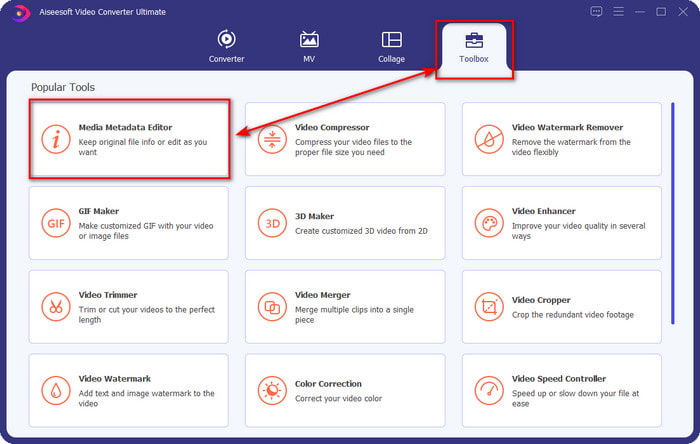
Steg 2. Nu när du har startat verktyget måste du gå till avsnittet Toolbox och leta efter Media Metadata Editor i listan nedan.
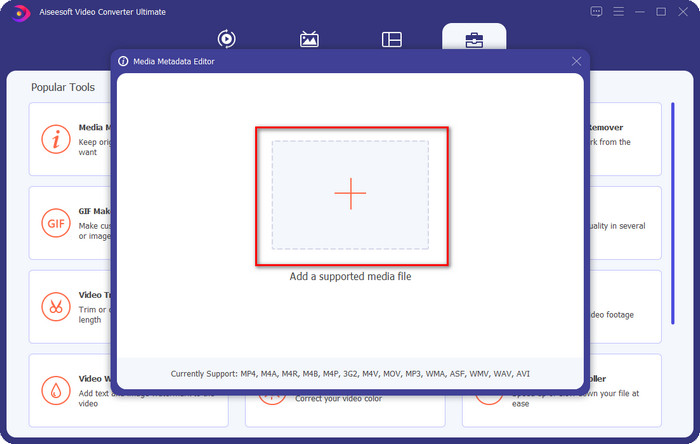
Steg 3. För att lägga till MKV-filen klickar du på knappen + som visas på skärmen, letar upp .mkv-filen i mappen och klickar på Öppna för att gå vidare till nästa steg.
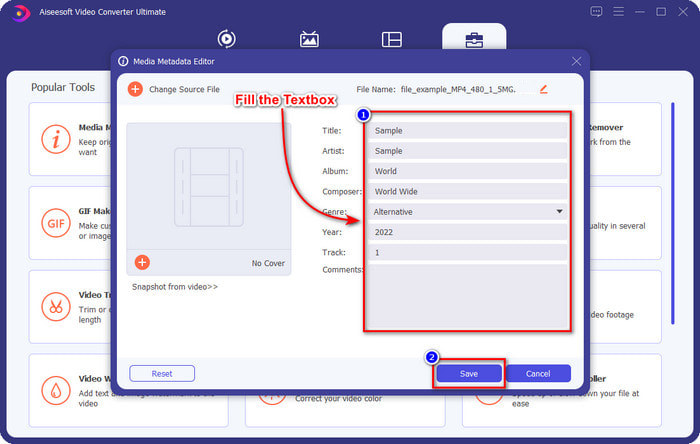
Steg 4. Här kan du nu lägga till den metadata du behöver i din MKV, fylla i dem efter dina önskemål och klicka på Spara när du är klar och redo att använda ändringarna. Därmed har du lagt till taggar i din MKV-fil så att du snabbt kan avgöra vad filen innehåller.
VLC Media Player – Gratis MKV Metadata Editor
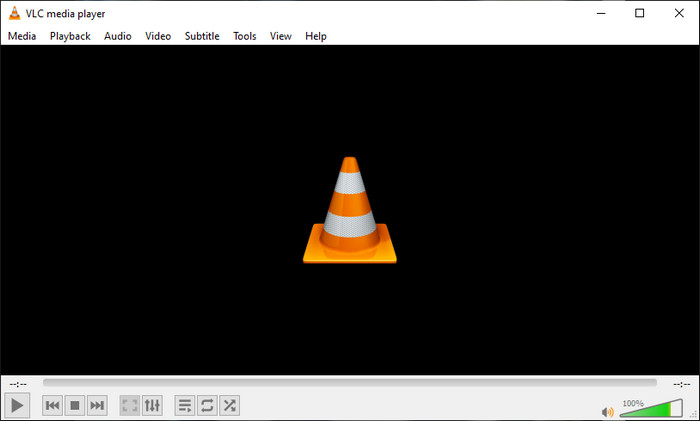
VLC Media Player kan enkelt spela upp och redigera taggarna i din MKV. Det här verktyget är open source, så du behöver inte oroa dig när du laddar ner programvaran till din dator eftersom du kan utnyttja verktygets fulla potential gratis, men du kan donera om du vill. Även om verktyget inte är lika bra som andra metadataredigerare i den här listan betraktas det fortfarande som ett pålitligt verktyg du kan använda på din enhet. Dessutom kan du fritt lägga till grundläggande information i din MKV-fil, oavsett om det gäller författarens namn, titel, artist, album osv. Följ stegen och lär dig hur du redigerar MKV-metadata med mediaspelaren som metadataredigerare.
Steg 1. Ladda ner och öppna sedan VLC på din dator.
Steg 2. Gå till Verktyg och klicka på Mediainformation. Om du vill ha ett enklare sätt kan du i stället använda en snabbtangent genom att trycka på CTRL + I. Oavsett vilket sätt du väljer är funktionen densamma.
Steg 3. Skriv in den information du behöver och klicka på Stäng för att spara metadata automatiskt.
MKVToolNix GUI – Dedikerad MKV Tag Editor
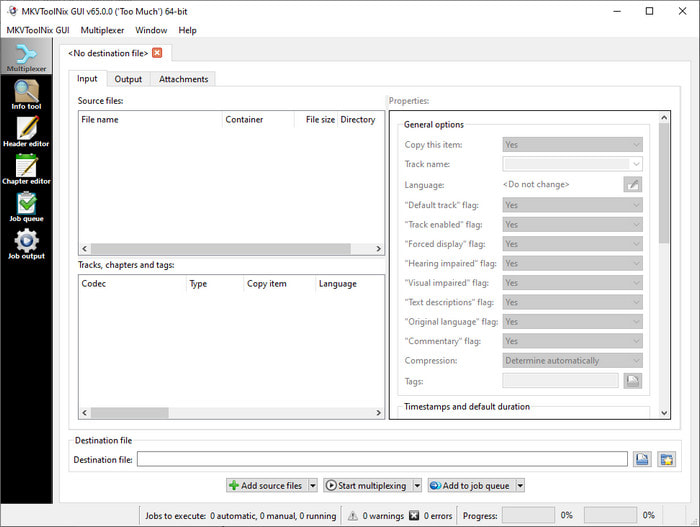
MKVToolNix GUI är en dedikerad lösning för MKV-filer; även om du kan ladda upp andra format kommer programvaran att omvandla dem till MKV. Verktyget blev känt som en allt-i-ett-lösning för MKV eftersom det stöder en verktygssvit, vilket innebär att du kan få funktioner utöver själva metadataredigeringen. Med sitt lättbegripliga GUI finns det inte mycket att lära sig för att använda det; i princip kan du lära dig hur det fungerar på några minuter. Även om verktyget är enkelt har vissa användare som redan använder mer avancerade metadataredigerare jämfört dess GUI med andra och sagt att verktyget inte är tillräckligt intuitivt för dem. Trots allt de sagt råder det fortfarande ingen tvekan om att verktyget kan lära oss hur man ändrar titeln på en MKV-fil.
Steg 1. Ladda ner programvaran till din dator, öppna den, klicka på Add Source File och leta upp MKV-filen i mappen.
Steg 2. Tryck på Output och ändra metadata där.
Steg 3. När du har gjort allt detta kan du nu spara genom att klicka på Start Multiplexing.
Del 2. Vanliga frågor om MKV Metadata Editor
Kan jag konvertera VOB till MKV?
Du kan enkelt konvertera VOB till MKV genom att klicka på den här länken, så öppnas en ny flik som direkt hjälper dig att konvertera VOB till MKV. Om du vill ha mer information om VOB och MKV är detta rätt artikel för dig.
Varför har mina MKV-filer en större filstorlek?
Anledningen till att dina MKV-filer är stora är att formatet inte bara innehåller video och ljud. Det innehåller också flera andra element, såsom undertexter, metadata, variabel bithastighet och mycket mer. Så vad ska du göra om du vill komprimera MKV-filen så att den blir mindre utan att förstöra kvaliteten? Det finns inte många pålitliga videokompressorer, och därför har vi gjort lite research för att hjälpa dig att komprimera MKV utan att förlora kvalitet på ett enkelt sätt.
Vilka är nackdelarna med MKV-formatet?
Även om filformatet är känt kan vissa mediaspelare och redaktörer fortfarande hantera formatet på grund av codec och elementproblem. Formatet har också enorm storlek, och inte all programvara stöder uppladdning av en stor filstorlek eftersom import och export av det skulle ta mycket tid. Filstorleken kommer också att öka eftersom den är en del av filen, på samma sätt som det andra formatet du har lagt till metadata. Även den har sin svaghet, den är fortfarande konkurrenskraftig när det gäller att lagra mediafilen och hålla dem säkra för framtida ändamål.
Slutsats
Är det inte fantastiskt? Vad kan dessa tre skrivbordsprogram erbjuda dig? Den andra är en mediaspelare, medan den andra är en dedikerad redigerare för MKV, men vilket verktyg ska du använda? Vill du ha det bästa tar vi gärna med dig det ultimata verktyget. Att lära sig att redigera MKV-metadata med FVC Video Converter Ultimate blev enkelt och effektivt. Så vad väntar du på? Ha verktyget inom räckhåll och använd det för att fixa metadata på dina MKV-filer som ett proffs med några klick bort.
-
 2 bästa sätten att redigera OGG-metadata du bör prova gratis
 Behöver du redigera OGG-metadata? Tja, du kan enkelt hantera att redigera taggarna genom att använda rätt programvara. Om du inte har någon som läser den här artikeln är ett måste.
-
 En absolut översikt om Pentaho Metadata Editor [Uppdaterad 2022]
 Hittar du ingen pålitlig artikel om Pentaho Metadata Editor? Lyckligtvis har vi granskat verktyget själva för att tillhandahålla fakta som du kommer att veta om verktyget.
-
 Tips och tricks om VLC Metadata Editor Du måste känna till 2022
 Vill du använda VLC som en metadataredigerare? I det här fallet kan du läsa den här artikeln eftersom vi ger en opartisk recension av VLC-metadataredigeraren.
