


 Video Converter Ultimate
 บันทึกหน้าจอ
 ซ่อมวิดีโอ
 ดาวน์โหลดอย่างปลอดภัย
ตัวแปลง HEIC ของ Apowersoft ฟรีและตัวแปลง HEIC ทางเลือกสำหรับการใช้งานคืออะไร
ตั้งแต่ที่ Apple เปิดตัวรูปแบบไฟล์ภาพขั้นสูงแบบใหม่ที่ชื่อว่า HEIC หลายคนต่างก็ชื่นชอบ เพราะสามารถเก็บภาพความละเอียดสูงได้ในขนาดไฟล์ที่เล็กลง แม้ความสามารถในการบีบอัดขนาดไฟล์จะน่าประทับใจ แต่เราก็ไม่ควรมองข้ามความจริงที่ว่ารูปแบบไฟล์ภาพนี้ยังใหม่ และแพลตฟอร์มที่ไม่เกี่ยวข้องกับ Apple ส่วนใหญ่ยังไม่รองรับ ดังนั้นหากคุณต้องการให้ไฟล์ HEIC ใช้งานได้ดีสำหรับผู้รับ คุณจะต้องแปลงไฟล์ให้เป็น JPEG โดยเฉพาะอย่างยิ่งถ้าผู้รับไม่ใช่ผู้ใช้ iOS หรือ Mac ด้วยความช่วยเหลือของ Apowersoft Free HEIC Converter คุณสามารถจัดการงานนี้ได้อย่างรวดเร็ว แต่ก่อนดาวน์โหลด นี่คือรีวิวของตัวโปรแกรมแปลงไฟล์ที่คุณควรอ่านก่อน เพื่อช่วยให้คุณตัดสินใจได้รวดเร็วขึ้น.

ส่วนที่ 1 กรอก Apowersoft Free HEIC Converter Review
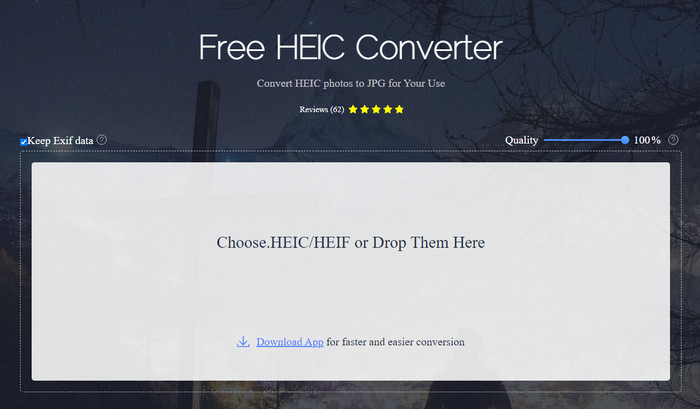
ตามชื่อของมัน Apowersoft HEIC Converter ให้โอกาสคุณแปลงไฟล์ HEIC ให้กลายเป็นรูปแบบ JPEG ที่ใช้งานร่วมกันได้ฟรี แทนที่จะต้องดาวน์โหลดโปรแกรมแปลงไฟล์ที่ไม่น่าเชื่อถือบนเดสก์ท็อป คุณสามารถใช้ตัวนี้ได้ทันทีโดยไม่ต้องดาวน์โหลดหรือติดตั้งทรัพยากรเพิ่มเติม การเข้าใช้งานเว็บทูลนี้ปลอดภัยเพราะการเชื่อมต่อของคุณจะได้รับการป้องกันเมื่อคุณอยู่บนเว็บไซต์ทางการ และคุณสามารถอัปโหลดไฟล์ HEIC ได้อย่างสะดวกด้วยการลากแล้ววางลงที่นี่ แต่สิ่งใดที่ทำให้โปรแกรมแปลงไฟล์ออนไลน์ตัวนี้โดดเด่นกว่าโปรแกรมแปลงไฟล์อื่น ๆ ที่คุณใช้ได้ทั้งบนเว็บหรือเดสก์ท็อป? นี่คือคุณสมบัติเด่นที่คุณจะได้รับหากตัดสินใจใช้งาน.
คุณสมบัติเด่นของ Apowersoft Free HEIC Converter:
◆ ไม่จำเป็นต้องดาวน์โหลดตัวแปลง เนื่องจากคุณสามารถเข้าถึงซอฟต์แวร์บนเว็บได้
◆ รองรับการแปลงไฟล์ HEIC เป็นชุดหรือทีละไฟล์เป็นรูปแบบ JPEG
◆ จัดการคุณภาพของภาพก่อนทำการแปลง
◆ หลังจากแปลงแล้ว คุณสามารถบันทึกไฟล์ EXIF เดียวกันในไฟล์ JPEG ได้
◆ แปลงไฟล์ HEIC โดยอัตโนมัติโดยไม่ต้องทำตามขั้นตอนเพิ่มเติม
ข้อดี
- อินเทอร์เฟซเครื่องมือเว็บค่อนข้างดีและภาพรวม
- รูปภาพคุณภาพสูงยังคงอยู่หลังจากแปลงไฟล์เป็น JPEG
- การแปลงไฟล์แบตช์เป็นเรื่องง่ายเพราะรองรับการแปลงไฟล์พร้อมกัน
จุดด้อย
- แม้ว่าจะแจ้งว่าเก็บข้อมูลเมตาไว้ แต่บางครั้งข้อมูลเมตาอาจสูญหายหลังจากแปลงรูปแบบ
- รูปแบบเอาต์พุตถูกจำกัดไว้ที่รูปแบบเดียว และนั่นคือ JPEG
- ฟังก์ชั่นมีจำกัด
ส่วนที่ 2 3 ของ Apowersoft Free HEIC Converter ทางเลือกที่ดีที่สุดออนไลน์และออฟไลน์
FVC ฟรี HEIC เป็น JPG Converter
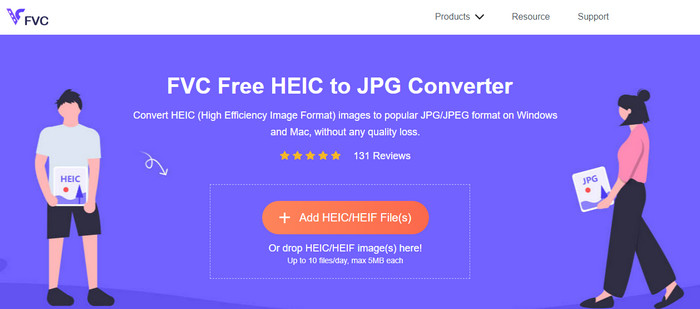
FVC Free HEIC to JPG Converter เป็นตัวเลือกทดแทนที่ดีที่สุดสำหรับ Apowersoft free HEIC to JPG converter เพราะมีอินเทอร์เฟซที่ใช้งานง่าย ช่วยให้คุณทำงานเสร็จได้ภายในไม่กี่วินาที ด้วยโปรแกรมแปลงไฟล์บนเว็บแบบนี้ คุณไม่จำเป็นต้องดาวน์โหลดตัวโปรแกรมหลักมาใช้ แต่คุณจะต้องดาวน์โหลดตัวเปิดใช้งานก่อน แม้ว่าตัวเปิดใช้งานจะเป็นสิ่งที่ต้องดาวน์โหลด แต่โปรแกรมนี้ก็ยังได้เปรียบด้านความเร็วในการแปลงไฟล์ ถึงคุณจะไม่มีประสบการณ์ในการแปลงไฟล์ HEIC เป็น JPG มาก่อน ด้วยเครื่องมือนี้คุณก็สามารถทำงานได้อย่างมีประสิทธิภาพโดยไม่ต้องมีคู่มือสอน.
จนถึงตอนนี้ เครื่องมือทางเว็บได้จัดการงานที่ไม่เหมือนกับตัวแปลงออนไลน์อื่นๆ แต่เราไม่สามารถละเลยความจริงที่ว่าเครื่องมือเว็บนี้มีข้อจำกัด เช่น ขนาดไฟล์ของแต่ละไฟล์และไฟล์ที่อนุญาตซึ่งคุณสามารถอัปโหลดได้ต่อวัน แต่ถ้าคุณไม่ต้องการมีข้อจำกัดเหล่านี้ เราขอแนะนำให้คุณดาวน์โหลดเวอร์ชันเดสก์ท็อป – Aiseesoft HEIC Converter ซอฟต์แวร์นี้ใช้ได้กับทั้งระบบปฏิบัติการ เช่น Windows และ Mac
HEICtoJPEG.com
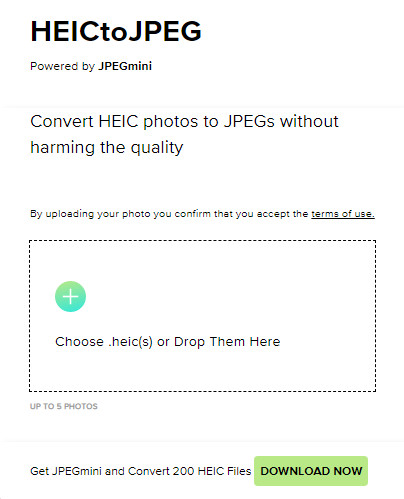
HEICtoJPEG.com เป็นอีกหนึ่งทางเลือกแทน Apowersoft HEIC Converter ที่คุณสามารถเข้าใช้งานได้ฟรีและปลอดภัยบนเว็บ เช่นเดียวกับเครื่องมือที่เรารีวิวอยู่ คุณสามารถแปลงไฟล์ HEIC เป็น JPEG ได้เท่านั้น ดังนั้นหากคุณต้องการแปลงไฟล์ HEIC เป็น JPEG โดยตรงโดยไม่ปรับแต่งคุณภาพ คุณควรใช้ตัวนี้ หลังจากเปิดเว็บทูลแล้ว คุณสามารถลากและวางไฟล์ลงที่นี่ จากนั้นการแปลงจะเริ่มขึ้นโดยอัตโนมัติ นอกจากนี้คุณยังสามารถแปลงไฟล์ HEIC แบบเป็นชุดด้วยเว็บทูลนี้ได้ แต่ไม่ได้จำกัดจำนวนครั้งการใช้งานต่อวัน.
โดยรวมแล้ว เครื่องมือบนเว็บนั้นยอดเยี่ยมเพราะรองรับการแปลงเป็นชุดสำหรับกระบวนการที่รวดเร็ว อย่างไรก็ตาม คุณไม่สามารถกำหนดการตั้งค่าขั้นสูงด้วยตนเองก่อนที่จะแปลงรูปแบบเป็น JPEG เหมือนกับที่เครื่องมือออนไลน์อื่นๆ สามารถทำได้ แม้ว่าเครื่องมือบนเว็บจะไม่ใช่ตัวเลือกระดับมืออาชีพ แต่ก็ยังดีที่สุดสำหรับผู้เริ่มต้นเช่นเราที่ต้องการแปลง HEIC แบบง่ายๆ
โปรแกรมแปลงรูปภาพ Pixillion
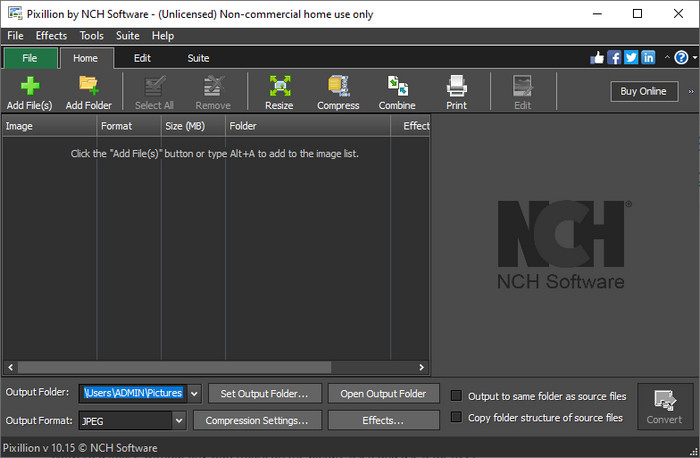
สมมติว่าการเชื่อมต่ออินเทอร์เน็ตของคุณไม่เสถียร ทำให้คุณไม่สามารถใช้ Apowersoft Free HEIC Converter ได้เพราะเครื่องมือนี้เป็นแบบออนไลน์ แล้วจะยังแปลงไฟล์ได้หรือไม่? ได้แน่นอน ด้วย Pixillion Image Converter ซอฟต์แวร์ออฟไลน์ตัวนี้ช่วยให้คุณแปลงภาพเป็นรูปแบบไฟล์ภาพได้หลากหลาย เช่น JPG, BMP, PNG และอื่น ๆ ด้วยเครื่องมือแบบนี้ คุณสามารถปรับแต่งรูปภาพ HEIC ก่อนส่งออกได้ ไม่ว่าจะเป็นการย่อขนาด บีบอัด แก้ไข และอื่น ๆ อีกมาก ซึ่งมากกว่าที่เว็บทูลที่เรานำเสนอไว้จะทำได้.
ไม่ว่าคุณจะอัปโหลดไฟล์รูปภาพใดก็ตาม คุณสามารถแปลงรูปแบบเป็นเอาต์พุตที่คุณต้องการได้อย่างง่ายดายและทำให้เข้ากันได้กับอุปกรณ์ปัจจุบันของคุณ ยอดเยี่ยมใช่มั้ย ใช่แล้ว. แต่ก่อนที่คุณจะสามารถใช้งานได้ คุณจะต้องดาวน์โหลดซอฟต์แวร์และติดตั้ง ซึ่งค่อนข้างยุ่งยากเพราะเป็นอีกขั้นตอนหนึ่ง โดยเฉพาะอย่างยิ่งหากคุณต้องการแปลงไฟล์ HEIC ไฟล์เดียวเป็น JPG หรือรูปแบบอื่น อย่างไรก็ตาม เครื่องมือนี้ยอดเยี่ยม และสามารถดาวน์โหลดได้ฟรีบนระบบปฏิบัติการ Windows ของคุณ
ที่เกี่ยวข้อง:
ส่วนที่ 3 คำถามที่พบบ่อยเกี่ยวกับ Apowersoft HEIC Converter Review
การส่งออกไฟล์ HEIC ที่แปลงแล้วบน Apowersoft Free HEIC Converter มีลายน้ำหรือไม่
โชคดีที่ไฟล์ที่คุณแปลงที่นี่จะไม่ทิ้งลายน้ำบนภาพของคุณ ดังนั้น คุณสามารถเพลิดเพลินกับภาพที่แปลงโดยไม่มีลายน้ำบนรูปภาพและใช้งานได้ฟรี
ฉันจำเป็นต้องเข้าสู่ระบบเพื่อใช้ Apowersoft HEIC Converter หรือไม่
คุณสามารถเข้าสู่ระบบเพื่อตรวจสอบบัญชีของคุณ แต่คุณไม่จำเป็นต้องเข้าสู่ระบบหากต้องการใช้ตัวแปลงออนไลน์ ดังนั้นคุณจึงสามารถใช้งานได้ทันทีโดยลากและวางบนเว็บไซต์ทางการของเครื่องมือและแปลงโดยอัตโนมัติ
สรุป
หลังจากการทบทวน Apowersoft HEIC Converter ตอนนี้เรารู้แล้วว่ามันเป็นตัวแปลงที่ดีที่สุดที่เราต้องใช้เพื่อแก้ปัญหา HEIC ของเราโดยการแปลงรูปแบบเป็น JPG แม้ว่าเครื่องมือเว็บจะใช้งานได้ฟรีและเข้าถึงได้บนเว็บ แต่เรายังคงรวมข้อเสียบางประการไว้ในบทความนี้ ดังนั้น หากคุณคิดว่านี่ไม่ใช่เครื่องมือสำหรับคุณ ทางเลือกสามทางอาจเติมเต็มช่องว่างที่คุณต้องการในตัวแปลงของคุณ ซึ่งตัวแปลงที่เราตรวจสอบไม่สามารถให้คุณได้ แต่ถ้าทั้งหมดนี้ยังไม่พอ เราขอแนะนำให้คุณดาวน์โหลดเครื่องมือขั้นสูงสุดที่สามารถแปลงไฟล์ HEIC ของคุณเป็น JPEG หรือ PNG อยากทราบว่ามันคืออะไร? จากนั้นคุณต้องคลิกปุ่มดาวน์โหลดที่เราเพิ่มไว้ด้านบนเพื่อให้เข้าถึงได้ไม่ว่าคุณจะใช้ Windows หรือ Mac
-
 วิธีที่ดีที่สุดในการแก้ไขข้อมูลเมตา MKV อย่างมืออาชีพ [ง่าย]
 ไม่รู้ว่าจะแก้ไขข้อมูลเมตาของ MKV ได้อย่างไร? ผู้ใช้บางคนพบว่าการแก้ไขแท็กใน MKV เป็นเรื่องยาก หากคุณเป็นหนึ่งในนั้น โปรดอ่านบทความนี้
-
 ตัวแก้ไขข้อมูลเมตา FLAC 3 อันดับแรกบน Mac และ Windows [อัปเดต 2023]
 คุณต้องการเปลี่ยนข้อมูลเมตา FLAC หรือไม่ ในกรณีนี้ คุณต้องอ่านบทความนี้ เนื่องจากเราให้ความรู้เพียงพอเกี่ยวกับตัวแก้ไขข้อมูลเมตา FLAC ล่าสุดจึงจะสามารถใช้ได้
-
 เทคนิคที่ดีที่สุดในการแก้ไขข้อมูลเมตาของ WebM อย่างรวดเร็ว
 อ่านรายละเอียดทั้งหมดที่เราให้ไว้ด้านล่างในขณะที่เราแทรกบทช่วยสอนเกี่ยวกับวิธีการแก้ไขข้อมูลเมตาของ WebM คลิกลิงค์นี้เพื่อทราบข้อมูลเพิ่มเติม
