


 Video Converter Ultimate
 บันทึกหน้าจอ
 ซ่อมวิดีโอ
 ดาวน์โหลดอย่างปลอดภัย
วิธีการแปลง MTS เป็น FLV ด้วย 3 MTS เป็น FLV Converter
ต้องการแปลงไฟล์ MTS เป็น FLV ใช่ไหม วิดีโอที่บันทึกด้วยกล้องถ่ายวิดีโอ AVCHD มักจะถูกเก็บในรูปแบบไฟล์ MTS หรือ M2TS ซึ่งไฟล์ MTS นั้นไม่ค่อยได้รับการรองรับจากโปรแกรมเล่นสื่อบางตัว และไม่สามารถอัปโหลดขึ้น YouTube หรือ Facebook ได้โดยตรง หากคุณมีกล้อง AVCHD อย่างเช่น Sony, Panasonic หรือ Canon คุณอาจต้องการแปลงวิดีโอ MTS ที่บันทึกไว้ให้เป็นไฟล์วิดีโอแฟลช (FLV) เพื่อให้สามารถเล่นได้บนโปรแกรมเล่นสื่อส่วนใหญ่ นั่นจึงเป็นเหตุผลที่คุณควรอ่านบทความนี้ต่อไป เพราะเราจะนำเสนอ 3 วิธีในการแปลงไฟล์ MTS เป็น FLV บน Windows และ Mac.

ส่วนที่ 1 วิธีแบบมืออาชีพในการแปลง MTS เป็น FLV ฟรี
หากต้องการแปลงไฟล์ MTS ของคุณเป็นไฟล์วิดีโอแฟลชสำหรับอัปโหลด คุณจำเป็นต้องมีเครื่องมือมืออาชีพอย่าง FVC Free MTS Converter นี่คือโปรแกรมแปลง MTS เป็น FLV ที่สามารถแปลงไฟล์ MTS เป็น FLV, MP4, WMV, MOV และรูปแบบวิดีโอและเสียงอื่น ๆ แบบเป็นชุดได้ ด้วยเครื่องมือแก้ไขวิดีโอที่มีมาให้ในตัว คุณยังสามารถแก้ไขไฟล์ MTS ก่อนทำการแปลงได้ด้วย.

FVC ตัวแปลง MTS ฟรี
1,286,400+ ดาวน์โหลด- แปลง MTS เป็น FLV บน Windows 10/8/7/Vista/XP และ Mac OS X
- บีบอัด ผสาน และเพิ่มเอฟเฟกต์วิดีโออื่น ๆ ลงในไฟล์ MTS
- เพิ่มธีมพิเศษให้กับไฟล์ MTS ของคุณ เช่น วันหยุด ครอบครัว วันเกิด
- ชุดแปลง MTS เป็น FLV, MP4, MKV ฯลฯ ด้วยความเร็วที่เร็วขึ้น 50x
ดาวน์โหลดฟรีสำหรับ Windows 7 ขึ้นไปดาวน์โหลดอย่างปลอดภัย
ดาวน์โหลดฟรีสำหรับ MacOS 10.7 ขึ้นไปดาวน์โหลดอย่างปลอดภัย
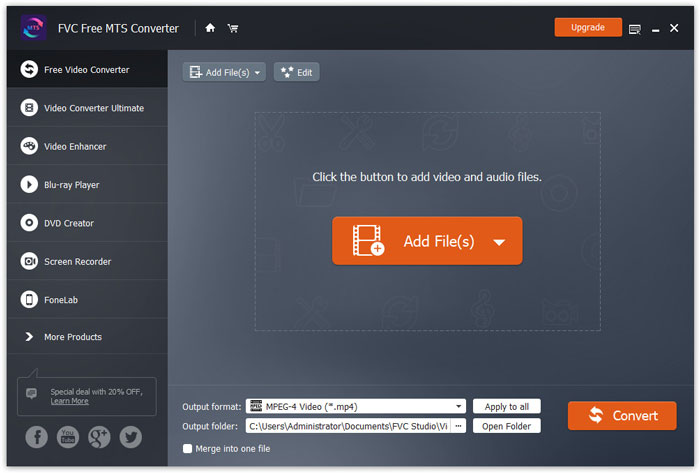
ขั้นตอนที่ 1. เพิ่มไฟล์ MTS
ดาวน์โหลด ติดตั้ง และเปิดใช้งาน FVC Free MTS Converter จากนั้นคลิกปุ่ม Add File(s) เพื่อเพิ่มไฟล์ MTS ของคุณ คุณยังสามารถลากไฟล์ MTS มากกว่าหนึ่งไฟล์เข้าไปในโปรแกรมได้ฟรี.
ขั้นตอนที่ 2. แก้ไขไฟล์ MTS
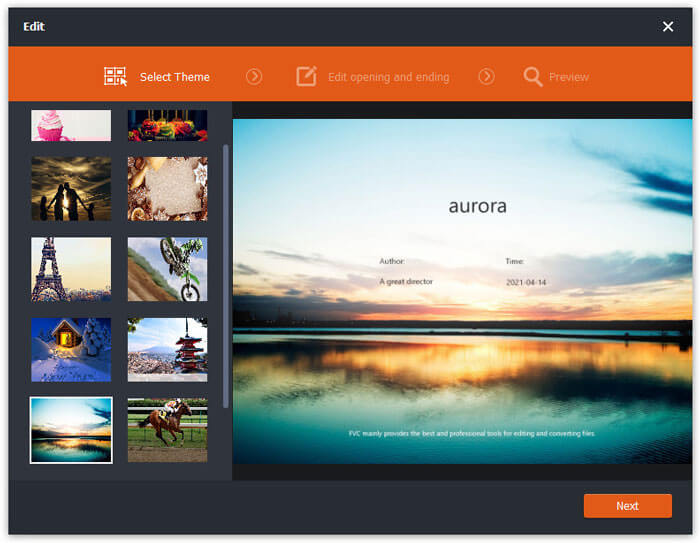
คลิกปุ่ม Edit เพื่อเริ่มแก้ไขไฟล์ MTS ของคุณ คุณสามารถเลือกธีม แก้ไขชื่อเรื่อง ผู้สร้าง และเวลาแสดงในช่วงเปิดและปิดวิดีโอได้.
ขั้นตอนที่ 3. ตั้งค่า FLV เป็นรูปแบบเอาต์พุต
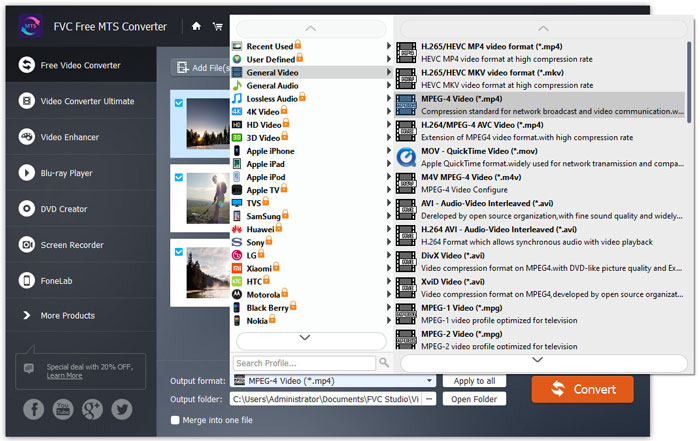
จากนั้นไปที่ส่วน Output format แล้วเลือกหมวดหมู่ General Video ค้นหา FLV - Flash Video Format (.flv) และตั้งค่าให้เป็นรูปแบบเอาต์พุต รูปแบบนี้เป็นรูปแบบสตรีมมิงวิดีโอบนเครือข่ายที่ได้รับความนิยมอย่างแพร่หลาย.
ขั้นตอนที่ 4. แปลง MTS เป็น FLV
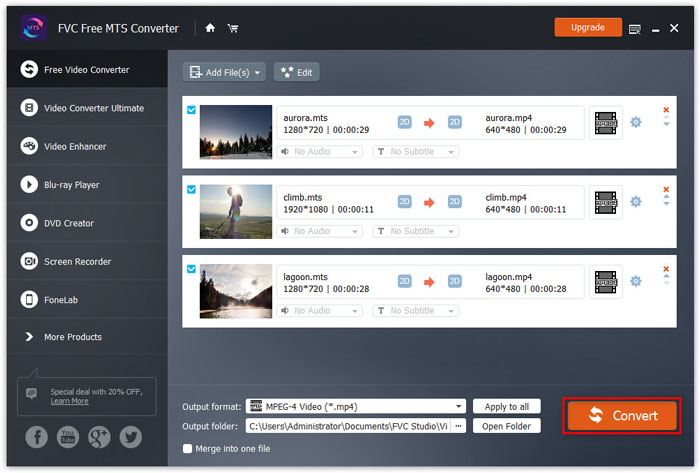
สุดท้าย ไปที่ส่วน Output folder แล้วเลือกโฟลเดอร์ปลายทางสำหรับบันทึกไฟล์ FLV ที่แปลงเสร็จ จากนั้นคลิกปุ่ม Convert เพื่อเริ่มแปลงไฟล์ MTS เป็น FLV ฟรี.
หลังจากนั้น คุณสามารถอัปโหลดไฟล์ FLV ที่แปลงแล้วไปยัง YouTube, Vimeo, Facebook, วิดีโอ Google หรือแพลตฟอร์มสื่ออื่นๆ
ส่วนที่ 2 วิธีการเปลี่ยน MTS เป็น FLV ฟรีออนไลน์
หากคุณต้องการหาเครื่องมือออนไลน์โดยไม่ต้องดาวน์โหลดซอฟต์แวร์ใด ๆ คุณสามารถใช้ FVC Free Online Video Converter ได้ นี่คือโปรแกรมแปลง MTS เป็น FLV ออนไลน์ที่ใช้งานง่ายและฟรี ซึ่งช่วยแปลงไฟล์วิดีโอ/เสียงยอดนิยมต่าง ๆ เช่น MTS เป็น FLV, MP4, WMV, AVI, MOV, MP3 เป็นต้น ได้ฟรีทั้งหมดทั้งบน Windows และ Mac คุณสามารถดูขั้นตอนโดยละเอียดในการแปลง MTS เป็น FLV ด้วยเครื่องมือออนไลน์ฟรีนี้ได้.
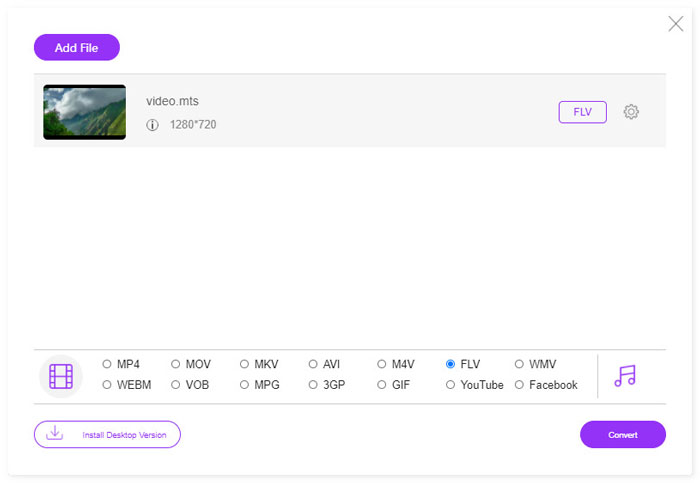
ขั้นตอนที่ 1. ไปที่เว็บไซต์ทางการของ FVC Free Online Video Converter (https://www.free-videoconverter.net/free-online-video-converter/) แล้วคลิกปุ่ม Add Files to Convert เพื่อดาวน์โหลดและติดตั้งตัวเรียกใช้งาน (launcher).

ขั้นตอนที่ 2. เลือกไฟล์ MTS ที่คุณต้องการแปลงจากคอมพิวเตอร์ของคุณ.
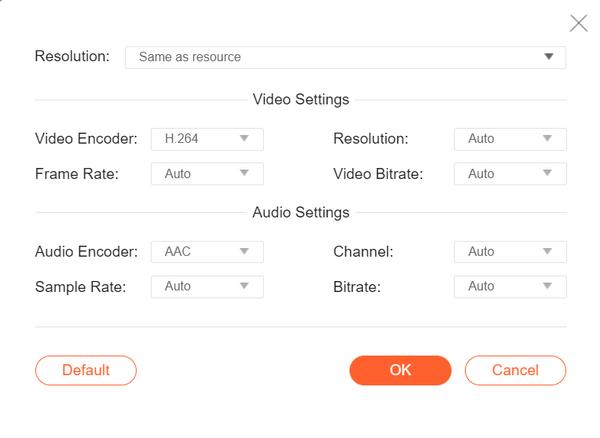
ขั้นตอนที่ 3. ตั้งค่า FLV เป็นรูปแบบเอาต์พุตที่ด้านล่าง หากคุณต้องการปรับการตั้งค่าเพิ่มเติม คุณสามารถคลิกไอคอนรูปเฟืองเพื่อปรับตัวเข้ารหัสวิดีโอ ความละเอียด เฟรมเรต บิตเรต และการตั้งค่าเสียงอื่น ๆ เช่น ตัวเข้ารหัสเสียง ช่องสัญญาณ อัตราการสุ่มสัญญาณ และบิตเรต.
ขั้นตอนที่ 4. คลิกปุ่ม Covert เพื่อเริ่มแปลงไฟล์ MTS ของคุณเป็น FLV.
ส่วนที่ 3 ฟรีส่งออกวิดีโอแฟลชจากไฟล์ MTS ด้วย VLC
VLC Media Player ไม่ได้เป็นเพียงโปรแกรมเล่นวิดีโอ/เสียงธรรมดาเท่านั้น แต่ยังเป็นโปรแกรมแปลงวิดีโอที่มาพร้อมฟีเจอร์ที่มีประโยชน์มากมาย มันทำหน้าที่เป็นโปรแกรมแปลง MTS เป็น FLV ที่รองรับไฟล์ได้หลากหลายสำหรับการแปลง และให้ใช้งานได้ฟรีโดยไม่มีข้อจำกัดใด ๆ ด้วย VLC คุณสามารถส่งออกไฟล์วิดีโอแฟลชจากไฟล์ MTS บน Windows หรือ Mac ได้ฟรี ในการแปลงไฟล์ MTS เป็น FLV คุณต้องดาวน์โหลดและติดตั้ง VLC บนคอมพิวเตอร์ของคุณก่อน.
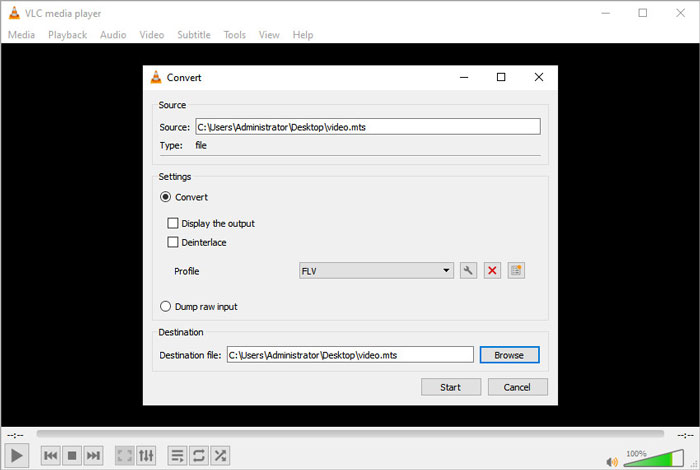
ขั้นตอนที่ 1. เปิดโปรแกรม VLC Media Player ไปที่เมนู Media แล้วคลิกปุ่ม Convert / Save.
ขั้นตอนที่ 2. คลิกปุ่ม Add เพื่อเพิ่มไฟล์ MTS แล้วคลิกปุ่ม Convert / Save เพื่อดำเนินการต่อ.
ขั้นตอนที่ 3. ทำเครื่องหมายที่ Convert ในส่วน Settings แล้วคลิกลูกศรดรอปดาวน์เพื่อเลือก FLV เป็นรูปแบบเอาต์พุต หากไม่มีตัวเลือกไฟล์ FLV ให้คลิกไอคอน Create a new profile เพื่อสร้างโปรไฟล์ FLV ใหม่.
ขั้นตอนที่ 4. จากนั้นไปที่ส่วน Destination และคลิกปุ่ม Browse เพื่อกำหนดโฟลเดอร์ปลายทาง.
ขั้นตอนที่ 5. ตรวจสอบให้แน่ใจว่าคุณตั้งค่าทุกอย่างเรียบร้อยแล้ว จากนั้นคลิกปุ่ม Start เพื่อเริ่มแปลง MTS เป็น FLV ใน VLC.
ส่วนที่ 4 คำถามที่พบบ่อยเกี่ยวกับการแปลง MTS เป็น FLV
รูปแบบวิดีโอ MTS คืออะไร?
ไฟล์ MTS คือไฟล์วิดีโอที่บันทึกในรูปแบบ Advanced Video Coding High Definition (AVCHD) ไฟล์ MTS เป็นรูปแบบวิดีโอมาตรฐานที่ใช้โดยกล้องถ่ายวิดีโอความละเอียดสูงของ Sony และ Panasonic จำนวนมาก และยังใช้สำหรับเก็บวิดีโอความละเอียดสูงบนแผ่น Blu-ray ด้วย.
ฉันจะแปลงไฟล์ MTS เป็น MP4 ได้อย่างไร
ด้วย FVC Free MTS Converter คุณยังสามารถ แปลงไฟล์ MTS เป็น MP4 ได้เช่นกัน เพียงคลิกปุ่ม Add File(s) เพื่อเพิ่มไฟล์ MTS จากนั้นไปที่ Output format และเลือก MP4 เป็นรูปแบบเอาต์พุต หลังจากนั้นคลิกปุ่ม Convert เพื่อเริ่มแปลง MTS เป็น MP4 ได้ฟรี.
Windows 10 สามารถเล่นไฟล์ MTS ได้หรือไม่?
ใช่. คุณสามารถใช้ Windows Media Player เพื่อเล่นไฟล์ MTS ของคุณได้ หากไฟล์ MTS ล้มเหลวในการเล่น คุณสามารถลองใช้โปรแกรมเล่น MTS อื่นๆ เช่น VLC Media Player, 5K Player, FVC Free Video Player และอื่นๆ
สรุป
ในบทความนี้ เราพูดถึง 3 วิธีในการแปลงไฟล์ MTS เป็น FLV ได้ฟรี คุณสามารถลองแปลง MTS เป็น FLV ทั้งหมดข้างต้นเพื่อส่งออกไฟล์วิดีโอแฟลชสำหรับการอัปโหลด ตัวแปลง MTS ฟรีนี้สามารถเปลี่ยนไฟล์ MTS ของคุณเป็น FLV, MP4, WMV, VOB, MP3 และอีกมากมายด้วยความเร็วที่รวดเร็ว
-
 ผู้เล่น FLV 10 อันดับแรกสำหรับ Windows, Mac, iOS และ Android ในปี 2021
 เครื่องเล่น FLV ช่วยให้คุณเข้าถึงไฟล์ FLV บนอุปกรณ์ Windows, Mac, Android, iOS ได้อย่างง่ายดาย ตรวจสอบเครื่องเล่นไฟล์ FLV ที่ดีที่สุดที่คุณสามารถดาวน์โหลดได้ตอนนี้
-
 วิธีที่ดีที่สุดในการแปลง VOB เป็น FLV
 ต้องการแปลงไฟล์ VOB เป็นไฟล์ FLV หรือไม่? คุณสามารถทำงานให้เสร็จสมบูรณ์ได้อย่างง่ายดายด้วยตัวแปลงเดสก์ท็อปหรือออนไลน์ อ่านคู่มือนี้และเรียนรู้วิธีแปลง VOB เป็น FLV อย่างง่ายดายและรวดเร็ว
-
 MTS VS M2TS - ความแตกต่างระหว่าง MTS และ M2TS
 ไฟล์ MTS หรือ M2TS คืออะไร อะไรคือความแตกต่างระหว่าง M2TS และ MTS? ฉันจะดูไฟล์ MTS หรือ M2TS ของกล้องถ่ายวิดีโอได้อย่างไร? ค้นหาคำตอบทั้งหมดได้ในโพสต์นี้
