


 Video Converter Ultimate
 บันทึกหน้าจอ
 ซ่อมวิดีโอ
 ดาวน์โหลดอย่างปลอดภัย
ตัวแปลง PNG เป็น HEIC ออนไลน์ที่ดีที่สุดที่ควรค่าแก่การลอง
PNG เป็นรูปแบบไฟล์รูปภาพมาตรฐานที่ใช้กันอย่างแพร่หลายในอินเทอร์เน็ตและแพลตฟอร์มอื่น ๆ แม้ว่าคุณภาพจะดี แต่เมื่อคุณรวบรวมรูปภาพ PNG จำนวนมากไว้ในอุปกรณ์ของคุณ ก็จะใช้พื้นที่จัดเก็บมาก อย่างไรก็ตาม หากคุณกำลังมองหาไฟล์รูปภาพที่มีขนาดไฟล์เล็กแต่ยังคงคุณภาพที่ยอดเยี่ยมอยู่ ให้แปลง PNG ของคุณเป็น HEIC ดังนั้นเราจึงได้ค้นหาโปรแกรมแปลง PNG เป็น HEIC ที่ดีที่สุดบนอินเทอร์เน็ต และคัดสรรตัวแปลง PNG เป็น HEIC แบบออนไลน์ที่ดีที่สุดมาให้แล้ว.

ส่วนที่ 1 ตัวแปลง PNG เป็น HEIC ออนไลน์ที่ดีที่สุดที่คุณต้องไม่พลาด
มีตัวแปลง PNG เป็น HEIC เพียงไม่กี่ตัวเท่านั้น ดังนั้นการค้นหาตัวแปลง PNG เป็น HEIC ที่ดีที่สุดจึงค่อนข้างท้าทาย แต่ไม่ต้องกังวลอีกต่อไปเพราะเราพบตัวแปลง PNG เป็น HEIC ที่ดีที่สุดและฟรีบนอินเทอร์เน็ต
PNGtoHEIC
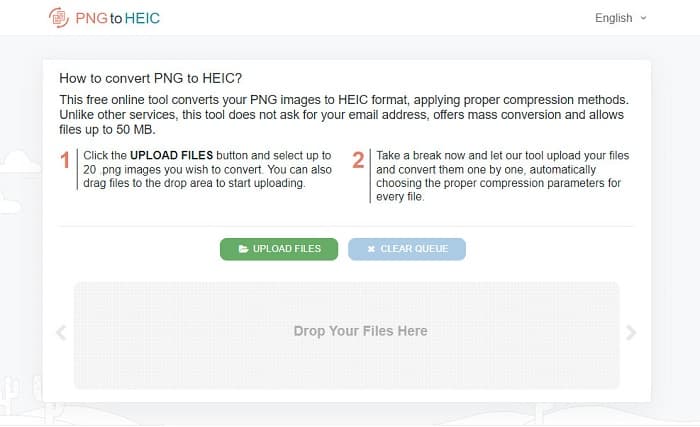
PNGtoHEIC เป็นตัวแปลง PNG เป็น HEIC แบบออนไลน์ เครื่องมือนี้ใช้งานได้ฟรีและปลอดภัย พร้อมทั้งมีส่วนติดต่อผู้ใช้ที่เรียบง่าย นอกจากนี้ยังรองรับการแปลงไฟล์แบบแบตช์จากภาพ HEIC เป็นรูปแบบภาพ PNG ได้อย่างง่ายดาย และยังสามารถแปลงภาพได้สูงสุดถึง 50 MB อีกด้วย และที่แตกต่างจากแอปบนเว็บอื่น ๆ คือไม่มีโฆษณากวนใจ แต่คุณอาจพบว่ากระบวนการแปลงไฟล์ช้าลงเมื่อการเชื่อมต่ออินเทอร์เน็ตของคุณช้า ดังนั้นเมื่อต้องการใช้เครื่องมือนี้ ควรตรวจสอบให้แน่ใจว่าคุณมีการเชื่อมต่ออินเทอร์เน็ตที่รวดเร็ว.
ข้อดี
- มีอินเทอร์เฟซซอฟต์แวร์ที่ใช้งานง่าย
- มีการแปลงเป็นชุดเพื่อแปลงภาพ PNG หลายภาพเป็น HEIC
- ใช้งานได้ฟรี 100%
จุดด้อย
- คุณอาจพบว่ามีกระบวนการแปลงที่ช้าเมื่อการเชื่อมต่ออินเทอร์เน็ตของคุณช้า
Convertio
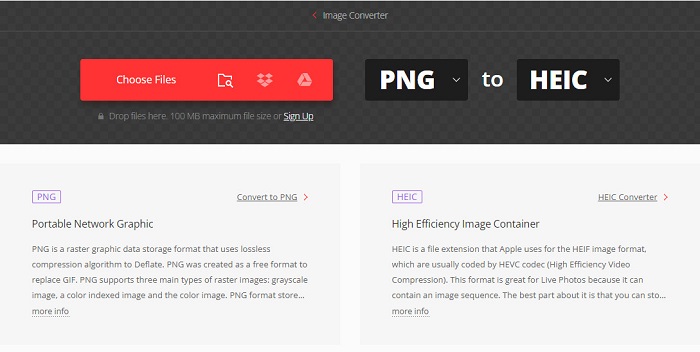
Convertio เป็นเครื่องมือออนไลน์ที่เป็นที่รู้จักอย่างกว้างขวางเพราะมีส่วนติดต่อผู้ใช้ที่เรียบง่าย ตัวแปลงออนไลน์นี้รองรับรูปแบบไฟล์ภาพหลากหลาย รวมถึง PNG, HEIC, SVG, HDR, BMP, WEBP เป็นต้น นอกจากนี้ยังสามารถแปลงไฟล์ที่มีขนาดสูงสุด 100 MB ได้ แต่หลายคนรู้สึกไม่พอใจเพราะมีโฆษณาป๊อปอัปบนเว็บไซต์ ซึ่งบางครั้งโฆษณาเหล่านี้อาจทำให้คอมพิวเตอร์ของคุณหน่วงได้ อย่างไรก็ตาม มันก็ยังเป็นหนึ่งในตัวแปลง PNG เป็น HEIC ที่มีคนใช้งานมากที่สุดอยู่ดี.
ข้อดี
- รองรับรูปแบบภาพมากมาย รวมถึง PNG, HEIC, JPG, WEBP, ICO, HDR เป็นต้น
- มีส่วนต่อประสานผู้ใช้ที่เรียบง่าย
- ช่วยให้คุณสามารถแปลงไฟล์ได้สูงสุด 100 MB
จุดด้อย
- มันมีโฆษณา
Aconvert.com
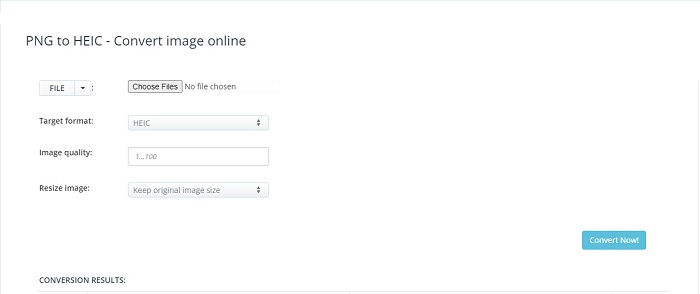
ตัวแปลงออนไลน์อีกตัวหนึ่งที่คุณควรลองคือ Aconvert.com. ตัวแปลงออนไลน์นี้ช่วยให้คุณแปลงรูปภาพ PNG เป็นรูปแบบ HEIC ได้ เช่นเดียวกับตัวแปลงออนไลน์ข้างต้น เครื่องมือนี้ก็มีส่วนติดต่อผู้ใช้ที่ใช้งานง่าย ทำให้เป็นเครื่องมือที่เหมาะกับผู้เริ่มต้น จุดเด่นของเครื่องมือนี้คือคุณสามารถปรับคุณภาพของภาพและย่อขนาดภาพได้ นอกจากนี้ยังสามารถใช้งานได้บนเว็บเบราว์เซอร์เกือบทุกตัว เช่น Google, Mozilla Firefox และ Safari.
ข้อดี
- มีอินเทอร์เฟซซอฟต์แวร์ที่ใช้งานง่าย
- ใช้งานได้ฟรีและปลอดภัย
- ช่วยให้คุณสามารถปรับขนาดภาพและปรับคุณภาพได้
จุดด้อย
- ไฟล์ของคุณอาจเสียหายเมื่อการเชื่อมต่ออินเทอร์เน็ตของคุณถูกขัดจังหวะ
Xconvert.com
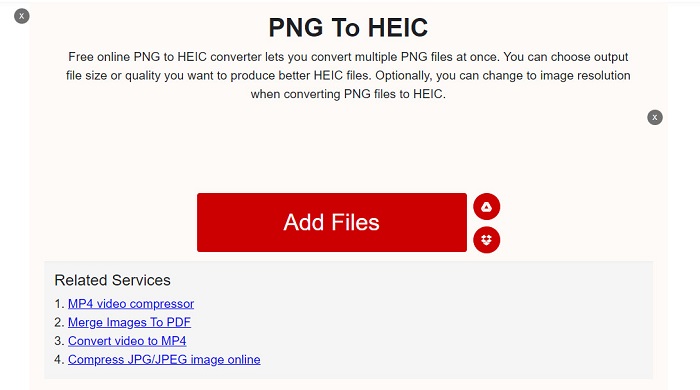
Xconvert.com เป็นหนึ่งในตัวแปลงไฟล์ออนไลน์ที่มีการใช้งานสูงสุดบนอินเทอร์เน็ต มันสามารถแปลงภาพ PNG ของคุณเป็น HEIC ได้อย่างง่ายดายและฟรี นอกจากนี้ยังมีฟีเจอร์ลดขนาดไฟล์ของภาพและเปลี่ยนความละเอียดได้ อีกทั้งยังสามารถแปลงไฟล์แบบแบตช์จากภาพ HEIC เป็นรูปแบบภาพ PNG ได้อีกด้วย และเนื่องจากเป็นแอปบนเว็บ จึงมีโฆษณาซึ่งอาจรบกวนคุณได้ แต่ถึงอย่างนั้น หลายคนก็ยังเลือกใช้ตัวแปลงนี้เป็นตัวเลือกอันดับแรก.
ข้อดี
- มีส่วนต่อประสานกับผู้ใช้ที่ตรงไปตรงมา
- มันสามารถแปลงภาพ PNG ของคุณเป็น HEIC ได้
- มีความปลอดภัยในการใช้งาน
จุดด้อย
- มีโฆษณาที่อาจรบกวนคุณ
FileProInfo
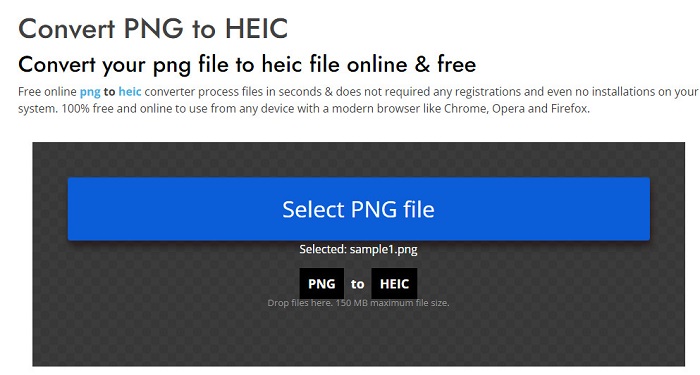
หนึ่งในตัวแปลงไฟล์ออนไลน์ที่เร็วที่สุดบนอินเทอร์เน็ตคือ FileProInfo ตัวแปลงออนไลน์นี้สามารถแปลง PNG เป็น HEIC ได้อย่างรวดเร็ว ใช้งานได้ฟรีและเข้าถึงได้อย่างปลอดภัย ดังนั้นคุณจึงไม่ต้องกังวลเกี่ยวกับความปลอดภัยของข้อมูลของคุณ นอกจากนี้ยังรองรับการใช้งานบนเว็บเบราว์เซอร์เกือบทุกตัว รวมถึง Google Chrome, Firefox และ Opera.
ข้อดี
- มีกระบวนการแปลงที่รวดเร็ว
- มีอินเทอร์เฟซซอฟต์แวร์ที่ใช้งานง่าย
- มีความปลอดภัยในการใช้งาน
จุดด้อย
- มันมีโฆษณารบกวนมากมาย
ที่เกี่ยวข้อง:
ส่วนที่ 2 แผนภูมิเปรียบเทียบเกี่ยวกับ PNG ออนไลน์เป็นตัวแปลง HEIC
ในส่วนนี้ คุณจะทราบถึงความแตกต่างและความคล้ายคลึงกันของตัวแปลง PNG เป็น HEIC ออนไลน์ที่แสดงด้านบน คุณจะมีข้อมูลเชิงลึกที่ดีขึ้นเกี่ยวกับเครื่องมือต่างๆ ดังนั้น โปรดอ่านอย่างละเอียด
| คุณสมบัติ | PNGtoHEIC | Convertio | Aconvert.com | Xconvert.com | FileProInfo |
| ความเร็วในการแปลง | เร็ว | เร็ว | เร็ว | เร็ว | เร็ว |
| แปลงได้โดยไม่สูญเสียคุณภาพ |  | | | |  |
| ต้องลงชื่อเข้าใช้ | | | | | |
| มันมีโฆษณา | | | | | |
| รองรับการแปลงแบทช์ | | | | | |
ส่วนที่ 3 คำแนะนำ: ตัวแปลง HEIC ที่ดีที่สุดในการแปลงไฟล์ HEIC
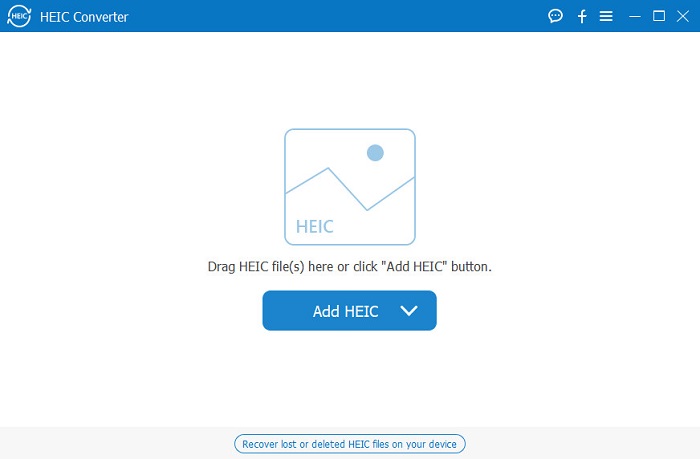
แต่ถ้าคุณกำลังค้นหาตัวแปลงที่สามารถใช้ออฟไลน์ ซึ่งสามารถแปลง HEIC เป็นรูปแบบ PNG หรือ JPG ได้ เครื่องมือนี้คือเครื่องมือที่คุณต้องใช้ Aiseesoft HEIC Converter เป็นเครื่องมือแปลงออฟไลน์ที่ให้คุณแปลงรูปภาพ HEIC เป็นรูปแบบ PNG หรือ JPG นอกจากนั้น ตัวแปลงนี้ยังเก็บข้อมูล EXIF ของไฟล์ของคุณไว้เมื่อทำการแปลง คุณยังสามารถปรับคุณภาพของภาพได้เมื่อใช้ตัวแปลงนี้
ข้อดี
- มีส่วนต่อประสานผู้ใช้ที่ใช้งานง่าย
- สามารถแปลงภาพ HEIC เป็นรูปแบบ JPG และ PNG
- มีการแปลงแบทช์
- ดาวน์โหลดได้ทุกแพลตฟอร์มสื่อ รวมทั้ง Windows และ Mac
จุดด้อย
- คุณต้องซื้อแอปก่อนจึงจะเข้าถึงคุณลักษณะเฉพาะของแอปได้
ส่วนที่ 4 ความรู้เพิ่มเติมเกี่ยวกับ PNG และ HEIC
PNG หรือ Portable Graphics Format เป็นรูปแบบไฟล์ภาพที่คนส่วนใหญ่ใช้ เป็นไฟล์รูปภาพที่ไม่มีการบีบอัดและไม่มีข้อจำกัดด้านลิขสิทธิ์ นอกจากนี้ ไฟล์ PNG ยังมีจานสี RGB 24 บิตและรูปภาพระดับสีเทา PNG มีแนวโน้มมากที่สุดคล้ายกับ JPG เนื่องจากทั้งคู่ใช้กราฟิกแรสเตอร์ นอกจากนี้ยังสามารถจัดเก็บภาพถ่ายดิจิทัลและกราฟิกบนเว็บ และมักใช้ในการถ่ายโอนภาพบนอินเทอร์เน็ต
ในทางตรงกันข้าม ไฟล์ภาพ HEIC เป็นรูปแบบภาพที่พัฒนาโดย Apple รูปภาพเหล่านี้มีขนาดไฟล์เล็กแต่ให้ความละเอียดของภาพที่สูง และยังสามารถบีบอัดภาพให้เล็กลงได้ถึงหนึ่งในสิบสองของขนาดเดิม อย่างไรก็ตาม รูปภาพ HEIC ไม่สามารถเปิดดูได้บนอุปกรณ์ Windows และแอปพลิเคชันอื่น ๆ.
ส่วนที่ 5. คำถามที่พบบ่อยเกี่ยวกับ PNG เป็น HEIC Converter
ความโปร่งใสของ PNG จะยังคงอยู่หลังจากแปลงเป็น HEIC หรือไม่
ความโปร่งใสของรูปภาพ PNG จะยังคงอยู่เนื่องจากรูปภาพ HEIC รองรับความโปร่งใสเช่นเดียวกับ PNG
PNG เป็นภาพแบบไม่สูญเสียข้อมูลหรือไม่?
ใช่. PNG ใช้การบีบอัดแบบไม่สูญเสียข้อมูล ซึ่งหมายความว่าเมื่อคุณบีบอัดหรือแปลงรูปแบบรูปภาพนี้ การผสมสี ความละเอียด และคุณภาพจะไม่สูญเสียไป
ฉันสามารถจัดเก็บภาพถ่ายสดเป็น PNG ได้หรือไม่
ไม่ เนื่องจากภาพถ่ายสดมักจะมีนามสกุล .jpg จึงจัดเก็บไว้ในรูปแบบ JPG
สรุป
หวังว่าถึงเวลานี้ คุณจะได้รับข้อมูลเชิงลึกมากมายเกี่ยวกับตัวแปลง PNG เป็น HEIC ที่ดีที่สุด ตัวแปลงทั้งหมดที่คุณอ่านด้านบนมีคุณสมบัติและลักษณะที่แตกต่างกัน และทั้งหมดนั้นมีประสิทธิภาพในการแปลงภาพ PNG ของคุณเป็นภาพ HEIC แต่ถ้าคุณต้องการแปลงอิมเมจ HEIC เป็นรูปแบบไฟล์อื่น ให้ดาวน์โหลด Aiseesoft HEIC Converter เพื่อสัมผัสประสบการณ์ตัวแปลง HEIC ออฟไลน์ที่ดีที่สุด
-
 CopyTrans HEIC รีวิว คุณสมบัติ และทางเลือก
 หากคุณต้องการทราบว่า CopyTrans HEIC สามารถทำอะไรได้บ้าง เราขอเสนอคุณสมบัติ ข้อดี และทางเลือกของเครื่องมือให้คุณ
-
 สุดยอด 9 HEIC เป็น PNG Converters สำหรับพีซีและ Mac [ออนไลน์และออฟไลน์]
 ค้นหาตัวแปลงออนไลน์และออฟไลน์ที่ดีที่สุดที่นี่ เรานำเสนอตัวแปลง HEIC เป็น PNG อันดับต้น ๆ และฟรีสำหรับ Windows และ Mac
-
 วิธีแปลง JPG เป็น HEIC บน Mac และ Windows
 ต้องการทราบวิธีการแปลง JPG เป็น HEIC หรือไม่? บทความนี้จะให้วิธีที่ดีที่สุดในการแปลง JPG เป็น HEIC โดยใช้ตัวแปลง JPG เป็น HEIC ที่ดีที่สุดและฟรี
