


 Video Converter Ultimate
 ضبط صفحه
 تعمیر ویدیو
نحوه تبدیل MP4 به 3GP آنلاین و آفلاین
MP4 یک قالب ویدیویی محبوب است که می تواند در دستگاه های پخش MP4 ، تلفن های همراه و تبلت ها پخش شود. فیلم هایی که از وب سایت بارگیری می کنیم معمولاً در قالب MP4 باقی می مانند. اما برخی از تلفن های همراه فقط از پخش فیلم های 3GP پشتیبانی می کنند. این مقاله 3 مبدل MP4 به 3GP رایگان را به شما نشان می دهد و می توانید MP4 را بدون دردسر به 3GP تبدیل کنید.

قسمت 1. نحوه تبدیل MP4 به 3GP در ویندوز و مک
اگر میخواهید MP4 را بهصورت آفلاین به 3GP تبدیل کنید، میتوانید از یک مبدل دسکتاپ MP4 به 3GP استفاده کنید. نرمافزار FVC Free FLV to 3GP Converter یک برنامه رایگان و آسان برای تبدیل ویدیو در ویندوز و مک است. این برنامه میتواند انواع ویدیوها مانند FLV، MP4، MOV، MKV، MTS، M2TS و غیره را بهراحتی به 3GP تبدیل کند. علاوه بر این، امکانات ویرایشی برای افزودن تم، تنظیم نویسنده، زمان و ارائهدهنده در بخش شروع و پایان ویدیو ارائه میدهد.

- فیلم ها را در MP4 ، MKV ، AVI ، MOV ، MP3 ، AAC ، AIFF و ... به 3GP تبدیل کنید.
- فیلم های 3GP و فایل صوتی بدون ضرر را از فایل MP4 با 1 کلیک صادر کنید.
- به کاربران اجازه می دهد ارائه دهنده ، عنوان ، نویسنده ، زمان و ویرایش موضوع را ویرایش کنند.
- برای بازی در برخی از تلفن های همراه ، MP4 را به 3GP تبدیل کنید.
دانلود رایگانبرای Windows 7 یا بالاتردانلود امن
دانلود رایگانبرای MacOS 10.7 یا بالاتردانلود امن
مرحله 1. FVC Free FLV to 3GP Converter را بهصورت رایگان در ویندوز یا مک خود دانلود، نصب و اجرا کنید. روی دکمه Add Files کلیک کنید تا فایلهای MP4 را از کامپیوتر خود بارگذاری کنید. میتوانید همزمان بیش از یک فایل MP4 را تبدیل کنید.
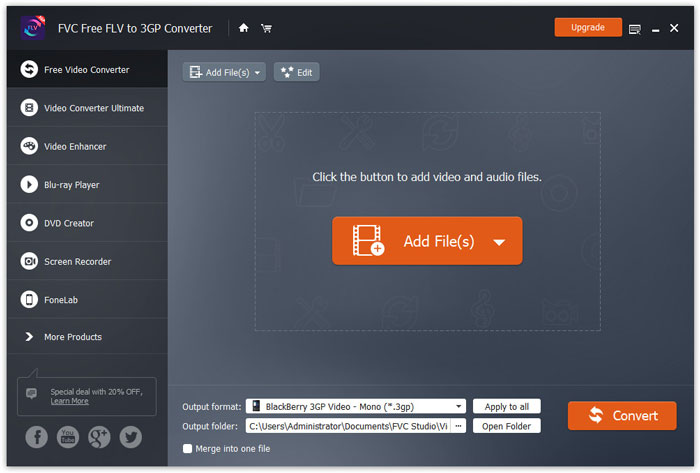
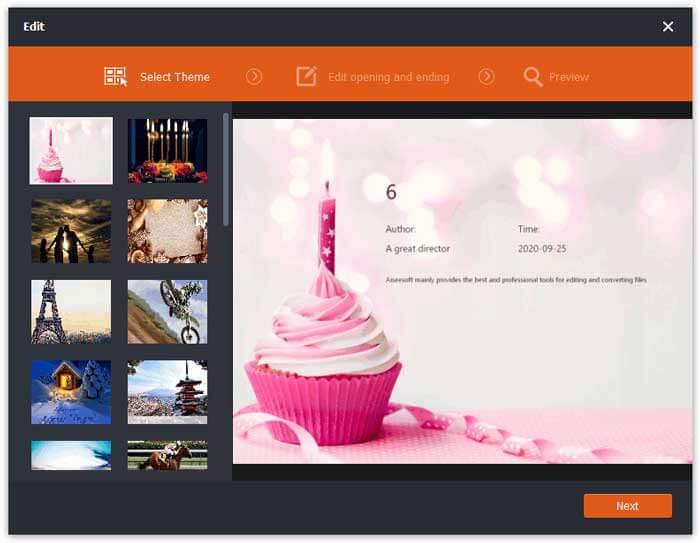
مرحله 2. روی فایل MP4 خود کلیک کرده و دکمه Edit را بزنید. میتوانید یک تم به فایل MP4 اضافه کرده و محتوای آغاز و پایان را ویرایش کنید. سپس روی Next کلیک کنید تا پیشنمایش گرفته و تغییرات را ذخیره کنید.
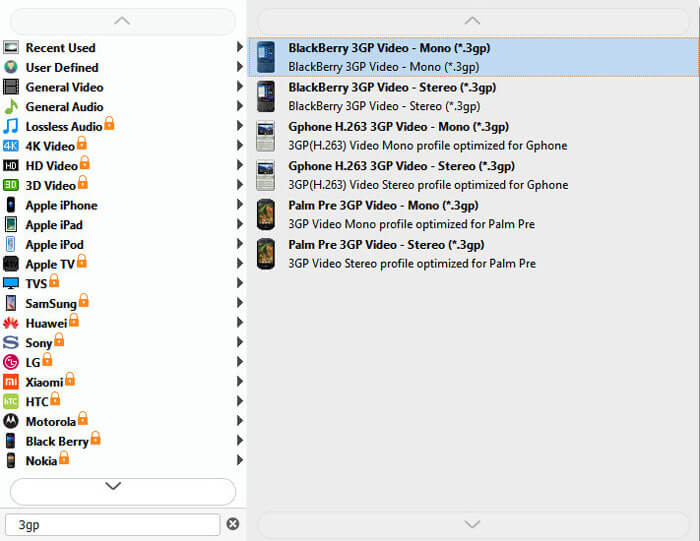
مرحله 3. از فهرست کشویی Output format در پایین، گزینه 3GP را انتخاب کنید. میتوانید BlackBerry 3GP Video - Mono (*.3gp) یا هر گزینه دلخواه دیگر را برگزینید.
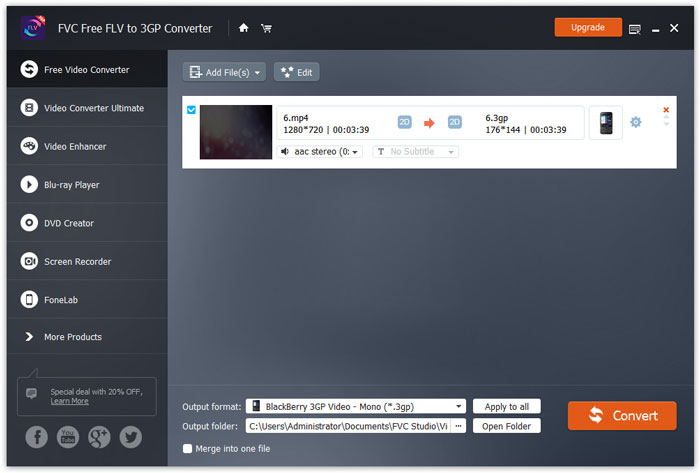
مرحله 4. در پایان، پوشه خروجی را در کامپیوتر خود مرور کرده و روی دکمه Convert کلیک کنید تا تبدیل MP4 به 3GP را آغاز کنید.
قسمت 2. صادرات 3GP از MP4 با 2 مبدل 3GP آنلاین
در مقایسه با نصب مبدل 3GP دسک تاپ ، استفاده از مبدل تحت وب برای تبدیل MP4 به 3GP بسیار ساده تر و آسان تر است. در این قسمت ، ما 2 مبدل 3GP آنلاین را به شما کمک خواهیم کرد تا به شما کمک کند MP4 را بدون مشکل به 3GP تبدیل کنید.
1. مبدل ویدیوی آنلاین رایگان FVC
FVC Free Online Video Converter یک پلتفرم شناختهشده تبدیل ویدیو است که در آن میتوانید فرمتهای محبوب ویدیو و صدا را به 3GP، MKV، MOV، WMV، AVI، MP3 و فرمتهای دیگر تبدیل کنید.
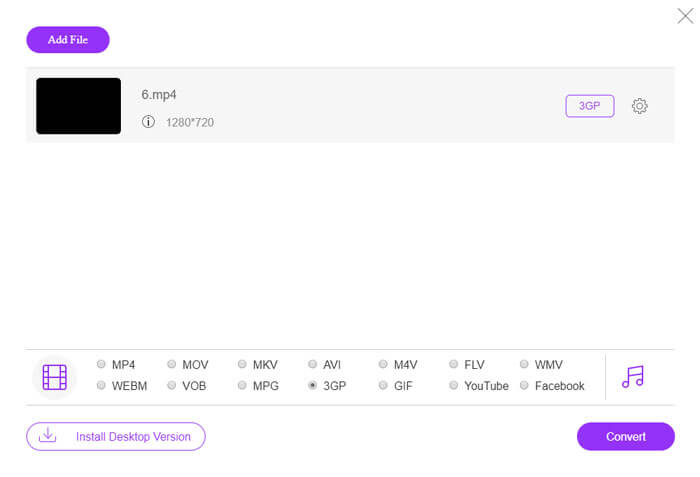
مرحله 1. به وبسایت رسمی FVC Free Video Converter بروید. روی دکمه Add Files to Convert کلیک کنید تا لانچر دانلود و نصب شود.
برای تبدیل دستهای فایلها، نسخهٔ دسکتاپ را دانلود کنید.

مرحله 2. فایلهای MP4 را از کامپیوتر محلی انتخاب کنید. میتوانید روی آیکون چرخدنده کلیک کنید تا بیتریت ویدیو، نرخ نمونهبرداری، نرخ فریم، وضوح تصویر و بلندی صدا را تنظیم کنید.

مرحله 3. در پایین، فرمت خروجی را روی 3GP تنظیم کنید. سپس روی دکمه Convert کلیک کنید تا تبدیل MP4 به 3GP را آغاز کنید. میتوانید چندین فایل MP4 را بهصورت دستهای همزمان به 3GP تبدیل کنید.
2. زامزار
Zamzar یک مبدل ویدیویی آنلاین ، مبدل صوتی ، مبدل تصویر و مبدل کتاب الکترونیکی است. تبدیل MP4 به انواع دیگر قالب ها با استفاده از Zamzar راحت است. در زیر مراحل ساده تبدیل MP4 به 3GP وجود دارد.
مرحله 1. به نشانی zamzar.com/convert/mp4-to-3gp/ بروید و روی دکمه Add Files کلیک کنید تا فایلهای MP4 خود را آپلود کنید.
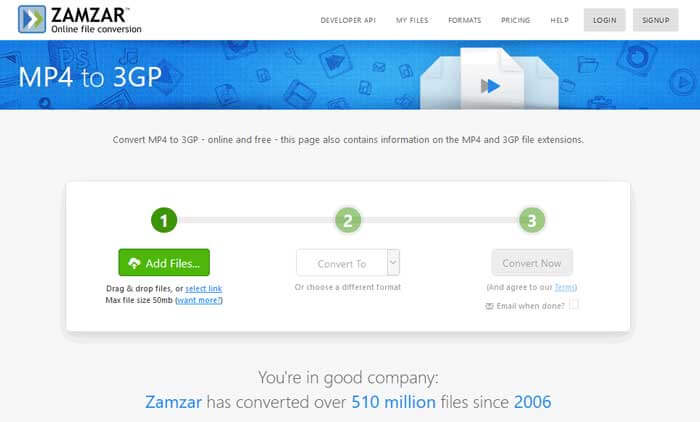
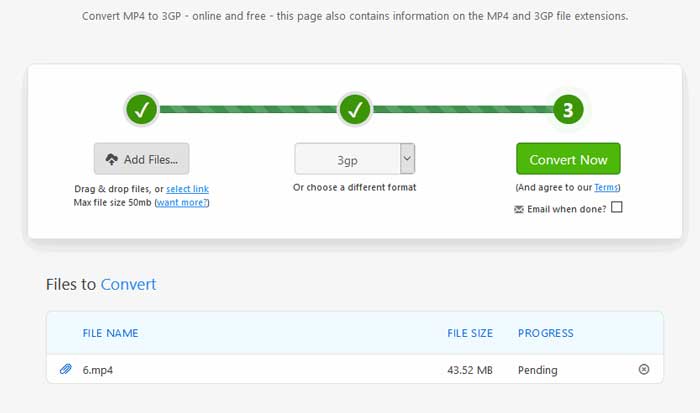
مرحله 2. میتوانید یک فرمت خروجی متفاوت انتخاب کنید. بهطور معمول، 3gp بهصورت پیشفرض بهعنوان فرمت خروجی تنظیم میشود. روی دکمه Convert Now کلیک کنید تا تبدیل MP4 به 3GP آغاز شود.
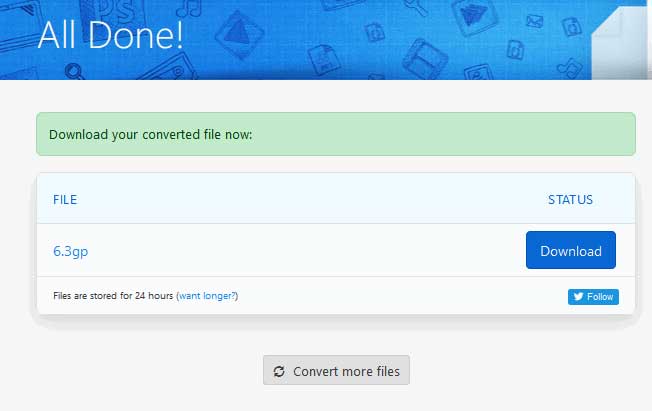
مرحله 3. سپس به صفحه دیگری منتقل میشوید. میتوانید روی دکمه Download کلیک کنید تا فایل 3GP تبدیلشده را در کامپیوتر خود ذخیره کنید.
اگر فایل MP4 شما حجم بالایی دارد چه کار کنید؟ آموزش نحوه فشردهسازی فایلهای MP4 را اینجا ببینید.
MP4 در مقابل 3GP
فرمت MP4 که توسط گروه متخصصان تصویر متحرک (MPEG) در سال 2001 منتشر شد، می تواند به شما کمک کند داده های ویدئو، صدا، زیرنویس و تصویر را در آهنگ های جداگانه ذخیره کنید. این فرمت کوتاه MPEG-4 Part 14 است. بعلاوه، یکی از محبوب ترین فرمت های مورد استفاده برای پخش و اشتراک گذاری ویدیوها است.
پروژه مشارکت نسل سوم (3GPP) فرمت 3GP/3GPP را به عنوان یک قالب کانتینری چند رسانه ای تولید کرد. این در واقع بر اساس فرمت فایل رسانه ای ISO است. ما اغلب از آن برای ذخیره جریان های ویدیویی/صوتی که بین تلفن های همراه 3G و آنلاین منتقل می شوند استفاده می کنیم.
قسمت 3. سوالات متداول در تبدیل MP4 به 3GP
1. آیا 3GP بهتر از MP4 است؟
فرمت 3GP برای تلفنهای همراه شبکه 3G طراحی شده است. میتوانید فایلهای 3GP را در پخشکنندههایی مانند QuickTime، VLC و RealPlayer اجرا کنید. MP4 بسیار سازگارتر از 3GP است و بهطور گسترده توسط بسیاری از پخشکنندههای رسانه قابلحمل و گوشیهای هوشمند پشتیبانی میشود.
2. 3GP چیست؟
3GP یک قالب ظرف چندرسانه ای است که توسط 3rd Generation تعریف شده است. این برنامه می تواند فیلم ها و جریان های صوتی را که در تلفن های همراه 3G پخش می شوند ذخیره کند ، اما در برخی از تلفن های 2G یا 4G نیز قابل پخش است.
3. چگونه MP4 را به FLV تبدیل کنم؟
با کمک FVC Free Online Video Converter میتوانید بهآسانی بهصورت آنلاین MP4 را به FLV تبدیل کنید. به این وبسایت آنلاین بروید و روی دکمه Add Files to Convert کلیک کنید تا لانچر نصب شود. سپس فایلهای MP4 را از کامپیوتر انتخاب کرده و FLV را بهعنوان فرمت خروجی علامت بزنید. برای تبدیل MP4 به FLV روی دکمه Convert کلیک کنید.
نتیجه
ما به طور عمده 3 روش برای تبدیل MP4 به 3GP در ویندوز و مک صحبت کردیم. اگر راه حل آنلاین را ترجیح می دهید ، می توانید FVC Free Video Converter Online یا Zamzar را بصورت آنلاین امتحان کنید. اگر می خواهید فایل MP4 خود را برای کمالات بیشتر ویرایش کنید ، می توانید به جای آن از مبدل FLV به 3GP رایگان استفاده کنید. اگر راه حل بهتری دارید ، لطفاً در این مورد اظهار نظر نکنید.
-
 3 روش برتر برای تبدیل سریع MP4 به VOB
 چگونه MP4 را به ویندوز PC و Mac تبدیل به VOB کنیم؟ برای حل این مشکل ، این پست 3 بهترین روش برای کمک به شما در تبدیل MP4 به VOB به صورت رایگان را به اشتراک می گذارد.
-
 رایگان | 3 بهترین روش برای تبدیل MP4 به WMV بدون افت کیفیت
 این پست نحوه تبدیل فیلم MP4 به فرمت WMV را در مک یا ویندوز به اشتراک می گذارد. ما همچنین گزینه های مختلفی از جمله نرم افزار دسک تاپ و مبدل های آنلاین مبتنی بر وب را به شما ارائه می دهیم. آیا می خواهید بهترین ابزارهای تبدیل MP4 به WMV را بدانید؟
-
 3 روش برای تبدیل MP3 به MP4 با تصویر
 چگونه MP3 را با کیفیت بالا به MP4 تبدیل کنیم؟ این پست 3 روش کارآمد و رایگان برای تغییر MP3 به MP4 همراه با تصاویر در ویندوز و مک را نشان می دهد.

