


 Video Converter Ultimate
 ضبط صفحه
 تعمیر ویدیو
7 روش آسان برای تبدیل سریع HEIC به PNG در چند ثانیه
میخواهید فایل HEIC خود را با اکثر دستگاهها سازگار کنید؟ ما همان چیزی را داریم که به دنبالش هستید! این مقاله بهترین روشها برای تبدیل فایل HEIC به PNG را بدون دردسر به شما نشان میدهد. پس آماده شوید تا با هم بهترین راههای تبدیل HEIC به PNG را بهسادگی یاد بگیریم.

بخش 1. چرا HEIC را به فرمت PNG تبدیل کنیم
فرمت فایل HEIC یک فرمت تصویری است که توسط اپل ساخته شده است. این یک فرمت تصویری است که دستگاه های اپل معمولا از آن استفاده می کنند. اگرچه وضوح با کیفیت بالایی دارد، اما فضای زیادی را روی دستگاه شما نمی گیرد. با این حال، فایل های HEIC با دستگاه های غیر اپل سازگار نیستند. در مقابل، PNG که مخفف عبارت Portable Graphics Format است، یک فرمت فایل تصویری است که برای جایگزینی فرمتهای GIF ایجاد شده است.
پرکاربردترین فرمت تصویر است که فشرده نشده است، به این معنی که حجم فایل زیادی دارد. با این وجود، تقریباً همه دستگاهها از این فرمت فایل تصویری پشتیبانی میکنند. بنابراین اگر می خواهید تصویر HEIC خود را به غیر از اپل در دستگاه های دیگر باز کنید، بهتر است آن را به فرمت فایل PNG تبدیل کنید.
قسمت 2. 5 روش آسان برای تبدیل فایل HEIC به فایل PNG آنلاین
جستجوی بهترین راه ها برای تبدیل HEIC به PNG بسیار سخت است. با این حال، ما بهترین و سادهترین روشها را برای تغییر HEIC به فرمت فایل PNG جستجو کردیم.
از مبدل FVC Free HEIC به PNG استفاده کنید
بهترین روش برای تبدیل HEIC به PNG استفاده از یک ابزار تبدیلکننده است. و بهترین ابزاری که ما در اینترنت پیدا کردیم FVC Free HEIC to PNG Converter است. این مبدل یک ابزار آنلاین است که بهراحتی فایل HEIC شما را به فرمت PNG تبدیل میکند. علاوه بر این، اگر بخواهید به صورت دستهای فایلهای HEIC خود را به PNG تبدیل کنید، این ابزار چنین قابلیتی را در اختیارتان میگذارد.
همچنین تقریباً در تمام مرورگرهای رایج قابل دسترسی است و آن را به ابزاری بدون محدودیت مرورگر تبدیل می کند. علاوه بر این، یک رابط نرم افزاری ساده دارد و هیچ محدودیتی در اندازه فایل ندارد، بنابراین می توانید فایل های HEIC را بدون فکر کردن به اندازه فایل تبدیل کنید. بنابراین، اگر علاقه مند به استفاده از این مبدل آنلاین HEIC به PNG هستید، راهنمای ساده زیر را دنبال کنید.
مرحله 1. در مرورگر خود، عبارت FVC Free HEIC to PNG Converter را جستوجو کنید. همچنین میتوانید روی این لینک کلیک کنید تا مستقیماً به صفحه وب آن بروید. اولین رابط کاربری به این شکل است:

مرحله 2. سپس روی دکمه Add HEIC/HEIF File(s) کلیک کنید. پوشههای کامپیوتر شما باز میشود و میتوانید فایل HEIC خود را انتخاب کنید.
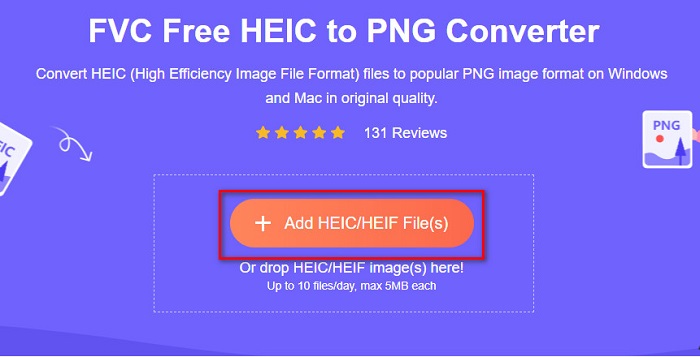
مرحله 3. سپس پوشههای کامپیوتر شما باز میشود و فایل HEIC خود را انتخاب میکنید. روی Open فشار دهید. سپس فرایند تبدیل HEIC به PNG شروع خواهد شد.

مرحله 4. در نهایت، در رابط کاربری نرمافزار، روی دکمه Download کلیک کنید تا فایل PNG خود را دانلود کنید.

ساده است، اینطور نیست؟ با دنبال کردن این مراحل آسان می توانید فایل HEIC خود را به یک فایل PNG تبدیل کنید.
از Xconvert.com استفاده کنید
Xconvert یک مبدل آنلاین رایگان HEIC به PNG است که فایلهای HEIC را بهسادگی به فایلهای PNG تبدیل میکند. این مبدل آنلاین رابط کاربری سادهای دارد که برای کاربران مبتدی بسیار مناسب است. علاوه بر این، هنگام استفاده از این مبدل آنلاین میتوانید وضوح (رزولوشن) تصویر خود را تغییر دهید. با این حال، چون ابزاری وابسته به اینترنت است، در صورت کند بودن اینترنت ممکن است فرایند تبدیل نیز کند شود. همچنین شامل تبلیغاتی است که ممکن است برای شما آزاردهنده باشد.
مرحله 1. در مرورگر خود Xconvert.com را جستوجو کنید. در وبسایت آنها روی دکمه Add Files کلیک کنید، سپس فایلهای کامپیوتر شما نمایش داده میشود و فایل HEIC خود را انتخاب کنید.

مرحله 2. تصویر شما در رابط کاربری نرمافزار بارگذاری میشود. پس از بارگذاری، روی دکمه Convert در گوشه پایین سمت راست رابط نرمافزار کلیک کنید. سپس منتظر بمانید تا فایل برای دانلود آماده شود و بعد به مرحله بعد بروید.
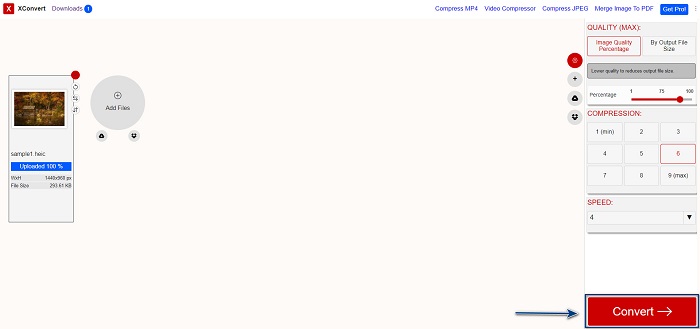
مرحله 3. وقتی فایل شما آماده شد، روی دکمه Download کلیک کنید تا فایل PNG خود را دانلود کنید؛ بالای دکمه دانلود، اندازه خروجی و مدت زمان تبدیل نیز نمایش داده میشود.

از زمزار استفاده کنید
روش دیگر برای تبدیل آنلاین HEIC به PNG استفاده از مبدل آنلاین Zamzar است. احتمالاً هنگام جستوجوی مبدل HEIC به PNG با این وبسایت برخورد کردهاید. این مبدل تقریباً در همه مرورگرهای موجود در دسترس است. علاوه بر این، رابط کاربری سادهای دارد که آن را به ابزاری کاربرپسند تبدیل میکند. با این حال، اگر در طول فرایند تبدیل اتصال اینترنت شما قطع شود، ممکن است فایل شما خراب شود. با وجود این، بسیاری از کاربران از این مبدل برای تبدیل HEIC به فایل PNG استفاده میکنند.
مرحله 1. در مرورگری که استفاده میکنید، Zamzar را جستوجو کنید. در وبسایت آنها روی دکمه Add Files کلیک کنید. سپس فایلهای کامپیوتر شما باز میشود و تصویر HEIC خود را بارگذاری کنید.

مرحله 2. پس از بارگذاری فایل HEIC، روی دکمه drop-down کلیک کنید و PNG را بهعنوان فرمت خروجی فایل انتخاب کنید.

مرحله 3. در پایان، روی دکمه Convert Now کلیک کنید تا فایل HEIC شما به فرمت PNG تبدیل شود. سپس فایل PNG خود را دانلود کنید. فقط چند ثانیه صبر کنید و تمام!

از Conversion Tools.io استفاده کنید
Conversion Tool یک مبدل آنلاین HEIC به PNG با رابط کاربری ساده است. این ابزار میتواند فایل HEIC شما را با سرعت بالا به PNG تبدیل کند. علاوه بر این، برخلاف بسیاری از مبدلهای آنلاین دیگر، تبلیغات زیادی ندارد. اما نقطه ضعف آن این است که روزانه فقط میتوانید ده فایل را تبدیل کنید و محدودیت حجم فایل نیز دارد. با این حال، اگر قصد تبدیل فایلهای کمحجم را دارید، این ابزار میتواند برای شما مناسب باشد.
مرحله 1. در مرورگر خود Conversion Tools.io را جستوجو کنید. سپس روی دکمه Browse در رابط اصلی نرمافزار کلیک کنید یا فایل HEIC خود را روی دکمه Browse بکشید و رها کنید.

مرحله 2. سپس روی دکمه Run Conversion کلیک کنید تا تبدیل فایل HEIC شما به PNG آغاز شود. سپس منتظر بمانید تا فایل تصویری شما بارگذاری شود و بعد به مرحله بعد بروید.

مرحله 3. در پایان، روی دکمه Download کلیک کنید تا فایل PNG خود را دانلود کنید.

از CDKM استفاده کنید
آخرین ابزاری که به شما معرفی میکنیم CDKM است. این ابزار به شما اجازه میدهد تنها با چند کلیک فایلهای HEIC را به PNG تبدیل کنید. با این حال، استفاده از این مبدل آنلاین بسته به سرعت اینترنت شما ممکن است چند ثانیه طول بکشد. همچنین شامل تبلیغاتی است که ممکن است برایتان آزاردهنده باشد. با این وجود، هیچ محدودیتی برای حجم فایل ندارد، بنابراین ارزش امتحان کردن را دارد.
مرحله 1. در مرورگر خود CDKM online converter را جستوجو کنید. در رابط اصلی نرمافزار، روی دکمه Choose Files کلیک کنید. پوشههای کامپیوتر شما باز میشود، سپس فایل HEIC خود را برای بارگذاری انتخاب کنید.

مرحله 2. سپس روی دکمه Start Conversion کلیک کنید تا فرایند تبدیل آغاز شود.

مرحله 3. در نهایت، کمی به پایین اسکرول کنید تا دکمه Download را ببینید. روی دکمه Download کلیک کنید تا فایل PNG خود را دانلود کنید.

قسمت 3. تبدیل HEIC به PNG در مک
دستگاههای اپل از فرمتهای فایل HEIC پشتیبانی میکنند و با استفاده از Mac، میتوانید فایل HEIC را بهطور بومی باز کنید. اما اگر می خواهید فایل HEIC خود را به PNG تبدیل کنید، می توانید آن را با استفاده از برنامه Photo App در مک تغییر دهید. بر همین اساس اگر کاربر مک هستید بهتر است این قسمت را مطالعه کنید.
مرحله 1. ابتدا، فایل HEIC خود را به داخل Photo App بکشید و رها کنید. سپس عکس HEIC خود را پیشنمایش کنید و روی File > Export > Export 1 Photo کلیک کنید.

مرحله 2. سپس، در بخش Photo Kind، فرمت خروجی موردنظر خود را انتخاب کنید. فرمت فایل PNG را برگزینید.

مرحله 3. سپس روی دکمه Export کلیک کرده و محل ذخیره فایل خروجی را انتخاب کنید. خواهید دید که فایل HEIC شما به فرمت PNG تغییر یافته است.

قسمت 4. تبدیل فایل HEIC به PNG در آیفون
اگر از آیفون استفاده می کنید، می توانید یک فایل HEIC را در دستگاه خود باز کنید. اما اگر می خواهید فایل HEIC خود را با استفاده از دستگاه آیفون به PNG تبدیل کنید، ما راهی برای شما داریم. با دنبال کردن این مراحل ساده و آسان زیر، می توانید بدون زحمت HEIC را به PNG تبدیل کنید.
مرحله 1. در Photo App روی آیفون خود، روی دکمه Select در بالای صفحه ضربه بزنید. سپس فایل HEIC خود را انتخاب کرده و روی آیکون Share ضربه بزنید.
مرحله 2. صفحه را به سمت بالا بکشید؛ گزینه Copy Photo را خواهید دید، سپس روی آن ضربه بزنید.
مرحله 3. در نهایت، به اپلیکیشن Files بروید، روی دکمه browse ضربه بزنید و محل ذخیره خروجی دلخواه خود را انتخاب کنید (روی iCloud Drive یا On My iPhone کلیک کنید). سپس فایل HEIC خود را در آنجا جایگذاری (Paste) کنید.

پس از اینکه فایل خود را پیست کردید، خواهید دید که فایل شما به طور خودکار به یک فایل PNG تبدیل می شود.
بخش 5. دانش گسترده در مورد فایل HEIC و فایل PNG
اگر هنوز شک دارید که آیا می خواهید فایل HEIC خود را به PNG تبدیل کنید، ما نمودار مقایسه ای را در اختیار شما قرار می دهیم تا به شما کمک کند تفاوت بین این دو فایل را تشخیص دهید. علاوه بر این، یک نمای کلی از ویژگی های HEIC و PNG به شما می دهد. با دقت بخوانید تا تفاوت بین فایل های HEIC و فایل های PNG را بدانید.
| HEIC | PNG | |
| سازگاری | فقط دستگاه اپل از این فرمت فایل پشتیبانی می کند. | تقریباً تمام دستگاه ها از جمله دستگاه های اپل از این فایل پشتیبانی می کنند. |
| حجم فایل | اندازه فایل کوچک. | می تواند به اندازه فایل بزرگ برسد. |
| کیفیت تصویر | کیفیت تصویر بالا. | کیفیت خوبی داره ولی بهتر از فایل HEIC نیست. |
| فشرده / غیر فشرده | فشرده شده | فشرده نشده |
| ویرایش | کیفیت تصویر را هنگام ویرایش حفظ می کند. | ممکن است کیفیت در هنگام ویرایش کاهش یابد. |
بخش 6. سوالات متداول در مورد تبدیل HEIC به PNG
آیا تبدیل HEIC به PNG بر اندازه فایل تأثیر می گذارد؟
آره. هنگامی که HEIC را به PNG تبدیل می کنید، اندازه فایل را افزایش می دهد، اگرچه زیاد نخواهد بود.
آیا می توانید فایل های PNG را در Adobe Photoshop باز کنید؟
قطعا. شما می توانید فایل های PNG را در Adobe Photoshop باز کنید زیرا Adobe Photoshop از فرمت فایل PNG پشتیبانی می کند.
آیا می توانید فرمت فایل PNG را در دستگاه های اپل به صورت بومی باز کنید؟
آره. وقتی از آیفون خود اسکرین شات می گیرید، به صورت خودکار در Camera Roll شما به عنوان فایل PNG ذخیره می شود.
نتیجه
بالاخره! به انتهای مسیرمان رسیدیم. این مقاله بهترین راهکارها برای تبدیل فایل HEIC به فرمت PNG را در اختیار شما قرار داد. تمام مبدلهای آنلاین HEIC به PNG که در بالا معرفی شدند میتوانند فایل شما را بهسادگی و بهطور مؤثر تبدیل کنند. علاوه بر این، اگر کاربر مک یا آیفون هستید، گزینههای دیگری نیز برایتان وجود دارد. اما اگر بهدنبال بهترین مبدل HEIC به PNG با قابلیتهای برجسته هستید، پس مبدل FVC Free HEIC to PNG بهترین انتخاب برای شماست.
-
 نحوه باز کردن فایل HEIC در ویندوز، مک و آنلاین
 آیا به دنبال راهی برای باز کردن فایل های HEIC هستید؟ این مقاله بهترین راه حل ها را برای باز کردن فایل های HEIC در ویندوز، مک و آنلاین در اختیار شما قرار می دهد.
-
 JPG در مقابل GIF: 3 روش ساده برای تبدیل JPG به GIF
 آیا می خواهید تفاوت بین JPG و GIF را بدانید؟ یا می خواهید فرمت متحرک JPG را به GIF تغییر دهید؟ سپس این مقاله را بخوانید تا ایده بگیرید.
-
 5 بهترین راه برای تغییر تصویر به GIF متحرک [به روز رسانی 2022]
 آیا نیاز به تبدیل تصویر به GIF دارید؟ این مقاله پنج بهترین مبدل را که میتوانیم در بازار پیدا کنیم، ارائه میکند. بنابراین، بیایید با خواندن این مقاله به این ابزارها پی ببریم.
