


 Video Converter Ultimate
 ضبط صفحه
 تعمیر ویدیو
بررسی کامل مبدل WaltR HEIC و بهترین جایگزین های آن [2022]
شکی نیست که تصاویر HEIC به دلیل حجم کم فایل و وضوح بالای تصویر، از قالبهای محبوب تصویری در اینترنت هستند. با ظهور iOS 11، بسیاری از افراد با این قالب تصویری دچار مشکل شدند، چون نمیتوانید آنها را در سایر برنامهها و در سیستم ویندوز مشاهده کنید. بنابراین بسیاری از کاربران آن را به قالبهای دیگر مانند JPG تبدیل میکنند. یکی از محبوبترین مبدلهای HEIC به JPEG، برنامه WaltR HEIC Converter است. در این مقاله با قابلیتها و همچنین روش تبدیل HEIC به JPG با استفاده از WaltR HEIC Converter آشنا خواهید شد.

قسمت 1. مبدل WaltR HEIC- بهترین ابزار برای تبدیل HEIC به JPEG
WaltR HEIC Converter یکی از بهترین مبدلها برای تبدیل فرمت HEIC به JPEG است. این ابزار آنلاین به شما امکان میدهد که بهصورت آفلاین HEIC را به JPG تبدیل کنید. این ابزار کاربرپسند است زیرا رابط نرمافزاری ساده و آسانی برای کار دارد. همچنین میتوانید چندین فایل HEIC را تنها با یک کلیک تبدیل کنید. علاوه بر این، استفاده از آن رایگان است و فایل HEIC شما را با سرعت بسیار بالا تبدیل میکند. اگر بخواهید تصویر HEIC خود را به فرمت PNG تبدیل کنید، این ابزار از این کار نیز پشتیبانی میکند.
مزایا و معایب تبدیل WaltR HEIC
طرفداران
- رابط کاربری ساده ای دارد.
- این می تواند تصاویر HEIC شما را به صورت دسته ای به تصاویر JPEG و PNG تبدیل کند.
- استفاده از آن 100% رایگان است.
- در تمام پلتفرم های رسانه ای از جمله ویندوز و مک موجود است.
منفی ها
- فقط از فرمت های JPEG و PNG پشتیبانی می کند.
نحوه استفاده از مبدل WaltR HEIC
نحوه تبدیل فرمت فایل HEIC به JPEG را با استفاده از مبدل HEIC WaltR به ما اطلاع دهید.
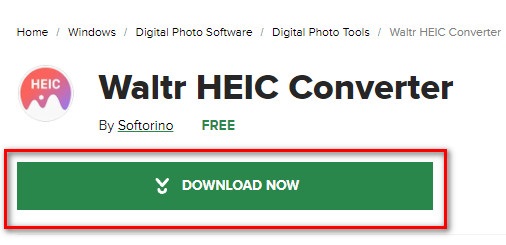
مرحله 1. برای دانلود برنامه WaltR HEIC Converter، عبارت WaltR HEIC Converter را جستجو کنید. سپس مراحل نصب را دنبال کرده و برنامه را اجرا کنید.
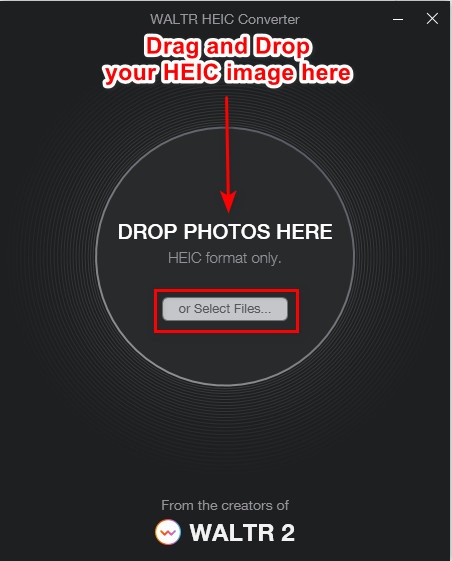
مرحله 2. تصویر HEIC خود را روی رابط اصلی نرمافزار بکشید و رها کنید یا روی دکمه Select Files کلیک کنید تا تصویر HEIC را به صفِ تبدیل اضافه کنید. سپس منتظر بمانید تا تصویر HEIC شما آپلود شود و بعد به مرحله بعد بروید.
مرحله 3. در مرحله بعد، روی دکمه کشویی کنار گزینه Format کلیک کنید تا فرمت خروجی دلخواه را انتخاب کنید. گزینه JPEG را بزنید.

مرحله 4. در نهایت روی دککمه Convert کلیک کنید تا تصویر HEIC شما به فرمت تصویری JPEG تبدیل شود. سپس محل ذخیره تصویر را انتخاب کنید و کار تمام است!
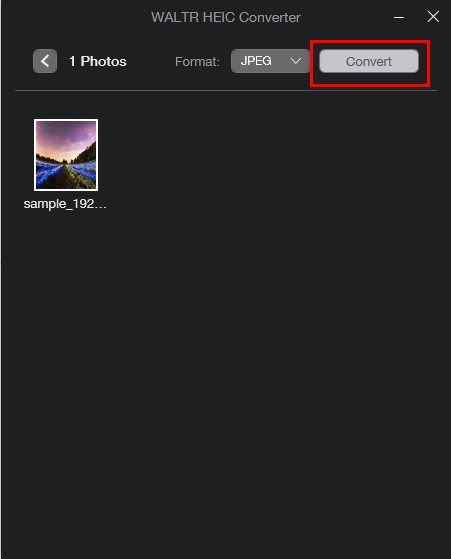
آسان است، درست است؟ با انجام مراحل بالا می توانید تصویر HEIC را به تصویر JPEG تبدیل کنید.
قسمت 2. 4 بهترین جایگزین برای تبدیل WaltR HEIC
با این حال، اگر به دنبال راهی راحتتر برای تبدیل HEIC به JPEG هستید که نیازی به دانلود آن ندارید، راه حل برای شما استفاده از مبدل آنلاین HEIC به JPEG است. ما بهترین مبدلهای آنلاین HEIC به JPEG را در اینترنت جستجو کردیم و متوجه شدیم که این ابزارها بهترین برای استفاده هستند. بنابراین، برای دانستن دو بهترین جایگزین برای مبدل WaltR HEIC به خواندن این مقاله ادامه دهید.
جایگزین 1. تبدیل FVC رایگان HEIC به JPEG
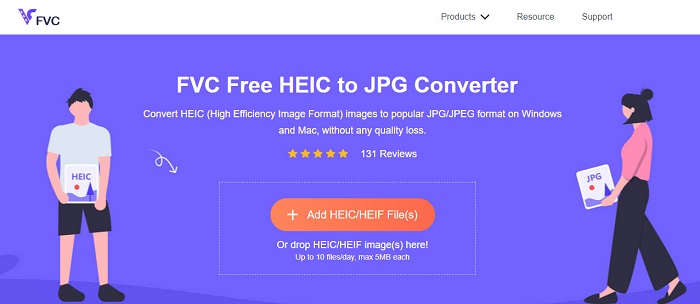
FVC Free HEIC to JPEG Converter بهترین ابزار برای تبدیل HEIC به JPEG بهصورت آنلاین است. این مبدل میتواند تصویر HEIC شما را بدون افت کیفیت به JPEG تبدیل کند. همچنین به شما امکان میدهد تا چندین تصویر HEIC را تنها با یک کلیک بهصورت گروهی به JPEG/JPG تبدیل کنید. افزون بر این، هنگام تبدیل تصاویر، دادههای EXIF مانند اندازه، ابعاد، تاریخ/زمان ثبت و تنظیمات نوردهی را حفظ میکند. این ابزار کاملاً 100% رایگان و ایمن است. و برخلاف بسیاری از ابزارهای آنلاین دیگر، FVC Free HEIC to JPEG Converter حاوی تبلیغات آزاردهنده نیست.
طرفداران
- دارای یک رابط نرم افزاری با کاربری آسان.
- می تواند تصاویر HEIC شما را به صورت دسته ای به فرمت تصویر JPEG تبدیل کند.
- استفاده از آن بی خطر و 100% رایگان است.
- قابل دسترسی در تمامی مرورگرهای وب از جمله گوگل، فایرفاکس و سافاری.
منفی ها
- زمانی که اتصال اینترنت شما کند است، ممکن است فرآیند تبدیل کندی داشته باشید.
جایگزین 2. OnlineConvert.com

OnlineConvert.com نیز ابزاری شناختهشده برای تبدیل تصاویر HEIC به JPEG است. این مبدل آنلاین HEIC به JPEG به شما اجازه میدهد اندازه و کیفیت خروجی تصویر را تغییر دهید. همچنین به دلیل داشتن رابط کاربری ساده، ابزاری کاربرپسند محسوب میشود. با این حال، شامل تبلیغات مزاحمی است که ممکن است برای شما آزاردهنده باشد. با وجود این، بسیاری از افراد همچنان برای تبدیل تصاویر HEIC به JPEG از این مبدل استفاده میکنند.
طرفداران
- این یک رابط نرم افزاری بصری دارد.
- این به شما امکان می دهد اندازه و کیفیت تصویر خود را تغییر دهید.
منفی ها
- این شامل تبلیغات است.
- در صورت قطع شدن اتصال اینترنت ممکن است فایل شما خراب شود.
جایگزین 3. CloudConvert
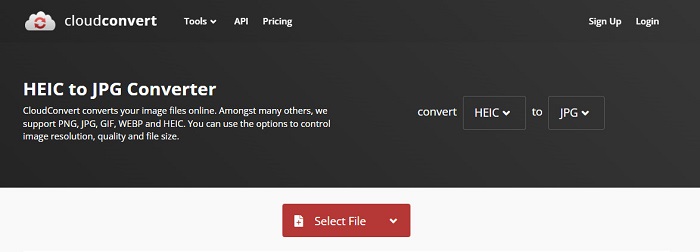
CloudConvert یک مبدل آنلاین است که میتواند تصاویر HEIC را نیز به JPEG تبدیل کند. این مبدل رابطی ساده دارد و در نتیجه ابزاری کاربرپسند است. با استفاده از این مبدل میتوانید عرض و ارتفاع و همچنین کیفیت تصویر خروجی را تغییر دهید. افزون بر آن، این ابزار از قالبهای مختلفی مانند HEIC، JPEG، PNG، GIF و WebP پشتیبانی میکند.
با وجود آن، هنگام استفاده از این مبدل، اتصال اینترنت شما باید سریع باشد تا در هنگام تبدیل تصویر HEIC خود، زیاد منتظر نمانید. با این وجود، هنوز هم یکی از کارآمدترین ابزارهایی است که می توانید در اینترنت پیدا کنید.
طرفداران
- استفاده از آن بی خطر و رایگان است.
- این به شما امکان می دهد کیفیت خروجی تصویر خود را تغییر دهید.
- دارای یک رابط کاربری آسان است.
منفی ها
- فرآیند تبدیل شما بسته به سرعت اینترنت شما کند خواهد بود.
جایگزین 4. FreeToolOnline.com
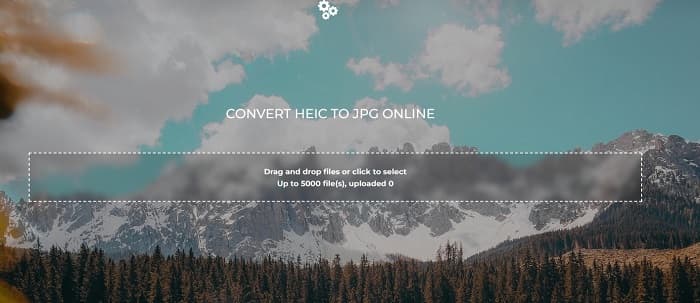
یکی دیگر از مبدلهای آنلاین HEIC به JPEG که باید امتحان کنید، وبسایت FreeOnlineTool.com است. این ابزار میتواند تصاویر HEIC را به فرمتهای JPEG و PDF تبدیل کند. همچنین این مبدل آنلاین رایگان و استفاده از آن ایمن است. اگر بخواهید چندین تصویر HEIC را بهطور همزمان به JPEG تبدیل کنید، این مبدل چنین قابلیتی دارد. افزون بر این، رابطی ساده و شهودی دارد. با این حال، مانند بسیاری از مبدلهای دیگر، حاوی تبلیغاتی است که ممکن است هنگام استفاده از آن برای شما آزاردهنده باشد.
طرفداران
- از تبدیل HEIC به فرمت JPEG و PFD پشتیبانی می کند.
- رابط کاربری گرافیکی ساده ای دارد.
- این اجازه می دهد تا شما را به تبدیل دسته ای تصاویر HEIC به تصاویر JPEG.
منفی ها
- این شامل تبلیغات است.
بخش 3. سؤالات متداول در مورد مبدل HEIC WaltR
آیا تبدیل WaltR HEIC در دستگاه های تلفن همراه موجود است؟
متأسفانه، تبدیل WaltR HEIC در هیچ دستگاه تلفن همراه قابل دانلود نیست.
آیا می توانید HEIC را با استفاده از مبدل HEIC WaltR به GIF تبدیل کنید؟
خیر. WaltR HEIC Converter از فایلهای تصویری GIF پشتیبانی نمیکند. اما اگر میخواهید تصویر HEIC خود را به فرمت GIF تبدیل کنید، میتوانید از این ابزار Aiseesoft Free Image Converter Online برای تبدیل تصویر HEIC به GIF استفاده کنید.
آیا تبدیل WaltR HEIC نسخه آنلاین دارد؟
مبدل WaltR HEIC نسخه آنلاین ندارد. بنابراین، اگر می خواهید HEIC را به صورت آنلاین به JPEG تبدیل کنید، از جایگزین های بالا استفاده کنید.
نتیجه
Waltr HEIC Converter واقعاً ابزاری فوقالعاده برای تبدیل HEIC به JPEG است. با توجه به امکانات بسیار خوبی که ارائه میدهد، تعجبی ندارد که بسیاری از افراد از آن استفاده میکنند. اما اگر نمیخواهید برای تبدیل HEIC به JPEG برنامهای را روی دستگاه خود نصب کنید، استفاده از ابزار آنلاین بهترین گزینه است. ما استفاده از بهترین ابزار موجود در بازار، یعنی FVC Free HEIC to JPEG Converter را پیشنهاد میکنیم.
-
 HEIC را با استفاده از 4 روش برتر در سال 2022 به PDF تبدیل کنید
 برای کسب اطلاعات بیشتر در مورد بهترین مبدل HEIC به PDF میتوانید این 2022 را دانلود کنید. میتوانید این مقاله را بخوانید زیرا ما بررسی آنها را ارائه کردهایم.
-
 5 مورد از بهترین مبدلهای HEIC به JPG را در سال 2022 انتخاب میکنند
 با مبدل HEIC به JPC می توانید به راحتی فرمت تصویر را به JPG قابل حمل تغییر دهید. می خواهید بدانید این 5 ابزار چیست؟ این مقاله را بخوانید.
-
 5 بهترین راه برای تغییر تصویر به GIF متحرک [به روز رسانی 2022]
 آیا نیاز به تبدیل تصویر به GIF دارید؟ این مقاله پنج بهترین مبدل را که میتوانیم در بازار پیدا کنیم، ارائه میکند. بنابراین، بیایید با خواندن این مقاله به این ابزارها پی ببریم.
