


 Video Converter Ultimate
 ضبط صفحه
 تعمیر ویدیو
5 بهترین کاتر MP4: یاد بگیرید چگونه ویدیوها را در رایانه شخصی، مک و دستگاه های تلفن همراه ببرید
اگر یک وبلاگ نویس یا مشتاق هستید، گرفتن ویدیو از خودتان بسیار رایج است. این کار به تلاش و اعتماد به نفس زیادی نیاز دارد و همچنین شما در مقابل دوربین عکاسی می کنید. همچنین، رایج ترین چیزی که همه افراد حرفه ای و تازه وارد در وبلاگ نویسی می کنند، اشتباهاتی است که مرتکب می شوید. به جای فیلمبرداری مجدد، آنها تمایل دارند آن را برش داده و با ویدیوهای اصلی ادغام کنند. برای ساختن یک ویدیوی کاملا جدید که از زوایای مختلف، نماها، مونتاژها و موارد دیگر تشکیل شده است، آن را از ویدیوهای مختلف جدا کرده و به یکی اضافه می کنند. اما بهعنوان تازهکار در این نوع کار یا حتی حرفهای، انتخاب ماشین اصلاح مناسب دشوار است. زیرا همه عملکردهایی که در تبلیغات ابزار گفته اند در ابزار نیست. به جای اینکه به مقاله دیگر بروید و توصیه را بخوانید، چرا ابتدا از آن درس نمی گیرید. همانطور که ما فقط شواهد واقعی را برای نفع خود جمع آوری کردیم. بنابراین، در اینجا در لیست برشهای MP4 وجود دارد که میتوانید برای شروع وبلاگنویسی از آنها استفاده کنید. روی تمرکز خود بمانید تا بدانید بهترین قیچیهایی که میتوانید استفاده کنید که یک چشمانداز ساده و در عین حال حرفهای را به ویدیوهای شما ارائه میدهند، کدامند.

قسمت 1. دانلود بهترین نرم افزار MP4 Video Cutter بر روی کامپیوتر و مک
اگر قرار است درباره بهترینها صحبت کنیم، ابتدا باید خواندن این مطلب را در اولویت قرار دهید. همانطور که پیشتر گفته شد، ساخت ولاگ بسیار سختتر از چیزی است که انتظار داریم؛ نه فقط از نظر داشتن اعتمادبهنفس برای روبهرو شدن با دوربین و منتشر کردن آن، بلکه باید داشتن یک ابزار چندمنظوره را هم در نظر بگیرید. ابزاری که ویدیویی جذابتر برای چشمان هر بینندهای ارائه دهد. FVC Video Converter Ultimate امکانات ویرایشی فوقالعاده و قابلیتهای تبدیل متعددی ارائه میکند که هر کسی که بخواهد میتواند از آن استفاده کند. چه تازهکار باشید و چه حرفهای، باید به دنبال بهترینِ موجود در بازار باشید. با اینکه این نسخه پولی است، اما همچنان همان کیفیتی را که میخواهید در اختیارتان میگذارد. و اگر این ابزار را بهعنوان انتخاب شخصی خود برگزینید، آینده درخشانی در انتظار شما خواهد بود. میخواهید از امروز ولاگسازی را شروع کنید؟ پس این مراحل را برای استفاده از این برشدهنده ویدیو MP4 دنبال کنید.
مرحله 1. روی دکمه دانلود زیر کلیک کرده و آن را روی رایانه ویندوز یا مک خود نصب کنید. مراحل نصب ابزار را دنبال کرده و برای اجرای نرمافزار روی پایان (Finish) کلیک کنید.
دانلود رایگانبرای ویندوز 7 یا بالاتردانلود امن
دانلود رایگانبرای MacOS 10.7 یا بالاتردانلود امن
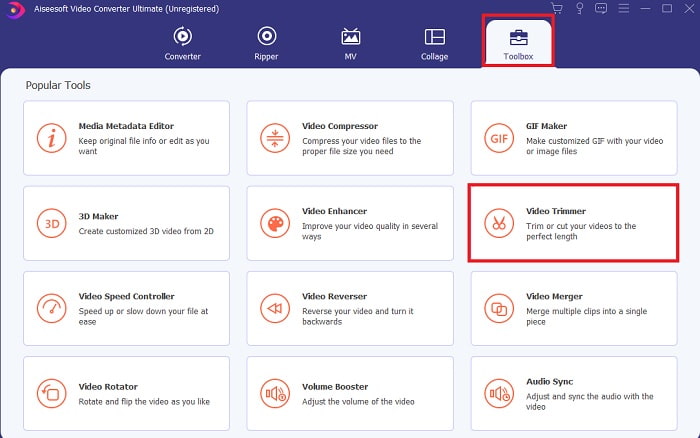
مرحله 2. اگر این صفحه روی نمایشگر شما ظاهر شده است، روی Toolbar کلیک کرده و در قسمت پایین به دنبال Video Trimmer بگردید.
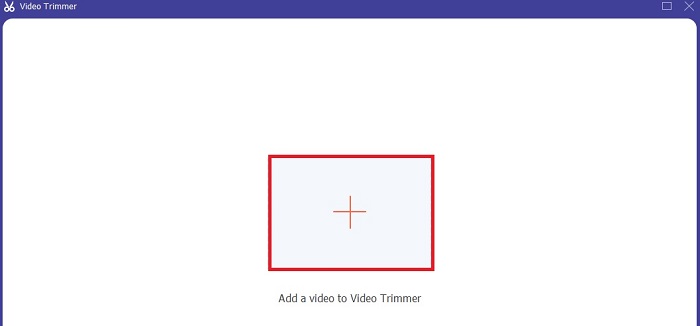
مرحله 3. روی دکمه plus کلیک کنید تا فایل را اضافه کنید. فایلی را که میخواهید برش دهید در درایو خود انتخاب کرده و برای وارد کردن ویدیو روی open کلیک کنید.
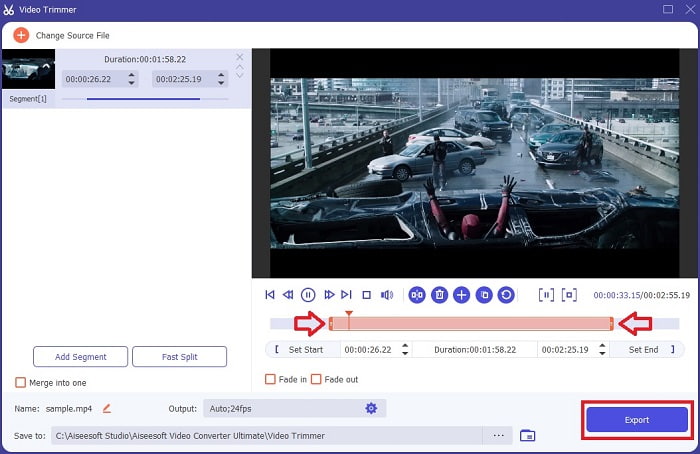
مرحله 4. برای تنظیم نقطه شروع و پایان ویدیوی خود، با جابهجا کردن playback in and out بازه زمانی دلخواه را مشخص کنید. در صورت تمایل میتوانید افکت محو شدن تدریجی در ابتدا و انتها (fade in و fade out) اضافه کنید. همچنین اگر روی دکمه cog کلیک کنید، میتوانید فرمت خروجی رسانه را هم تغییر دهید. وقتی کارتان تمام شد، برای آغاز فرآیند برش روی دکمه Export کلیک کنید.
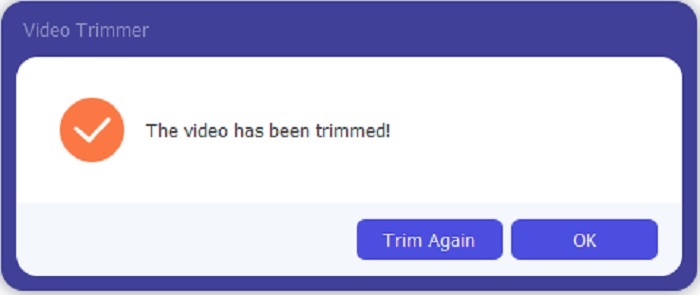
مرحله 5. تنها چند ثانیه صبر کنید و حالا ویدیوی شما برش خورده است. سپس اگر کار تمام است روی OK کلیک کنید یا اگر لازم است ویدیوی دیگری را برش دهید روی Trim Again کلیک کنید. اگر میخواهید ویدیویی را که همین حالا ساختهاید ارتقا دهید، دوباره روی نوار ابزار کلیک کرده و به دنبال ابزار تقویتکننده ویدیو (video enhancer) بگردید.
مزیت داشتن ابزار ادغام ارائه شده توسط FVC Video Converter Ultimate with Steps
برخلاف هر برنامه دیگری، ادغام ویدیوها در FVC Video Converter Ultimate بسیار آسان است. اگر این ابزار را به دست آورید، این یک ویژگی جایزه است. همانطور که گفته شد، این ابزار چند منظوره است، بنابراین بدون بحث بیشتر، بیایید شروع کنیم به ادغام ویدیوهای مختلف در یک.
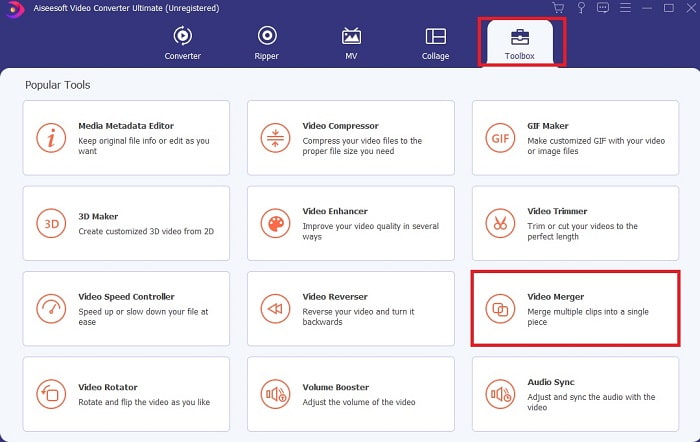
مرحله 1. نرمافزار را باز کرده و به نوار ابزار (Toolbar) بروید، سپس Video Merger را پیدا کرده و روی آن کلیک کنید.
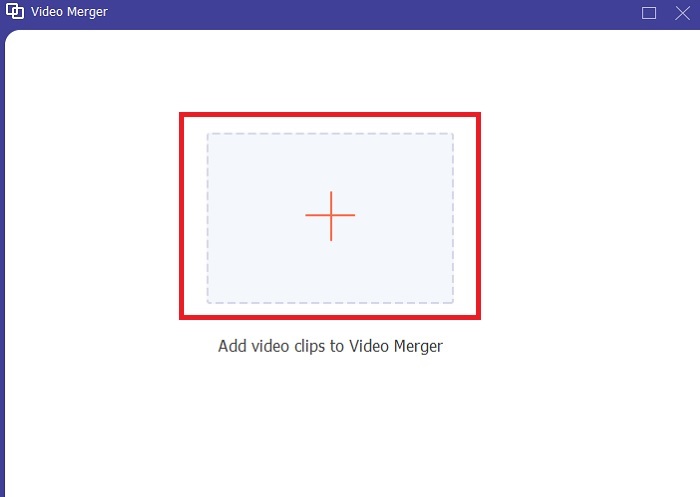
مرحله 2. روی دکمه add کلیک کرده و ویدیویی را که میخواهید ادغام کنید انتخاب کرده و برای ادامه روی open کلیک کنید. بعد از انتخاب اولین فایل، روی علامت بعلاوه کلیک کنید تا فایل دیگری را که میخواهید ادغام کنید، اضافه نمایید.
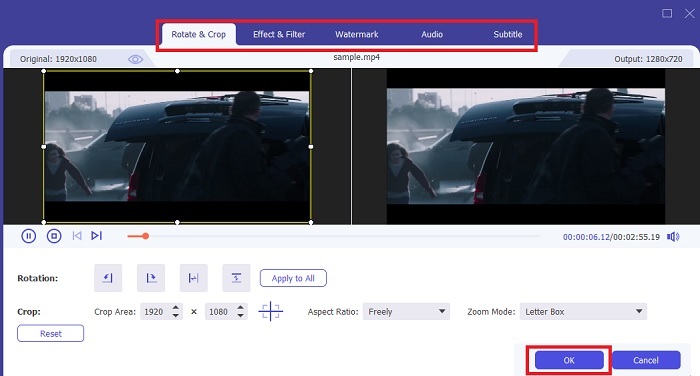
مرحله 3. در رابط کاربری، روی دکمه wand کلیک کنید تا افکتها را اضافه کنید، صدا را تقویت کنید، ویدیو را بچرخانید یا برش دهید و زیرنویس اضافه کنید. برای ذخیره ویرایشهایی که انجام دادهاید روی OK کلیک کنید. در صورت تمایل، همین روند را برای سایر ویدیوها هم تکرار کنید.
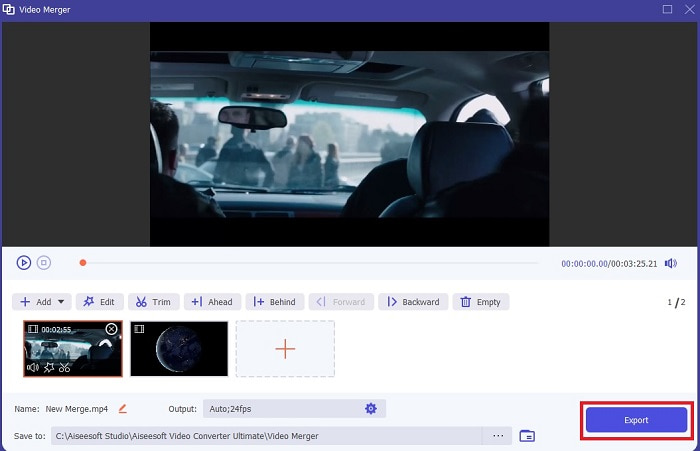
مرحله 4. اگر آماده شروع فرآیند هستید، روی Export کلیک کنید. پس از پایان گرفتن خروجی، یک پنجره مدیریت فایل روی صفحه شما باز میشود. برای تماشای ویدیوی خروجی فقط روی آن کلیک کنید و لذت ببرید.
قسمت 2. بهترین برش MP4 آنلاین
این میتواند یک برشدهنده خوب باشد، اما مانند FVC Video Converter Ultimate بهترین نیست. با این حال، استفاده از این برشدهندههای آنلاین MP4 ارزش امتحان کردن را دارد.
1. 123Apps Online Video Cutter
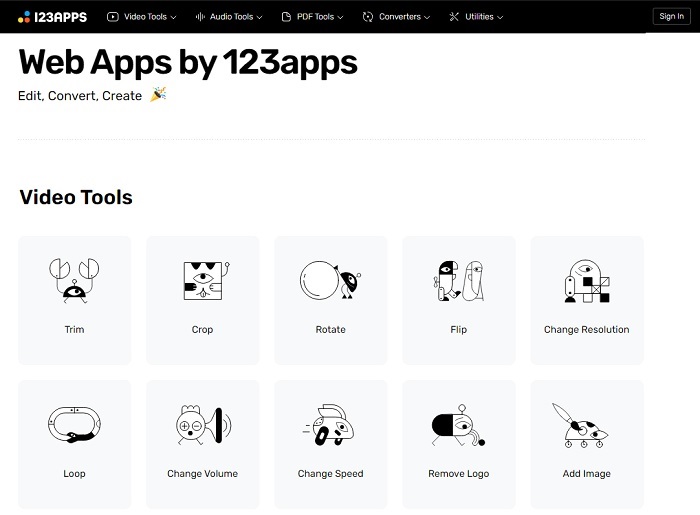
این اولین ابزار آنلاین برای بهتر کردن ویدیوهای شما در نظر گرفته شده است. می تواند مدت زمان ویدیو را تنظیم کند، برش دهد، متن اضافه کند و موارد دیگر. اما این ابزار زمان زیادی را برای صادرات می گیرد. پس از صادرات باید آن را دانلود کنید و این روند به سرعت اینترنت شما بستگی دارد. همچنین، شما نمی توانید کیفیت ویدیوهای خود را تنظیم کنید. بنابراین، اگر ویدیوی شما کمی تار است و نیاز به تنظیم فریم در ثانیه دارد، نمیتوانید این کار را در اینجا انجام دهید. اما با این حال، ارزش امتحان کردن را دارد.
2. کلیدیو
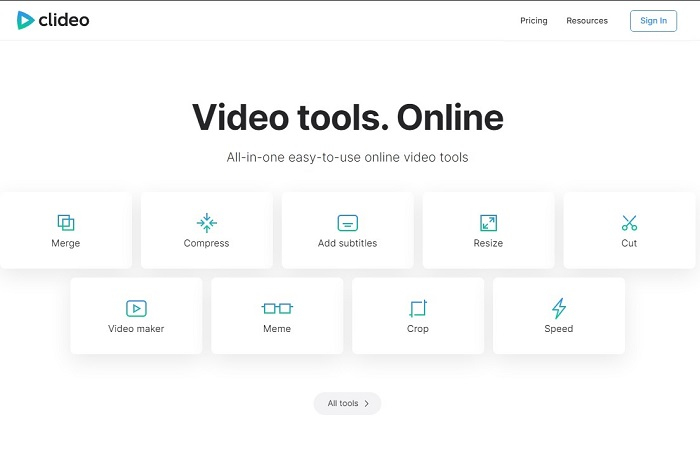
اگر صحبت از برش ویدیو باشد، این گزینه هم میتواند انتخاب خوبی باشد. Clideo یکی از بهترین برشدهندههای آنلاین MP4 است که میتوانید پیدا کنید. درست مانند اولین ابزار آنلاین که قبلاً ذکر شد، این ابزار هم امکانات ویرایش پایه را ارائه میدهد. هرچند فقط از ویرایشهای ابتدایی پشتیبانی میکند، اما اگر قصد ساخت یک ویدیوی واقعاً چشمگیر را دارید، این امکانات کافی نیست. با این حال میتوانید آن را به صورت آنلاین امتحان کنید؛ نیازی به نگرانی نیست، هم رایگان است و هم امن.
قسمت 3. 3 بهترین برنامه های MP4 Cutter در اندروید و iOS
اگر دسکتاپ ندارید تا از ابزارهای بالا استفاده کنید و بخواهید یک وبلاگ نویس باشید، هنوز ممکن است؟ اگر تلفنی مانند اندروید یا iOS دارید، می توانید از این برنامه ها برای انجام ویرایش در گوشی های خود استفاده کنید. اما برخی از ویژگی های موجود در بالا وجود دارد که در اینجا وجود ندارد. بنابراین، به خواندن زیر ادامه دهید تا بدانید این ابزارها چیست و از بین آنها انتخاب کنید.
1. iMovie برای iOS
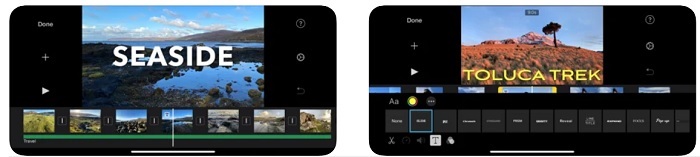
اگر میخواهید به ویدیوی خود حال و هوایی شبیه فیلمهای هالیوودی بدهید، iMovie نرمافزار مناسبی است. این اپلیکیشن برش MP4 فقط برای کاربران iOS طراحی شده است. اما با وجود امکانات ویرایشی پیشرفته، برخی از باگهای آن هنوز برطرف نشدهاند. در بعضی موارد، برنامه هر بار که تلاش میکنید ویرایشی انجام دهید کرش کرده و صفحه سیاه میشود. گاهی هم بهخاطر خطاها، تصویر و صدا با هم هماهنگ نیستند. اینها تنها چند نمونه از باگها هستند؛ شاید ساده به نظر برسند اما بیشتر مواقع واقعاً آزاردهندهاند. پس اگر میخواهید iMovie را امتحان کنید، میتوانید آن را از App Store دانلود کنید.
2. Video Editor & Maker – Viva Video for Android
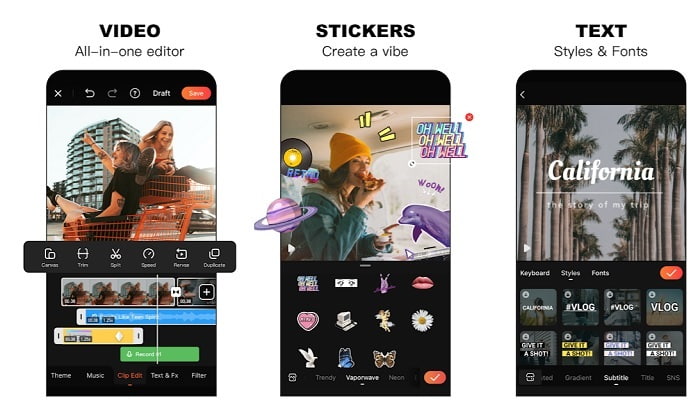
یکی از بهترین برشدهندههای رایگان MP4 روی اندروید، برنامه Video Editor & Maker – Viva Video است. درست مانند ابزار قبلی، هر دو بهترین قابلیتهای ویرایش روی گوشی را ارائه میدهند؛ مثل افکتهای انتقال، گلیچ و موارد دیگر، اما این ابزار برای استفاده نیاز به پرداخت هزینه دارد. مشکلی که وجود دارد این است که دکمه اشتراک (لغو اشتراک) مشخصی برای متوقف کردن اپلیکیشن نیست. بنابراین شاید فکر کنید بهترین راهحل این باشد که برنامه را حذف کنید تا اشتراک تمام شود، اما این اتفاق نمیافتد. اگر این شیوه پرداخت را انتخاب کرده باشید، همچنان هزینه از کارت اعتباری شما کسر میشود. اما در مجموع، این ابزار در رده A قرار میگیرد؛ نه بیشتر و نه کمتر.
بخش 4. سوالات متداول در مورد MP4 Cutter
MP4 چیست؟
MP4 همچنین به عنوان فرمت رسانه چند منظوره شناخته می شود. به جای ذخیره کد، داده های فیلم ها، عکس ها، زیرنویس ها یا متون را ذخیره می کند. همچنین، این فرمت رایجترین فرمت ویدیو در سراسر جهان است.
آیا MP4 اتلاف دارد یا بدون افت؟
MP4 از آنجایی که یک فرمت چند منظوره است، فشرده سازی با اتلاف است.
بهترین فرمت غیر از MP4 چیست؟
برخی فرمتها خروجی رسانهای بهتری نسبت به MP4 ارائه میدهند، اما به اندازه این فرمت انعطافپذیر نیستند. برای مثال WMV، این فرمت حجم کمتری نسبت به MP4 دارد اما با دستگاههای اپل سازگار نیست، چون بهعنوان فرمت بومی Windows Media Player طراحی شده است. میتوانید برای پخش بهتر، فایلهای MP4 خود را به WMV تبدیل کنید.
نتیجه
در پایان، حالا فهمیدن تفاوت میان هر ابزار برای شما سادهتر شده است. اما همانطور که قبلاً گفته شد، همه آنها امکانات برش فوقالعادهای مانند FVC Video Converter Ultimate ارائه نمیدهند؛ بهویژه اگر میخواهید ویدیویی جذابتر برای جذب بازدید بیشتر و در نتیجه کسب درآمد بسازید. پس بهجای اینکه به یک گزینه موقت بسنده کنید، چرا از FVC Video Converter Ultimate استفاده نکنید تا با خیال راحت به سراغ آینده بروید و بهترین نسخه را برای خودتان به دست آورید؟.
-
 راهنمای نحوه تبدیل RMVB به MP4 در ویندوز / مک (3 روش رایگان)
 آیا می خواهید RMVB را به MP4 برای پخش آسان در رایانه یا تلفن همراه خود تبدیل کنید؟ در این راهنما راه های ساده ای برای تبدیل فایل های RMVB خود به MP4 خواهید یافت.
-
 4 بهترین مبدل MP4 به M4V برای تبدیل فیلم های MP4 به M4V با سهولت
 در صورت نیاز به تغییر پرونده های MP4 به M4V ، باید جزئیات بیشتری درباره تفاوت بین این دو قالب و همچنین بهترین مبدل های MP4 به M4V را از مقاله بیاموزید.
-
 AMV Converter - 3 بهترین روش برای تبدیل MP4 به AMV در Win / Mac
 بهترین مبدل های MP4 به AMV برای تبدیل فیلم ها به Amine Music Video کدام است ، شما می توانید در مورد 3 روش کارآمد برای دریافت فیلم های مورد نظر به راحتی از مقاله بیشتر بدانید.
