


 Video Converter Ultimate
 Skjermopptaker
 Videoreparasjon
Hvilken er den beste omformeren å bruke for å konvertere MP3 til WAV
MP3 er det velkjente lydformatet over hele verden. Faktisk er det standardformatet for lagring og opptak av lydfiler. Selv om dette formatet brukes av mange, finnes det likevel mange andre formater som gir høyere lydkvalitet enn MP3, som for eksempel WAV. Så hvis du vil vite hvordan du konverterer MP3 til WAV for å få glede av å høre på musikk eller opptak du har gjort, må du holde tempoet oppe, for dette kan bli en lang løype – uten videre om og men, la oss starte løpet.

Del 1. Hvordan konvertere MP3 til WAV på Windows og Mac med detaljerte trinn
1. FVC Video Converter Ultimate
Vil du vite hvordan du konverterer MP3 til WAV på Mac og PC med høy lydkvalitet? Da er FVC Video Converter Ultimate verktøyet for deg. Det er også raskt i konvertering, som SSC Tuatara, og trygt å bruke. Konverter så mange du vil samtidig, for det er ingen grense for hvor mange mediefiler som kan konverteres her. I tillegg kan du bruke dette verktøyet til å lage musikkvideoer, kollasjer og mye mer. Hvis du vil vite hvordan du bruker det, følger du disse trinnene og starter konverteringsprosessen.
Trinn 1. Velg mellom PC eller Mac og klikk på nedlastingsknappen ved siden av. Installer verktøyet og følg veiledningen, og klikk deretter Fullfør for å lagre endringene.
Gratis nedlastingFor Windows 7 eller nyereSikker nedlasting
Gratis nedlastingFor MacOS 10.7 eller nyereSikker nedlasting
Trinn 2. Etter installasjonen klikker du på Add Files for å legge til MP3-lyden du vil konvertere. Hvis du har mer enn to lydfiler, er det bedre å dra og slippe dem inn i grensesnittet.
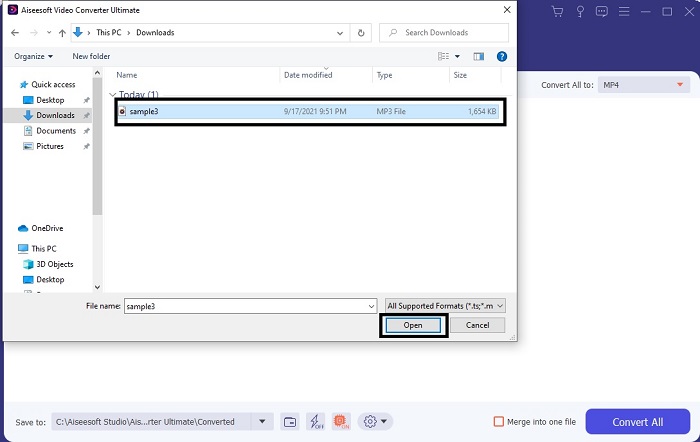
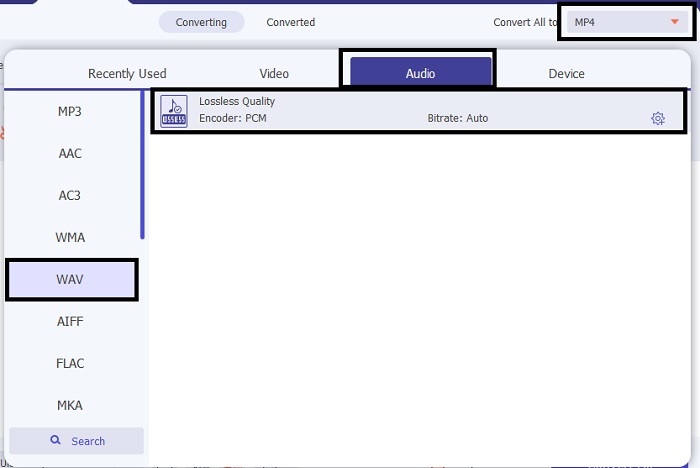
Trinn 3. Endre MP3 til WAV eller til et annet lydformat du ønsker i undermenyen.
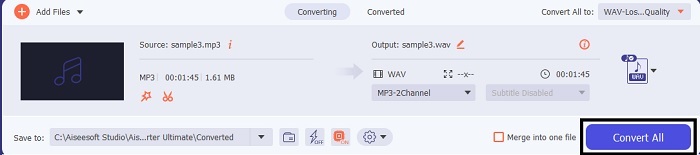
Trinn 4. Hvis alt allerede er klart, klikker du på Convert All for å starte konverteringen.
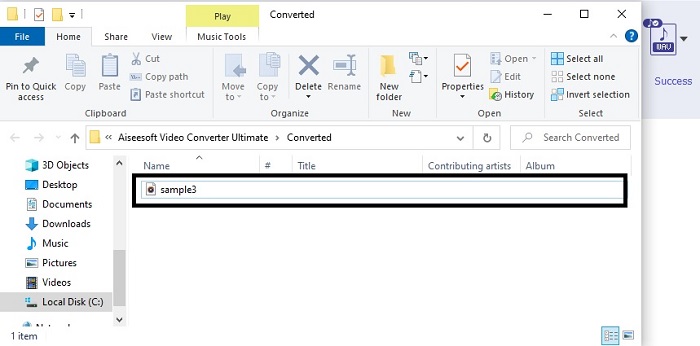
Trinn 5. Når konverteringen er ferdig, åpnes en filbehandler automatisk på skjermen. Klikk på den konverterte lydfilen og nyt å lytte til den nye versjonen. I tillegg, hvis lyden er litt lav for deg, går du til verktøylinjen og finner Audio Booster for å få tydeligere og bedre lyd.
2. iTunes
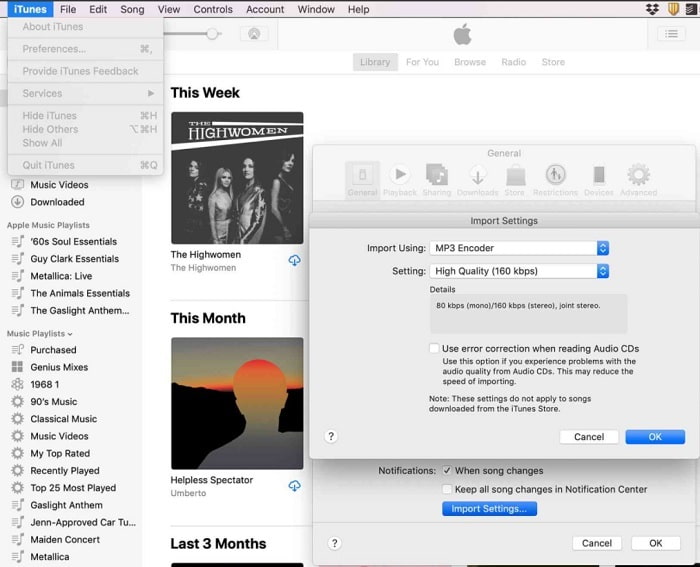
iTunes brukes mye for å spille musikk på Mac og iOS-produkter. Men visste du at du kan konvertere MP3 til WAV i iTunes? Svaret er ja. Avspilling og konvertering er samlet i dette verktøyet, men det kan ikke brukes på Android og Windows, fordi det er Apples standard mediespiller på deres produkter. Så hvis du ikke har et Apple-produkt, kan du likevel gjøre konverteringen ved hjelp av FVC Video Converter Ultimate. Men hvis du har et, er det et must å bruke iTunes og følge disse trinnene.
Trinn 1. Åpne programvaren på enheten din.
Trinn 2. Velg MP3-lydfilen du vil konvertere.
Trinn 3. Deretter klikker du på Convert og venter til prosessen er fullført.
Del 2. Topp 5 beste gratis online MP3 til WAV-konverterere på nettet
1. FVC Free Audio Converter
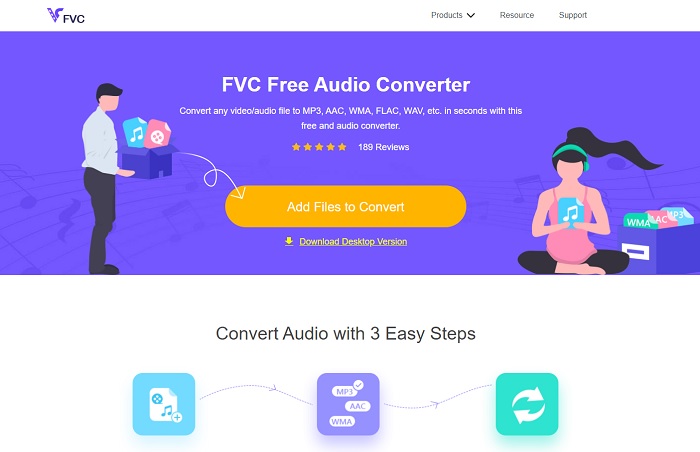
FVC Free Audio Converter er den beste MP3 til WAV-konverteren på nett. Den har de samme mindre funksjonene som FVC Video Converter Ultimate kan tilby deg. Så forvent ikke noe mindre når du bruker dette verktøyet, selv om de viktigste premium-funksjonene ikke er tilgjengelige her. Fordi det er gratis, kan du klikke på hyperlenken som er gitt spesielt til deg hvis du vil prøve det. Så, før noe annet, la oss begynne med hvordan du bruker denne nettbaserte konverteren.
Trinn 1. For å få tilgang til verktøyet må du klikke på denne lenken.
Trinn 2. Klikk på Add Files to Convert for å starte verktøyet.
Last ned skrivebordsversjonen for å konvertere filer i batch.
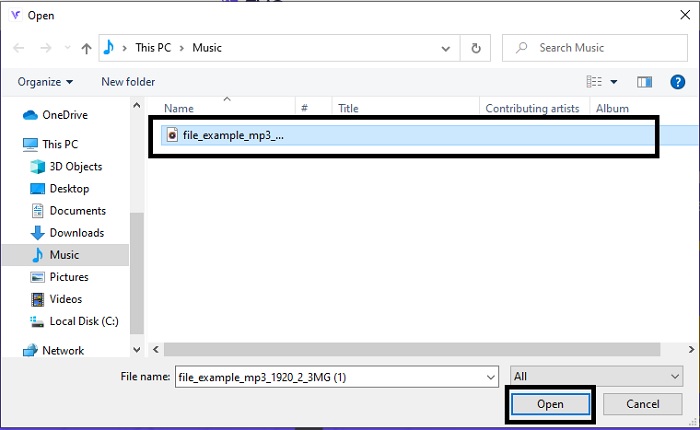
Trinn 3. Etter at verktøyet er startet, velger du MP3-filen du vil konvertere og klikker Open.
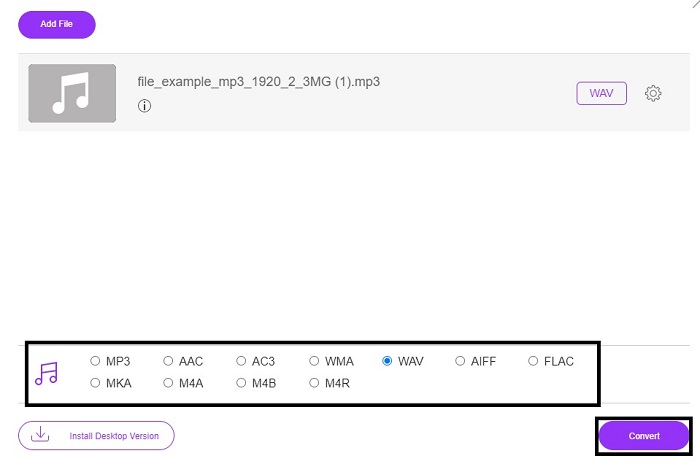
Trinn 4. Velg formatet nedenfor og klikk deretter Convert for å starte prosessen.
Trinn 5. Det tar bare noen få minutter, og når konverteringen er ferdig, klikker du på mappen for å finne filen du nettopp har konvertert.
2. Cloud Convert
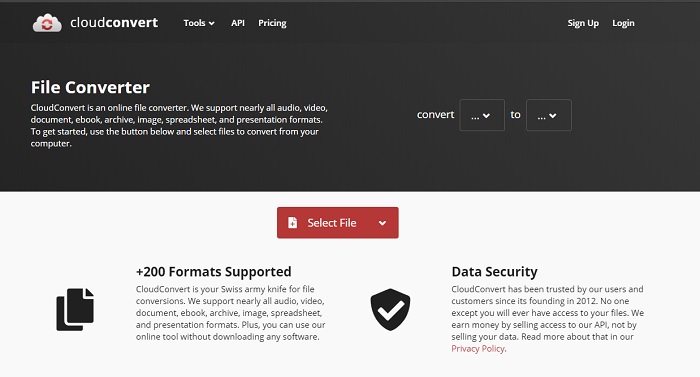
Et annet verktøy du kan få tilgang til på nettet er Cloud Convert for å konvertere til et nytt format. Det er et av de beste på markedet når det gjelder konvertering, men du kan ikke justere eller endre bitrate, fps og kodeker. Men hvis du vil konvertere tekstfiler til et nytt format, er dette verktøyet absolutt verdt å prøve.
3. Convertio
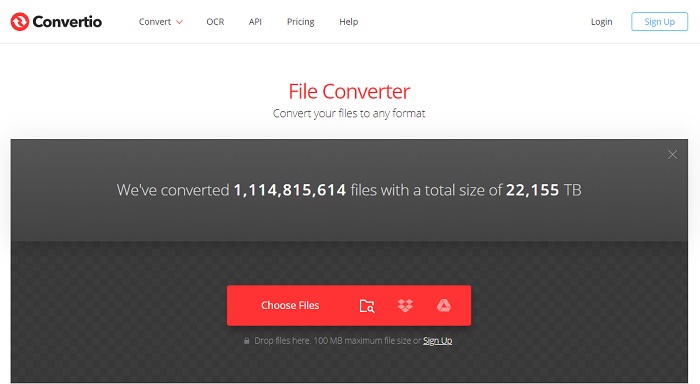
Akkurat som Cloud Convert er Convertio også laget for å være gratis. Når det gjelder konvertering, tilbyr det også kraftig komprimering og konvertering. Dette verktøyet brukes av mange til å konvertere fordi instruksjonene er presise og det er enkelt å bruke. Selv om du får tilgang til verktøyet på nettet, har hovednettstedet mange annonser i webgrensesnittet, noe som er litt irriterende – spesielt hvis du ikke vil bli forstyrret mens du konverterer.
4. Online-Konverter
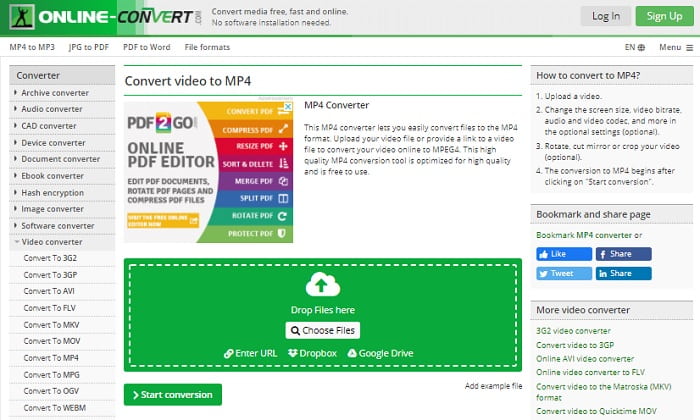
Dette verktøyet har mye å tilby når det gjelder konvertering, og det er også svært informativt. Online-Convert gir avanserte funksjoner der du kan endre bitrate, oppløsning og kanaler. Hvis du er ny når det gjelder konvertering, kan dette verktøyet virke litt overveldende. I tillegg, når du laster opp en fil i webgrensesnittet, må du vente på at den blir behandlet. Ikke bare det, det er også en grense for hvor mye du kan konvertere – kun 100 MB – så hvis du vil konvertere mange filer, må du kjøpe premiumversjonen for å fjerne annonser også.
5. 123 Apps- Audio Converter
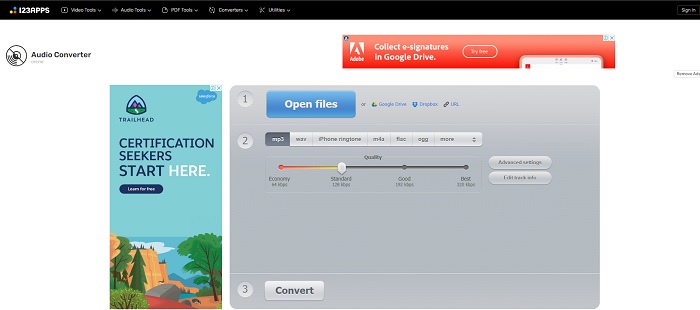
I dette nettverktøyet kan du konvertere effektivt og effektivt. Selv om det bare støtter tre lydformater, er 123 Apps - Audio Converter et av de enkleste verktøyene. Du kan bare åpne verktøyet, sette inn filen, velge format og konvertere – så enkelt er det. Men ulempen med dette verktøyet er at det har kommet noen rapporter om at lydkvaliteten blir lavere etter konvertering.
Del 3. Sammenligningsskjema over omformerne på listen
Lær forskjellene på hvert verktøy og la oss sammenligne dem deretter.
| Egenskaper | FVC Video Converter Ultimate | iTunes | FVC Free Audio Converter | Cloud Convert | Convertio | Online-Konverter | 123 apper - lydkonverterer |
| Audio Converter |  | | | | | | |
| Redigeringsfunksjoner | |  | | | | | |
| Endre bitrate, fps, oppløsning eller lignende | | | | | | | |
| Program støttet | Desktop basert verktøy | Standard skrivebordsbasert verktøy | Nettbasert verktøy | Nettbasert verktøy | Nettbasert verktøy | Nettbasert verktøy | Nettbasert verktøy |
| Støttet operativsystem | Tilgjengelig i alle OS | Kun Apples støttede produkt | Tilgjengelig i alle OS | Tilgjengelig i alle OS | Tilgjengelig i alle OS | Tilgjengelig i alle OS | Tilgjengelig i alle OS |
| Prisklasse | I 1 måned: $25.00 I et år: $31.20 For livstidslisens: $55.20 | Slik fjerner du annonser: $10 per måned $15 i måneden for en familie på seks $5 per måned for studenter | Gratis | Gratis | Gratis | For de ekstra 8 GB: Månedlig abonnement $70 USD fakturert månedlig Årlig abonnement $672 USD | Gratis |
MP3 kontra WAV
MP3-formatet ble utgitt i 1993 av Moving Picture Experts Group (MPEG). Det var standarden for lagring av musikk da den kunne komprimere lyd til en mye mindre størrelse enn andre ukomprimerte formater. Det er fortsatt mye brukt i dag, spesielt for å distribuere lyd på nettet.
WAV, også kjent som WAVE-formatet, er basert på Resource Interchange File Format (RIFF). Den er utviklet av Microsoft og IBM sammen på begynnelsen av 1990-tallet. Det er et alternativ for å lagre rå, ukomprimert lyd i Microsoft Windows. Dermed spilles WAV-filer oftere på Windows-datamaskiner.
Del 4. Vanlige spørsmål om MP3 til WAV
Hva er meningen med WAV?
WAV betyr Waveform Audio Files; det er et ukomprimert tapsfritt format.
Hvilken er større i filstørrelse? MP3 eller WAV?
Selv om begge formatene lagrer lydfiler, er WAV mye større enn MP3. I noen tilfeller kan det være opptil 15 ganger større enn MP3 fordi det er ukomprimert. Du kan klikke her for å lære hvordan du konverterer WAV til MP3.
Hvor kan jeg ta opp WAV?
For å gjøre opptak må du bruke det beste verktøyet på nettet. Særlig fordi dette formatet er ukomprimert, må du være forsiktig så du ikke mister data under opptak. Og med det sagt er FVC Screen Recorder den suverene WAV-opptakeren. Den kan både ta opp og redigere, slik at resultatet ditt blir enda bedre i både bilde og lyd. For å vite mer må du laste ned programvaren til datamaskinen din.
Konklusjon
Når løpet nærmer seg slutten, er det nå klarere for oss at det finnes én vinner. Bare ved å skaffe deg dette verktøyet vil du føle deg som kongen av verden når det gjelder opptak. FVC Video Converter Ultimate gjør mesteparten av jobben som de andre opptakerne ikke klarer. Hvis du har problemer med å ta opp video, lyd eller spill, bør du sikre deg overtaket ved å satse på riktig verktøy. Sett alt på FVC Video Converter Ultimate og få en enkel seier på veien.
Gratis nedlastingFor Windows 7 eller nyereSikker nedlasting
Gratis nedlastingFor MacOS 10.7 eller nyereSikker nedlasting
-
 Hvordan konvertere MP4 til WAV gratis på skrivebordet eller online [2021]
 Prøver du hardt å konvertere MP4 til WAV? Vet du ikke hvilken omformer som kan hjelpe deg med det perfekt uten å betale en krone? Les dette innlegget og alle spørsmålene dine vil bli besvart.
-
 WAV Player - Topp 5 WAV Player-apper for Android, iPhone, PC og Mac
 Hvordan spiller jeg WAV-filer på Android-telefonen? Hvilken spiller kan spille WAV? Dette innlegget deler 5 beste gratis WAV-spillere for Android, iPhone, Mac og PC.
-
 FLV til WAV - Konverter FLV til WAV gratis online og på Mac / PC
 Hvordan konverterer jeg en FLV-fil? Kan VLC konvertere YouTube FLV til WAV? Dette innlegget forteller 3 gratis måter å konvertere FLV til WAV uten tap av kvalitet.

