
FVC Image Upscaler

Processing...
Cancel

Cancel

Cancel

Cancel
Retry
Cancel
Continue
Cancel
OK

Upgrade
Cancel



OK
OK
Original:
Upscaled:
FVC Image Upscaler
 142 Reviews

General Images
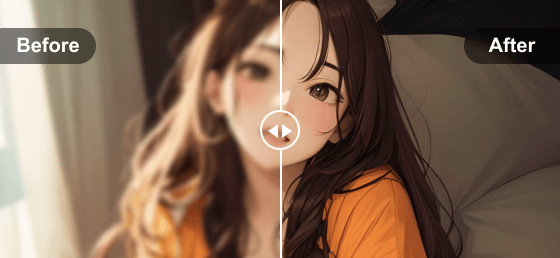
Animation



3 Easy Steps to Upscale Image

1. Upload image


2. Enhance and enlarge


3. Download image
This powerful 4K image upscaler is powered by advanced AI Super Resolution technology trained on millions of deep-learning datasets. With no installation or download required, you can use it to increase image resolution with incredible clarity instantly. It perfectly restores lost pixels, vibrant colors, intricate textures, and fine details. Additionally, portraits are easily recognized and enhanced naturally with this smart AI resolution enhancer. After the picture upscaling process, you will get crystal-clear and watermark-free images effortlessly.

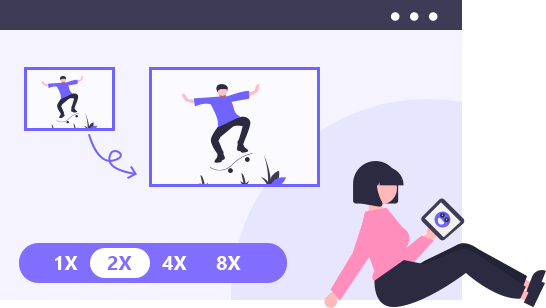
Worried about the insufficient size of your photos? This online image upscaler will meet your needs. Other than enhancing the image quality, this online image upscaler also enables you to enlarge the images by 2×, 4×, 8×, and even to 4K/HD resolution. Just select the one you want and enlarge your image to the exact pixel. After the enhancement and lossless enlargement, you can apply the processed photos to more scenarios.

Print Poster
Imagine that you have the image of your favorite movie star or your pet. If you want to print it out to hang on your wall, you should ensure the high quality of it. This online image upscaler helps you achieve your dream.

Set as Desktop Wallpaper
Find a satisfying picture but it’s blurry when set as the wallpaper? Don’t worry. High-definition pictures are better-looking when used as wallpapers on computer phone screen. This online image upscaler helps improve the quality for you.

Use as Social Media Background
Social media background helps others know more about you. If you want to attract more people to follow your account, you need to get them interested in you. A clear and exquisite background paper will help you a lot.
Preview Effect
This image upscaler allows you to preview the output image in real time.Multi-formats Compatible
You can upload many popular formats like JPG, JPEG, and BMP.Fast & Efficient
The processing speed is efficient. You can finish the upscaling in the blink of an eye.No Account Required
You don’t need to register an account to start the enhancement. It’s super convenient.Free to Use
Unlimited FREE 4K image upscaling daily and download your photos with no watermark.Safety Guaranteed
The uploaded images are 100% safe. Feel free to use this reliable online image upscaler.| System Requirements | Supported OS: Windows 11, Windows 10, Windows 8, Windows 7, macOS 10.7 or above Processor: 1GHz Intel/AMD CPU or above RAM: 1G RAM or more |
| Input Image Format | JPG, JPEG, BMP, PNG |
| Output Image Format | JPG, JPEG, BMP, PNG |

This Free Image Upscaler saves my life. My blurred old photos were enhanced perfectly and I can see my lost relatives clearly in photos.

Highly recommend! FVC Free Image Upscaler is has magic! All photos uploaded are improved in a fast speed. It really saves me a lot of time.

Taking photos is enjoyment. Sometimes I feel lost that I have to give up the blurred photos of which I really like the composition. Like this tool a lot.
What is image upscaler?
A regular image upscaler may enlarge the pictures to a larger display, which will cause blurry output. FVC Free Image Upscaler enlarges your images in a lossless way and enhances the quality at the same time.
Does upscaling improve picture quality?
Traditional upscaling only increases image size and resolution, but it does not add real details. But FVC’S AI-powered upscaling can enhance sharpness, reduce noise, and improve the overall visual quality of an image while enlarging it.
Which is better, 1440p or 4K?
In terms of pure pixel count, 4K resolution is significantly better than 1440p. A 4K image (3840*2160) contains over 8.3 million pixels, which is 2.25 times more than the 3.7 million pixels of a 1440p image (2560*1440). This means 4K delivers much sharper details and crystal-clear clarity, especially on larger screens.If you have a 1440p photo and want to enjoy it in stunning 4K quality, you can use our FVC Free Image Upscaler. It uses advanced AI to increase the pixels and instantly upscale your photos to 4K resolution without losing any quality.
How do I change the KB size of a photo?
To change or reduce the KB size of a photo, you can simply compress, crop, or resize it. However, if your goal is to increase the KB size to make a low-quality photo clearer, you can use our FVC Free Image Upscaler. It naturally recreates missing pixels and expands the image size (up to 2x, 4x, or 8x). This process increases both the pixel count and the file size (KB/MB), making your blurry photos look incredibly sharp and professional.
What is the maximum resolution and size limit of the images I can upload to this free image upscaler?
The maximum resolution for images you can upload to our free AI image upscaler is 4096 x 4096 pixels, with a maximum file size limit of 10MB. As long as your source photo stays within these resolution and size limits, you can use our online tool to enlarge, sharpen, and upscale your images up to 2x, 4x, or 8x to achieve stunning 4K clarity for free.

 FVC Image Upscaler
$0.05/credit
$0.07/credit



| FVC Credit Costing Rules | |
|---|---|
| Tools/Features | Credits Consumed |
| AI Image UpscalerIt is free to download upscaled images with a watermark. | 2 credits per image |
Copyright © 2026 FVC Studio. All rights reserved.



 Video Converter Ultimate
 Screen Recorder
 Video Repair
By Amelia
This professional image upscaler helps me a lot. I can fix the blurry old photos and find my memory back. Highly recommend!
By Terisa
As an Internet influencer, I need attractive pictures in my profile page. FVC Free Image Upscaler does such a good job! I’m super satisfied with how my profile looks like.
By Michael
This online image upscaler is totally free to use. And the interface is intuitive. Even with my little image processing knowledge, I can handle it well.