


 Video Converter Ultimate
 Screen Recorder
 Video Repair
 Secure Download
A Comprehensive Look at DVD Resolution [Explained]
Have you noticed varying video quality when playing your DVDs? For example, others have better quality than the one you’ve played before. This difference often comes down to the resolution and format of the DVD, as they are not often the same. In this guide, we'll explore what DVD resolution is, why it matters, and how you can change it. We'll also discuss how DVD quality differs from Blu-ray and provide you with practical tips on adjusting DVD resolution for optimal playback. Continue reading to know more.

Part 1. What is DVD Resolution
Resolution refers to the number of pixels in the video image, expressed as width x height. Usually, we can easily identify video resolution on streaming platforms, where it adjusts the quality of the video. The same with DVDs, various resolutions can affect the quality of the DVD video playback. The following are the types of DVD resolutions:
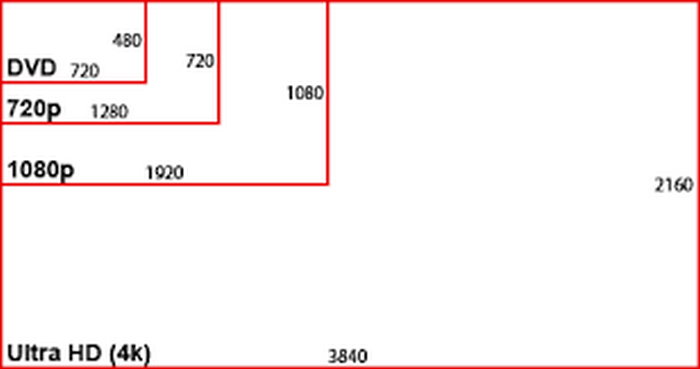
NTSC DVD Resolution: 720 x 480 pixels can be displayed in either 480i or 480p formats. This resolution is Standard Definition or SD, is compatible with NTSC television systems, and is commonly used in North America and parts of Asia.
PAL DVD Resolution: 720 x 576 pixels. This resolution supports 576i and 576p formats, providing slightly higher quality compared to NTSC DVDs. Also, it is commonly used in Europe, Australia, and other regions.
Note: Both NTSC and PAL DVD resolutions are available in both 4:3 and 16:9 aspect ratios.
Lastly, the max DVD resolution is 480i/p or 576i/p, which means that DVDs are limited to Standard Definition quality.
Part 2. DVD Quality vs. Blu-ray
Blu-ray is a digital optical disc designed to play High Definition format. In terms of quality, DVD quality fell short, and to understand this, please refer to the table below:
This table shows that there are indeed differences between DVD quality vs. Blu-ray. DVDs are limited to SD or Standard Definition when it comes to the resolution, but Blu-ray can deliver an HD video up to 4K. Additionally, Blu-ray offers a larger storage capacity than DVD’s capacity. But in terms of compatibility, HD is more flexible as it can be played on both DVD and Blu-ray. Nevertheless, this comparison does not determine which is the best. This is to give you a picture of what you can expect more of your DVD resolution.
Part 3. How to Change DVD Resolution
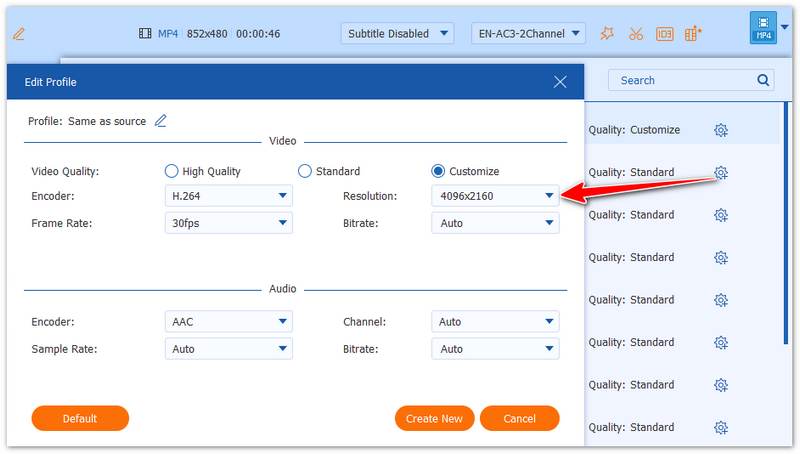
If your DVD has a low resolution, you cannot directly increase it because the source is hardware-limited. However, you can easily improve it by ripping the DVD with a tool like AnyMP4 DVD Ripper. This software allows you to convert DVDs (including 99-title, homemade, commercial, or encrypted discs) to digital formats like MP4, MOV, and more, while also adjusting the resolution up to 4K (4096×2160).
Step 1. Download and install it on your computer with your DVD inserted.
Free DownloadFor Windows 7 or laterSecure Download
Free DownloadFor MacOS 10.7 or laterSecure Download
Step 2. Click “Load DVD” to add and analyze your DVD.
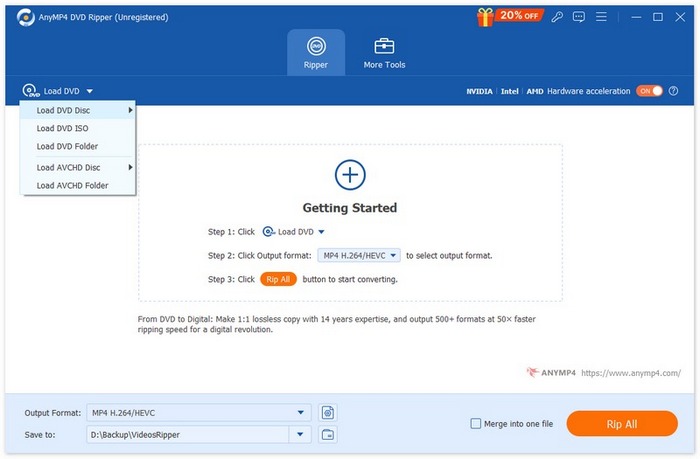
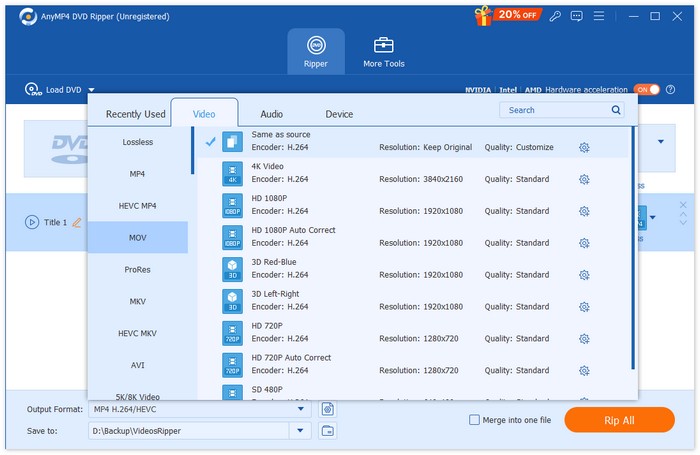
Step 3. Choose the “Output Format” dropdown to select a destination format.
Step 4. Click the “Custom Profile” button next to the format you selected and adjust the resolution to up to 4096×2160.
All in all, AnyMP4 DVD Ripper is reliable, versatile, and supports almost all DVD types. It’s perfect for upgrading your DVD videos to higher-resolution digital files. You can also try other DVD ripping software as you like.
Free DownloadFor Windows 7 or laterSecure Download
Free DownloadFor MacOS 10.7 or laterSecure Download
Part 4. FAQs about DVD Resolution
What is the standard DVD resolution?
The standard DVD resolution varies based on the region. For NTSC DVDs, the resolution is 720 x 480 pixels. Meanwhile, PAL DVDs have a resolution of 720 x 576 pixels. Both formats are available in 4:3 and 16:9 aspect ratios.
Why does DVD resolution affect video quality?
The resolution determines how many pixels are used to display the image, directly impacting the quality of the video. Higher resolution means more pixels and, typically, better quality. DVDs are limited to Standard Definition or SD, which is lower quality compared to high-definition formats like Blu-ray.
What’s the difference between NTSC and PAL DVD resolutions?
NTSC is used primarily in North America and parts of Asia and has a resolution of 720 x 480 pixels. Meanwhile, PAL is commonly used in Europe, Australia, and other regions and has a resolution of 720 x 576 pixels. PAL offers slightly higher quality compared to NTSC, but both are limited to Standard Definition or SD.
Is DVD resolution the same as Blu-ray resolution?
No. DVD resolution is significantly lower than Blu-ray resolution. DVDs are limited to Standard Definition, which is 480p/576p, while Blu-ray discs can display High Definition or HD resolutions of up to 1080p and even 4K Ultra HD. Blu-ray offers better video quality, larger storage capacity, and superior audio compared to DVDs.
Conclusion
In conclusion, although DVD resolution is limited to standard definitions like 720 × 480 and 720 × 576, you can still improve your viewing experience by converting DVDs into digital formats. With AnyMP4 DVD Ripper, you can easily rip DVDs and adjust the output resolution to better suit modern screens, making it a practical solution for upgrading old DVD content.
Free DownloadFor Windows 7 or laterSecure Download
Free DownloadFor MacOS 10.7 or laterSecure Download
-
 Best Linux DVD Ripper Recommend – Which One Do You Like
 If you want to find a Linux DVD ripper for your computer, you can refer to the 6 options we provide. The differences between them will also be demonstrated.
-
 What Is NTSC Format & How to Rip NTSC DVD on Our Computer
 If you want to know what the NTSC format is and how it differs from PAL, read this article. We will explain the definition of NTSC and how to rip NTSC DVDs.
-
 What Is A BUP Format – How Can We Play and Convert BUP File
 If you want to know what a BUP file is or what kind of player we can use to open it, please read this guide. We will provide the most detailed introduction.
