


 Video Converter Ultimate
 Screen Recorder
 Video Repair
Everything You Should Know About Vance AI [In-Depth Review]
Today, enhancing images is just a click away. We don’t have to worry about low-resolution pictures that have been stuck for a long time in our files and galleries. With that, in this article, you are going to learn about one of the best AI image upscaler tools, Vance AI Image Enhancer. Moreover, we will delve deeper into its key features, pros and cons, pricing, and everything you need to know to fully explore how it stands out as a reliable, efficient, and user-friendly tool for anyone looking to enhance their images effortlessly. Ready to upscale your images? Read this post now.

Part 1. What is VanceAI?
VanceAI is an advanced image enhancement platform that uses artificial intelligence and deep learning to automatically improve the quality of your images. It offers various tools such as AI Image Enhancer, AI Image Upscaler, AI Denoiser, and AI Background Remover, designed for users who want fast and professional-grade results without needing editing skills.
The tool can increase image resolution up to 8×, restore lost details, sharpen blurry areas, and enhance colors with impressive precision. It’s compatible with both Windows and Mac, and users can also access it through the VanceAI online version for convenience.
Main Features:
• Upscale images up to 8× without quality loss.
• Remove background automatically.
• Denoise and sharpen blurry photos.
• Improve image clarity and color balance.
Pros
- Enhances and upscales images with high quality.
- Easy to use, even for beginners.
- Has multiple AI tools like denoiser, background remover, and colorizer.
- Supports batch processing for multiple images.
- Provides quick and automated results.
- Safe to use with strong privacy protection.
Cons
- The free version might feel restricted.
- Limited upload size for large images.
- Some results may look slightly over-processed.
- Offers limited manual editing control.
VanceAI is truly a reliable and powerful AI image enhancement tool, but just like any other tool, it also has some loopholes. While it excels in delivering high-quality upscaling and effortless automation, it still has room for improvement in areas such as flexibility and free access. Some users may find its free version too limited and the lack of manual editing options restrictive, especially for those who prefer more control over their edits. Nevertheless, it can be your go-to image editing tool.
Part 2. Is VanceAI Safe?
Yes, VanceAI is safe to use. The platform uses secure encryption and privacy protection measures to ensure that your uploaded images and data are not shared or stored without permission. It is operated by a verified company that complies with data protection standards, making it trustworthy for both personal and professional use.
Additionally, images processed through VanceAI are deleted automatically after a short period, ensuring that your files remain private. Users can safely use VanceAI’s online services without worrying about data leaks or unauthorized use.
Part 3. Is VanceAI Free?
VanceAI offers a free version that allows users to try out its features, but it comes with limitations on the number of images you can enhance. Free users can process a few photos with basic access, while the paid plans offer more credits and full access to AI features.
Pricing Plans:
• 100 Credits: $4.95
• 200 Credits: $7.95
• 500 Credits: $12.95
• 1000 Credits: $17.95
Part 4. Best VanceAI Alternative
FVC Free Image Upscaler stands out as the best alternative to VanceAI, particularly for its Image Enhancer, which offers a powerful online solution for image upscaling with advanced AI technology. It excels in automatically recognizing and enhancing blurred portions, ensuring the restoration of lost details. Moreover, users can easily enlarge their images by 2×, 4×, or 8× with high quality, providing versatility for various applications. The seamless functionality and efficient AI features make FVC Free Image Upscaler an excellent choice and a top alternative for those seeking effective and user-friendly image upscaling solutions.
Main Features
• Advanced AI resolution technology for image upscaling.
• Automatic recognition and enhancement of blurred image sections.
• Precise restoration of lost pixels, colors, textures, and finer details.
• Excellent recognition and natural restoration of portrait features.
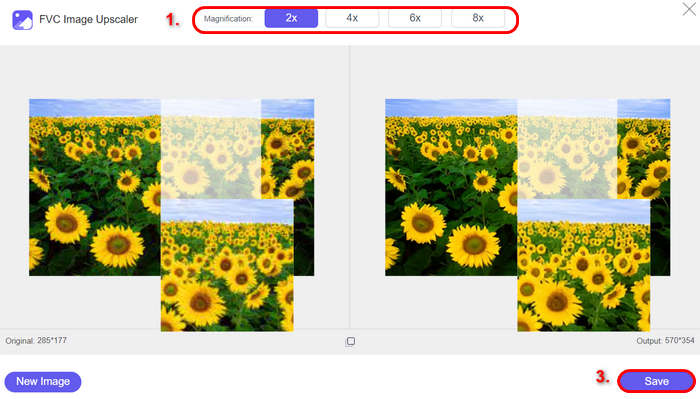
• Versatility in image enlargement options: 2×, 4×, or 8× with high quality.
• User-friendly online interface for seamless image enhancement and enlargement.
Step-by-Step Guide
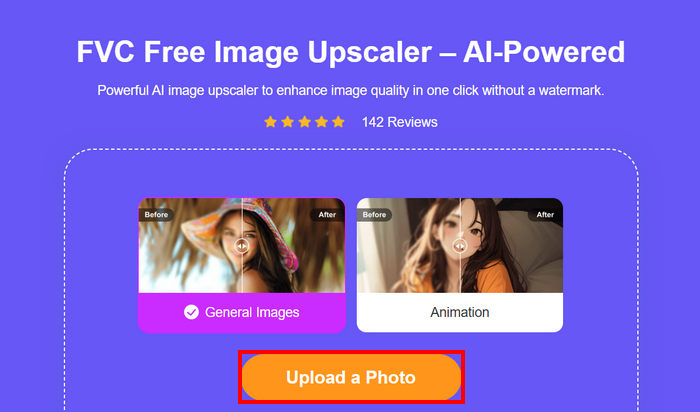
Step 1. Start by going to the official FVC Free Image Upscaler website.
Step 2. Now, click on the Upload Photo button to select the image you want to enhance.
Step 3. After uploading, the tool will provide a preview of your image. To closely examine the details, use the Magnifier option.
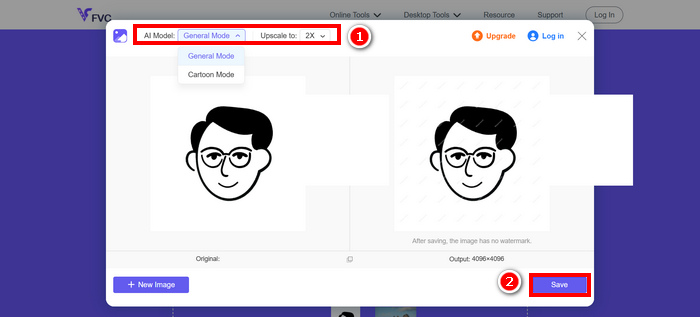
Step 4. Once satisfied with the preview, click on the Save button to download your enhanced image.
FVC Free Image Upscaler is really a good alternative to VanceAI Image Enhancer. Its ability to seamlessly enhance images with advanced AI, effortlessly recognize and improve details, and its user-friendly interface and free access make it a standout choice.
Part 5. FAQs about VanceAI
What types of images can VanceAI enhance?
VanceAI can enhance a wide range of images, including portraits, landscapes, product photos, and low-resolution pictures. It automatically sharpens blurry areas, restores details, and improves color balance for professional-looking results.
Are the enhancements from VanceAI noticeable?
Yes. VanceAI can upscale images up to 8×, restore lost details, sharpen blurry areas, and improve colors. While some results may look slightly over-processed in rare cases, most users notice significant improvement in image quality with minimal effort.
Can I use VanceAI safely for my personal images?
Absolutely. VanceAI uses secure encryption and privacy protection to ensure your images are safe. Uploaded files are automatically deleted after processing, and the platform complies with data protection standards, making it safe for personal and professional use.
Are there any free alternatives to VanceAI?
Yes. FVC Free Image Upscaler is a great free alternative. It offers AI-powered image enhancement, restores lost details, and allows you to enlarge images by 2×, 4×, or 8× with high quality. Its user-friendly online interface makes it an excellent option for those who want an easy, no-cost solution.
Conclusion
VanceAI is a powerful and reliable AI image enhancement tool, perfect for quickly transforming low-resolution or blurry photos into high-quality images. With features like upscaling, background removal, denoising, and color enhancement, it delivers professional results with minimal effort. While the free version has limitations, the paid plans unlock its full capabilities, making it a strong choice for both beginners and professionals.
For those seeking a free or alternative option, FVC Free Image Upscaler is an excellent choice. It offers advanced AI-powered image enhancement, restores lost details, and allows enlargement up to 8×, all through a user-friendly online interface. Whether you choose VanceAI or its alternative, both tools make it easier than ever to enhance your images with precision and ease.
-
 7 Image Upscaler You Can Use to Enhance & Improve Every Image [2025]
 Are you in need of the image upscaler? Luckily, this article covers the best software you can access and download on your desktop.
-
 4 Effective Ways to Remove Background in Photoshop
 Learn in this article how to remove the background in Photoshop. Each method is simplified to better guide you, along with an alternative tool that you can try.
-
 5 Simple Ways on How to Unblur an Image on Your Computer
 Want to unblur your blurry image? Luckily there are ways for you to unblur your image. Read to learn how to unblur an image easily on your computer and phone.
