


 Video Converter Ultimate
 Screen Recorder
 Video Repair
 Secure Download
Full Review: VideoByte BD-DVD Ripper [Things You Must Know]
Watching movies or videos on physical discs like DVDs gives us so much nostalgia. It’s a feeling that can’t be explained. Now, all eyes are on various media streaming platforms, which offer much convenience and flexibility in watching movies. However, if you still want to keep the DVD content from your discs functional, like you want to watch them anywhere you want, consider using a DVD ripper tool to digitize its content.
In this article, we are going to take a look at one of the best DVD ripper tools today, the VideoByte BD-DVD Ripper. This tool offers a reliable solution for converting DVD and Blu-ray discs into digital files that you can save on your device, cloud storage, or external drive. Can’t wait to get to know more about this tool? Let’s get started!

Part 1. What is Videobyte BD-DVD Ripper
VideoByte BD-DVD Ripper is a software tool that allows users to convert Blu-ray and DVD content into various digital formats. With this tool, users can easily rip their physical media collections to high-quality digital copies that can be easily accessed on multiple devices. Moreover, this DVD ripper tool has a very intuitive and user-friendly feature that can be easily used and accessed even by beginners.
Major Features:
Extensive Format Support:
VideoByte BD-DVD Ripper supports over 300 popular video and audio formats, including H.265, MP4, MKV, and audio formats like MP3 and M4A. Moreover, it can handle 3D formats such as 3D AVI and 3D MKV.
Wide Support for Various Devices:
VideoByte BD-VDV Ripper offers presets for over 100 devices, from iPhones, iPads, and Apple TV to Kindle, Android tablets, Xbox One, and more. With this, users can easily select their device from the list.
Impressive Video Quality Output:
VideoByte BD-DVD Ripper ensures a 1:1 quality preservation during the ripping process. Users can choose MPG Lossless for DVDs or MKV Lossless for Blu-rays. Moreover, with this tool, you can also include multiple subtitles and audio tracks in the final video output.
Fast Conversion Speeds:
The software utilizes advanced technologies such as multi-threading, multi-core utilization, and GPU acceleration, achieving up to 6X faster conversion speeds. It supports Intel QSV, NVIDIA NVENC/CUDA, and AMD APP.
Integrated Video Editing Tools:
VideoByte BD-DVD Ripper includes built-in editing features that allow users to customize their videos. This includes options to trim segments, adjust settings like bit rate and frame rate, and preview changes in real time.
Customization Options:
Lastly, with VideoByte BD-DVD Ripper, users can customize their output by selecting specific video segments and modifying parameters such as resolution and play regions.
Part 2. How to Use VideoByte BD-DVD Ripper
Now, let’s proceed with how you can use VideoByte BD-DVD Ripper for ripping your DVDs.
Step 1. First, you need to download and install the tool on your computer.
Step 2. Open the tool and click on Load DVD or Load Blu-ray to load the content.
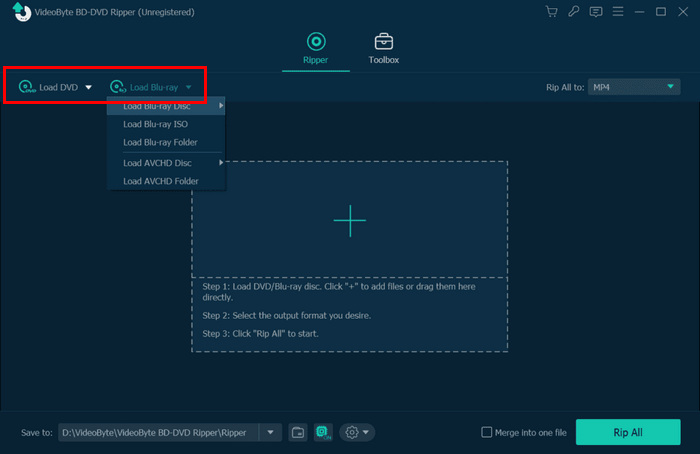
Step 3. After that, select titles, audio tracks, and subtitles.
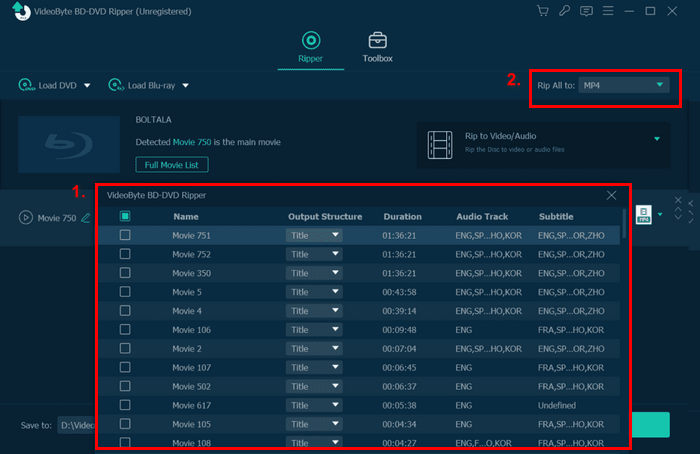
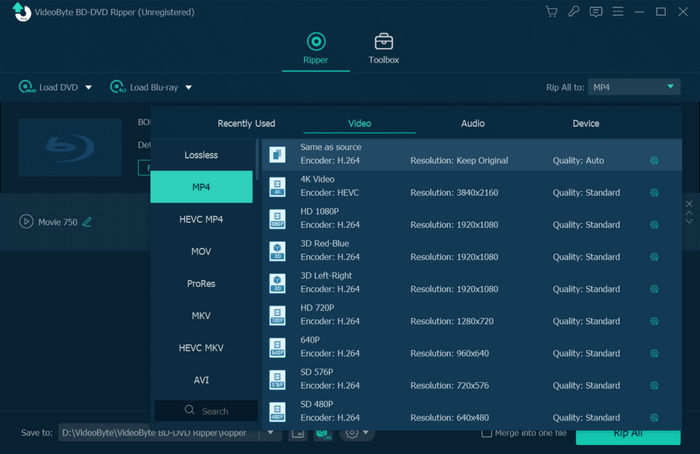
Step 4. In the Rip All menu on the right side of your screen, choose the format that you prefer.
Step 5. Once done, click on the Rip All button below.
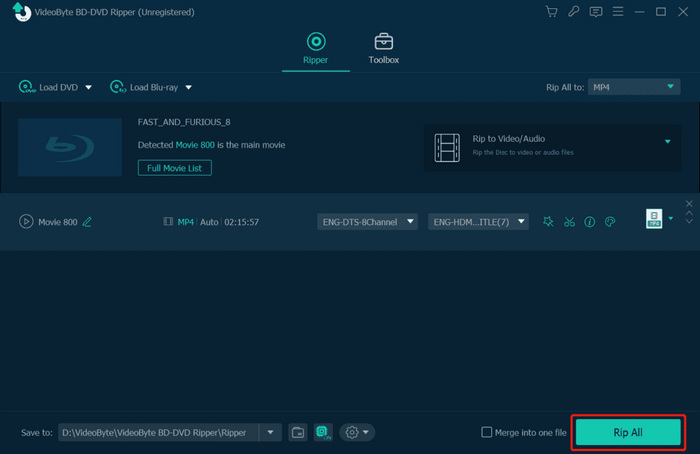
There you have it! You can easily rip your DVDs using VideoByte BD-DVD Ripper. But take note that this comes with a price. You can check the pricing in the next part.
Part 3. VideoByte BD-DVD Pricing
VideoByte BD-DVD Ripper is a bit pricey, but you can choose whatever pricing plans best suit your needs and budget:
• 1 Month Subscription: $34.95
• Single License: $69.95
• BD-DVD Ripper + Blu-ray Player: 83.92
Part 4. VideoByte BD-DVD Ripper Alternative
If you find VideoByte BD-DVD Ripper expensive, a highly recommended alternative is AnyMP4 DVD Ripper. With this tool, you can effortlessly rip DVDs to a wide range of digital formats, including MP4, MOV, AVI, MKV, and more. Powered by GPU and CPU acceleration, it ensures fast conversion speeds without compromising quality.
Free DownloadFor Windows 7 or laterSecure Download
Free DownloadFor MacOS 10.7 or laterSecure Download
Main Features:
• Convert DVDs to digital video formats quickly and easily.
• Supports popular formats such as MP4, MKV, MOV, AVI, and more.
• Built-in video editing tools: trim, crop, add watermarks, and apply effects.
• Customizable output settings: encoder, resolution, sample rate, channels, and bitrate.
• Intuitive and user-friendly interface, perfect for beginners.
How to Use AnyMP4 DVD Ripper as a VideoByte BD-DVD Ripper Alternative:
Step 1. Download and install AnyMP4 DVD Ripper on your computer.
Step 2. Launch AnyMP4 DVD Ripper and click the "Load DVD" button to load your DVD.
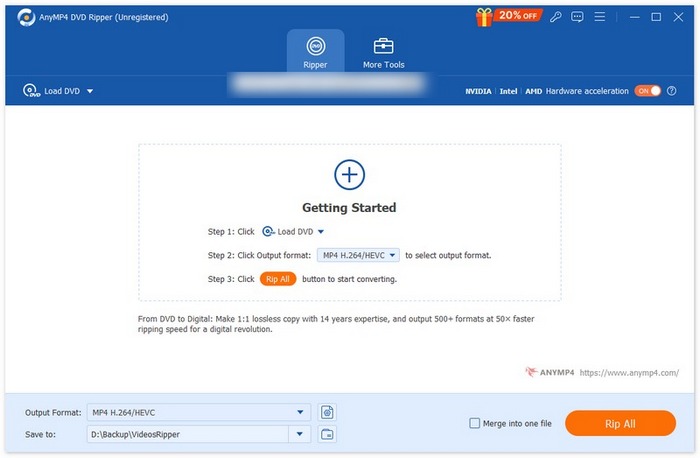
Step 3. Click on "Output Format" and choose your preferred digital format from the video tab. Once ready, click "Rip All" to start ripping your DVD.
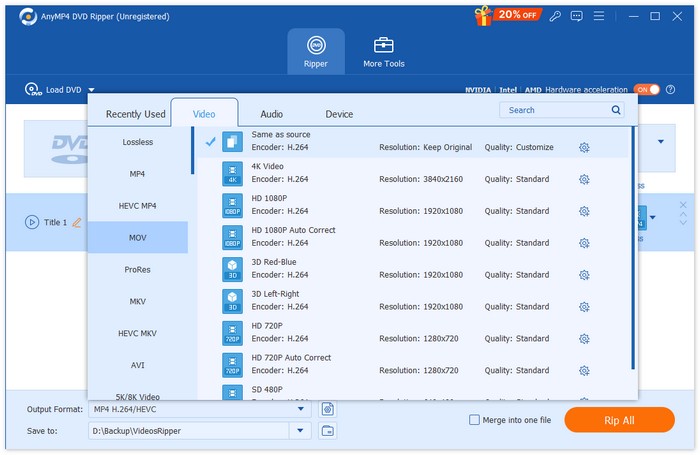
With AnyMP4 DVD Ripper, you can easily rip your DVDs in just a few clicks thanks to its intuitive interface. Compared to VideoByte BD-DVD Ripper, it is more cost-effective while supporting a wider range of formats and devices. The batch conversion feature saves time, and the built-in video editing tools allow you to customize your videos by trimming, cropping, or adding effects. Overall, AnyMP4 DVD Ripper is a versatile and reliable tool for all your DVD ripping needs.
Part 5. FAQs about VideoByte BD-DVD Ripper
What is VideoByte BD-DVD Ripper used for?
VideoByte BD-DVD Ripper is a software tool designed to convert Blu-ray and DVD content into various digital formats, like DVD to AVI, allowing users to create high-quality digital copies of their physical media collections for easy access on multiple devices.
How fast is the conversion process with VideoByte BD-DVD Ripper?
VideoByte BD-DVD Ripper utilizes advanced technologies such as multi-threading and GPU acceleration to achieve conversion speeds of up to 6X faster than traditional methods, making it efficient for ripping DVDs and Blu-rays.
What types of DVDs can I rip with VideoByte BD-DVD Ripper?
You can rip both standard DVDs and Blu-ray discs using VideoByte BD-DVD Ripper.
Can I edit videos after ripping them?
Yes. VideoByte BD-DVD Ripper includes integrated video editing tools that allow you to trim, adjust settings, and preview changes before finalizing your output.
Can I rip encrypted DVDs with VideoByte BD-DVD Ripper?
Yes, you can rip encrypted DVDs with VideoByte BD-DVD Ripper. The software includes advanced decryption technologies that allow users to bypass various DVD encryption methods, making it possible to access and convert protected content into digital formats.
Conclusion
Now that you have a complete picture of what a VideoByte BD-DVD Ripper is, from its extensive features and very user-friendly interface, you can now identify if it is the best for your DVD ripping needs. However, if you feel like it’s much more costly, you can try the AnyMP4 DVD Ripper for a cost-efficient option and an easier way of ripping your DVD media contents.
-
 Rip DVD to AVI: 3 Best DVD Ripper Softwares [Review]
 Want to rip your DVDs to AVI for easier playback and storage? Read our detailed review of the best DVD to AVI converters to find the perfect tool for you.
-
 3 Methods to Burn Video_TS to DVD on Windows and Mac
 Have the TS file on hand and want to save it on DVD, read this guide. We will teach you how to burn Video_TS to DVD on Windows or Mac computers in detail.
-
 How to Fix Windows Media Player Not Playing DVDs: 3 Methods
 Is the Windows Media Player not playing DVDs? It doesn't matter if your device is using Windows 7,8 or 10. You can find a solution. Here are the best players.
