


 Video Converter Ultimate
 Screen Recorder
 Video Repair
 Secure Download
HitPaw Watermark Remover Review: An In-Depth Analysis
Have you ever downloaded a video or photo only to find a watermark that seriously affects the viewing experience? If you're familiar with the internet, your first instinct was probably to search for ways to remove it. During that process, you may have come across the main subject of this article on recommendation lists or forums: HitPaw Watermark Remover.
However, downloading, installing, and learning to use new software can take a considerable amount of time. So the real question is: Does it actually work, and is it worth trying?
No worries - this detailed HitPaw Watermark Remover review has you covered. It explores the software's concept, features, compatibility, pricing, and step-by-step usage instructions. All the questions and concerns you may have can be answered right here.

Part 1. A Simple Look at HitPaw Watermark Remover
Before we begin, allow us to briefly introduce the concept of HitPaw Watermark Remover to lay the groundwork for the following information.
HitPaw Watermark Remover is an AI-powered, professional-grade watermark removal tool that enables users to eliminate various types of watermarks, text overlays, timestamps, and other objects from videos or images.
Now let's examine its performance in other areas.
Supported Platforms:
This watermark removal tool currently offers desktop versions for Windows and Mac, as well as a HitPaw online Watermark Remover version. This review will primarily focus on the desktop versions.
Supported Media Formats:
Before using HitPaw Watermark Remover for Mac and Windows, ensure your video and image formats are compatible.
Here's a brief list of formats officially supported by HitPaw Watermark Remover:
Image: JPEG, JPG, PNG, BMP, TIFF.
Video: MP4, MOV, AVI.
Main Features
• Naturally Remove Everything Unnecessary
HitPaw Watermark Remover app can eliminate timestamps, text overlays, unwanted people, extraneous objects, emojis, text stickers, and more. It works like a universal eraser.
• Offers 5 Powerful AI Watermark Removal Modes
HitPaw Watermark Remover provides 5 modes tailored to different scenarios and image styles: AI Model, Matte Fill, Color Fill, Gaussian Blur, and Smooth Fill. Choose the one that best suits your needs.
• Removes Dynamic Watermarks
HitPaw Watermark Remover effortlessly erases dynamic watermarks that move from one corner to another.
• Three Watermark Removal Modes
This image watermark remover offers Smooth Fill, Edge Fill, and Texture Repair modes. It ensures high-precision watermark removal while preserving original image details and maintaining consistency with surrounding areas.
• Multiple Selection Methods
You can let AI automatically detect and remove watermarks, or use three selection tools: Brush (for detailed selection), Rectangular (for quick framing), and Freeform (for irregular shapes).
• User-Friendly Design
HitPaw Watermark Remover features an intuitive interface with clearly organized sections. Reset, Undo, and Redo buttons allow flexible adjustments.
Pricing Plan
Now we come to the pricing details you're most interested in.
HitPaw Watermark Remover offers four subscription plans:
• HitPaw Watermark Remover Free
Yes, it does offer a free trial. However, most advanced features are unavailable, and you can only export images for free up to 4 times - video export is not permitted.
Starting with the following basic paid plans, you unlock all features.
- • Monthly: $9.99
- • Yearly: $19.99
- • Perpetual: $29.99
Part 2. How to Use HitPaw Removes Your Watermarks?
After covering the overall process, let's move on to the practical application and explore the usage steps.
How to Remove Photo Watermarks
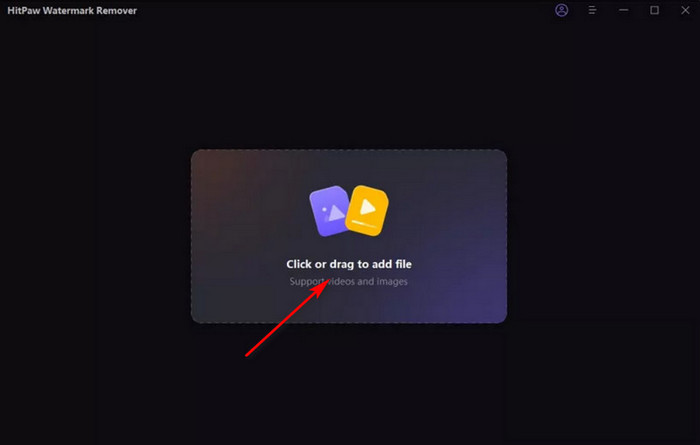
Step 1. First, download and install HitPaw Watermark Remover on your computer. Launch it and access the main interface.
Click the rectangular area in the center of the page to upload your image.
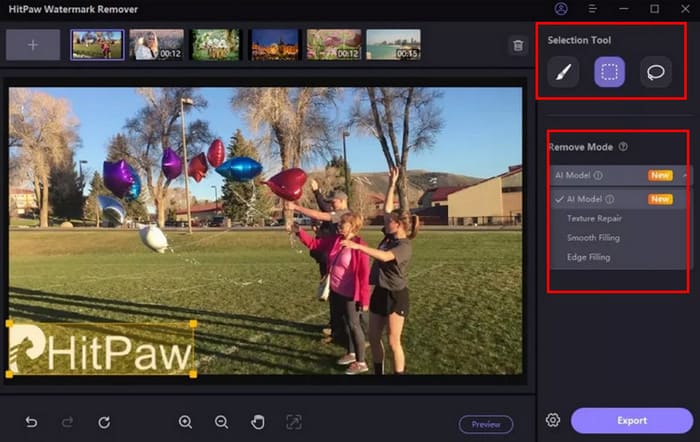
Step 2. Select one of the tools - the Marquee Tool, Polygonal Lasso Tool, or Brush Tool - to outline the area you wish to remove from the image.
Then, based on the image's specifics, choose one of the five AI removal methods provided by the platform to apply.
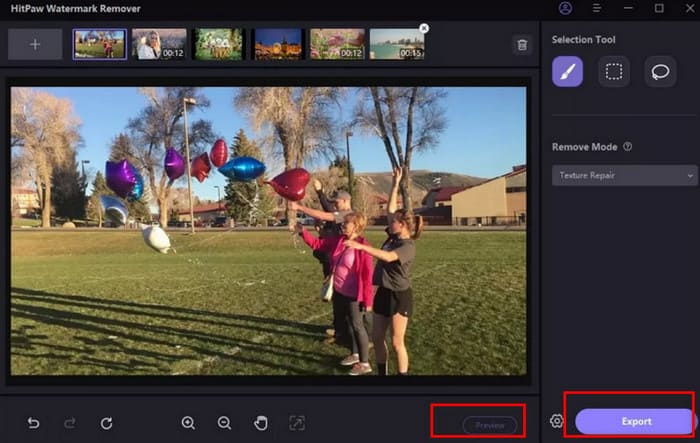
Step 3. Click Preview to see the photo watermark removal effect. If satisfied, click Export to save the image.
How to Remove Video Watermark
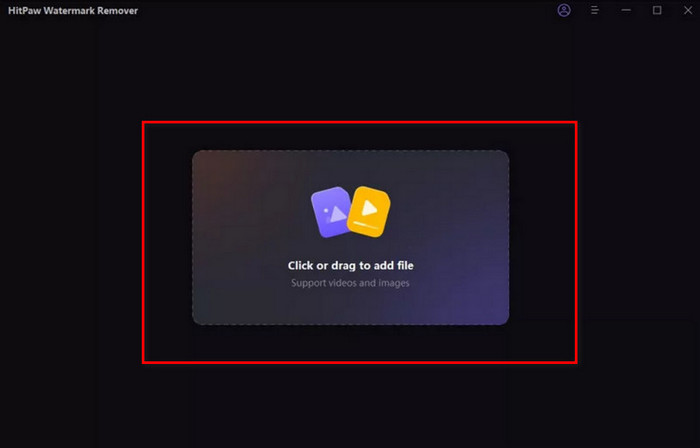
Step 1. First, download HitPaw Watermark Remover from the official website to your computer.
After launching the program and entering the main interface, you'll see a rectangular area. Drag your video file into this area to upload it.
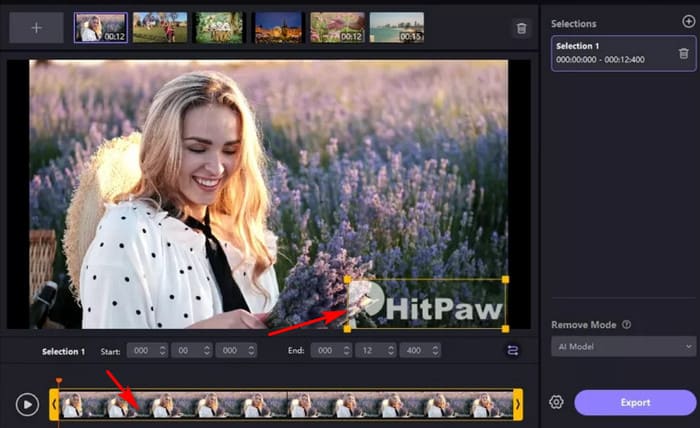
Step 2. Next, choose the AI watermark removal mode that best suits your situation from the five available options.
Then select the watermark within the video frame. Proceed to the timeline and drag the yellow box to highlight the segment where the watermark appears throughout the clip.
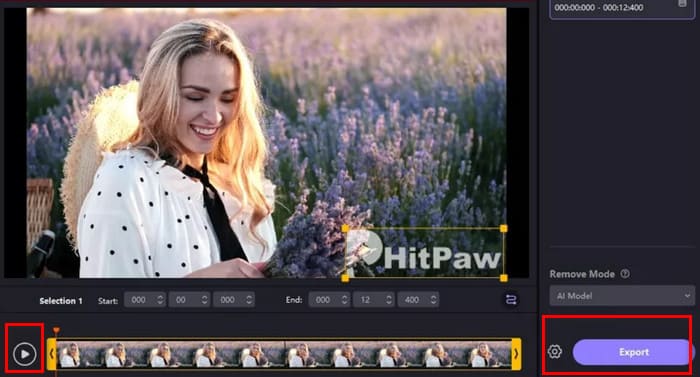
Step 3. Now you can click the play button to preview the video with the watermark removed.
If you're satisfied with the result, click Export to save the processed video.
Part 3. Best Alternative to HitPaw Watermark Remover
If you're dissatisfied with HitPaw Watermark Remover's limitations in watermark removal, we recommend trying these two alternatives to remove watermarks from photos and videos.
For Video: FVC Video Converter Ultimate
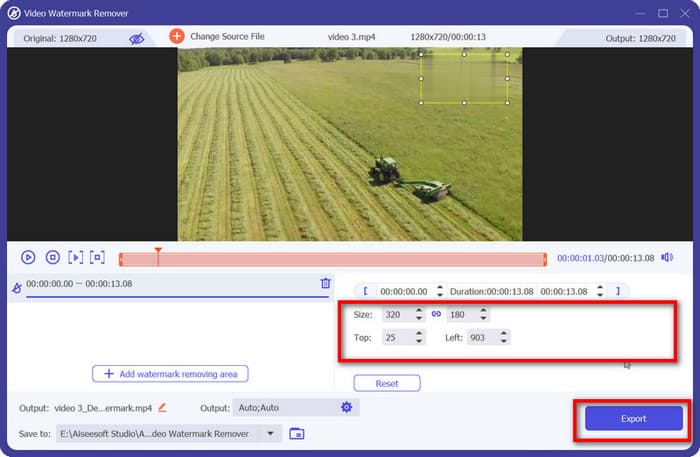
FVC Video Converter Ultimate is a desktop software that combines video conversion and editing. It features a comprehensive Toolbox where you can easily find the Video Watermark Remover.
You can select the area containing the watermark you wish to remove and precisely control the range by adjusting the size of the selection box. It's incredibly simple to use, making it a great choice for beginners.
Free DownloadFor Windows 7 or laterSecure Download
Free DownloadFor MacOS 10.7 or laterSecure Download
For Image: Picwand.AI
Picwand.AI's Object Remover is the perfect solution for removing watermarks from your images. It's fast, automatic, and free, leveraging cutting-edge AI technology to eliminate watermarks, text, and even people or objects.
It provides a brush tool to select the target area - simply mark the part you want removed, and the AI handles the rest. Rest assured, your images retain their original quality after watermark removal.

Part 4. FAQs of HitPaw Watermark Remover
Can HitPaw remove watermarks?
Absolutely. HitPaw Watermark Remover is your perfect solution. It offers three ways to select watermarks, paired with five AI-powered removal modes to handle any scenario.
What's the best free watermark remover?
HitPaw Watermark Remover's free trial plan is a solid option. It's easy to use, though advanced features may be limited. Besides, Picwand.AI Object Remover serves as a viable alternative.
Is HitPaw free to use?
Both its online and desktop versions offer partial free functionality. However, accessing the latest and most advanced services requires a paid subscription.
Conclusion
Overall, HitPaw Watermark Remover is indeed a highly effective tool for removing watermarks. Its flexible selection tools, intelligent removal modes, and lightning-fast processing speed set it apart. Not to mention its equal strength in handling both images and videos.
However, it imposes significant limitations on free users. To bypass these restrictions, this guide recommends using FVC Video Converter Ultimate or Picwand.AI Object Remover as alternatives.
-
 How to Remove the Weibo Watermark on Videos & Images Easily
 Having trouble removing Weibo Watermark on exported video and image? In that case, you must a watermark remover that we list below that could help you.
-
 3 Ways to Add a Watermark to a Video [Beginner’s Guide]
 If you’re looking for effective ways to add a watermark to a video, we’ve got you covered! This article will teach you three different ways to add a watermark.
-
 5 Ways to Remove a Watermark from a Video in a Professional Manner
 Need to remove a watermark from a video to make it look professional? Well, read this article as we add a tutorial on how to do it!
