


 Video Converter Ultimate
 Screen Recorder
 Video Repair
 Secure Download
Find the Best AMV Video Converter Here: 3 Available Options
Although MP4 is the most widely supported video format across modern devices and streaming platforms, it isn't compatible with everything. One day, you might dust off your old portable media player and want to copy some classic anime onto it for a nostalgic viewing experience. However, you may soon discover that many older devices simply don't support the MP4 format.
That's because the format designed for many legacy media players is AMV. To watch your videos on these devices, you'll need to convert MP4 to AMV. Since AMV is far less common than MP4, the conversion process can feel confusing. Which AMV video converter should you choose? And how exactly do you convert your files?
This guide has everything you need. We'll introduce three AMV video format converter tools, each with its own strengths, and use one of them as an example to walk you through the entire conversion process step by step. Hopefully, you'll be able to enjoy your videos on your old media player again in no time.

How We Test and Review
This guide combines hands‑on experience, summaries from major platforms, and genuine user feedback to select the top three AVI video converters for you. The specific selection criteria are as follows:
- • Compatibility: The selected converters must support two-way conversion between MP4 and AMV formats.
- • Ease of Use: The selected converters must be recognized by major news and review websites as simple to use and featuring a user-friendly interface.
- • Output Quality: To ensure that videos do not lose too much detail or clarity after conversion, the converters we select must minimize quality loss and compression as much as possible.
- • Additional Features: Converters with additional features such as video editing and enhancement will be prioritized in our recommendations.
Part 1. Top 3 AMV Video Converters
In the introduction, we've already provided a general overview of scenarios in which you might need to convert videos to the AMV format. If you're facing the same or a similar situation, please read on. The main content - specifically, three AMV format video converters - will be introduced in this section.
FVC Video Converter Ultimate
Star Rating: 4.8
Best for: An all‑in‑one video converter
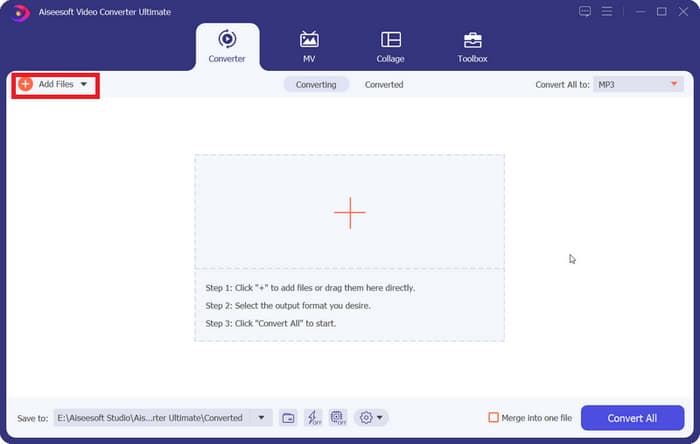
First up is an AMV AVI video converter that perfectly meets our selection criteria: FVC Video Converter Ultimate. Let's start with the most basic compatibility issue: FVC Video Converter Ultimate offers versions compatible with both Windows and Mac systems and supports over 1,000 multimedia formats - including, of course, MP4 and AMV. It appears to perfectly meet our requirements, with no restrictions on operating systems; not only can it convert between MP4 and AMV, but it also offers additional options.
Next, let's look at output quality. FVC Video Converter Ultimate allows you to select your desired output quality after conversion, with resolutions up to 4K or even 8K. Additionally, its exclusive hardware acceleration technology enables conversions up to 120X faster while ensuring zero loss of video quality. Therefore, you don't need to worry at all about the downloaded video being distorted or degraded.
FVC Video Converter Ultimate's ease of use and clean, intuitive interface are also key reasons for its popularity among users worldwide. Beyond these fundamental guarantees for the conversion process, this video converter also offers a full suite of video editing tools. Its interface includes basic functions such as trimming, cropping, rotating, and merging, and it also features a built‑in Toolbox with advanced tools like a video enhancer, compressor, and 3D creator.
In summary, based on every criterion we've outlined, FVC Video Converter Ultimate is the absolute perfect choice.
Free DownloadFor Windows 7 or laterSecure Download
Free DownloadFor MacOS 10.7 or laterSecure Download
Pros
- Highly versatile, with comprehensive support for a wide range of conversion formats.
- Fast conversion speed - up to 120X faster.
- Easy to use, with intuitive buttons and interface.
- Offers a wide range of video editing features.
Cons
- The free trial unlocks only a limited number of features.
Handbrake
Star Rating: 4.6
Best for: Free, Ease of use
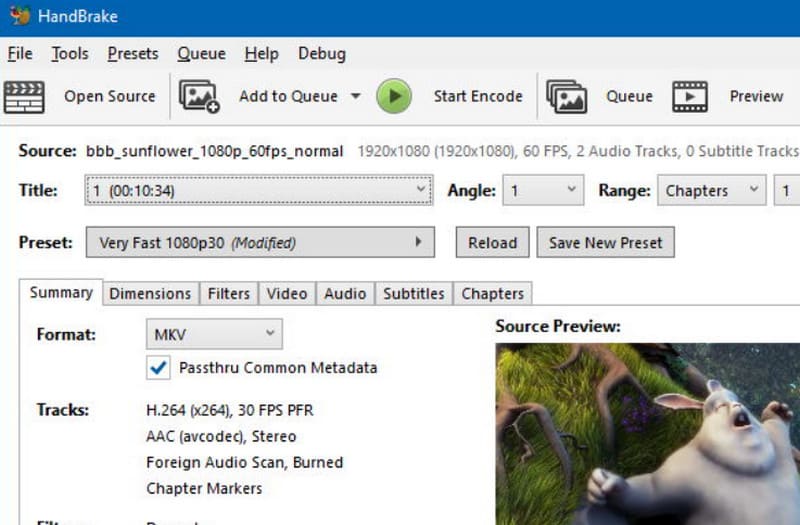
When it comes to the most user‑friendly AMV video converter for Mac & Windows for the average user, Handbrake is undoubtedly the top choice. This program has been offering free format conversion services to users for quite some time and has always been known for its simplicity and speed. It's ideal for converting AMV videos, and its conversion interface offers a wide range of output options to configure, including encoders, frame rates, and quality settings. You can also perform basic audio editing on your videos.
Finally, we'd like to remind you that Handbrake also offers basic video editing features such as subtitle editing, adding video filters, noise reduction, cropping, and scaling. You never have to worry about paid pop‑ups appearing - just take your time to explore the software.
Pros
- Developed by volunteers and completely free.
- Simple interface.
- Supports configuration of output quality, codecs, FPS, and other parameters.
Cons
- Limited support for output formats.
- The interface design is somewhat outdated.
MConverter
Star Rating: 4.7
Best for: Online
You may find that both of the tools mentioned above, which can help you convert to the AMV video format, require you to download and install them first before they can be used properly. Yes, this process will certainly take quite a long time.
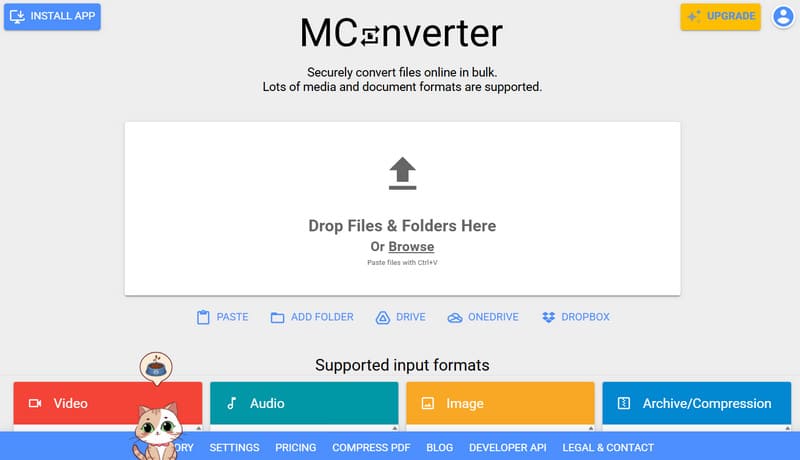
If you want to avoid this issue, we recommend trying an online converter called MConverter. One of its greatest advantages over other products is its simple drag‑and‑drop interface. You'll notice it the moment you visit the website, and to your pleasant surprise, it even supports batch drag‑and‑drop uploads and format conversions.
Some users have concerns about the security of online platforms. We must emphasize here that MConverter uses SSL encryption and automatically deletes your uploaded videos once the conversion is complete, ensuring your files will not be disclosed to anyone.
Pros
- The entire conversion process is completed online, with no installation or downloads required.
- Supports batch conversion.
- Very minimalist interface.
Cons
- Free users face file size limits for uploads.
- Certain features require a subscription to unlock.
Part 2. How to Convert MP4 to AMV Video
The steps for using a tool to convert MP4 to AMV video are generally similar. This guide will use FVC Converter Ultimate as an example to show you the specific steps.
Step 1. Download and install FVC Converter Ultimate on your computer. Once you're on the main interface, click the Add Files button in the upper‑left corner to upload your MP4 video.
Step 2. Locate the Output Format option in the bottom‑left corner. Expand the menu next to it and select Video > AMV as the output format.
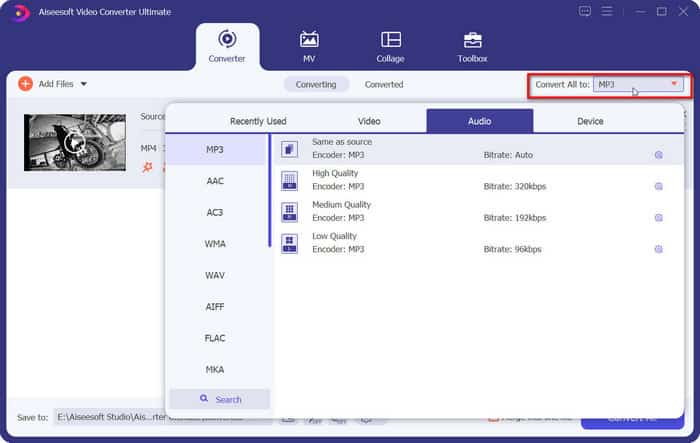
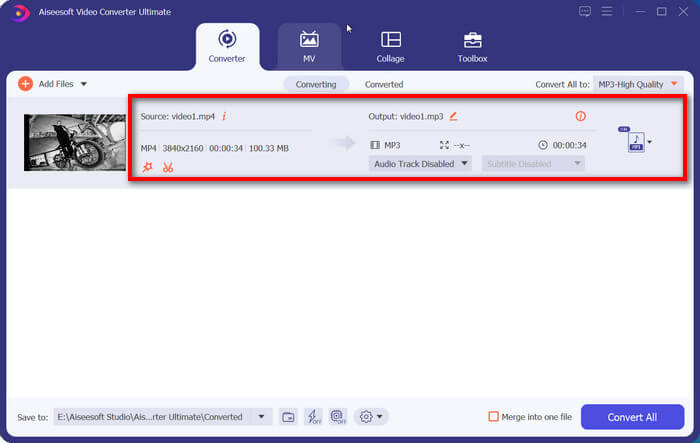
If you want to adjust the video's output settings, click the Edit or Crop icon next to the file.
Step 3. Finally, click Convert All in the bottom‑right corner to start the conversion.
Part 3. FAQs of AMV Video Converter
How do I convert MP4 to AMV?
All you need to do is find a converter that supports both MP4 and AMV formats. Upload your source file, select the output format, and finally click the Convert button. By following these steps, you can easily convert MP4 to AMV or AMV to MP4.
Which is the best video converter?
All things considered, FVC Converter Ultimate is arguably one of the best converters available. It supports over 1,000 conversion formats and is compatible with both Windows and Mac operating systems. Its 120X faster conversion speed puts it far ahead of the competition. Additionally, FVC Converter Ultimate features a modern, well‑organized interface with clearly labeled buttons.
How to open AMV files?
You can choose a player known for its broad compatibility, such as VLC Media Player. Additionally, Windows Media Player, designed specifically for Windows systems, is also a good choice for opening AMV files.
Conclusion
This guide introduces three reliable AMV video converters: FVC Video Converter Ultimate, which combines powerful features, ease of use, batch conversion, and high‑speed performance; Handbrake, known for being free and open‑source; and MConverter, which stands out for its online accessibility without requiring any download or installation. The best choice ultimately depends on which features matter most to you.
-
 Best Free Video Converters for Windows 2025 Review
 Looking for a video converter? Look no further! We’ve listed down the top 10 best tools for converting videos free in any format to your desired output.
-
 Review of Top 10 HD Video Converter Software (Free & Commercial)
 Read and Compare to get the best HD video converter software from 10 recommendations. Here’re the detailed reviews of each HD video converter for multiplatform.
-
 Top 8 4K Video Converters for Windows/Mac/Online
 Looking for the best 4K video converters for your videos? Find the perfect tool here to convert and enhance your videos with our full list.
