


 Video Converter Ultimate
 Screen Recorder
 Video Repair
 Secure Download
What is the Best Way to Enhance VHS Video Quality?
Since VHS tapes are no longer supported by the majority of the industry, most of them are now converted into a digital copy to cope with modern devices and formats. However, even after digitizing, these videos often retain their original flaws, low resolution, noise, blur, and faded colors, reasons to make them less enjoyable to watch.
However, with the help of advanced tools and AI-powered technology, it is now possible to enhance the overall quality of VHS videos. This includes upscaling resolution, reducing grain, sharpening details, and restoring colors. Now, in this article, you’ll discover the best way to enhance VHS video quality, along with reliable tools and simple methods you can use to upgrade your old recordings to near 4K or even 8K resolution without losing their sense and feel.

Part 1. What is a VHS Video?
A VHS video refers to a digitized or converted file taken from an original VHS or the Video Home System tape. Instead of watching it on a VCR, the content is transferred into a digital format so it can be played on computers, phones, or modern TVs.
Moreover, even after conversion, the video still keeps the original limitations of VHS. This means it may look low-resolution, blurry, grainy, or have faded colors. These issues come from the analog nature of VHS, not the conversion itself. In most cases, the output is saved in common formats like MP4 or AVI, making it easier to store, edit, and share.
Because of this, enhancing VHS video quality is becoming a thing where the goal is to improve clarity, reduce noise, fix colors, and upscale the resolution.
Part 2. How to Enhance VHS Video Quality on Windows/macOS up to 4K/8K?
If you have a VHS video and you want to upscale or enhance it for a better viewing experience, there’s a way to do that. You can use a video enhancer tool like the FVC Video Converter Ultimate. This tool is known for its exceptional 4K video conversion capabilities for 4K MP4, 4K MKV, 4K MOV, 4K AVI, etc. Compared to other converting 4K video tools, this not only converts formats, but it also has a feature that can make you upscale videos up to 8K. Additionally, it allows you to customize and edit the encoder, framerate, resolution, and bitrate for both audio and 4K video streams. Moreover, there's an AI video enhancer option to correct and improve the video resolution automatically in one click, which makes it really ideal to enhance VHS video quality.
Notably, this tool is 120× faster in GPU acceleration support in conversion speed, enabling swift processing even for large video files. Lastly, if you have multiple clips to convert to 4K and merge into one file, you can seamlessly accomplish this task within the software.
Main Features
- • Intuitive and user-friendly interface for 4K conversion.
- • Convert video or audio to 1000+ formats.
- • Over 20 tools under the toolbox to refine your 4K footage, like video watermark remover, video compressor, etc.
- • AI technology to enhance your video quality, such as removing video noise, optimizing video and contrast, and reducing video shaking.
Steps on How to Enhance VHS Video with FVC Video Converter Ultimate:
Step 1. First, you need to download and install the tool on your computer.
Free DownloadFor Windows 7 or laterSecure Download
Free DownloadFor MacOS 10.7 or laterSecure Download
Step 2. Once done, open the tool and click the Enhancer tab. From there, you can select a bunch of AI enhancement tools, including the Video Quality Repair Model.
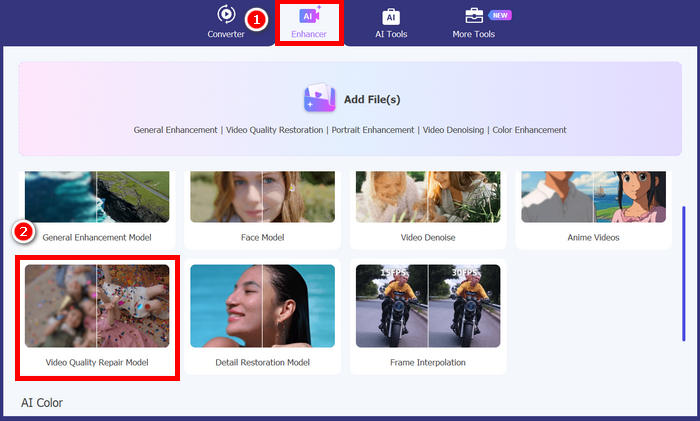
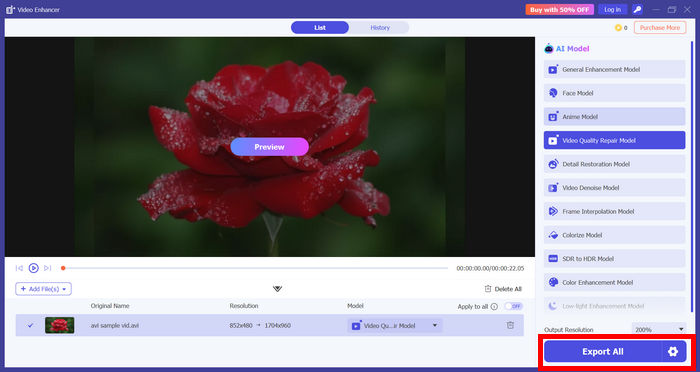
Step 3. After that, choose the Video Quality Repair Model and import the video that you want to enhance. Wait for a few seconds to directly enhance the video, and then click the Export button to download it.
Part 3. How to Use Topaz Video Enhance AI to Enhance VHS Quality
Topaz Video AI is an advanced video enhancement tool that uses artificial intelligence to improve video quality. It is especially popular for enhancing VHS videos, low-resolution clips, and even damaged or noisy recordings.
What makes this tool stand out is its ability to intelligently upscale videos while preserving details. Instead of simply stretching the image, it analyzes each frame to enhance sharpness, reduce noise, and restore clarity. Because of this, it’s often used to upgrade VHS videos to HD 1080p, 4K, or even 8K resolution.
Main Features
- • AI-powered video upscaling up to 4K and 8K.
- • Supports VHS and SD videos.
- • Automatic noise reduction and detail enhancement.
- • Frame-by-frame processing for better clarity and sharpness.
- • Supports various video types, including old, low-quality, and high-resolution files.
- • Customizable output settings for resolution and quality.
How to Use Topaz AI Video to Enhance VHS Video Quality:
Step 1. First, download and install the Topaz Video AI on your computer, then launch it.
Step 2. Click Browse to import your VHS video, or simply drag and drop the file into the program. Once added, you’ll see several settings on the right panel for enhancing video quality.
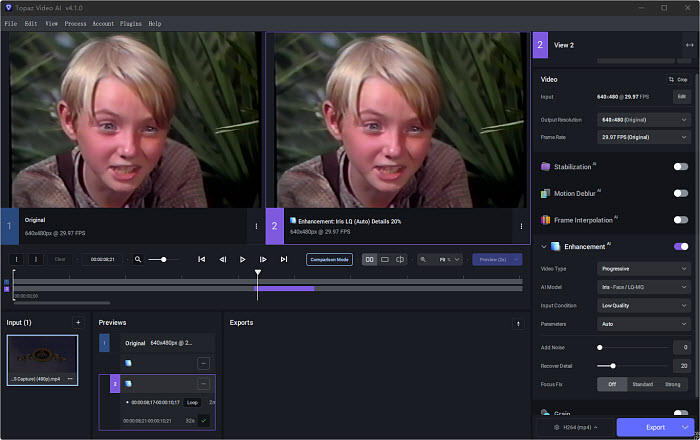
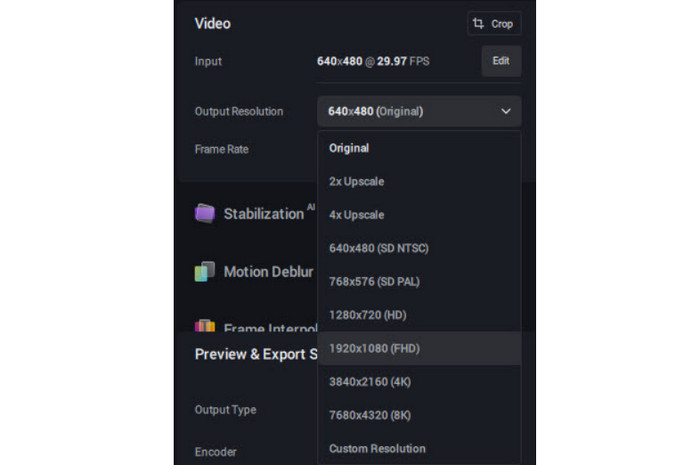
Step 3. After that, choose from different preset options depending on your needs, such as converting to 60fps, creating slow motion, deinterlacing, or upscaling to HD and 4K.
Step 4. Next, turn on the Enhancement feature to start improving your video.
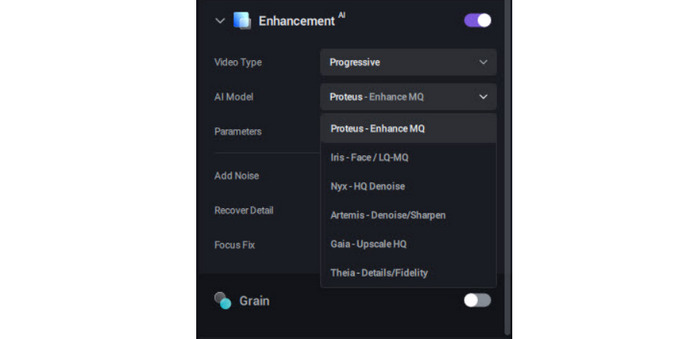
Step 5. Lastly, set your preferred output format and resolution, then click Export to begin processing. Once finished, the enhanced video will be saved in the same folder as the original file by default.
Verdict: While Topaz Video AI delivers high-quality results, it can be slow during processing, especially when working with large files or higher resolutions. It’s also a premium tool, costing around $299, and the free version adds a noticeable watermark to the exported video.
Tips: How to Convert VHS Tapes to Digital Video for Upscaling
In order for a VHS video to be enhanced, it must be ripped first, and the best tool to use to convert VHS tapes to a digital video is by using the FVC Video Converter tool.
Step 1. First, you need to download and install the tool on your device.
Free DownloadFor Windows 7 or laterSecure Download
Free DownloadFor MacOS 10.7 or laterSecure Download
Note: Before the next step, you must insert the VHS tape into the DVD driver on your computer and wait for a few minutes until it is detected.
Step 2. Now, launch the tool and click the Add File icon to load the disk.
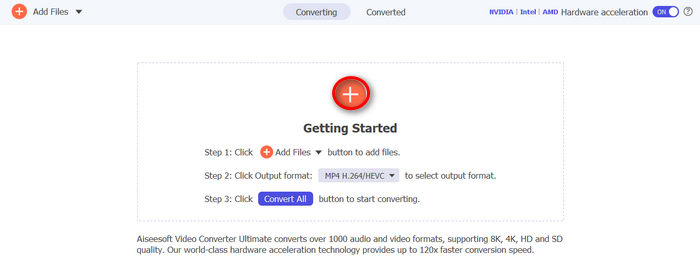
Step 3. After that, click on the Output Format below and choose the digital format that you prefer from the Video tab. Once done, just simply click on the Convert All button to start ripping your DVD.
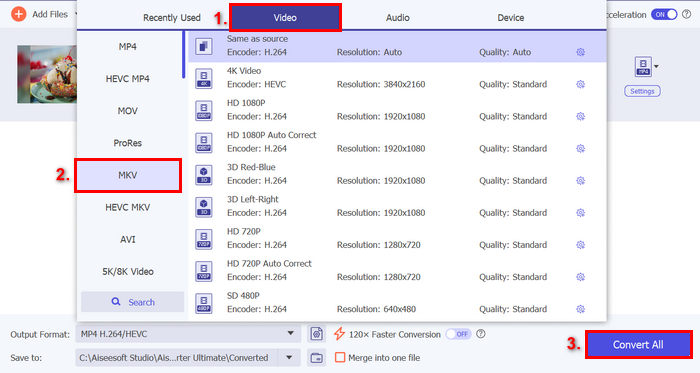
Now that you have finally digitized your VHS tapes, you can then proceed to enhance this VHS video for a better viewing experience.
Part 5. FAQS about Enhancing VHS Video Quality
What is the best way to enhance VHS video quality?
The best way to enhance VHS videos is by using AI-powered video enhancers. Tools like FVC Video Converter Ultimate offer features such as noise reduction, resolution upscaling, and color correction, making it easier to improve old footage with just a few clicks.
Do I need to convert VHS tapes before enhancing them?
Yes, you need to convert VHS tapes into a digital format first before enhancing them. Once digitized into formats like MP4 or AVI, you can then use enhancement tools to upscale resolution, reduce noise, and improve overall video quality.
Why do digitized VHS videos still look low-quality?
Even after conversion, VHS videos still look low-quality because the original footage was recorded using VHS, which has limited resolution and detail. Digitizing only transfers the content and doesn’t improve the quality unless you enhance it using special tools.
Conclusion
Old VHS videos may not match today’s video quality, but that doesn’t mean they can’t be improved. By converting them into digital files and using enhancement tools, you can make them clearer, sharper, and more enjoyable to watch.
With the help of tools like FVC Video Converter Ultimate and Topaz Video AI, enhancing VHS videos becomes a simple process. So there’s no reason for these videos to be stuck with their low quality. What are you waiting for? Get ready and start enhancing your VHS videos today!
-
 How to Enhance Video Quality on Canva: Things You Must Know
 Wondering if Canva can enhance video quality? Read this article to learn more. Also be guided on how to enhance video as well as the best alternative for Canva.
-
 Easiest Way to Enhance Video Quality in Premiere Pro
 Learn how to enhance video quality in Premiere Pro with simple steps, the best export settings, and an AI alternative for pro-quality results.
-
 Learn How CapCut Can Enhance Video Quality: 3 Easy Methods
 Do you want to enhance your video quality using CapCut but are not sure where to start? Read this article and learn how CapCut enhances video quality easily.
