


 Video Converter Ultimate
 Screen Recorder
 Video Repair
How to Make Emojis Bigger on iPhone, Android & Online
Is it really possible to make emojis bigger? Probably one of you has ever thought of this, and the answer is yes. Emojis can appear bigger because they are treated like images or characters that can be scaled depending on how they’re used.
Emojis are a fun way to express emotions, but sometimes they can appear too small, especially in chats or posts where you want them to stand out. Fortunately, there are several ways to make emojis bigger, whether you’re texting on your iPhone or Android, or even creating one online. Learning this would surely be fun and easy, so let’s start by exploring how you can make emojis bigger right from your device.

Part 1. How to Make Emojis Bigger Online
Since it is possible to make emojis bigger, here’s the first method that you can use to easily make them. There are various online tools that have the ability to enlarge images. Emojis are treated as images, so with this tool, users can enlarge their emojis in a few clicks.
FVC Free Image Upscaler, from its name, is an online image upscaler tool that allows users to enlarge their photos. This includes turning emojis bigger than their usual sizes.
Main Features:
• Advanced AI resolution technology for image upscaling.
• Automatic recognition and enhancement of blurred image sections.
• Precise restoration of lost pixels, colors, textures, and finer details.
• Excellent recognition and natural restoration of portrait features.
• Versatility in image enlargement options: 2×, 4×, or 8× with high quality.
• User-friendly online interface for seamless image enhancement and enlargement.
Steps on How to Make Emojis Bigger with FVC Free Image Upscaler:
Step 1. Start by going to the official FVC Free Image Upscaler website.
Step 2. Now, click on the Upload Photo button to select the image you want to enhance.
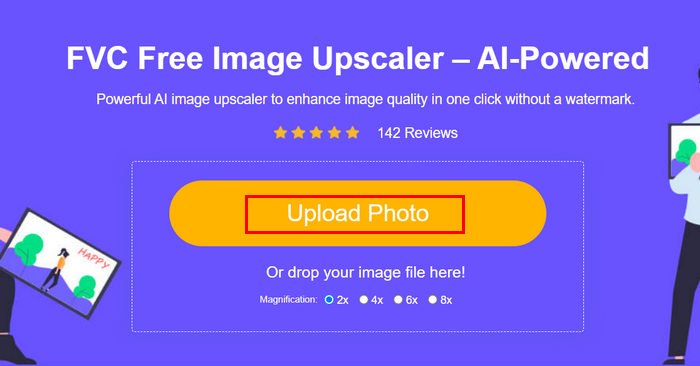
Step 3. After uploading, the tool will provide a preview of your image. To closely examine the details, use the Magnifier option.
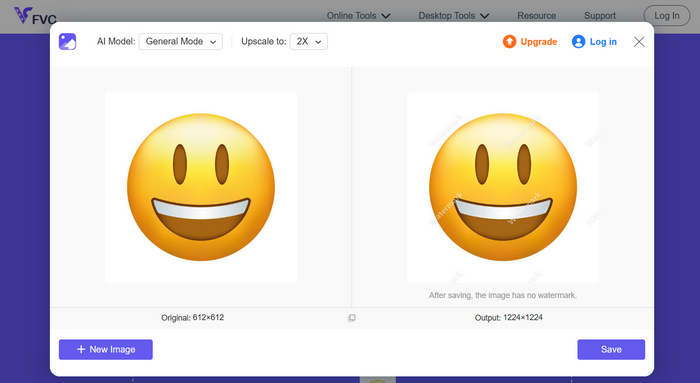
Step 4. Once satisfied with the preview, click on the Save button to download your enhanced image.
With FVC Image Upscaler, in a few clicks, you can easily enlarge your emojis. Moreover, its simplicity and intuitive interface make it a go-to tool for any type of user.
Click here to learn how to remove emojis from a picture if interested.
Part 2. How to Make Emojis Bigger on iPhone
If you prefer not to use any third-party app, you can make your emojis bigger directly through your iPhone’s settings. This method slightly increases the overall display size, which also enlarges text and emojis in your messages and apps.
How to Make Emojis Bigger on iPhone:
Step 1. Open the Settings app on your iPhone. This is where you can customize all your display and accessibility options.
Step 2. Scroll down and tap Display & Brightness to access your phone’s visual settings.
Step 3. Under this section, look for Display Zoom and tap it. This feature allows you to change how content appears on your screen.
Step 4. Select the Larger Text or Zoomed view option. Doing so will make everything on your screen, including emojis, appear bigger.
Step 5. Tap Done to apply the changes. Once set, your iPhone will restart briefly, and you’ll notice that your emojis, texts, and icons now look larger and easier to see.
While this method does make emojis bigger, it also enlarges everything else on your screen, including app icons and text. So, if you only want to make emojis bigger without changing the overall display, this option may not be ideal.
Part 3. How to Make Emojis Bigger on Android
If you’re using an Android device and you want to make your emojis bigger, you can use the PicWish AI Photo Editor. This app allows you to easily enlarge emojis without losing their quality. You can upload any emoji or even a screenshot of it, and then use the resize or upscale tool to make it bigger while keeping it clear and detailed.
Steps on How to Make Emojis Bigger on Android:
Step 1. On your Android phone, search for the PicWish AI Photo Editor in your app store and download it.
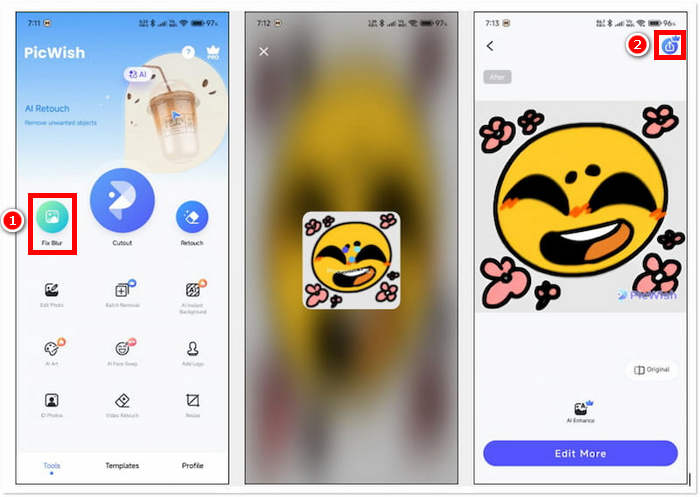
Step 2. Next, open the app and on the main screen, look for the Fix Blur option and tap it to proceed.
Step 3. After that, select the emoji you want to enlarge by choosing it from your device’s gallery.
Step 4. After the enlargement process, click the Save button to save the enlarged emoji to your device’s gallery.
After the app analyzes the emoji, you will find that there are no options for upscaling adjustments. With this, you have no choice but to save the enlarged emoji directly. While this makes the process quick and effortless, it can also be a drawback if you want more control over the final size or quality. Still, PicWish remains a convenient option for instantly making emojis bigger on your iPhone without needing advanced editing skills.
Part 4. FAQs about Making Emojis Bigger
Why do emojis appear bigger when sent alone in messages?
When you send an emoji by itself in messaging apps like iMessage, WhatsApp, or Messenger, the app automatically enlarges it for better visibility and emphasis. This feature is built in to make the emoji more expressive and noticeable, but it only works when the emoji isn’t accompanied by text or other emojis.
Can I make emojis bigger without changing my whole screen?
Yes. You can use online tools or apps like FVC Free Image Upscaler and PicWish to make emojis bigger only, instead of adjusting your phone’s display settings.
Can I copy and paste bigger emojis into my chats?
Yes. After enlarging an emoji using an online tool or app, you can save it as an image and then copy or insert it into your messages or social media posts.
Why do some emojis look small even on large screens?
The size of emojis depends on the app and font style your device uses. Some platforms automatically resize emojis to match the text, so even on bigger screens, they may still appear small unless you adjust the display or use an image enlargement tool.
Conclusion
See, it’s possible and easy to make emojis bigger. And now that you know how to make them, what you can do is to try which method you find comfortable on your end. Whether it’s through your phone’s settings, an app, or an online tool, each option lets you express yourself in a more fun and creative way. Just remember that some methods may have slight limitations, but overall, learning how to make emojis bigger is a simple trick that can make your conversations stand out even more.
-
 3 Ways to Compress Images for Discord Emoji [Guide]
 If you’re looking for a method to compress images for Discord emojis due to their strict file size restriction, read this article and be guided by 3 easy ways.
-
 Step-by-Step Guides on How to Remove Emojis from Video
 Feeling annoyed with emojis on your videos? This post will bring you the best procedures to instantaneously remove emojis from your videos using great tools.
-
 How to Remove Watermarks from Videos in After Effects Easily
 This article will help remove watermarks from the video using After Effects. Also, it will provide the best alternatives for eliminating disturbing objects.
