


 Video Converter Ultimate
 Screen Recorder
 Video Repair
 Secure Download
Analog to Digital Video Converters: Preserve Old Memories
Twenty years ago, or even earlier, people more often used physical tapes to store videos or songs. Even today, old tapes remain a treasure for collectors who love preserving memories. You may have also found tapes at home that contain old movies, classic songs, or family recordings. Keeping them is a meaningful way to remember the past, but it is also important to create a digital backup of the videos stored on these tapes.
To complete the backup process, you will need a computer and a professional analog-to-digital video converter. First, copy the videos from the tapes to your computer, and then convert them into popular digital formats. This guide will help you complete the process: we have prepared 3 products widely recognized by users and professionals, along with an additional selection guide. Take some time to read through it carefully and try capturing the videos from your old tapes.

How We Test and Review
- • Gathering cutting-edge industry information: To accurately select products that are truly useful to you, we will first conduct extensive research. Once we’ve identified suitable candidates, we’ll cross-check the information with authoritative review platforms or blogs.
- • Hands-on testing: After identifying products that are widely recognized within the industry, we will test them to evaluate their performance in the digital video conversion process, such as speed and quality.
- • Focusing on users’ actual needs: We have gathered genuine feedback from users seeking to convert analog video to digital video on major forums and websites to ensure the final selected products can solve their problems. We will also provide additional guides to help readers choose the best converter.
Part 1. Top Solutions to Convert Analog to Digital Video
| Product | Connection Type | PC Required | Price | Included Software |
| Elgato Video Capture | RCA, S-Video | Yes | ~$90 | Elgato Capture Software |
| VIDBOX Video Conversion Suite | RCA, S-Video | Yes | ~$70–$100 | VIDBOX Conversion Software |
| ClearClick Video to Digital | RCA / AV | No | ~$150–$200 | Not Required |
Why might people be in such a hurry to convert analog video to digital video?
Because our videotapes are becoming increasingly fragile at a rate visible to the naked eye: they're yellowing, wearing out, and getting stuck. Even a single instance of damage could render the footage on that tape completely unreadable. If you have such tapes at home, we recommend checking out the 3 video analog to digital converters in this section right away to see which one can help you - you never know when you might suddenly want to relive the home videos or classic old movies on those tapes.
So let's dive right in and start with the first product.
1. Elgato Video Capture
Best for: overall quality
We can't expect too much from the original quality of videos stored on VHS tapes, but if the footage is already somewhat blurry - especially for those of you who are used to watching 4K video today - and if the original image quality is further degraded during the digitization process, the final output will certainly look terrible.
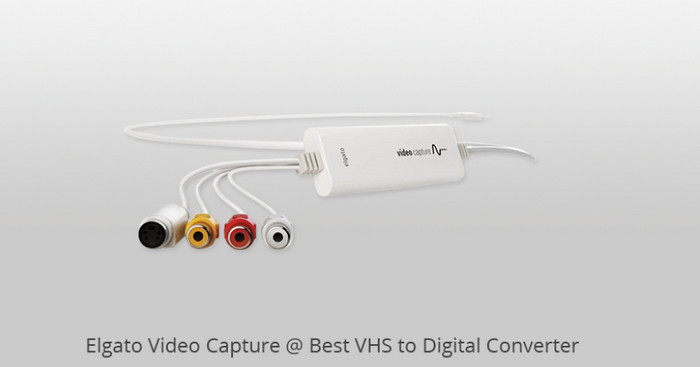
If you have high expectations for video quality, we highly recommend Elgato Video Capture. This product includes a capture card and accompanying software. Once you've successfully connected your VCR to your computer, you can use the software to capture the video from the VHS tape exactly as it is - truly unchanged, with no distortion or artifacts - at a resolution of up to 480p, which is sufficient for older videos.
Another commendable feature is that the Elgato Video Capture software includes basic video editing functions. If you wish to further process the files from your videotapes, this is the perfect solution for you.
Please note that you'll need to use an RCA or S-Video cable to establish the connection; the S-Video cable is widely recognized as the option that provides higher image quality.
Pros
- Very user-friendly.
- Includes cropping tools.
- Restores video quality as faithfully as possible.
Cons
- Does not support Linux.
2. VIDBOX Video Conversion Suite
Best for: Beginner
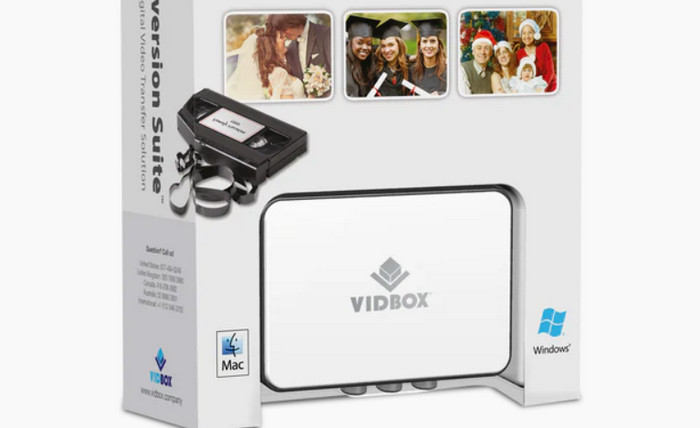
If you want the entire analog-to-digital video conversion process to be as simple as possible while still having full control over the results, we recommend trying VIDBOX Video Conversion Suite.
One of the most notable advantages of VIDBOX Video Conversion Suite is that it offers a wide range of customization options and convenience-enhancing settings before you finally export your video. First, you can manually select the approximate duration of the video to be recorded, allowing the converter to run unattended; second, it lets you choose a video aspect ratio of either 4:3 or 16:9; Finally, a dialog box will pop up prompting you to select the final file resolution from 640 x 480, 720 x 480, 720 x 576, or 1024 x 768. You can also manually set the Video Quality to Normal, Good, or Best, and VIDBOX Video Conversion Suite will display the file size corresponding to each quality level.
Pros
- Extremely easy to use.
- Offers useful customization options.
- Supports automatic recording stop.
Cons
- Some users have reported distortion and pixelation in the final output video.
3. ClearClick Video to Digital
Best for: No PC required
Do you really need a computer to convert analog video to digital?
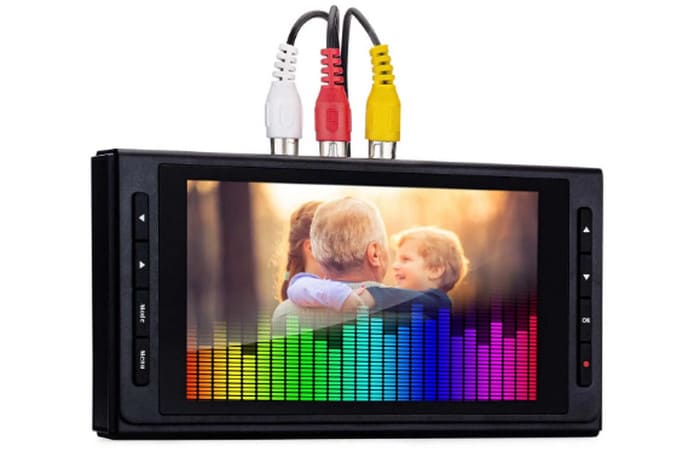
ClearClick Video to Digital is here to show you that it's time to break free from that misconception. This video analog to digital converter features a unique design: it can directly record video from your old tapes onto storage devices like USB drives or SD cards. The entire process requires no additional software, allowing you to create a permanent backup - and you're free to play it back on either a computer or a TV.
It's worth noting that you don't necessarily have to watch the entire recording process. The device features a built-in automatic stop function that can be set for 60, 90, 120, or 150 minutes, so you can schedule it in advance and simply come back later to retrieve your files. Another bonus: ClearClick Video to Digital supports upscaling video to 720p or 1080p.
Pros
- Supports setting a timer to automatically stop recording.
- No computer or other software required.
Cons
- Some users have reported that it may split long videos prematurely.
- Recording interruptions may result in corrupted video files.
Part 2. Buying Guide: Choosing the Right Capture Hardware and Video Conversion Software
Please note that not every analog-to-digital video converter is ready to use right out of the box. If you're unsure how to choose one, please refer to the factors mentioned in this section:
Input Connections
First and foremost, confirm the input type - that is, whether the converter can connect to your VCR.
Most common VCRs use either RCA or S-Video connectors. RCA is a more traditional type that offers better compatibility with older devices, but its ability to transmit video signals is limited, so video quality isn't particularly outstanding. If your device is very old, RCA is a safer choice; S-Video, on the other hand, offers better resistance to interference, meaning it delivers higher video quality. If quality is a top priority for you, we recommend choosing S-Video.
Software Compatibility
If you need to further process the converted video, check whether the converter you choose includes analog-to-digital video conversion software that supports post-processing options such as format, length, quality, and compression.
However, the software included with these products often only supports basic MP4 editor features. If you're looking for more advanced options, we recommend finding more specialized software.
FVC Video Converter Ultimate is an excellent choice. It supports a wide range of video formats and can handle most conversion tasks with ease. It offers a full suite of features for video compression, enhancement, trimming, cropping, merging, and splitting, and allows you to freely add filters, effects, and stickers. If you need to add other information, you can also use it to design and add custom watermarks.
Free DownloadFor Windows 7 or laterSecure Download
Free DownloadFor MacOS 10.7 or laterSecure Download
Part 3. FAQs of Analog to Digital Video Converter
What is the best analog-to-digital video converter?
If you prioritize video output quality, Elgato Video Capture is the best choice; if you're looking for simplicity, a device like ClearClick Video to Digital - which doesn't even require a computer - is the best option.
What is the best way to convert old VHS tapes to digital?
Using a VCR like ClearClick Video to Digital is a reliable option. If you need more precise control, choose a converter that connects the VCR to a computer, such as the VIDBOX Video Conversion Suite.
Is it worth digitizing old home videos on VHS?
Absolutely. Videos stored on VHS tapes are at risk of being lost at any time due to the aging and deterioration of the tapes themselves. It's best to extract the videos and keep a digital backup. If the videos are divided into segments, we also recommend exporting the clips as MP4 files and then combining MP4 files into a single, complete video.
Conclusion
This guide presents three analog-to-digital video converters: Elgato Video Capture, which excels in video quality; ClearClick Video to Digital, which is extremely convenient and doesn't even require a computer; and VIDBOX Video Conversion Suite, which allows for custom settings.
If you're unsure how to choose, refer to the two key criteria provided in the latter half of this guide. Be sure your final choice meets both your compatibility needs and your quality requirements.
-
 AMV Converter – 3 Best Methods to Convert MP4 to AMV on Win/Mac
 What are the best MP4 to AMV converters to turn the videos into Amine Music Video, you can learn more about 3 most efficient methods to get the desired videos with ease from the article.
-
 4 Best MP4 to M4V Converters to Turn MP4 Videos into M4V with Ease
 When you need to change MP4 to M4V, you should learn more details about the differences as well as the best MP4 to M4V converters from the article.
-
 7 Ways to Convert AVI to MP4 [Comprehensive Guide]
 Easily convert your AVI files to MP4 with these seven effective methods. Read this article and discover which AVI to MP4 converter works best for your needs.
