


 Video Converter Ultimate
 Screen Recorder
 Video Repair
 Secure Download
8 Best AI Video Enhancers to Upscale Video Quality (2026 Review)
In an era where visual content is king, blurry or low-resolution videos can ruin precious memories or professional projects. Thanks to the rapid advancement of artificial intelligence, AI video enhancers have become the ultimate solution to breathe new life into old footage. Whether you need to fix motion blur, remove noise, or upscale 1080p to 4K, these tools use sophisticated neural networks to recreate missing pixels and deliver stunning clarity.
In this guide, we review the top 8 AI video enhancers available for Windows, Mac, and online, helping you choose the right one to transform your videos into cinematic masterpieces.

How We Test and Review
- All desktop software is tested on an NVIDIA RTX 4080 (16GB VRAM) rig to measure real-world rendering speed and GPU efficiency.
- We use a standardized 5-minute 1080p clip and time exactly how long it takes to upscale to 4K. This gives us a concrete "Speed Score" for every tool.
- We test each AI model against four "nightmare" scenarios: grainy 480p family tapes, blurry handheld action shots, low-light night scenes, and heavily pixelated social media downloads.
Quick Comparison: Best AI Video Enhancers at a Glance
| Product | Best For | Platform | Max Resolution |
| FVC Video Converter Ultimate | All-in-one efficiency & beginners | Windows, Mac | 8K |
| Topaz Video AI | Professional cinematographers and archival restoration. | Windows, Mac | 16K |
| AVCLabs Video Enhancer | Face restoration and colorizing black-and-white films. | Windows, Mac | 8K |
| WinXvideo AI | Low-end PCs & basic editing | Windows, Mac | 4K |
| Audials Vision | Movie & series recording enhancement | Windows | 4K |
| CapCut Online | TikTok or YouTube creators who need a quick resolution boost. | Web, Mobile | 4K |
| TensorPix | Users looking for a cloud-based service with background processing. | Web | 4K |
| Vmake AI | Users who want an instant improvement without much tweaking. | Web | 4K |
Top 5 AI Video Enhancer Software for Desktop
1. FVC Video Converter Ultimate (Editor’s Choice)
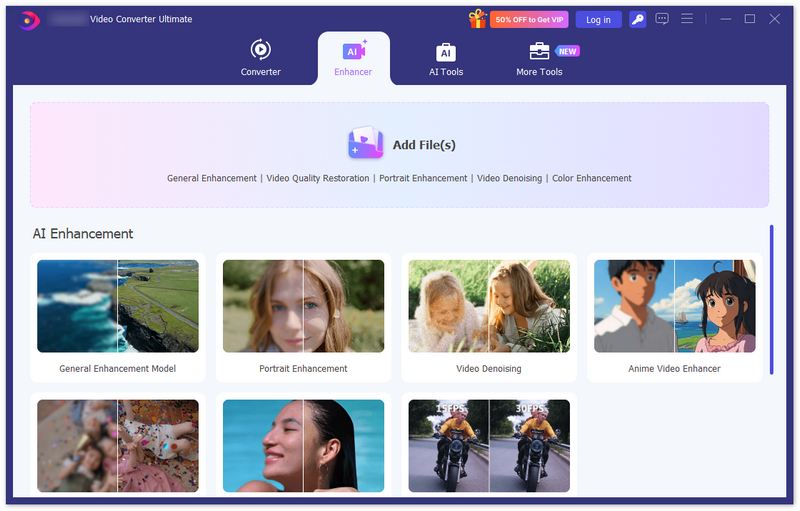
FVC Video Converter Ultimate stands out as the most balanced AI video enhancer on the market. It integrates a powerful AI toolkit designed to simplify complex restoration tasks. Unlike professional software that requires a steep learning curve, FVC allows users to upscale resolution, optimize brightness, and remove video noise with a single click. It is particularly effective at "cleaning" grain from low-light footage and stabilizing shaky handheld videos, making it an essential tool for both casual users and content creators.

FVC Video Converter Ultimate
30000+ Downloads- AI Upscaling: Transform SD/HD videos into 4K or even 8K clarity.
- One-Click Optimization: Automatically adjust brightness and contrast for a balanced look.
- Noise Reduction: Remove "dirt" and grainy artifacts from old recordings.
- Shaky Video Fix: Built-in stabilizer to smooth out motion blur.
Free DownloadFor Windows 7 or laterSecure Download
Free DownloadFor MacOS 10.7 or laterSecure Download
Pros
- Extremely fast conversion thanks to hardware acceleration.
- Supports over 1000+ formats (MP4, MKV, MOV, etc.).
- No watermark on output.
- User-friendly interface suitable for non-professionals.
- Its batch processing capabilities can enhance hundreds of clips simultaneously.
Cons
- The high-resolution export (8K) requires significant CPU/GPU resources.
Processing speed: Upscaling a 5-minute 1080p clip to 4K can take anywhere from 3 – 6 minutes depending on your GPU.
2. Topaz Video AI
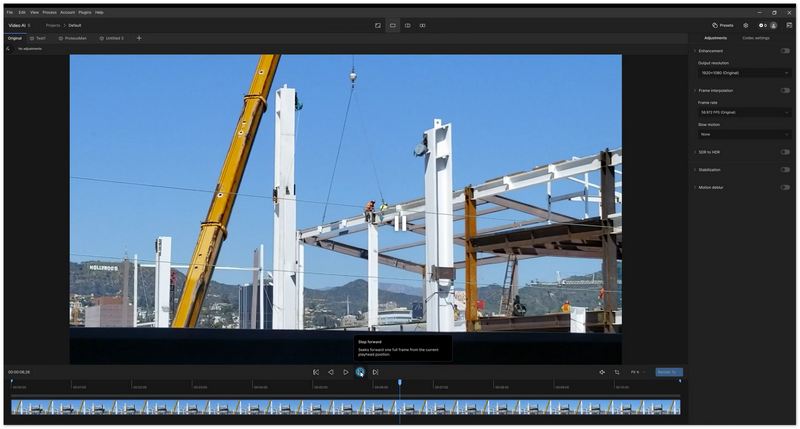
Topaz Video AI is widely considered the industry standard for professional video restoration, and it excels at upscaling, deinterlacing, and motion interpolation. It uses state-of-the-art machine learning algorithms to enhance video quality by predicting and adding new pixels to improve the sharpness and detail.
Pros
- Excellent at keeping natural details intact, making it perfect for upscaling older videos to higher resolutions (e.g., 720p to 4K).
- Supports frame rate conversion up to 120FPS, enhancing the smoothness of motion.
- Powerful deinterlacing and noise reduction make it great for professional-quality archival restoration.
- It boasts its specific AI models such as Iris (best for face enhancement) or Nyx (specifically designed for high-ISO noise removal).
Cons
- Enhance video with Topaz Video AI is expensive; extremely slow rendering on average computers.
- It requires an NVIDIA RTX or Apple M-series chip for reasonable speeds.
Processing speed: Upscaling a 5-minute 1080p clip to 4K can take anywhere from 5 – 9 minutes depending on your GPU.
3. AVCLabs Video Enhancer AI
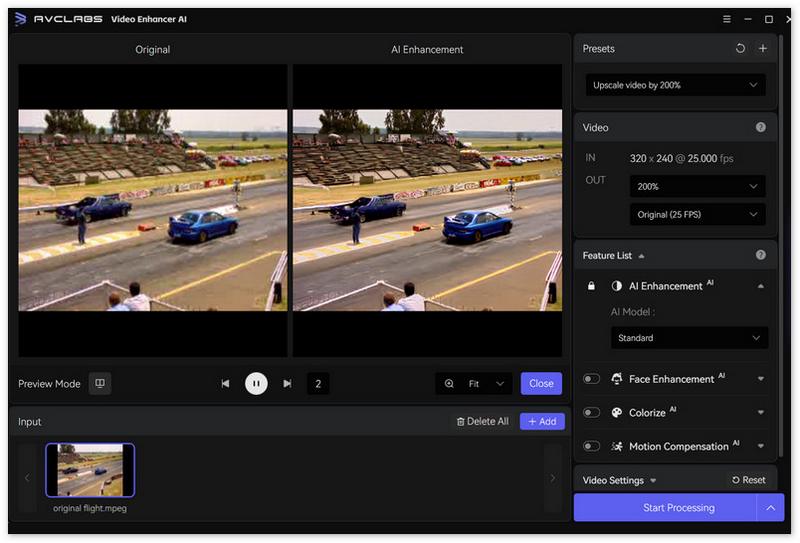
AVCLabs Video Enhancer AI is an excellent tool for video quality enhancement. It uses multi-frame convolutional neural networks to improve video resolution, detail, and colors. It is particularly useful for portrait-style videos and restoration of older, low-quality footage.
Pros
- It supports up to 8K resolution, making it ideal for high-resolution restorations.
- AVCLabs offers great precision in color grading, which is essential for face refinement and restoring old footage.
- Its AI Colorization feature is a massive selling point for users looking to restore black-and-white historical footage.
- The AI excels at restoring facial details, making it a top choice for portrait-style videos or family footage.
Cons
- The subscription cost is relatively high compared to one-time purchases, which could be a barrier for casual users.
Processing speed: Upscaling a 5-minute 1080p clip to 4K can take anywhere from 4 – 8 minutes depending on your GPU.
4. WinXvideo AI
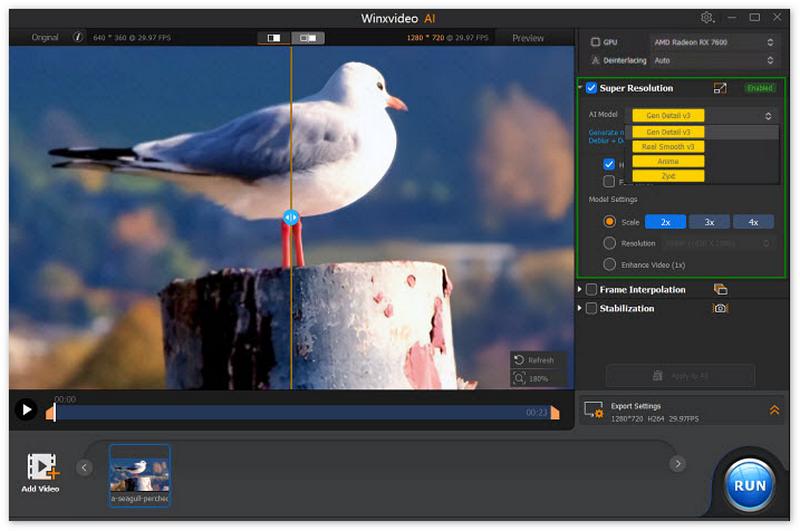
WinXvideo AI is a lightweight alternative to more expensive, resource-heavy video enhancement software. It combines AI upscaling with a full-featured video converter and compressor, making it a great all-in-one tool for users with older or lower-end hardware.
Pros
- Optimized to run on entry-level PCs, making it a good choice for users without powerful machines.
- In addition to video enhancement, it also includes screen recording features, allowing you to capture content and improve its quality.
- It offers quick processing times compared to professional-grade tools like Topaz.
Cons
- AI models are less "intelligent" compared to Topaz or FVC.
- For more intricate video restoration tasks (e.g., deep color grading or frame interpolation), it falls short.
Processing speed: Upscaling a 5-minute 1080p clip to 4K can take anywhere from 3 – 6 minutes depending on your GPU.
5. Audials Vision
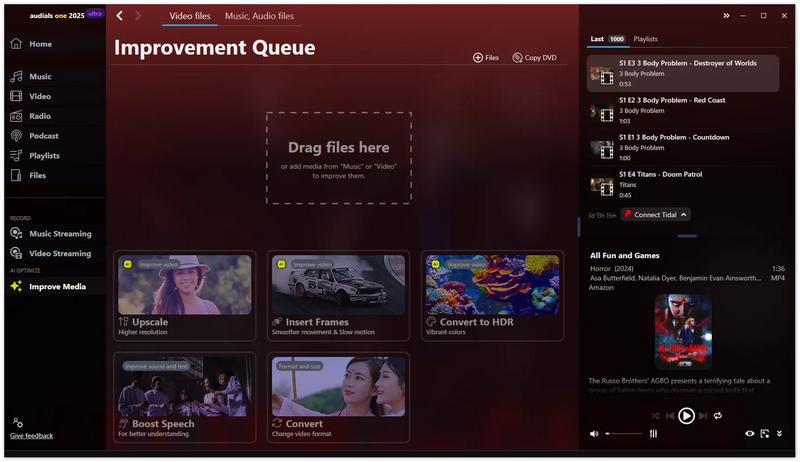
Audials Vision is tailored for movie lovers who want to improve the quality of standard movies. It uses AI to enhance visuals and transform content into HDR-quality experiences, making it ideal for enhancing old movies and TV shows.
Pros
- Converts standard video to HDR, enhancing contrast, brightness, and color accuracy for a cinematic experience.
- The software provides smooth motion enhancement, improving the fluidity of video playback.
- Offers an easy-to-navigate interface designed specifically for movie and TV show enthusiasts.
Cons
- Unlike some of the other tools, Audials Vision is limited to Windows users, which may restrict its accessibility for macOS users.
- The tool’s capabilities are tailored towards movies and TV shows, so it may not be the best for general video enhancement.
Processing speed: Upscaling a 5-minute 1080p clip to 4K can take anywhere from 4 – 7 minutes depending on your GPU.
Part 2. Top 3 Online AI Video Upscalers (No Installation)
1. CapCut AI Video Upscaler
CapCut's online version offers a surprisingly robust AI-powered video upscaling tool that’s perfect for quick edits and improvements. It is entirely free to use, making it a popular choice among content creators on platforms like TikTok and YouTube.

Pros
- Completely free; integrated with a powerful video editor.
- The interface is straightforward, and the process is quick.
Cons
- Limited control over specific AI parameters.
- The quality may not match desktop solutions like Topaz or FVC Video Converter Ultimate.
Processing speed: Upscaling a 5-minute 1080p clip to 4K can take anywhere from 15 – 30 minutes depending on your GPU.
2. TensorPix
TensorPix is a cloud-based AI video enhancer that leverages powerful server-side processing. This allows you to process videos without taxing your local machine, making it great for devices with limited resources.

Pros
- Offloads the heavy lifting to their servers, meaning you can work on other tasks while the video is being processed.
- Since it’s cloud-based, you can access TensorPix from any device with a browser, offering full cross-platform compatibility.
Cons
- Credit-based pricing can get expensive for long videos.
- You’ll need to purchase credits for larger files or extended features, which can be a downside for casual users.
Processing speed: Upscaling a 5-minute 1080p clip to 4K can take anywhere from 14 – 28 minutes depending on your GPU.
3. Vmake AI Video Enhancer
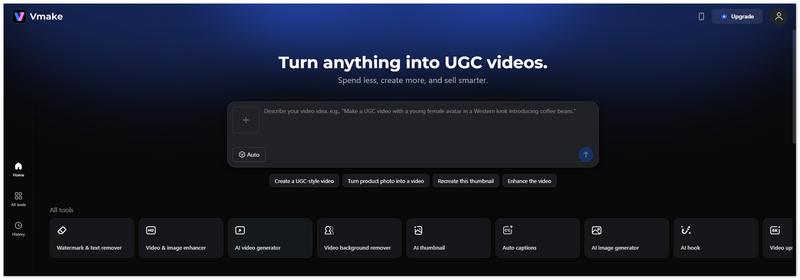
Vmake is an online AI video enhancer that simplifies the process of improving video quality with a single upload. It’s designed for users who don’t want to waste time adjusting settings and just want automatic processing.
Pros
- The process is quick and efficient, allowing for instant improvements in video clarity and saturation.
- The tool automatically adjusts video saturation, clarity, and other aspects, making it ideal for quick enhancements.
Cons
- While Vmake does improve video quality, it lacks the deeper customization and editing features available in more professional tools.
- You won’t be able to tweak specific settings or parameters, limiting advanced users.
Processing speed: Upscaling a 5-minute 1080p clip to 4K can take anywhere from 15 – 30 minutes depending on your GPU.
Part 3. FAQs about AI Video Enhancement
How does AI enhance videos?
Unlike traditional upscaling which just stretches pixels, AI uses machine learning to predict what the missing pixels should look like based on millions of data samples, effectively "creating" new detail.
Can I upscale 720p to 4K?
Yes, tools like FVC Video Converter Ultimate can upscale 720p footage to 4K. While it won't look as perfect as native 4K, the clarity and sharpness will be significantly improved.
What is the best free AI video enhancer?
CapCut is the best free online option, while FVC Video Converter Ultimate offers a superior trial experience for desktop users looking for high-quality offline processing.
Conclusion
Choosing the right AI video enhancer depends on your specific needs. If you are looking for a professional-grade tool for cinematic restoration, Topaz Video AI is top-tier. For online AI video enhancement, tools like CapCut, TensorPix, and Vmake offer easy, quick improvements. However, for most users who want a mix of speed, ease of use, and high-quality 4K/8K output, FVC Video Converter Ultimate is the most recommended choice.
Free DownloadFor Windows 7 or laterSecure Download
Free DownloadFor MacOS 10.7 or laterSecure Download
-
 Top 4 Video Players with Speed Controller in 2025
 Haven't you noticed the playback speed of every media player whenever you play a video? This article introduces video players with speed control.
-
 How To Screen Record Videos in 4K: Why and How to Do
 Learn how to screen record videos in 4K with this guide. Discover why 4K recording matters and how to capture ultra-high-definition content on any device.
-
 How to Play a Video in Reverse on PC and Mac You Should Not Miss
 Having a problem because you want to play your videos in reverse? Then try to read this article to know how to play video in reverse with easy steps.
