


 Video Converter Ultimate
 Screen Recorder
 Video Repair
HEIC Converters (Online & Desktop): Play HEIC on Windows and Other
The need to play HEIC files on Windows, Android, and other devices might be a hassle, as it seems. Thus, transforming the file into a more universal format like JPG and PNG is necessary. Good thing this article exists, because we will give you the top six HEIC converters that can offer every feature you need. In this article, we will review HEIC converters for online and desktop tools. In addition, we will also guide you through the simple steps to follow to make it possible. Please start reading now until the end so you will not miss a thing.

How We Test and Review
Each tool presented in this article is carefully reviewed and tested based on common factors to call them the best. In this article, we list the six HEIC converters that stand out in the testing process and the features they offer. To be specific, here are the factors we consider during the review and testing:
- • Feature and Performance: We dig deeper into the features it offers for its users and how effective these features are in the process.
- • Ease of Use: How accessible and easy to use the features are to complete the process.
- • Pricing and Compatibility: Is the tool affordable or available for free, and how is it compatible with your device?
What Is a HEIC Converter?
As we give you the overview, HEIC converters are common tools used to transform HEIC or High Efficiency Image Container files for better compatibility on other devices. These tools are commonly available for online and desktop use. Using these, you can convert HEIC to a more universal file format such as JPG, JPEG, and PNG.
Best Online HEIC Converters
We shall start with these amazing online tools for transforming your HEIC with ease. We have listed below the most accessible, effective, and easy-to-use tools. Check them below and see what’s best to use for an instant conversion process.
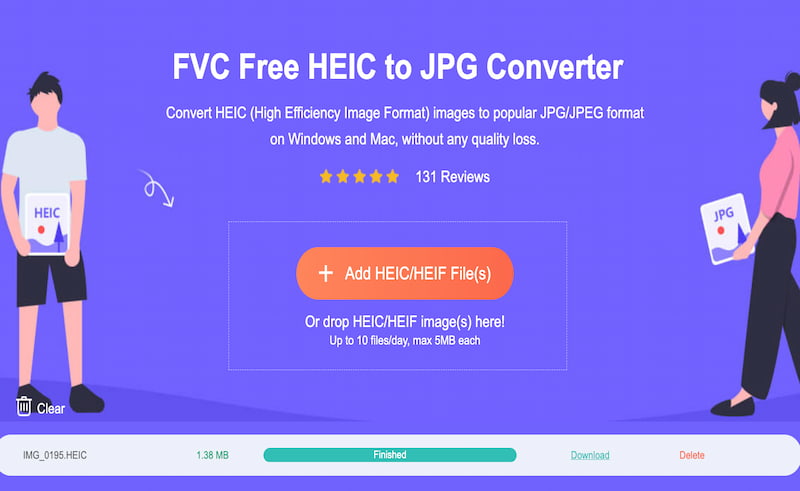
FVC Free HEIC to JPG Converter
Best For: Easy and high-quality online conversion process.
Price: Free
Overall Rating: 4.5/5
The first on the best HEIC Converter list and probably the most recommended tool is the amazing FVC Free HEIC to JPG Converter. This is popular for its amazing features that are easy to use. It is also accessible because all you need to do is visit its official website using your browser. More than that, you can expect a high-quality output from this tool, giving you the clearer converted HEIC file you need.
Pros
- Ease of use with a drag-and-drop process.
- Accessible, login to an account is not mandatory.
- High-quality HEIC output and other formats.
Cons
- You might find it limited in advanced features.
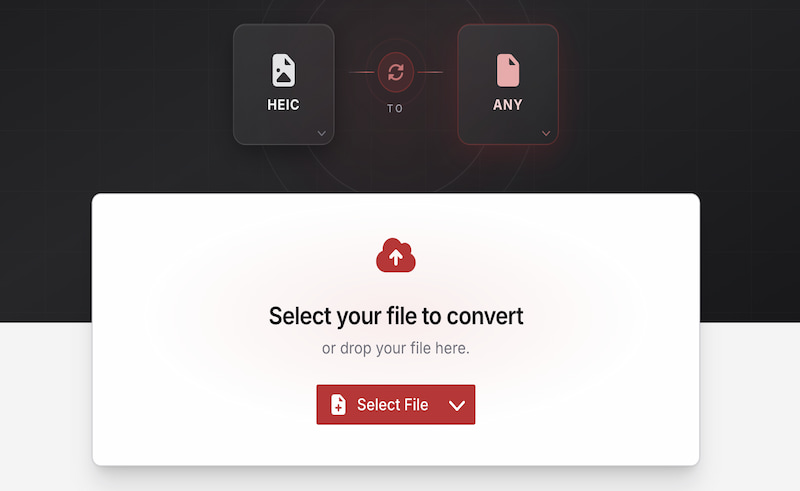
CloudConvert HEIC Review
Best For: Flexible online conversion.
Price: Free tier (limited) and paid plans available.
Overall Rating: 4.5/5
Another online tool is CloudConvert, which is known for its conversion process linked with your own cloud. This tool is a very versatile converter with support for more than 200 file types for input and output. More than that, this tool offers easy customization features for your bitrate, resolution, codec, and more elements for your file. Overall, CloudConvert offers great features for converting HEIC files yet might limit you with its free tier account. A paid account is encouraged to enjoy its full features.
Pros
- It has wide support for different file formats.
- Customizable options are available in the tool.
- It offers a cloud-based conversion process.
Cons
- Their free trials are limited in features.
- Full features and an account might be expensive for an online tool.
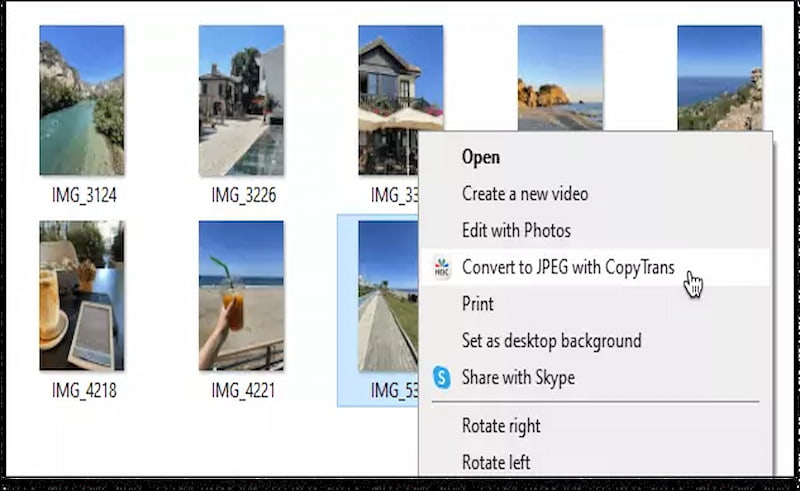
CopyTrans HEIC for Windows (Best Plugin for Native Windows Viewing)
Best For: Preview of HEIC in Windows.
Price: Free tier (limited) and paid plans available.
Overall Rating: 3.5/5
Our next tool is a free plugin that we can use for Windows PCs to open and view HEIC files. This is also capable of converting the default HEIC and HEIF photo formats with ease. This tool is somewhat unique compared to other options because it offers file explorer integration and gives us native viewing capability for HEIC. Yet, it might also be overwhelming to use compared with other online tools here.
Pros
- Free for home use.
- Privacy-friendly.
- Local conversion on your computer.
Cons
- Limited to JPEG results.
- Personal accounts are very limited.
Best HEIC Converters for Windows and Mac
We shall now move forward with the HEIC converter that we can use for desktop usage. Most commonly, these tools offer much more advanced and wider features for converting our HEIC files. Yet, some features might be overwhelming and have a learning curve. Despite that, you might get along well with these three tools; check them out now:
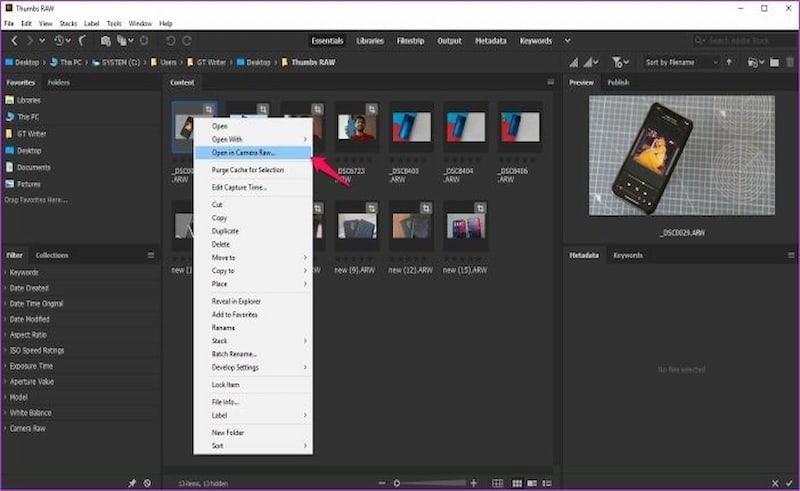
Adobe Bridge
Best For: Existing Adobe Creative Cloud Suite users.
Price: Free
Overall Rating: 4/5
Adobe Bridge is a popular tool that can help you preview, edit, organize, and batch process creative files. Yet, it is also a great tool that can help you convert your HEIC files. Here is the catch: the tool comes with certain format restrictions and setup requirements depending on the Operating system of your device. Despite that, the tool is great for batch-processing workflows. Lastly, this tool is recommended for users who are already using Adobe Creative Suite.
Pros
- No importing of files needed.
- It has a deep Adobe integration.
- Batch processing is supported.
Cons
- It constantly lags in performance.
- No editing features available.
- It has heavy resource usage.
Pixillion Image Converter
Best For: Converting and editing HEIC files.
Price: Free
Overall Rating: 4/5
The next tool is called Pixillion Image Converter, which is commonly popular as a multi-format image file converter. This can help you convert HEIC to JPG, PNG, PDF, and more. In addition, this desktop tool offers basic editing features developed by NCH Software. All of these are available for your Windows and Mac devices.
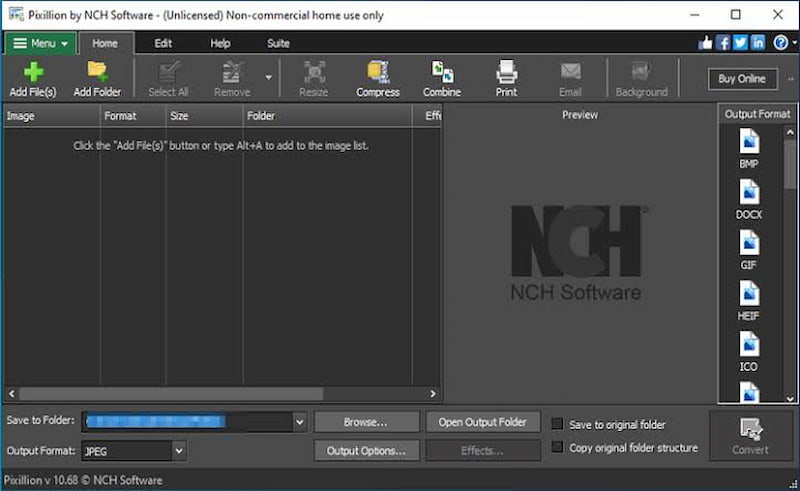
Pros
- Easy file conversion process.
- It offers batch processing.
- AI resizing of file format.
Cons
- The free version is limited in features.
- The premium version is expensive.
iMazing HEIC Converter
Best For: Converting and editing HEIC files.
Price: Free
Overall Rating: 4/5
The iMazing HEIC Converter is the next one in the list. This tool is another free desktop software available for Windows and Mac. This tool can smoothly convert Apple’s modern media format, like HEIC, into the most universal file types. Users of this tool highlight its quality and resolution controls, allowing you to easily adjust these elements in accordance with your preference.
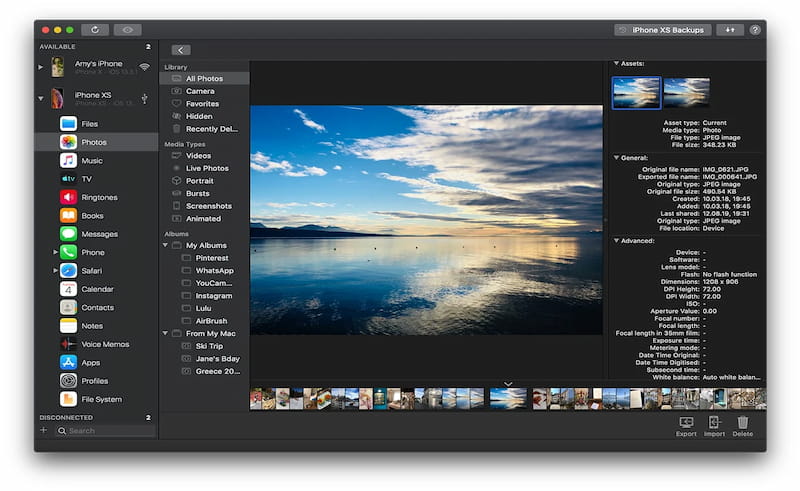
Pros
- This is a free tool.
- Easy to use.
- It can preserve your metadata.
Cons
- This is a single-purpose tool.
- Limited output formats.
- There is a stability issue.
How to Convert HEIC to JPG or PNG on Different Devices
We have discovered six amazing HEIC converters for online and desktop tools. In this part, we shall now guide you in turning your HEIC file into a JPG or PNG using our top tool, FVC Free HEIC to JPG Converter. Allow us to show you how easy it is to do:
Step 1. Access the amazing tool, FVC Free HEIC to JPG Converter, using your browser. From there, click Add a File or drop the HEIC file you need to convert.
Step 2. After uploading your HEIC file, click the Download button to get the output.
Step 3. You can now preview your HEIC on your Windows device without issue.
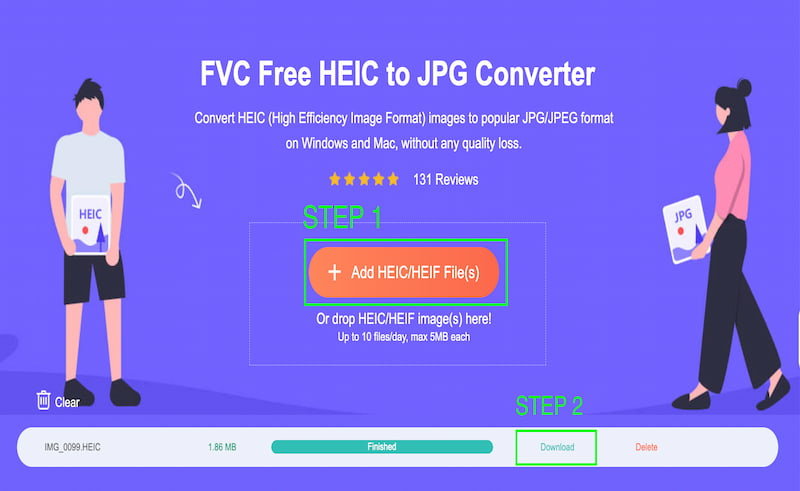
That’s how simple the conversion of HEIC to JPG is using the amazing FVC Free HEIC to JPG Converter. No wonder it is the first choice among users. Use it now.
How to Choose the Right HEIC Converter
Among the six HEIC converters we reviewed, it is certain that these options overwhelm us. You might be asking by now what the best tool among these options is. With that, allow us to help you choose the right HEIC Converter for you by giving you some factors to consider when choosing:
- • Straightforward. You need to select the tool that can give you a straightforward process.
- • Affordability and Accessibility. The tool that you can access anytime without having so many steps and processes.
- • Quality Output. You need to see the output it gives. It should always be high-quality.
FAQs about HEIC Converter
Does converting HEIC reduce quality?
Yes. There is a high chance that your HEIC file will reduce its quality, especially if you convert it to JPG or PNG. The reason behind it is that HEIC files come with high-quality resolution. They are undoubtedly superior to JPG and PNG.
Can Windows open HEIC files?
Yes, with the help of installing a media player that supports HEIC files. Most of the built-in media players on Windows devices cannot open or view HEIC because of their high-quality resolution. As we all know, HEIC files are native to the Apple Ecosystem and not to the Windows operating system and Android devices.
HEIC vs JPG: which is better?
HEIC is better when it comes to resolution. This will always give you a high-quality image. Yet, JPG is good for a universal file format, allowing you to view and open it on any device you are using.
Can I batch convert HEIC to JPG?
Yes. There are tools that offer features allowing you to convert HEIC to JPG all at once. One of the tools that you can use is Adobe Bridge and Pixillion Image Converter.
Conclusion
In conclusion, converting HEIC files to JPG or PNG is easy to do. We have different tools to use for online and desktop processes. All of the six tools we presented above are effective and can really help you. Yet, if you are still looking for a recommendation, many users love to use FVC Free HEIC to JPG Converter because of its easy-to-use features and straightforward process. You can get the process done in just a few steps.
-
 Best Technique to Transform HEIC to MP4 Efficiently
Learn the best ways to perform the HEIC to MP4 conversion on your computer and iPhone devices. This post contains the technique for effective conversion.
-
 Best and Easy Methods on How to Turn Off HEIC on iPhone
Are you searching for a way to turn off HEIC on your iPhone? This write-up will show you the best and easiest methods of turning off HEIC on an iPhone.
-
 How to View and Convert HEIC Files on Android [Free & Effortless]
Do you want to view or convert HEIC files on Android without destroying the original image quality? In this type of scenario, this article will help.
