


 Video Converter Ultimate
 Screen Recorder
 Video Repair
Comprehensive Details of AV1 Versus HEVC Comparison
Let us navigate the codec landscape by defining and comparing AV1 and HEVC. It is common knowledge that AV1 is royalty-free and has superior compression. On the other hand, HEVC is known to be standardized by MPEG, which can deliver faster encoding and wider support for different devices. There is so much more to discover about these file codecs; that is why this article exists to help you compare them with important details and elements. See this article as we help you know which codec you need between AV1 VS HEVC. Read this article now to discover.

AV1 vs HEVC: Quick Comparison Table
| Feature | AV1 | HEVC |
| Licensing Fees | Royalty-free (Alliance for Open Media). | Royalty-bearing (MPEG LA, Access Advance). |
| Compression Efficiency | 30% better than HEVC at the same quality. | 50% better than H.264, but less efficient than AV1. |
| Release Year | 2018. | 2013. |
| Backing Organizations | AOMedia (Google, Microsoft, Netflix, Amazon, Intel, Apple, and more) | MPEG or ITU-T. |
| Hardware Support | Growing (RTX 40 series, Intel Arc, AMD RX 7000 plus). | Mature, widely available since 2016. |
| Browser/Platform Support | All major browsers (Chrome, Firefox, Edge, Safari). | Universal across devices, browsers, TVs. |
| Best Use Case | Streaming, cloud storage, bandwidth savings. | Broadcast, surveillance, legacy compatibility. |
AV1 vs HEVC: Compression Efficiency & Video Quality
AV1 can outperform HEVC when it comes to raw efficiency. That is because AV1 can save you an additional 20 percent to 30 percent bandwidth and file size. Thus, here is a detailed table that shows you important things about their compression and efficiency.
| Feature | AV1 | HEVC |
| Bandwidth Savings | 20–30% smaller file sizes than HEVC at the same quality. | 50% smaller than H.264, but larger than AV1. |
| High‑Resolution Performance | Excels at 4K and 8K, reducing streaming costs. | Strong at 4K, but less efficient at 8K. |
| Perceptual Quality | Maintains equal or better visual fidelity at lower bitrates. | High quality, but requires more bitrate than AV1. |
| Encoding Complexity | Slower encoding due to advanced compression tools. | Faster encoding with mature implementations. |
| Streaming Impact | Ideal for platforms needing maximum efficiency. | Reliable for legacy devices and broadcast workflows. |
Encoding Speed & Hardware Acceleration Limitations
The Computational Cost: Why is AV1 Encoding So Slow?
AV1 is slower compared to HEVC because it uses advanced compression details. This algorithm allows you to maximize the codec yet requires you to have heavy and high CPU or GPU resources. In the end, encoding AV1 can take longer than HEVC. This is much longer with 4K to 8K workflows.
Hardware Support: Do Graphics Cards Support AV1 and HEVC Hardware Acceleration?
Yes. Graphic cards can now support AV1 and HEVC hardware acceleration. These include the NVIDIA RTX 40 series, AMD RX 7000 cards, and Intel Arc for AV1. HEVC hardware acceleration has been available since 2016 for NVIDIA, Intel, and AMD GPUs. HEVC is universal and mature, while AV1 is still expanding.
AV1 Codec vs. HEVC: Browser & Device Compatibility
| Platform | AV1 | HEVC |
| Browsers | Chrome, Firefox, Edge, and Safari. | Universal and Safari. |
| Mobile | Android 10 plus andiOS 14 plus. | Broad iOS or Android support. |
| Smart TVs | Newer Samsung, LG, and Sony models. | Most TVs since 2016. |
| Streaming | YouTube, Netflix, and Twitch rollout. | Netflix, Disney+, Apple TV+. |
| GPUs | RTX 40, Intel Arc, AMD RX 7000+. | NVIDIA Pascal+, Intel Quick Sync, AMD Polaris+. |
| Legacy | Limited. | Strong, wide coverage. |
Verdict: Should You Choose AV1 or HEVC for Your Videos?
AV1 is a great option if you need efficiency. This is a great choice for 4K to 8K video and cloud workflows. Go with HEVC if you need speed and device compatibility.
| Platform | AV1 | HEVC |
| Licensing | Royalty‑free and cost‑effective. | Royalty‑bearing and higher costs. |
| Efficiency | 20 to 30percent smaller files, ideal for 4K/8K. | Efficient vs. H.264, but less than AV1. |
| Encoding Speed | Slower and resource‑heavy. | Faster and mature implementations. |
| Compatibility | Growing support and modern devices. | Broad and legacy device coverage. |
| Best Use Case | Streaming, cloud storage, and future‑proof workflows. | Broadcast, surveillance, and older hardware ecosystems. |
Bonus: How to Convert AV1 to HEVC or Vice Versa
Now, for converting your media files into the codec you prefer, whether it is AV1 or HEVC, a great tool is here to help you. We have FVC Video Converter. This tool offers an advanced feature that allows you to convert AV1 to HEVC or vice versa in a high-quality output. More than that, you can use the tool now because it is free and easy to use. Check the steps below to start using the tool with ease.
Step 1. Download FVC Video Converter Ultimate for free by going to the official website.
Step 2. Open the tool and access the Converter tab. From there, click the Add button to add the media files you want to convert.
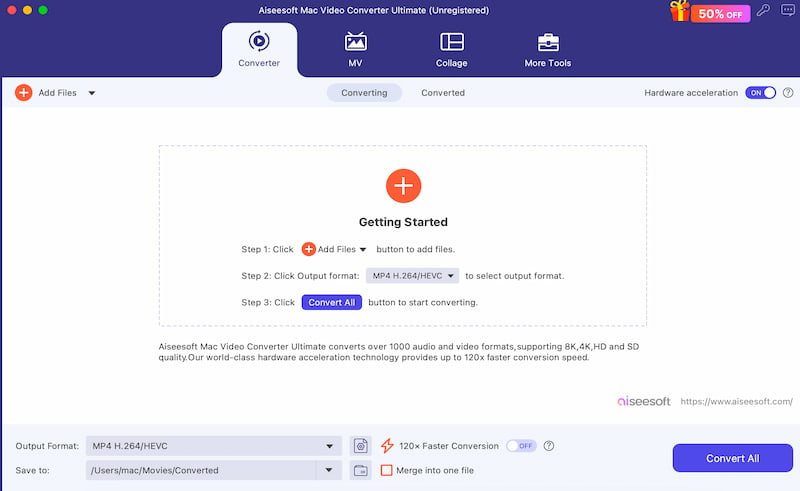
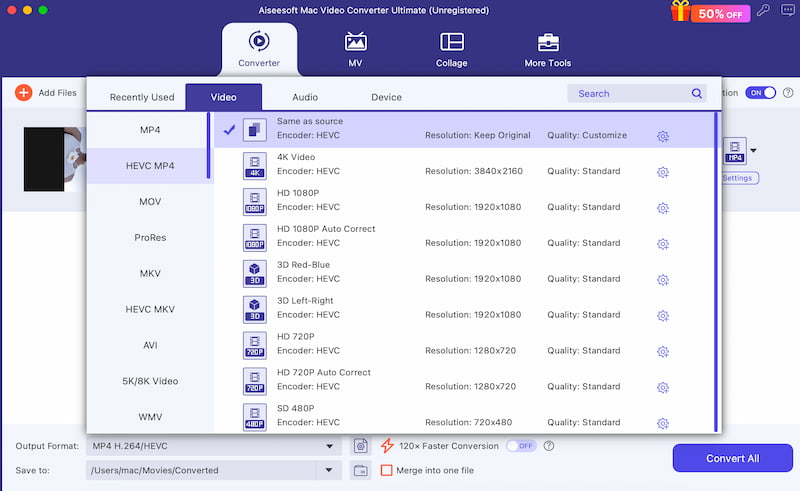
Step 3. You will now see the media files on the interface; then change the codec from AV1 to HEVC or vice versa. You can change it under the Output Format setting.
Step 4. If you are done with it now, please click the Convert All button and allow the tool to process the file. It will take a few seconds, and your video will now be ready.
FAQs about AV1 and HEVC
Q: Why does encoding AV1 take longer compared to HEVC?
A: That is because AV1 has a complex prediction mode and a larger file size. It has better compression efficiency. For that, it requires higher requirements for the GPU and CPU.
Q: Does AV1 save more bandwidth compared to the HEVC codec?
A: Yes. AV1 lessens the bitrate by 20 to 30 percent. This is higher than HEVC with the same visual quality.
Q: What streaming platform uses AV1?
A: Various streaming platforms use AV1 nowadays. Some of these platforms are YouTube, Netflix, Twitch, and more. However, HEVC is still dominant in TV, Broadcast, Blu-ray, and more.
Conclusion
To conclude, AV1 and HEVC are both useful depending on the field you are in. They have different strengths. They can be superior in different ways. Now, in the process of choosing between AV1 and HEVC, you need to know your field and where you are going to use the files. Nevertheless, we have a great converter that you can use anytime if you have the wrong codec. Use FVC Video Converter Ultimate for free now and see a higher-quality result.
-
 7 Ways to Convert AVI to MP4 [Comprehensive Guide]
 Easily convert your AVI files to MP4 with these seven effective methods. Read this article and discover which AVI to MP4 converter works best for your needs.
-
 How to Convert AVI Videos to Animated GIF Files on Windows/Mac
 Want to select interesting AVI segments for GIF memes? This article tells you the 2 best methods to clip and convert AVI to animated GIF for free.
-
 How to Convert AVI to MOV with Easy Steps and Tools
 Do you want to know how to convert AVI into a playable MOV? You must follow this article to know how to do it and tips to have a successful conversion.
