


 Video Converter Ultimate
 Screen Recorder
 Video Repair
 Secure Download
24 vs. 30 vs. 60 vs. 120 FPS: Choosing the Best Frame Rate for 4K Video
One can quite easily think that more frames per second (FPS) always bring about better quality, but it's really not always true. Frame rate, or FPS, is the number of individual images shown every second in a video. The FPS you use can totally alter the appearance and the atmosphere of your videos.
Honestly, if I'm selecting the best frame rate for 4K video, I don't merely concentrate on the figures. I focus on the desired output. Do I want the style of a movie? Or do I desire smooth, real‑looking movements for games, sports, or video blogs? There isn't a universally "best" frame rate since it depends on why you are being creative.
This article is a rundown of 24, 30, 60, and 120 FPS, when it is a good idea to use one or the other, and how you can decide on the appropriate frame rate for your future 4K work.

Part 1. What is the Best Frame Rate for 4K Videos
The best frame rate for 4K video, iPhone, or any other camera really changes based on the style of your final video. Each frame rate has its distinct flavor of motion and rhythm, from a cinematic movie style to an ultra‑smooth motion. It's a good idea to understand what each one is best for before making your choice. I'll list the best‑known 4K frame rates and what they are best used for, to help you decide.
4K at 24FPS: The Cinematic Standard (Movies, Short Films)
24 FPS is my go‑to frame rate if I want to give my movie a vintage film look. It mimics the way our eyes perceive motion, and that slight blur leads to the aesthetic that film lovers associate with cinema and intense storytelling. So, what is the best frame rate for 4k video? My suggestion is 24 FPS for short movies, documentaries, and artistic projects where mood and feelings weigh more than perfect motion fluency.
Best for: Films, short movies, cinematic travel videos, documentaries, and content focused on storytelling.
4K at 30 FPS: The Digital Sweet Spot (YouTube, TV Broadcasts)
Typically, I produce content for regular consumption at 30 FPS. It gives a better flow of motion compared to 24 FPS, yet remains quite natural‑looking, which is why it's an excellent option for vlogs, tutorials, interviews, and TV content. In case you’re curious about the best frame rate for 4K video on YouTube, 30 FPS usually represents a compromise because it gives a smooth viewing experience while avoiding the production of excessively large file sizes.
Best for: YouTube videos, TV broadcasts, online tutorials, interviews, travel videos, and everyday content.
4K at 60 FPS: Smooth Motion (Gaming, Sports, Vlogs)
I usually shoot my videos at a speed of 60 frames per second (FPS) when I want them to be as smooth and realistic as possible. Rapidly moving characters, side‑scrolling, and blowing things up are all visibly clearer, so the video becomes more immersive. Which frame rate is best for 4K video? I'd respond, "60 FPS is a great choice for games, sports vlogs, and other content where there's a lot of movement." This enhanced smoothness and quality is yet connected to much larger file sizes.
Best for: Gaming videos, sports action scenes, travel vlogs, fast‑paced events, and outdoor activities.
4K at 120 FPS: Slow‑Motion B‑Roll
If I were to be making slow‑motion scenes, I would always prefer to shoot 120 FPS. The additional frames enable one to decelerate the footage without compromising on the smoothness and details of motion. Though the files become greatly enlarged, the results still justify the use of such dramatic shots and creative edits.
In case you're trying to figure out the best frame rate for 4K video to produce cinematic slow‑motion effects, then your pick should definitely be 120 FPS.
Best for: Slow‑motion B‑roll, action sequences, sports highlights, nature shots, and cinematic creative projects.
Quick Guide: Choose the Best Frame Rate for Your 4K Video
| Frame Rate (FPS) | Best For | Visual Feel | File Size Impact | Ideal Platform |
| 24 FPS | Movies, short films, documentaries | Cinematic, film‑like | Low | Cinema, film festivals, streaming platforms |
| 30 FPS | YouTube, TV shows, tutorials, interviews | Natural and balanced | Moderate | YouTube, TV broadcasts, social media |
| 60 FPS | Gaming, sports, vlogs, action videos | Ultra‑smooth and realistic | High | YouTube, Twitch, gaming platforms |
| 120 FPS | Slow‑motion B‑roll, action sequences | Extremely smooth (ideal for slow motion) | Very High | Professional editing, commercials, cinematic productions |
Part 2. How Frame Rate Impacts 4K File Size & Storage
One thing I figured out is that a higher frame rate doesn't only make videos smoother. It also leads to bigger files. Since more images are taken per second, your camera gets more data, which results in bigger video files. That is a point to bear in mind if your storage space is limited or you are planning to edit long videos.
Here's a quick comparison of how different frame rates affect storage:
| Frame Rate (FPS) | Estimated File Size | Storage Impact | Best Choice If… |
| 24 FPS | Smallest | Low | You want cinematic videos and longer recording time. |
| 30 FPS | Small | Moderate | You need a balance between quality and storage. |
| 60 FPS | Large | High | You record gaming, sports, or fast‑moving subjects. |
| 120 FPS | Largest | Very High | You plan to create slow‑motion videos in post‑production. |
Things to Consider Before Choosing a Frame Rate
- • Storage Space: More frames per second produce much larger video files, which fill up the storage faster.
- • Editing Performance: Large-sized video files need a more powerful computer to make video editing smooth.
- • Export Time: Most of the time, video clips captured at higher frame rates take the longest time to render and export.
- • Sharing Online: Besides, larger files require more time to be uploaded on YouTube, cloud storage, or social media.
30 frames per second is frequently the ideal compromise between file size, storage efficiency, and video quality if you don't require slow motion or extremely smooth action.
Part 3. Bonus: How to Change My Videos' Frame Rate
In case you have already captured your video with the incorrect frame rate, you do not need to record it again. FVC Video Converter Ultimate enables you to modify your video's frame rate with ease, plus change the format, resolution, bitrate, and other output settings. Besides, it is a great tool for beginners to make videos compatible with various devices and platforms.
Steps to Change a Video's Frame Rate in FVC Video Converter Ultimate
Step 1. Download and install FVC Video Converter Ultimate on your PC using Windows or Mac.
Free DownloadFor Windows 7 or laterSecure Download
Free DownloadFor MacOS 10.7 or laterSecure Download
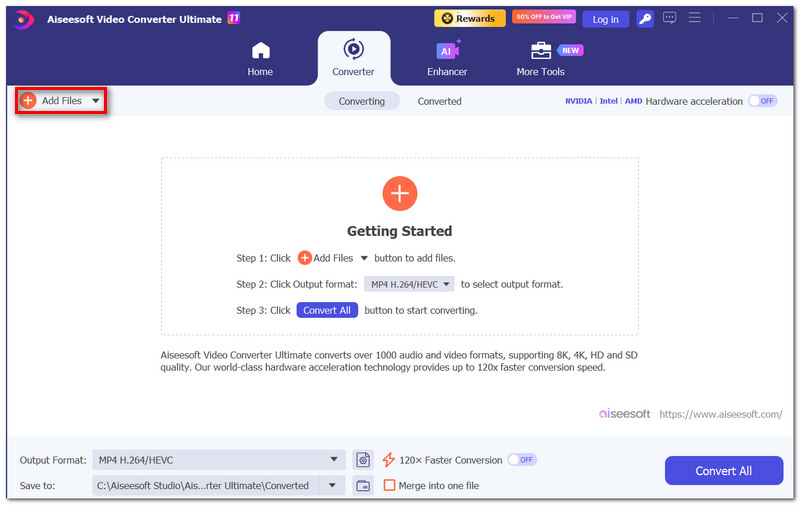
Step 2. Run the program and hit Add Files to bring the video you've decided to work on into the software.
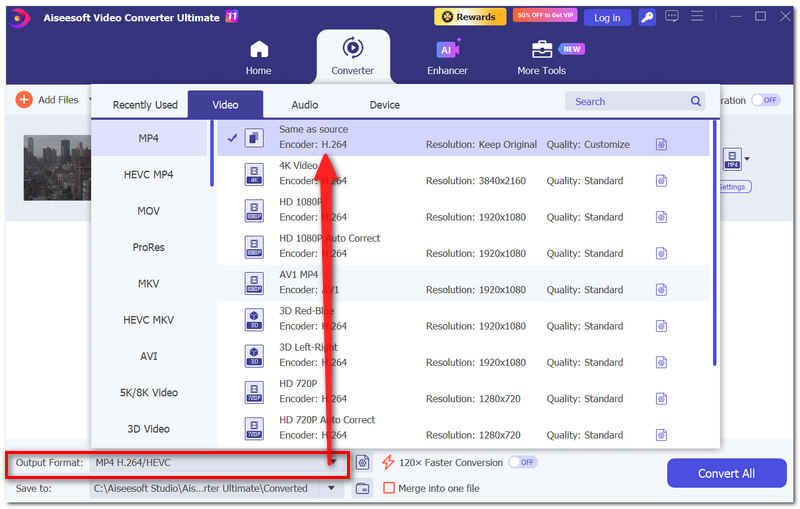
Step 3. Go to the Output Format option and pick a video format that you want.
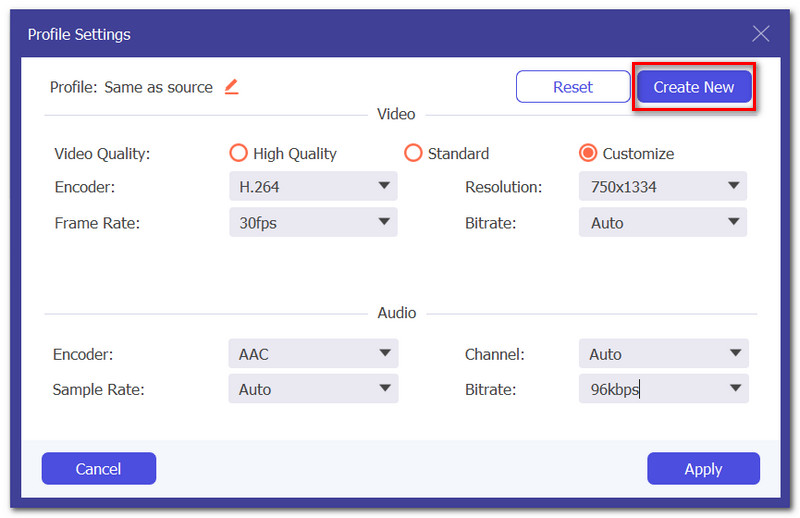
Step 4. Next to the current output format, click the Settings icon. In the Video Settings window, find the Frame Rate (FPS) option.
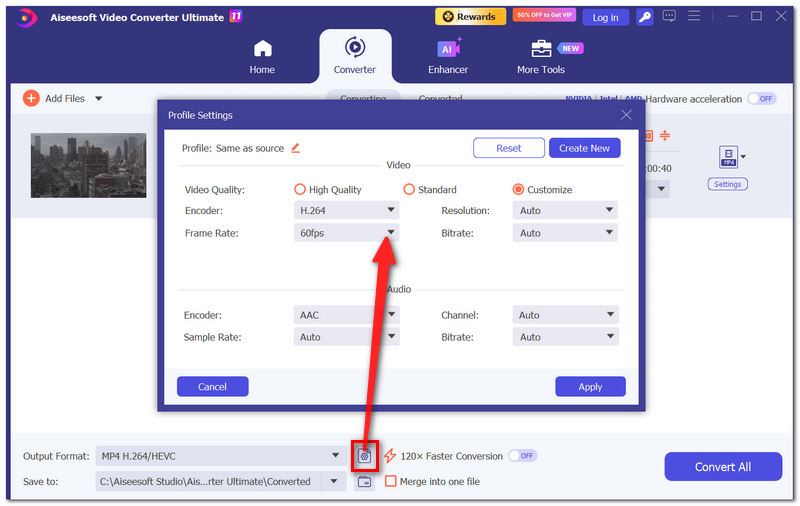
Step 5. Pick a frame rate of your choice: 24 FPS, 30 FPS, 60 FPS, or any other available one. If you want, you can also modify resolution, bitrate, or encoder, and then hit Create New or OK to save the profile.
Step 6. Pick a location for your converted video file and hit the Convert All button to change the frame rate of your video and export it.
Once the conversion finishes, your video will have the new frame rate and will be better for your editing workflow or the playback platform you prefer.
Part 4. FAQs on the Best Frame Rate for 4K Video
Why might two 4K videos with the same frame rate sometimes appear completely different?
Frame rate is just one element. Also, camera settings, shutter speed, bitrate, lighting, and color correction can influence the final look and quality of the video.
Why do some cinematic videos intentionally avoid high frame rates?
Most of the time, filmmakers opt for lower frame rates because viewers instinctively link them with movies and stories.
Should I prioritize frame rate or resolution if my device has limited storage?
Basically, it is down to what you are intending to do. For example, if smooth motion is more important than having the extra detail, a lower resolution with a higher FPS could be a better option than 4K with limited recording time.
Conclusion
First of all, the choice of the right frame rate really depends on the type of video you want to make. Simply choosing the highest FPS is not the answer to this question. For example, if you want a movie‑style video, smoother motion, or slow‑motion drama, each frame rate has its own advantage. In case you are looking for the best frame rate for 4K video iPhone or any other camera, this manual is at your service for balancing between visual quality, storage, and your creativity so that every 4K video can really come out great.
-
 Fraps Screen Recorder Review: Is it Still Worth It?
 Is Fraps Screen Recorder on your list, and want to know more about it? Read this in-depth review and learn what it is, how to use it, and if it is worth it.
-
 QuickTime Screen Recording – Record Video with Audio on Mac & PC
 Recording screen with audio on Mac comes in handy. The built-in player, QuickTime Player can do it. Read his post and know how to capture screen with sound on Mac and PC.
-
 Top 4 Free AVI Screen Recorders to Capture Screen Video as AVI Files
 To record screens in high-quality AVI files, the article identifies and shares the top 4 free AVI screen recorders in this post.Read it and get what you want.
