


 Video Converter Ultimate
 Screen Recorder
 Video Repair
 Secure Download
In-depth Review of Dxtory: Everything You Need to Know
For sure, you’re wondering what Dxtory is, and that’s exactly what we’re here to explore. When searching for a screen recorder, you’ll come across many options, each with different features and capabilities. Dxtory has been around for a while, offering a distinct approach to screen recording that sets it apart from other tools. But is it still a good choice today?
In this review, we will examine this tool more closely and compare it with other popular screen recorders to see how it performs. We will also introduce the best alternative if Dxtory doesn’t meet your needs. If you want to know more, continue reading!

Part 1. What is a Dxtory Screen Recorder?
Price: $33.35 one-time payment
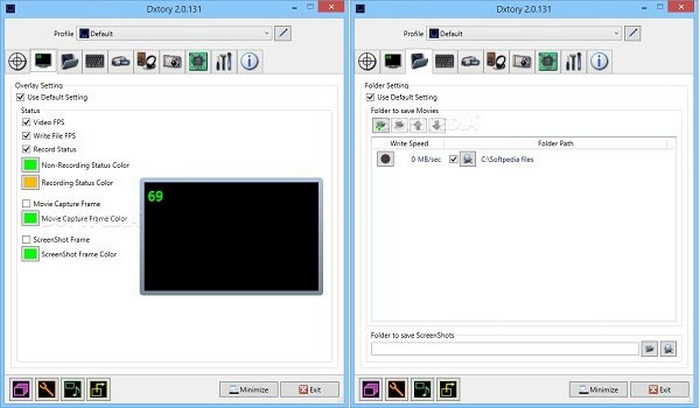
Dxtory is a screen recording software that captures high-quality video from DirectX and OpenGL applications. Unlike other screen recorders, Dxtory directly accesses video data from the source. One of Dxtory’s key features is its ability to record lossless video. It also supports multiple audio sources, allowing users to simultaneously record system audio and external microphone input. Additionally, this tool offers customizable frame rates, codec support, and various file output formats, giving users greater control over their recordings.
Part 2. Is Dxtory Worth Your Try?
There are various factors that need to be considered when using a certain tool. So, if you’re considering Dxtory for your screen recording needs, then you have to evaluate the tool based on its overall performance, features, and price. But is Dxtory really worth it? The answer is it depends on what you’re looking for in a screen recorder. Dxtory excels in capturing high-quality, lossless video with minimal system impact, making it a powerful tool for those who prioritize recording precision. Below are the pros and cons of using this tool:
Pros
- Captures OpenGL and DirectX video data quickly.
- Lossless video recording for high-quality output.
- Minimal system performance impact due to direct video data capture.
- Multiple audio source recordings.
- Saves recordings in multiple video and audio formats.
- Allows selection of preferred video codecs, including the VFW codec.
Cons
- May slow down system performance, especially on older devices.
- The free version has significant limitations.
- The interface may feel outdated.
Verdict:
Dxtory offers high-quality, lossless video recording with minimal system impact, along with the ability to record multiple audio sources and support for third-party codecs. However, given the availability of newer and more user-friendly alternatives, its complexity and reliance on system compatibility may make it less appealing for many users. While it's a solid option for those who need detailed control, other tools might provide a more streamlined and efficient experience.
Part 3. Dxtory Comparison with Alternatives
There are various screen recorder tools aside from Dxtory that may offer the same or even better performance. Fraps and OBS are just two of them, each with its own strengths and weaknesses. To determine whether Dxtory is the best choice, it’s important to compare its features, recording quality, and overall usability against these alternatives.
Dxtory vs. Fraps
Video Quality:
Both Dxtory and Fraps deliver excellent video quality, but their approaches differ. Dxtory provides more flexibility with multiple quality settings, including RGB and YUV formats, allowing users to balance quality and performance. Meanwhile, Fraps records using the Fps01 codec with Lossless RGB, ensuring high fidelity but at the cost of massive file sizes. Dxtory’s ability to use alternative codecs, such as the UtVideo codec, gives it an advantage in customization and efficiency.
Audio Quality:
Dxtory outperforms Fraps in audio recording due to its ability to capture up to eight separate audio sources and store them in separate tracks, making post-editing more convenient. Fraps, on the other hand, merges microphone and system audio into a single track, limiting audio adjustments during editing.
Overall performance:
Fraps is optimized for high performance, as it minimizes CPU usage by avoiding real-time compression, resulting in a smooth gaming experience. However, this leads to extremely large file sizes. Dxtory, while demanding on lower-end systems, excels when used on a powerful PC, maintaining frame rates without recording glitches and generating more manageable file sizes compared to Fraps.
Dxtory vs. OBS
Video Quality:
Dxtory offers higher recording quality with support for lossless video capture and customizable codecs, whereas OBS prioritizes compression and streaming efficiency. While OBS Screen Recorder allows for real-time encoding, its video quality may not match the lossless capture of Dxtory, especially for local recordings.
Audio Quality:
OBS supports multiple audio tracks, similar to Dxtory, making it ideal for professional recording and live streaming. However, Dxtory’s ability to handle up to eight separate audio sources gives it an edge for complex recording setups.
Overall performance:
OBS is a lightweight and efficient tool designed for live streaming, making it less demanding on system resources. In contrast, Dxtory is tailored for high-quality local recording and requires a more powerful PC to reach its full potential.
Part 4. Best Dxtory Alternative
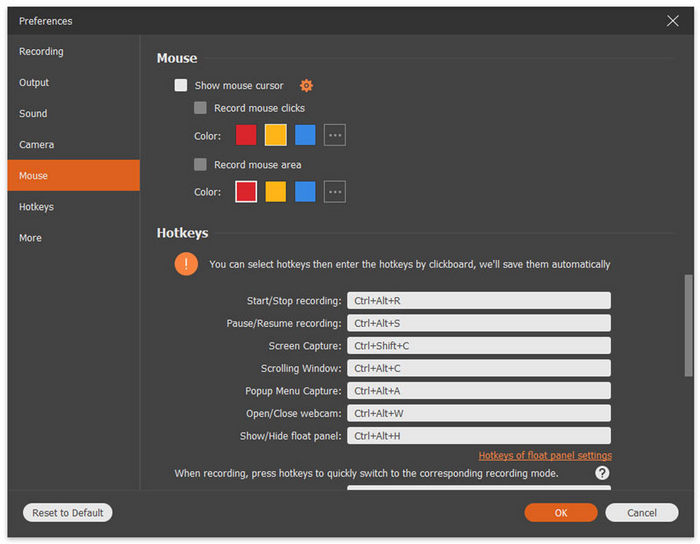
If you're looking for the best alternative to Dxtory, FVC Screen Recorder is an excellent choice. This professional-grade screen recording tool provides a seamless and flexible way to capture your screen with high-quality results. This tool supports multiple recording modes, including full-screen, custom regions, and window-specific capture. You can also record videos with system audio, microphone input, or webcam overlay, making it ideal for content creators, gamers, and professionals. Additionally, the software supports a variety of output formats such as MP4, MKV, MOV, and AVI, ensuring compatibility with various platforms.
Free DownloadFor Windows 7 or laterSecure Download
Free DownloadFor MacOS 10.7 or laterSecure Download
With advanced features like real-time annotations, scheduled recording, hardware acceleration, and high-quality export settings, FVC Screen Recorder stands out as a powerful and user-friendly alternative to Dxtory.
Part 5. FAQs about Dxtory Screen Recorder
Why is Dxtory preferred for recording gameplay?
Dxtory is popular among gamers because it captures lossless video directly from DirectX and OpenGL applications. It also allows customizable frame rates, third-party codec support, and multiple audio track recording.
What are the limitations of Dxtory’s free version?
The free version of Dxtory has several restrictions, including a watermark on recorded videos and limited codec options. Additionally, it may not support certain advanced settings, such as multiple audio track recording, which are available in the paid version.
Does Dxtory support live streaming?
No. Dxtory is designed primarily for high-quality local recording, not live streaming. If you need a tool for both recording and streaming, OBS Studio is a better alternative.
Conclusion
Dxtory is a powerful screen recorder known for high-quality, lossless video capture and multiple audio tracks. However, its outdated interface, lack of live streaming, and compatibility issues may be a drawback for some users. If you need precise recording control, Dxtory is a solid choice, but for a more user-friendly and versatile option, alternatives like OBS Studio or FVC Screen Recorder may be better.
-
 iSpring Free Cam Screen Recorder Review and Its Mac Free Alternative
 In this iSpring Screen Recorder review, you will see its features, price, pros, cons, usage, and the best alternatives. We hope to help you understand it 100%.
-
 iMovie Tutorial – How to Record Screen Video and Audio with iMoviet
 Read and get the detailed steps to record a video with iMovie. If you encounter problems with iMovie recording, you can get an iMovie free alternative to screen record on Windows and Mac without watermark too.
-
 How to Easily Record Screen Using VLC [Complete Guide]
 If you’re wondering how to record your screen using the VLC screen record feature, don’t fret! This article will teach you four easy ways to do it like a pro.
