


 Video Converter Ultimate
 Screen Recorder
 Video Repair
 Secure Download
Easily Convert DVD to AVI with Our Best 3 DVD Rippers
Audio Video Interleave also known as AVI, is a widely utilized file format used for storing both video and audio content in one single file. This format is known for its versatility and its wide support of various codecs. Because of this, a lot of users who need to rip their DVD collections convert them into an AVI format.
Apart from that, users rip a DVD to AVI not just to save its content but also to make it playable on any device. Lastly, despite the emergence of new formats, AVI remains relevant and it’s even a popular choice for converting DVDs. Now, to help you easily convert your DVDs to AVI, we’ve compiled a list of the best three DVD rippers that offer efficient conversion to AVI format. So what are you waiting for? Read this entire article now!

Part 1. Rip DVD to AVI with AnyMP4 DVD Ripper
First on our list is AnyMP4 DVD Ripper. This tool makes it easier for anyone to convert DVDs to AVI real quick. After loading the DVD, users just need to import it to the software and change its format to AVI. Aside from AVI, users can also rip their discs into MP4, MOV, MKV, and more. Lastly, this tool contains a built-in editing feature that they can use to further enhance their video output before converting them.
Price:
● 1 Month License: $24.96
● Lifetime License: $54.96
Supported System:
● macOS
● Windows
Pros:
● Supports up to 500 formats and devices.
● The DVD ripping feature is boosted with hardware acceleration from NVIDIA, Intel, and AMD.
● The interface is very user-friendly, which is best for beginners.
● Includes basic video editing features to enhance video output.
● Allows adjustment of video quality and effects before ripping.
Cons:
● The full feature is not available in the free version.
Quick guide to rip DVD to AVI with AnyMP4 DVD Ripper:
Step 1: First, download and install AnyMP4 DVD Ripper on your computer. Before proceeding, make sure to insert the DVD into your DVD drive and wait a few moments for the software to detect the disc.
Free DownloadFor Windows 7 or laterSecure Download
Free DownloadFor MacOS 10.7 or laterSecure Download
Step 2: Launch AnyMP4 DVD Ripper and click on the “Load DVD” button to load the DVD content.
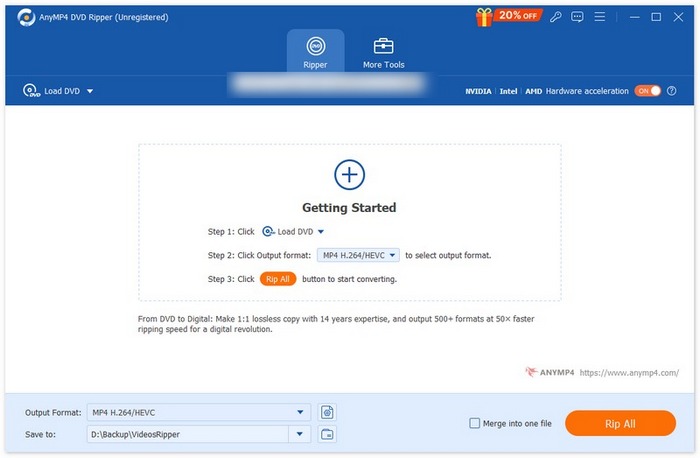
Step 3: Next, click on the “Output Format” section and choose “AVI” from the “Video” tab. Once you’ve selected the format, simply click on the “Rip All” button to begin ripping your DVD.
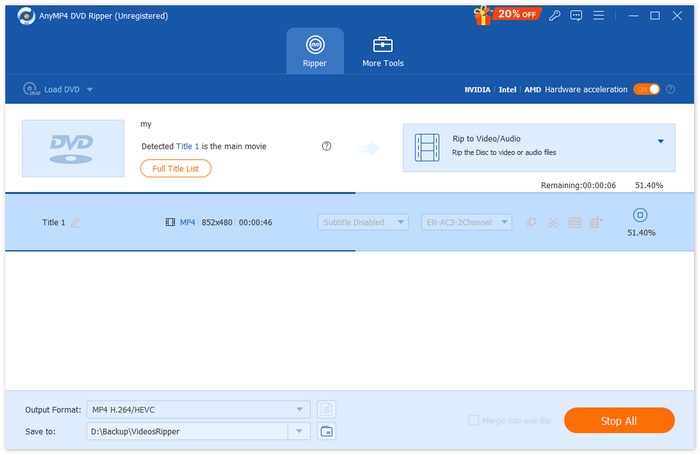
With AnyMP4 DVD Ripper, converting your DVD to the AVI format is quick and effortless. Plus, with support for resolutions up to 8K, 4K, and 1080p, you can be sure your converted DVD will maintain a lossless quality output.
Part 2. Convert DVD to AVI with Winx DVD Ripper Platinum
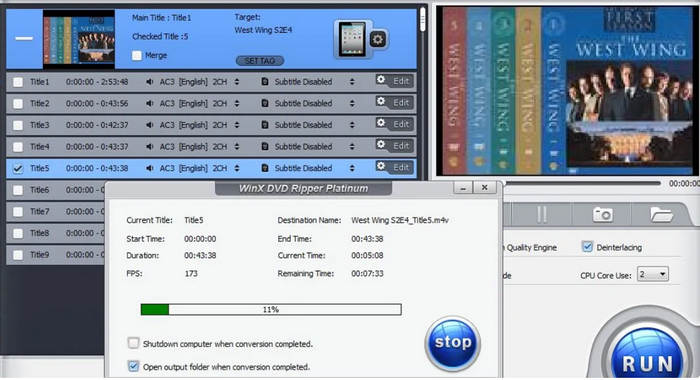
Another tool that you can use to convert DVD to AVI is the WinX DVD Ripper Platinum. This tool is known for its powerful and versatile ripping feature that can rip DVD content into various video formats like AVI. Moreover, it can efficiently rip copy-protected DVDs. However, take note that ripping copy-protected DVDs can have legal consequences. Lastly, this tool utilizes a level 3 hardware acceleration for conversions, making it fast to rip DVD to AVI.
Price:
● 1 Year Subscription: $39.95
● Lifetime License: $59.95
● ● 4 in 1 Bundle: $89.95
Supported System:
● macOS
● Windows
Pros:
● Supports HVEC encoding for quality video output.
● Can rip DVD files that have copy protection.
● Supports AVI, MP4, WMV, MOV, FLV, MPEG, and MP3 output formats.
● Provides high-quality output with no crashes.
Cons:
● The user interface is not ideal for some beginners because it’s overwhelming.
● The editing features are limited.
Part 3. Rip DVD to AVI with HandBrake
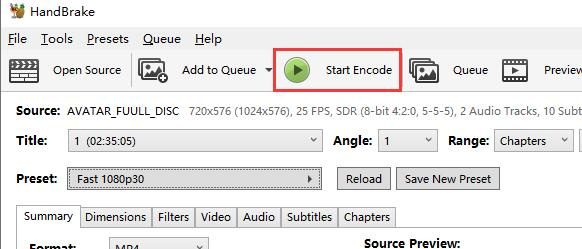
The last tool that you can use to rip DVD to AVI is the HandBrake. This tool is a popular open-source video conversion tool that supports a wide range of most used video formats. With its rich support for varying audio and video formats, this DVD ripper tool makes it easy and efficient to convert DVDs to any format, especially to AVI.
Price: Free
Supported System:
● macOS
● Windows
● Linux
Pros:
● Easy to navigate interface.
● The batch conversion queueing tray is extremely useful.
● Supports a wide range of output formats and codecs.
● Provides advanced customization options for video quality.
● Free and open-source.
Cons:
● Conversion speed can be slower compared to paid DVD rippers with GPU acceleration.
● HandBrake doesn't natively support ripping protected or encrypted DVDs without additional third-party tools.
Part 4. FAQs about Ripping DVDs to AVI Format
What is the difference between AVI and MP4?
While AVI and MP4 are both video container formats, they differ in terms of compression, compatibility, and file size. AVI tends to be less compressed which offers high video quality but larger file sizes. Meanwhile, the MP4 is more compressed, resulting in smaller file sizes.
How to convert a CD to digital without a CD drive?
To convert a CD without a CD drive into a digital file, you’ll need to use an external USB CD drive. This driver is readily available and allows you to connect to your computer and rip CDs as you normally would using ripping software. Another option is to use a computer with a CD drive to rip the CD into digital formats of your choice and then transfer those files to your device via USB, cloud storage, or external drives.
Can I rip a DVD to my computer legally?
Technically, no, but it should be legally done and is not against the local laws. In many regions, it is legal to rip DVDs that you own for personal use, such as creating a backup or transferring the content to another device for personal viewing. However, ripping copy-protected DVDs may be illegal as breaking digital rights management or DRM protections can violate copyright laws.
Does ripping a DVD lose quality?
Yes. When you rip a DVD, there’s a possibility that the converted output will have a loss in quality. However, this depends on the tool and settings used during the ripping process. Usually, DVDs are encoded in MPEG-2 format, which is already compressed. Therefore, when you rip a DVD to formats like AVI, it will be compressed further. Yet, still, there are DVD rippers that offer options for lossless extraction, ensuring that the quality is as close to the original as possible.
Conclusion
While watching content from DVD is something that we can enjoy. However, with the rise of digitalization, where watching movies is becoming more convenient, the need to rip DVD to AVI plays a significant role in keeping with these changes. If you’re someone looking for the best tool to convert your DVDs into a video format of your choice, especially AVI, the tools reviewed in this article might be for you.
-
 How to Stream DVD Movies from PC/Mac to TV via Chromecast
 Don't know how to watch DVD movies on TV via Chromecast? This article shows the easiest way to cast your DVD movies from PC to TV through Chromecast.
-
 Android DVD Player – How to Play DVD Videos on Android Mobiles
 How to play DVD files on Android mobiles? Are there any Android DVD players? In this article, you will learn about 3 ways to play DVD videos on Android mobiles with or without the external driver.
-
 The Best 3 Alternatives to DVDFab Player to Play DVD Videos on PC
 Is DVDFab Player worth buying? Can it play 4K videos? How about its paid version? This article will introduce its features in detail and there are the 3 best alternatives to DVDFab Player for you to choose from.
