


 Video Converter Ultimate
 Screen Recorder
 Video Repair
GIMP Review: Is it Still Worth Trying in 2025 or Not?
If you’re looking for a free and powerful photo editing tool, the GNU Image Manipulation Program, also known as GIMP, might be one of the first names you’ll come across. It’s been around for years and continues to be a go-to option for photographers, designers, and artists who want professional-level editing without spending a dime.
In this GIMP review, we’ll take a closer look at what GIMP can do, how safe it is, and whether it’s still a good choice for photo editing in 2025. You’ll also discover an easier and more modern alternative that can help you achieve high-quality results in just a few clicks. So, what are you waiting for? Let’s get started!

Part 1. What is GIMP? [Overall GIMP Review]
GIMP, short for GNU Image Manipulation Program, is a free and open-source image editing software used by photographers, designers, and artists across the globe. It’s a powerful tool that rivals paid programs like Photoshop in many ways. With this photo editing tool, you can retouch photos, create digital artwork, design graphics, and enhance images using layers, filters, and various advanced tools.
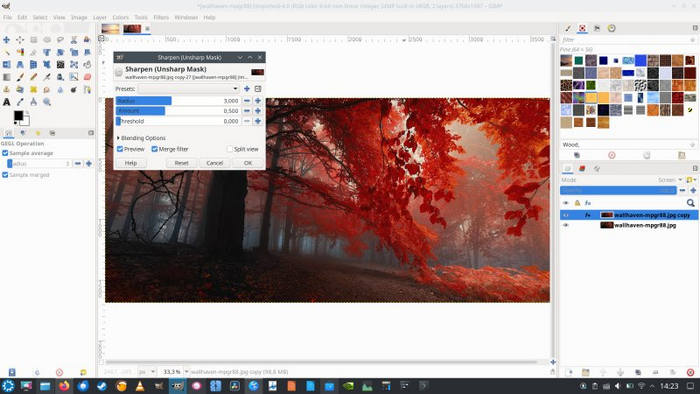
Main Features:
• Free and open-source image editing software.
• Supports multiple file formats like JPEG, PNG, TIFF, PSD, and more.
• Advanced tools for image retouching, color correction, and layer editing.
• Works across Windows, macOS, and Linux.
• Supports creating original digital artwork.
• Provides graphic design tools for logos, posters, and banners.
Pros
- Completely free and open-source.
- Lightweight and runs smoothly on most devices.
- Highly customizable with plugins and extensions.
- Offers many professional-level editing features.
Cons
- The interface may look outdated to some users.
- Steeper learning curve for beginners.
- Text handling limitations.
- Lacks some advanced AI-based tools available in paid editors.
With this GIMP review, you now have an idea of what GIMP is, what it can do, and what its downsides are. Overall, GIMP is a great free photo editor with many powerful tools for editing and designing. It works well on different systems and can handle most editing tasks like a pro. However, its interface can be confusing for beginners, and it doesn’t have the advanced AI tools that paid software offers. But this is not finished yet, in the next sections, you will also learn if it is still safe to use and if it remains a good photo editor this 2025.
Part 2. Is GIMP Software Safe?
Yes, GIMP is safe to use as long as you download it from its official website or trusted sources. It’s an open-source project maintained by a large community of developers, which means its code is publicly available for GIMP review, making hidden malware or spyware unlikely. However, always avoid downloading this tool or any other tools from third-party websites, as they might bundle unwanted software or ads.
Part 3. Is GIMP Good for Photo Editing?
Definitely, yes. GIMP is one of the best free photo editing tools available today. It supports essential editing functions such as cropping, resizing, color correction, and background removal. For more advanced users, GIMP also offers features like layer masks, path tools, and plugin integration to achieve professional-quality results.
However, unlike AI-powered editors, GIMP relies more on manual adjustments, which can be time-consuming for casual users. If you prefer automatic enhancements or one-click improvements, you might consider a GIMP alternative, which you can learn about in the next section.
Part 4. Best Alternative to GIMP
While GIMP is a great free tool for image editing, it may not suit everyone’s needs. Its interface can be complicated, and it lacks AI-powered tools that can automatically enhance photos or upscale images with ease. For users who prefer a faster, more straightforward solution that doesn’t require advanced editing skills, a GIMP alternative might be a better choice.
FVC Free Image Upscaler stands out as the best alternative to GIMP, offering a powerful online solution for image upscaling with advanced AI technology. It excels in automatically recognizing and enhancing blurred portions, ensuring the restoration of lost details. Moreover, users can easily enlarge their images by 2×, 4×, or 8× with high quality, providing versatility for various applications. The seamless functionality and efficient AI features make FVC Free Image Upscaler an excellent choice and a top alternative for those seeking effective and user-friendly image upscaling solutions.
Main Features
• Free access.
• Advanced AI resolution technology for image upscaling.
• Automatic recognition and enhancement of blurred image sections.
• Precise restoration of lost pixels, colors, textures, and finer details.
• Excellent recognition and natural restoration of portrait features.
• Versatility in image enlargement options: 2×, 4×, or 8× with high quality.
• User-friendly online interface for seamless image enhancement and enlargement.
Step-by-Step Guide
Step 1. Start by going to the official FVC Free Image Upscaler website.
Step 2. Now, click on the Upload Photo button to select the image you want to enhance.
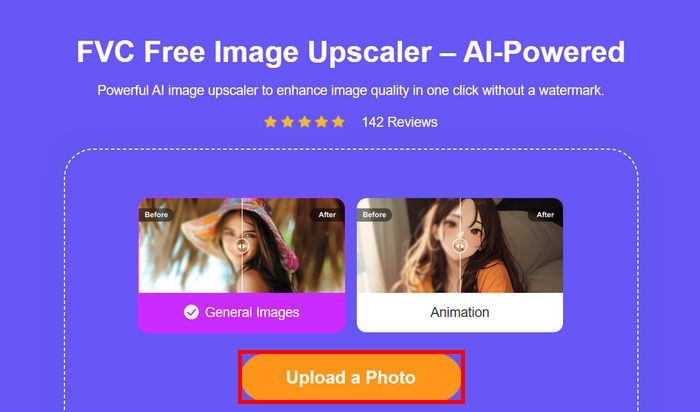
Step 3. After uploading, the tool will provide a preview of your image. To closely examine the details, use the Magnifier option.
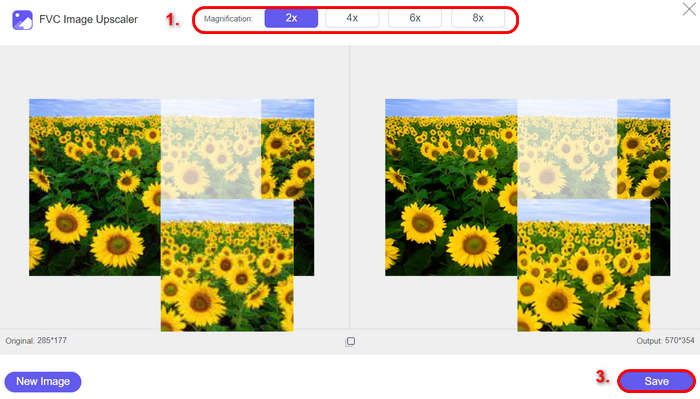
Step 4. Once satisfied with the preview, click on the Save button to download your enhanced image.
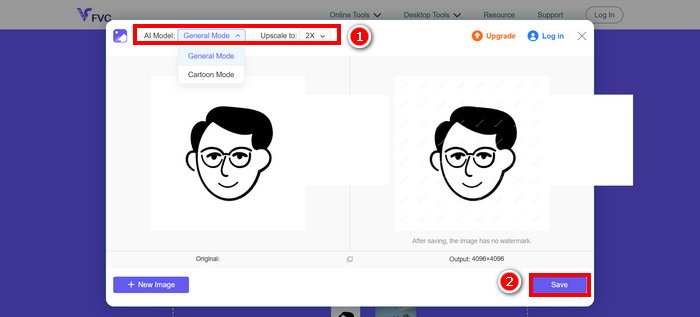
Indeed, FVC Free Image Upscaler emerges as the go-to alternative to GIMP. Its ability to seamlessly enhance images with advanced AI, recognizing and improving details effortlessly, and its user-friendly interface and free access make it a standout choice.
Click here to learn more about resizing image by GIMP if needed.
Part 5. FAQs about GIMP
Can GIMP replace Photoshop?
For many users, yes. GIMP offers powerful tools for photo editing, retouching, and design, though it may lack some advanced AI features and smoother workflows found in Photoshop. However, there have been complaints about its outdated interface and limited compatibility with PSD files, which can make the transition from Photoshop a bit challenging for professionals. Despite that, GIMP remains one of the best free alternatives for those who want strong editing capabilities without paying for a subscription.
Does GIMP work on Mac and Windows?
Yes, GIMP works across multiple platforms, including Windows, macOS, and Linux, offering a consistent editing experience for all users.
Can beginners use GIMP easily?
Not really at first. GIMP has a steep learning curve, especially for beginners who are new to photo editing or coming from simpler apps. Its interface and tools can feel overwhelming because they’re designed for professional-level control. However, with practice and the help of online tutorials, beginners can gradually get comfortable using it. Once learned, GIMP becomes a powerful and rewarding tool for creative projects.
Conclusion
Overall, this GIMP review shows that it remains one of the best free photo editors for users who want full control over their edits. While its learning curve and lack of AI tools may be challenging for beginners, GIMP is still powerful and reliable. For a faster and easier option, FVC Free Image Upscaler is the best alternative worth trying.
-
 In-depth Review of the PicResize Tool [Updated 2025]
 Do you want to know more about the PicResize tool? Read this full review article and learn its key features, pricing, pros and cons, and its best alternative.
-
 Everything You Need to Know About the Waifu2x and Alternative
 Need to know more about the Waifu2x? This article provides the information that needs to be highlighted in this app and its alternative.
-
 How to Optimize Image for the Web Using the Best Solutions [Quick]
 How to optimize the image for the web? You will need dependable software and a tutorial; all the information is here.
