


 Video Converter Ultimate
 Screen Recorder
 Video Repair
In-depth Review of the Bigjpg: Understanding Its Features
If you’re searching for a reliable image upscaler, Bigjpg is likely one of the tools you’ll come across. Known for its ability to enhance image quality without compromising its detail, this tool offers a range of features designed to make upscaling easy and effective. Now, if you find this tool interesting to use for your image upscaling needs, then we’ve got you covered! This article will help you understand what the tool can do for you, especially in terms of upscaling images, its cost, safety features, how it differs from other tools, and its best alternative in case you’re looking for something that Bigjpg doesn’t offer. To guide you, continue reading!

Part 1. Bigjpg Review: What Can it Do for You?
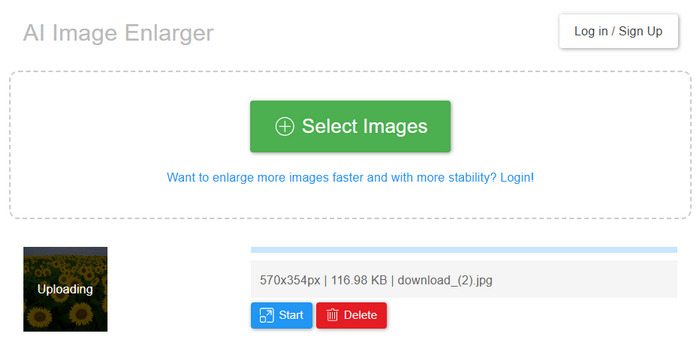
Bigjpg is an AI-powered image upscaling tool designed to upscale photos, artworks, and illustrations while preserving the original image integrity. Moreover, this tool utilizes Deep Convolutional Neural Networks to intelligently enhance images, reducing noise while preserving details such as lines and colors. Bigjpg is available both as a web-based application and as downloadable software for desktop use, making it easy for users to upscale and improve their images across different devices. Its advanced AI processing makes it especially effective for enhancing anime-style artworks and regular image files. Lastly, the tool’s interface is very simple and intuitive, making it ideal even for beginners.
Main Features:
Pros
- Simple and easy to navigate interface.
- It has a free version that is available online.
- Supports a wide range of image formats.
- Offers an APK version on Google Play for mobile use.
- API support for developers.
Cons
- Image processing can be slow, especially for larger files.
- The free version has a lot of limitations.
Part 2. Bigjpg Pricing: How Much Does It Cost?
Bigjpg offers flexible pricing options to fit different user needs. You can start with the free plan or upgrade to paid plans that unlock faster processing speeds, higher upload limits, and more advanced features. Check the table below for the pricing plan:
Part 3. Is Bigjpg Safe?
Yes, Bigjpg is safe to use. Your uploaded and enlarged images are automatically deleted after 3 to 15 days, depending on the source. The image links are encrypted, so no one can access your files unless you choose to share them. Overall, Bigjpg is a reliable tool for safely enlarging images online, as well as through its desktop and mobile apps.
Part 4. Bigjpg vs. Waifu2x
Bigjpg and Waifu2x are both AI-powered image upscaler tools. They both aim to improve image quality, especially anime-style and illustration images, but they work in slightly different ways and offer different features. Here’s how they differ:
Bigjpg offers up to 16x enlargement on paid plans and supports formats such as JPG, PNG, BMP, and GIF. It features multiple noise reduction levels, editing history, batch processing, and even desktop and mobile apps. It’s ideal for users who want more control, flexibility, and higher-quality enlargements. Waifu2x, on the other hand, is a free, browser-based tool that processes images directly on your device without uploading them to a server. It supports up to 4× enlargement with automatic noise reduction and delivers quick results. While it lacks advanced features, it’s simple, private, and easy to use. So, which is better? It still depends on the user’s preference and needs. Both are good in their own terms.
Part 5. Bigjpg Alternative: FVC Free Image Upscaler
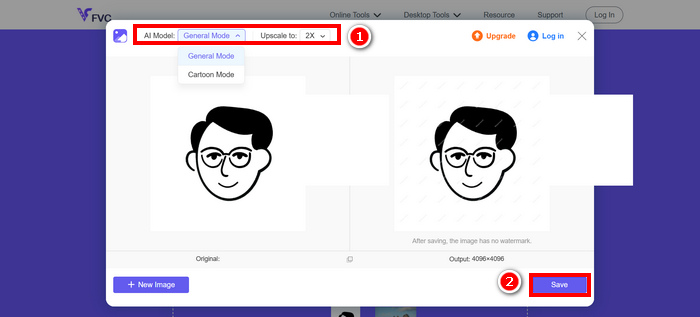
If you’re looking for the best free alternative to Bigjpg for upscaling images, the FVC Free Image Upscaler is worth trying. This AI-powered tool allows users to easily upscale photos by simply uploading the image they want to resize. After a few seconds, the image will be automatically upscaled. You can then choose to resize your photo by 2×, 4×, 6×, or 8× without losing quality. Moreover, this image upscaler tool also fixes blurry areas, restores lost details, and supports popular formats such as JPG, JPEG, PNG, and BMP. It offers fast processing, real-time preview of results, and best of all, it leaves no watermark on your upscaled images, making it an excellent free option for anyone needing quick and high-quality enlargements.
Part 6. FAQs about Bigjpg
Do I need to download software to use Bigjpg?
Not necessarily. Bigjpg works as a web-based tool, but you can also download its desktop app or mobile version if you prefer offline access or batch processing features.
What are the limitations of Bigjpg’s free plan?
The free plan of Bigjpg limits users to 20 images per month, a maximum file size of 5MB, and a maximum of 4x enlargement. It also uses shared servers, which can result in slower processing speeds compared to paid plans.
Can Bigjpg enlarge any type of image?
Bigjpg works well as a photo enlarger with various image types, including photos, artwork, and anime-style images. It supports popular formats such as JPG, PNG, GIF, BMP, and ICO, making it versatile for a wide range of users.
Conclusion
Bigjpg indeed is just one of the best image upscaler tools today. With its AI-powered technology, it effectively enlarges images while maintaining detail and reducing noise, making it a strong choice for both beginners and experienced users. But take note of the plans, since this image upscaler tool is not completely free. To enjoy some of its full features, you will need to unlock the premium versions. Meanwhile, if you’re looking for an alternative tool that is free and works the same as Bigjpg, don’t miss out on trying the FVC Free Image Upscaler tool.
-
 Complete Guide of Imglarger – Solution for Photo Designers
 Imglarger is one of the most eminent image solution tools. Click this page to learn the full descriptions, pros and cons, price, and alternatives of Imglarger.
-
 In-depth Review of the PicResize Tool [Updated 2025]
 Do you want to know more about the PicResize tool? Read this full review article and learn its key features, pricing, pros and cons, and its best alternative.
-
 FastStone Photo Resizer – A Powerful App for Resizing Images
 FastStone Photo Resizer is a great app for resizing images. Click this post to learn more about FastStone Photo Resizer and the best alternative for the tool.
