


 Video Converter Ultimate
 Screen Recorder
 Video Repair
Best 60FPS Video Converters: Boosting Video Games with Ease
Watching and playing low-quality FPS gameplay is not the fantasy that we would like to experience. Having 30 FPS in your gameplay or recorded play will not give you the full potential of the recorded gameplay. Thus, converting video to 60 FPS is the recommended thing to do. Therefore, if you need help with it, then this article is for you. We prepared four methods using different tools, making the high-quality conversion as much as possible. Let us discuss their features and what they can offer. Start reading now as you discover more about them in this post.

How We Test and Review
Here are the three important factors we considered in testing these 60 FPS video converting tools below. All of these are used to decide what the best tool is for you:
- • Frame Quality. We tested how smooth the tool is in handling 60 FPS conversion.
- • Price and Value. We compared all of the free and paid versions and saw if the tool is worth purchasing.
- • Ease of Use. We checked the interface design and how it offers simplicity to the workflow.
Comparison Table of the Best 60FPS Video Converter
Let us now give you an overview of the four amazing tools for converting 60 FPS video. We prepared a comparison table that showcases the tool’s frame interpolation, price, and ease of use. With these factors, you can now have an idea of what will be the best tool you can use for your own conversion process. Please take a look at the details below:
| Tool | Frame Interpolation | Price | Ease of Use |
| FVC Video Converter Ultimate | Supports smooth 60fps output and limited advanced interpolation. | Free and paid for full features. | Very easy to use and beginner‑friendly. |
| HandBrake | Basic frame rate adjustment to 60fps, no advanced interpolation. | Free, open‑source. | Moderate, technical interface. |
| Shutter Encoder | Professional rendering with codec variety, strong frame handling. | Free. | Moderate to advanced, steeper learning curve. |
| Hybrid | Advanced 60fps processing with deep customization. | Free. | Complex, best for experienced users. |
Best 60fps Video Converter
We shall now go into deep detail about the four tools we introduced in the comparison table. We will offer you an in-depth overview about it and their pros and cons for balancing the review.
Tool 1: FVC Video Converter Ultimate: Smooth 60 FPS Output
Starting with the best 60fps video converter tool you can use is the amazing FVC Video Converter Ultimate. This tool is one of the leading tools you should use nowadays to turn your videos into 60fps for the gameplay-worthy video content you need. It is a very straightforward tool offering faster processing while ensuring quality. One of its biggest flexes is the smooth rendering process, even in a batch process of conversion. Basically, FVC can balance ease of use while having an advanced customization process.
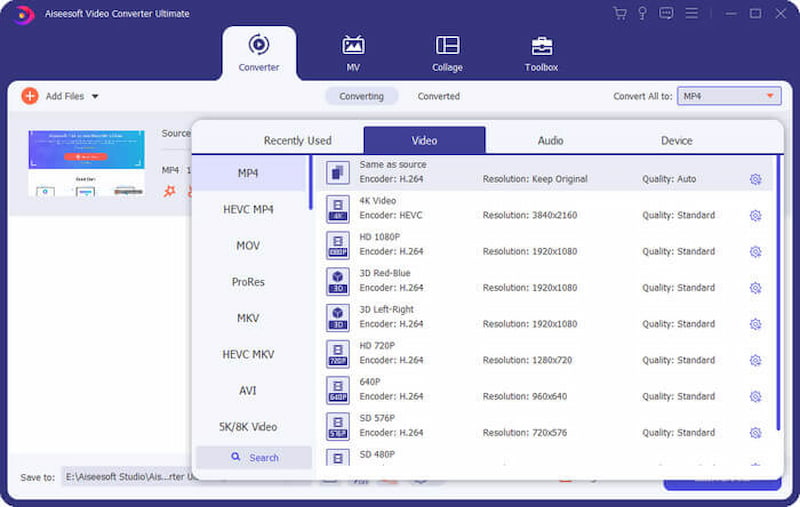
Pros
- It has intuitive controls for a user-friendly interface.
- Smooth batch conversion for multiple video files you have.
- Expect a 60 FPS output.
Cons
- You need to pay if you need its full features.
- Lack of advanced editing tools.
Tool 2. HandBrake for Standard 60 FPS Frame Adjustment
The second tool on the list is a free 60fps video converter. The amazing tool HandBrake is known for its open-source features. You can use this to adjust the video frame rate to 60 fps. Using this tool can also ensure you get smooth playback on any device you are using. See its pros and cons below:
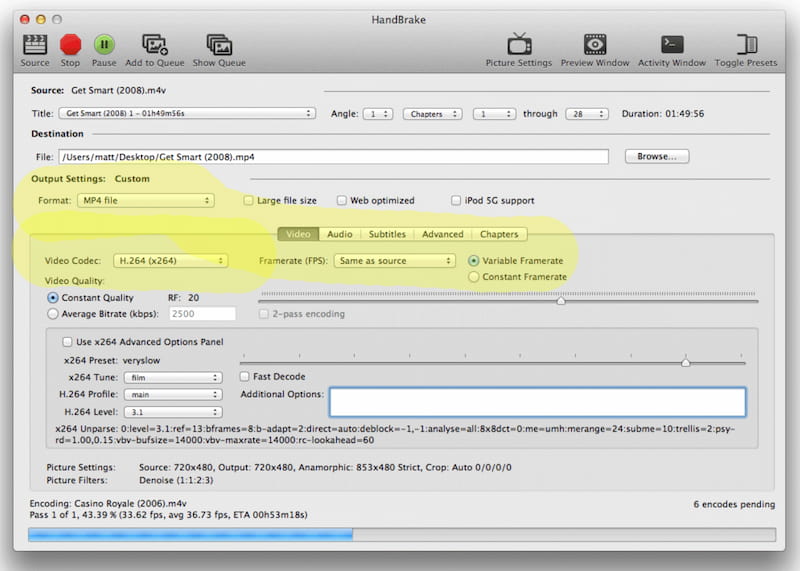
Pros
- You can use this tool for free and open-source.
- It has a wide range of codecs and supports various formats.
- Adjust your frame rate effectively.
Cons
- The interface is intimidating for novice users.
- It has a slow conversion speed compared with other tools here.
Tool 3. Shutter Encoder: Professional High Frame Rate Rendering
We come to the professional video conversion tool you can use. Shutter Encoder is known for its high-rate rendering process. That is why it is favored by many professionals because of its precision and codec variety. All of these offer a robust 60 FPS rendering process if you need an advanced workflow.
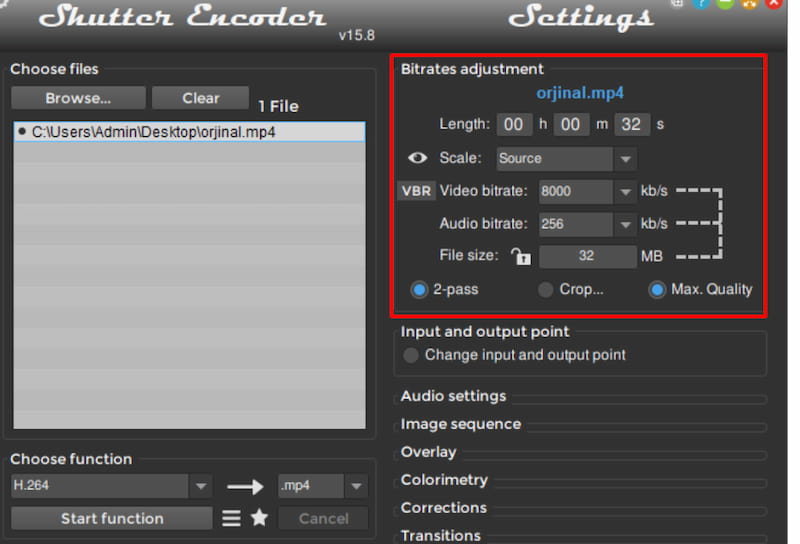
Pros
- It has a professional-grade for its codec support.
- Rendering 60 FPS with high-quality output.
- Advanced users can enjoy its flexible settings.
Cons
- The learning curve is steeper.
- Casual users can find it overkill.
Tool 4. Hybrid for Advanced 60fps Video Processing
Another powerful tool is the Allied Hybrid tool. It has great features for customization and advanced 60 FPS video processing capabilities.
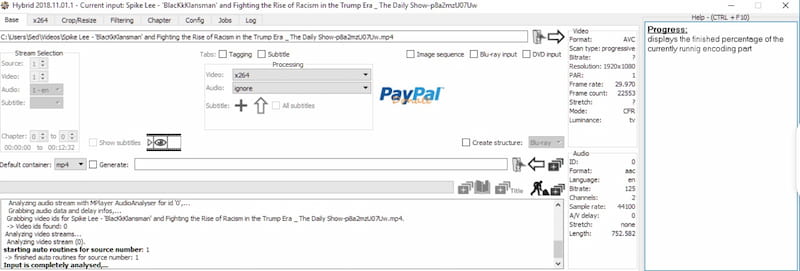
Pros
- Settings are highly customizable.
- It supports various platforms and formats.
- It can support complex workflows.
Cons
- This is not beginner-friendly.
- You need technical knowledge to maximize its features.
FAQs about 60FPS Video Converter
Q: Why does my 60 FPS look choppy?
A: Even your 60 FPS video can stutter after conversion. This typically happens, especially if the source footage you get has motion blur. Also, if your converter uses frame duplication rather than real interpolation.
Q: Can I convert 60 FPS to improve 1080p image quality?
A: No. The resolution will remain the same because the conversion only improves the frame rate. Yet, you can expect smoother motion in your video. This can give you a clearer video.
Q: Is my 24fps video applicable for converting to 60 fps?
A: Yes. But this is only possible with AI interpolation that requires you to synthesize new frames. Most likely, it will only do a simple duplication that can bring artifacts or unnatural motion to your video.
Q: How does AI technology convert 30 fps to 60 fps?
A: AI is now capable of converting frame rates. We have what we call AI frame interpolation, which can analyze the motion between the frames of your video. From there, it will generate a new frame rate in between for smoother playback.
Q: Do mobile phones support playing 60fps?
A: Yes, iPhone, Samsung, and Google Pixel are famous mobile devices that can play your 60 FPS video. In fact, they are also capable of capturing raw 60 FPS using their camera settings.
Conclusion
In conclusion, we can see that converting video to 60 FPS is possible. We already have various tools that can make the process possible. In this article, we learned that the amazing tools of FVC Video Converter Ultimate, HandBrake, Shutter Encoder, and Hybrid are the top-tier options you can use. Yet, many users believe that FVC is clearly leading the line because of its amazing features, combined with ease of use and quality output. Use it now for free.
-
 Best Frame Rate for 4K Video: A Complete FPS Guide
 Not sure which 4K frame rate to use? Compare 24, 30, 60, and 120 FPS, learn how each affects video quality and file size, and choose the best for your project.
-
 Topaz Video AI Frame Interpolation: Tips, Settings & Alternatives
 Discover how Topaz Video AI frame interpolation works, learn the best settings, avoid common mistakes, and explore an effective alternative.
-
 How to Lower The Frame Rate of Video Without Losing Quality
 Learn how to lower a video's frame rate using simple methods to reduce file size, improve compatibility, or create a smoother cinematic look.
